Three.js: FBXLoader not working with many skeleton animations (e.g., from Mixamo.com)
Description of the problem
The FBXLoader does not work with many skeleton animations. e.g., from Mixamo.com. One example from Mixamo that fails is the following:
Character: WHITECLOWN N HALLIN
Animation: SAMBA DANCING
You can get this model by downloading it from Mixamo directly but I have also attached it to this issue.
WhiteClownSambaDancing.zip
Here is the displayed result using the webgl_loader_fbx.html sample in THREE v96 modified to load the WhiteClownSamaDancing.fbx:
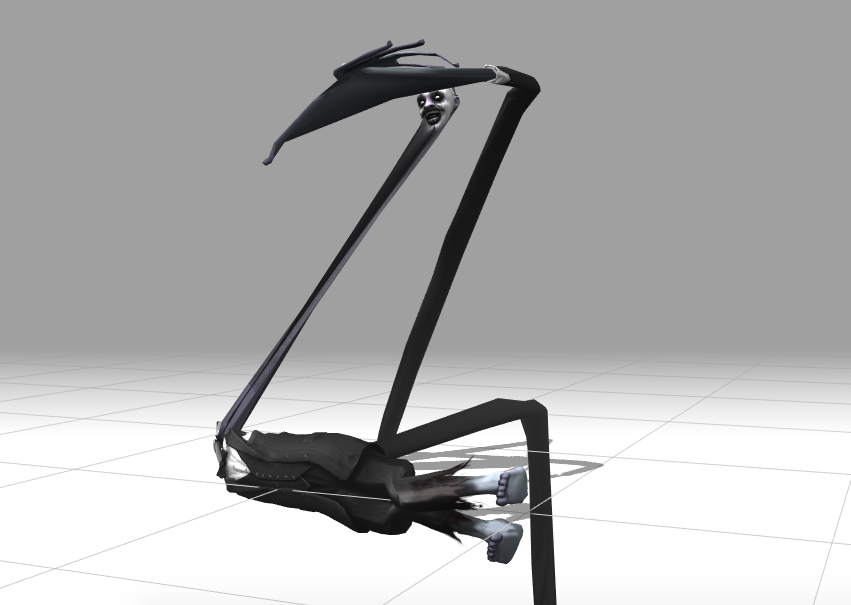
_Screen shot using webgl_loader_fbx.html_
Here is the same FBX file displayed in AutoDesk FBX Review:
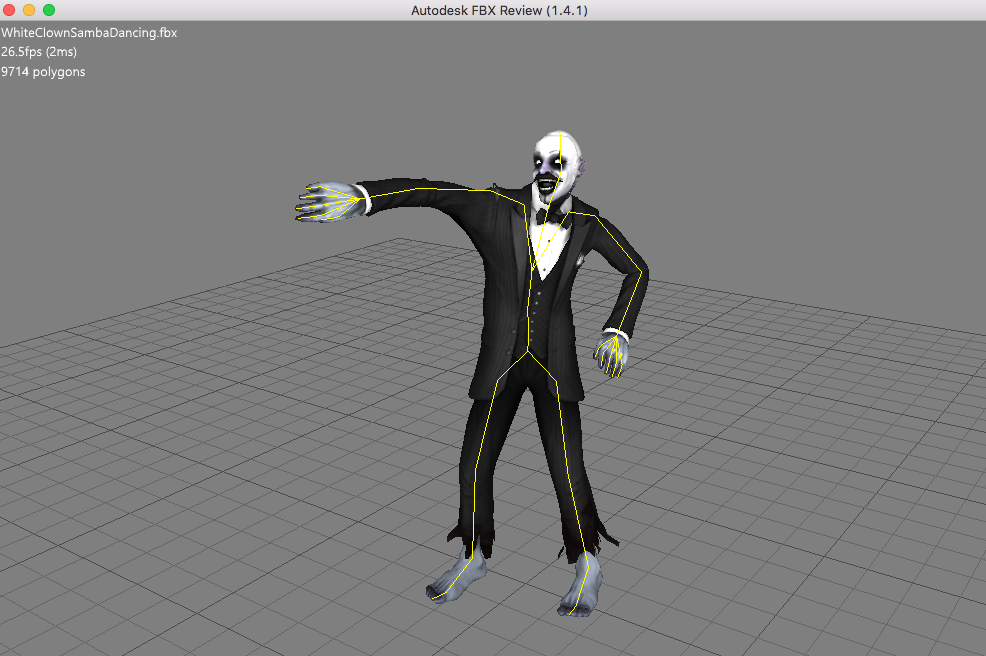
_Screen shot using AutoDesk FBX Review_
There are many other Mixamo character/animations pairings that work fine with the FBXLoader but many that do not. It is possible (though not confirmed) that the ones that fail were created with Maya (this has been stated as a possible problem in some other issues).
Also, the WhiteClownSambaDancing.fbx file loads correctly in many other software including the Mixamo site itself and http://www.open3mod.com/. The later is fully open source so you can see the exact code they use to perform the node/bone transforms and animations. They actually use AssImp for their conversion and you can see the exact code there. In particular, see the following for their FBX import 3D transform handling:
https://github.com/assimp/assimp/blob/master/code/FBXConverter.cpp#L644
After digging into the FBXLoader code a bit, it seems there may be several areas where the issue could lie:
- There does not seem to be any code to honor the FBX inherit type on the nodes.
- There does not seem to be any code to implement rotate/scale pivot points on the nodes (NOT the geometry transforms which are implemented).
The following code from the AutoDesk FBX SDK may be of some help for implementing both of the above, esp. the code and comments in CalculateGlobalTransform():
AutoDesk FBX source code Transformations/main.cxx
There are some other THREE.js issues which have not been fully addressed regarding incorrect FBX animations loaded via the FBXLoader (#11895, #13466, #13821). This issue is about improving the FBXLoader, not a particular file or asset pipeline. Please do not suggest use of FBX2GLTF (which just bakes the animations) or other converters.
Also, we are willing to provide some help with design and coding, if need be, but doing a full solution with a PR is beyond our bandwidth at this time (ping @looeee @Kyle-Larson @takahirox ?).
Three.js version
- [ ] Dev
- [X] r96
- [ ] ...
Browser
- [x] All of them
- [ ] Chrome
- [ ] Firefox
- [ ] Internet Explorer
OS
- [x] All of them
- [ ] Windows
- [ ] macOS
- [ ] Linux
- [ ] Android
- [ ] iOS
Hardware Requirements (graphics card, VR Device, ...)
 radman-x
All 22 comments
Thanks for the detailed bug report. This seems to be the same issue as #14864.
There does not seem to be any code to honor the FBX inherit type on the nodes.
Can you explain what you mean by the above line?
There does not seem to be any code to implement rotate/scale pivot points on the nodes (NOT the geometry transforms which are implemented).
Three.js doesn't support transformed pivot points, so there is no way to do this directly. The only solution that I am aware of would be to create a parent Group for each model and apply the pivot transforms using that. However this is obviously not desirable, since it involves creating extra nodes in the scene graph, and would also probably add a lot of complexity to the animation section of the loader. Ideally we'll be able to solve this issue without resorting to this approach.
The data on FBX transforms are taken from this page. It's not completely clear from that, but I've found that FBX files can contain either the __FBX and Maya__ transform type detailed there _or_ the __3ds Max__ type.
It seems likely that this issue stems from incomplete / incorrect application of the __FBX and Maya__ transform type.
 looeee
on 12 Sep 2018
looeee
on 12 Sep 2018
Thanx for the fast reply. The "inherit type" issue I discussed is a property on the FBX node -- see:
(The above link is to the 2014 FBX spec but I think it's the same on the 2017). This property, essentially, determines the equation to use for a node's complete, global 3D transformation. There are 3 values for this:
- eInheritRrSs (0)
- eInheritRSrs (1)
- eInheritRrs (2)
I think if the letter is cap, then that transform is global (e.g., "R" => global rotation) or if it's small, then that is local (e.g., "r" => local rotation). And that gives the order of the matrix multiplications. In any event, if you search through the CalculateGlobalTransform() method in this page (same "main.cxx" link as in my first comment above), you will find the final matrix equation is determined by this property (search for the "lInheritType" variable). I believe these are the correct equations and code we need to implement. Both the failing Mixamo asset file and some succeeding asset files have these properties on their nodes (we found this by dumping some data in FBXLoader) so this may not be problem but it is something to consider.
Also the code in the AssImp FBXConverter::GenerateTransformationNodeChain method here does something similar though they do not seem to use the InheritType property. It seems they are just doing tests for non-zero values of some properties (pivot vectors, etc.). One of the more interesting aspects of the AssImp code id that they have the same problem as we do with THREE -- they must insert extra nodes in the hierarchy to accomplish the full 3D transform. Recall that the AssImp code is used Open3Mod and that correctly loads the offending Mixamo file.
I am not sure we can implement this in the current state of THREE without inserting additional nodes at the points where a pivot exists (though we might be able to). Of course, if THREE added pivot points (rotation and scale) to their 3D transform matrix calculations, this would be a lot easier.
Your hunch on Maya vs. 3DS Max may in fact be right. Maybe the Mixamo characters created in 3DS Max work in FBXLoader and those created in Maya do not. If I get some time, I can dump some more data in FBXLoader to determine the authoring application of the bad vs. good Mixamo FBX files.
 radman-rt
on 12 Sep 2018
radman-rt
on 12 Sep 2018
Thanks for the info. I've looked over the links you provided, especially AutoDesk FBX source code Transformations/main.cxx, which I hadn't seen before.
I think I was incorrect about the meaning of _pivot_ in the context of FBX transforms. It seems like pivot actually means "global transform matrix" here - so it's possible to apply all the pivot transforms via matrix transforms.
The exception is the 3DS Max style Geometric transform data, referred to as the _3DS Max object-offset concept_ in the FBX docs. I had been implementing this by transforming the geometry of each mesh, thinking it was a hack to get around the lack of pivot points, but actually it seems like that may be the correct interpretation after all.
I'll have a go at implementing the transform code from that link. It will be sometime next week before I have time to do it, however.
looeee
on 14 Sep 2018
OK, that sounds great.
BTW, one thing I found handy is the AutoDesk FBX Converter -- 2013 is the latest version I found here. It is very nice since you can convert to ASCII and view the data much easier. I will continue some further research to find the differences between the working and failing FBX files.
Let me know if I can provide any further info or assistance.
radman-rt
on 14 Sep 2018
After #14933, model (Group, Mesh, etc ) transforms are applied correctly according to the FBX spec.
However, it seems like there are still issues with how transforms are applied to bones and / or animation nodes. I'm going to link some reference info here that may help me or someone else figure out what the problem is:
Bones (cluster nodes in FBX) have three additional matrices and a "mode" associated with them:
transform- the initial global transform of the mesh that the bone is controlling. These should be safe to ignore, apparently they are largely legacy and will be the same for every bone in the case of a single skinned mesh.transformLink- the bone's global transform at the moment of binding.TransformAssociateModel- this also appears to be ignored in FBX SDK example code, and is only needed dependant on the value ofELinkModeaccording to docs.- ELinkMode - this specifies whether vertex weights need to be normalized, and is currently ignored.
There is some information in the following links regarding how to apply transformations to bone nodes:
- Useful things you might want to know about FBXSDK
- Calculating bind pose matrix and animation bone transforms
- Getting the local transformation matrix for the vertices of a cluster?
It's mentioned in a couple of places that the correct matrix for the bone at the time of binding is
lClusterRelativeInitPosition = lClusterGlobalInitPosition.Inverse() * lReferenceGlobalInitPosition;
Which I am interpreting to mean:
bone.matrix = transformLink.inverse() * model.matrixWorld
However, so far, attempting to do this in the loader has not given good results.
looeee
on 19 Sep 2018
Apologies @mrdoob, I was probably unclear in the last comment - this model still has issues, probably related to bone transforms.
looeee
on 19 Sep 2018
It closed automatically 🤔
 mrdoob
on 20 Sep 2018
mrdoob
on 20 Sep 2018
Oh, apologies to the AI system that closed it then 😆
I'll be more careful when using the word 'fixed' and referencing an issue in the same sentence in future.
looeee
on 20 Sep 2018
i have the same problem. for 3 days im trying to find where is the problem.
i believe the problem is in array
Transform: *16 {
not
TransformLink: *16 {
FBXLoader sounds reading Transform{ } incorrectly.
while TransformLink{ } is not important. like we can ignore it.
im glad to donate for developers who solve this. i really need this.
thanks for your time!
*Edit: here is an example copy of my FBX file: http://rigmodels.com/del/test.zip
you can see Animation works on all programs, except ThreeJS.
 yazancash
on 29 Dec 2018
yazancash
on 29 Dec 2018
i check this page every month, hopefully this bug being fixed soon.
yazancash
on 19 Jun 2019
still hoping to see this fixed soon. thanks anyway!
yazancash
on 19 Aug 2019
@yazancash sorry to say, this is very low on my list of priorities, and I don't think anyone else is interested in working on the FBXLoader at the moment. Commenting repeatedly is not going to change that.
You'll be better off searching for a workaround - I recommend using fbx2gltf and loading your models in glTF format.
looeee
on 19 Aug 2019
thank you _Lewy Blue_ for reply.
my models are rigged & animated online (on cPanel PHP server) by website script: https://rigmodels.com
i cannot install FBX2GLTF on my server.
so i need to play FBX animations directly, as they were generated on the server.
models are generated in same structure used in Mixamo. they are working fine on all Application. but not ThreeJS.
i really hope to see this fixed someday. so i can continue my free project "RigModels"
im glad to donate for ThreeJS developers. but my budget it not that high to pay the real efforts you do.
yazancash
on 19 Aug 2019
I recently encountered this, or an extremely similar issue, in the webapp I'm working on. As near as I've been able to tell, the problem only arises from models exported from Maya. Exporting the exact same model from Blender or 3DS Max doesn't run into the same issue.
I haven't been able to dig deep enough into the FBX file spec to figure out for sure causing this, but in inspecting the ASCII versions of the different models I've got a solid hunch:
Models exported from Maya produce AnimationCurveNodes that rely on the MaxHandle property (I have no idea what this means), whereas Max models use the R, S, and T property. From my brief investigation of the FBXLoader, I've noticed that this MaxHandle property isn't handled.
 matthew-robertson
on 11 Oct 2019
matthew-robertson
on 11 Oct 2019
maybe it help import the FBX with this settings https://donmccurdy.com/2017/11/06/creating-animated-gltf-characters-with-mixamo-and-blender/
 arpu
on 11 Oct 2019
arpu
on 11 Oct 2019
the problem only arises from models exported from Maya.
Can you try disabling 'segment scale compensation' on all bones in Maya? Info here and here.
It seems like Maya models with this setting (which is on by default) cannot be imported into nearly any other apps. FBX2GLTF fails to convert these Maya files correctly as well.
looeee
on 11 Oct 2019
@looeee Thanks for pointing me towards that, it does look disabling that setting will resolve the problem for the model. I might have to look into what Blender's doing that allows it to import such models properly.
matthew-robertson
on 11 Oct 2019
@yazancash, @radman-x can you guys confirm whether you models are exported from Maya with "segment scale compensation" enabled?
If that is the case, then I recommend closing this as "won't fix". This setting is not supported in most other 3D engines - 3DS Max, Unreal, Unity - so I think it's OK for us not to support it either.
looeee
on 13 Oct 2019
@looeee in my case, it was not Maya, the problem was in FBX files, it has been solved finally.
yazancash
on 14 Oct 2019
man.zip
This file also has the similar problem in FBXLoader animation.
 lilypen
on 22 Oct 2019
lilypen
on 22 Oct 2019
here is working copy of your model. man2.zip
i see Bones does not match with Mesh. (there is 90' rotation)
yazancash
on 22 Oct 2019
Thank you so mach~ The animation does work!
lilypen
on 22 Oct 2019
Related issues
 clawconduce
·
3Comments
clawconduce
·
3Comments
 zsitro
·
3Comments
zsitro
·
3Comments
 scrubs
·
3Comments
scrubs
·
3Comments
 donmccurdy
·
3Comments
donmccurdy
·
3Comments
 konijn
·
3Comments
konijn
·
3Comments