Three.js: Two mesh with Muti-Materials set same renderOrder value, the z-order is not correct?
Description of the problem
I create two mesh with same renderOrder.
var circleGeometry = new THREE.CircleBufferGeometry(radius, segements);
var ringGeometry = new THREE.RingBufferGeometry(radius, radius + ringWidth, segements);
var cellGeometry = null;

//...

var circleMaterial = new THREE.MeshBasicMaterial({
  map: texture,
  // wireframe: true
});
var ringMaterial = new THREE.MeshBasicMaterial({
  color: 0x000000,
  vertexColors: THREE.VertexColors,
  // wireframe: true
});

cellGeometry = THREE.BufferGeometryUtils.mergeBufferGeometries([circleGeometry, ringGeometry], true);
var mesh1 = new THREE.Mesh(cellGeometry, [circleMaterial, ringMaterial]);
scene.add(mesh1);
mesh1.renderOrder = radius;
var mesh2 = new THREE.Mesh(cellGeometry, [circleMaterial, ringMaterial]);
mesh2.position.x += 2;
mesh2.renderOrder = radius;

scene.add(mesh2);
The result was not correct, see screenshot!


Three.js version
- [ ] r94
Browser
- [x] Chrome
OS
- [ ] macOS
Hardware Requirements (graphics card, VR Device, ...)
 navigator117
All 27 comments
If the renderOrder was different a litte like + 0.000001, the result will be:

navigator117
on 4 Jul 2018
Multi material objects are treated as separate render items within the renderer. In this particular case, four render items are generated (two per mesh since the material array has two entries). Since both meshes have the same depth and render order, the render items are grouped by materials/shader programs. So I guess the render items with circleMaterial are drawn first, then the ringMaterial (which explains the strange overlapping).
Since this behavior is not correct, I think you can consider the issue as a bug. The sorting algorithm of render lists should retain the order of render items defined by multi material objects.
 Mugen87
on 4 Jul 2018
Mugen87
on 4 Jul 2018
Sorry, I think it is premature to label this a bug.
Why does the user rendering multiple meshes at the same render depth, resulting in significant z-fighting?
Why is the user merging geometries with different materials when the merged geometries are going to be rendered in separate draw calls anyway?
Since this behavior is not correct,
The library is doing exactly what was intended: sorting by materials when the render order is the same.
The sorting algorithm of render lists should retain the order of render items defined by multi material objects.
That is impossible when there are multiple meshes each with multi materials.
 WestLangley
on 4 Jul 2018
WestLangley
on 4 Jul 2018
That is impossible when there are multiple meshes each with multi materials.
Why is this "impossible"? Can you explain a bit?
Mugen87
on 4 Jul 2018
Sorry, 'impossible' was a poor choice of words. I was assuming you meant "render in the order specified by geometry.groups." Is that what you were saying? If so, what would be the sorting algorithm that would achieve that result in this particular case?
Regardless, this example is an edge-case since there is z-fighting anyway. So I do not really think we need to worry about this issue.
WestLangley
on 4 Jul 2018
I was assuming you meant "render in the order specified by geometry.groups." Is that what you were saying? If so, what would be the sorting algorithm that would achieve that result in this particular case?
I've meant the render items derived from a multi material object are grouped together in the render list. But yeah you are right, it's definitely an edge case and I'm not sure now if a different sorting algorithm is the right approach to solve this issue.
Mugen87
on 4 Jul 2018
After some testing, I found the z-fight only related to ring geometry, all of them seems to thinking they should on top of circle geometry. The circle geometry was overlapped correctly with random z-order:
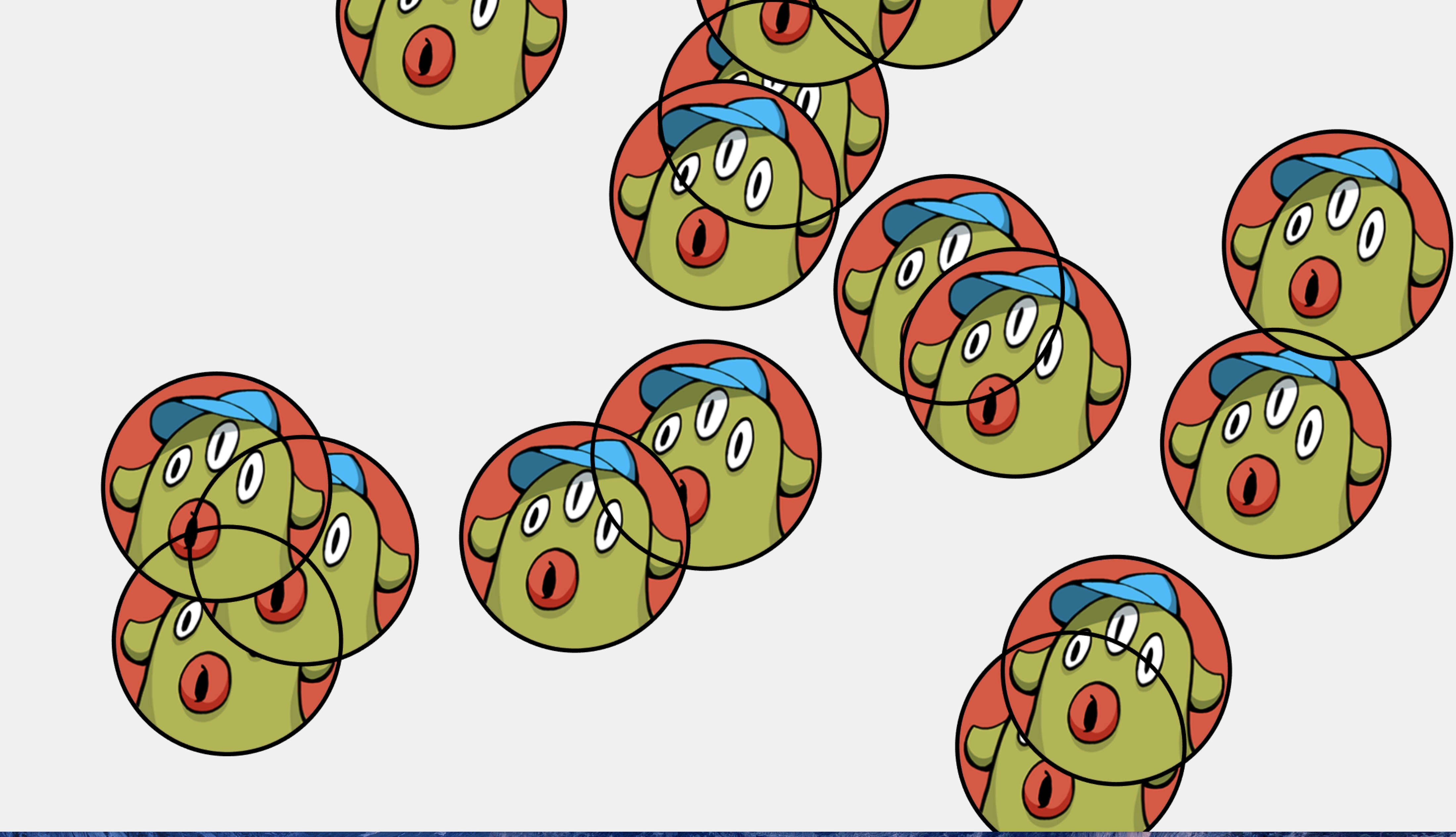 Maybe it's a MeshBasicMaterial with vertex color( shader program) bug?
navigator117
on 5 Jul 2018
Em ......, maybe it's not a bug but a feature request. Many game developer may want to use three.js to create 2D game with 3d effect.
In these kind of game, character may be create by many parts like arms, legs, weapons etc.. Parts should be join in group and sorting in group, and group as character sorting with other characters. Unfortunately threejs group's renderOrder not function like this, users must set renderOrder for each part and set renderOrders still can't full-fill this request. In Unity3D, there are SortingGroup class which is especially designed for these kind of questions, and I have tried this test without problem. SortingGroup API
Sorting Group Manual
navigator117
on 5 Jul 2018
Try using polygonOffset:
var ringMaterial = new THREE.MeshBasicMaterial( {
    color: 0x000000,
    polygonOffset: true,
    polygonOffsetFactor: 1,
    polygonOffsetUnits: 1
} );
test with polygonOffset not working.
navigator117
on 5 Jul 2018
polygonOffset works perfectly for me, as it should.
WestLangley
on 5 Jul 2018
Please check this code:jsfiddle
navigator117
on 6 Jul 2018
You want each disk to have a black border ( like here )? Which disk should be in front, then? How are you ensuring that? How are you preventing z-fighting?
WestLangley
on 6 Jul 2018
Sorry, I think it is premature to label this a bug.
Why does the user rendering multiple meshes at the same render depth, resulting in significant z-fighting?
It's not a bug at all.
In fact this topic is about bad practices ...
 RemusMar
on 7 Jul 2018
RemusMar
on 7 Jul 2018
Please read: https://docs.unity3d.com/ScriptReference/Rendering.SortingGroup.html
Unity offers a mechanism in order to avoid such visual glitches. Depending on how you look at it, this issue is a bug or a feature request.
Mugen87
on 7 Jul 2018
Michael,
The bad practice is still there.
This "SortingGroup" workaround comes with wasted processing power (performances hit).
Feel free to take it as 'feature request' if you like.
RemusMar
on 7 Jul 2018
@navigator117 Is it possible to provide your original code as a live example?
Mugen87
on 7 Jul 2018
@WestLangley yes, I want each disk with a border. If they have same renderOrder, any 'one' in front is ok, here 'one' means disk and border as a group. I'm thinking if a custom geometry combine circle and ring with single material sound more practicable? can threejs MeshBasicMaterial handle this?
@Mugen87 here is the example.
As threejs API are very clean and easy to use. If this feature request can't be add in master code, how about put it here: http://www.threejsgames.com/extensions/? It's should be a very useful feature.
navigator117
on 7 Jul 2018
@navigator117 Thank you for the live example 👍
Mugen87
on 7 Jul 2018
I'm thinking if a custom geometry combine circle and ring with single material sound more practical?
Yes.
WestLangley
on 7 Jul 2018
I've created an experimental PR to see one possible solution to solve such a problem.
Mugen87
on 8 Jul 2018
Hi!
I definitely need material specific renderOrder feature, instead of mesh.renderOrder.
I'm currently working on Unity familiar stuff ( https://hub.vroid.com ),
and it has material.renderQueue to deal with multiple material meshes.
Since Three.js has no ability to sort its render order per material,
We made our own WebGLRenderList to achieve correct rendering order:
https://gist.github.com/FMS-Cat/8e86dad4293516c5f2eeed1eedd88843#file-webglvrmrenderlists-ts-L39-L53
Our current way is too hacky and very vulnerable to future Three.js updates
so I want a feature that can tweak its render order by material property.
 FMS-Cat
on 25 Dec 2018
FMS-Cat
on 25 Dec 2018
@FMS-Cat should we add renderOrder to THREE.Material?
 mrdoob
on 25 Dec 2018
mrdoob
on 25 Dec 2018
Um, I'm not sure Material.renderOrder would solve the problem mentioned by @navigator117.
The related PR (#14433) tried to enhanced WebGLRenderer by introducing a new API (THREE.SortingGroup) so it's possible to sort and render the children of a renderable Object3D together. This is particularly useful for rendering complex sprites and maybe it would also solve @FMS-Cat's use case.
Mugen87
on 26 Dec 2018
should we add renderOrder to THREE.Material?
That would be definitely what I want but 👇
I'm not sure
Material.renderOrderwould solve the problem mentioned by @navigator117
I'm pretty sure it doesn't. I would rather do micro z transform trick to solve @navigator117 's problem.
To deal with this problem by using sorting group sounds still painful to do, but it's already an solution in Unity, huh
First I thought customizable render order function would help such a complex cases and Three.js deserves to have such a hacky solution.
FMS-Cat
on 27 Dec 2018
@FMS-Cat what about this solution? https://github.com/mrdoob/three.js/pull/14433#issuecomment-450405281
mrdoob
on 28 Dec 2018
Having render order per Group sounds good to solve this problem!
It doesn't solve mine though... I think I still need material.renderOrder (-ish featrue)
FMS-Cat
on 30 Dec 2018
Related issues
 fuzihaofzh
·
3Comments
fuzihaofzh
·
3Comments
 jack-jun
·
3Comments
jack-jun
·
3Comments
 Horray
·
3Comments
Horray
·
3Comments
 Bandit
·
3Comments
Bandit
·
3Comments
 alexprut
·
3Comments
alexprut
·
3Comments