Three.js: Under the orthogonal camera, there is a problem with the halo
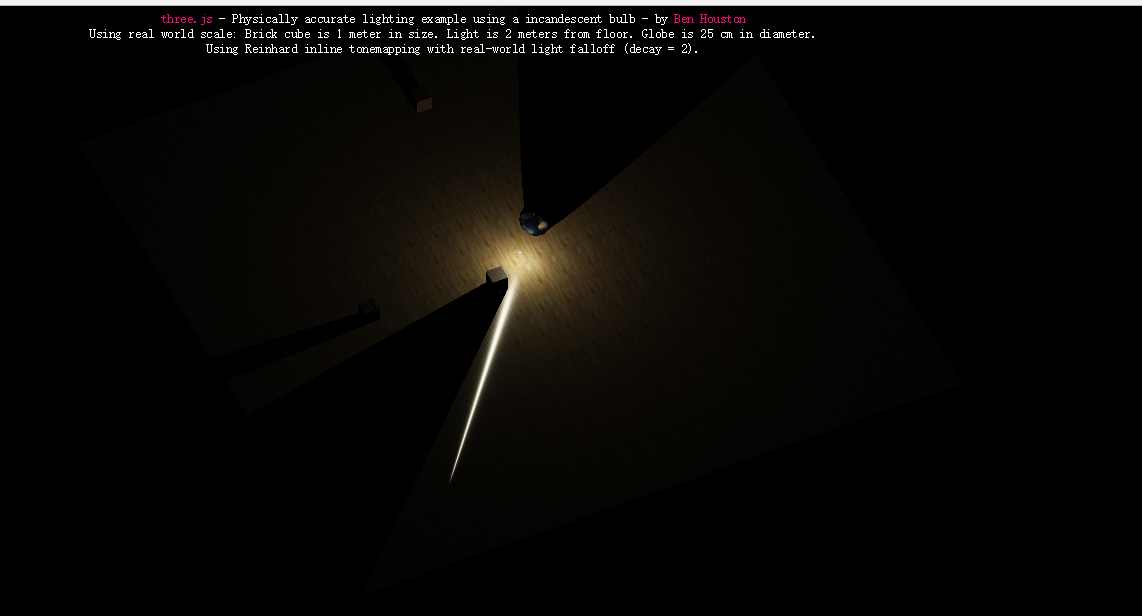
I tried using a OrthographicCamera
in https://threejs.org/examples/webgl_lights_physical
I do not know if this is a bug
let height = 2;
let aspec = window.innerWidth / window.innerHeight;
camera = new THREE.OrthographicCamera(-2, 2, 2, -2,
    -1000, 1000);
camera.left = aspec * height / -2;
camera.right = aspec * height / 2;
camera.bottom = height / -2;
camera.top = height / 2;

camera.position.x = -4;
camera.position.z = 4;
camera.position.y = 2;
camera.updateProjectionMatrix();
Three.js version
- [ ] Dev
- [x] r87
- [ ] ...
Browser
- [x] Chrome
OS
- [x] Windows
Hardware Requirements (graphics card, VR Device, ...)
 FishOrBear
All 13 comments
I assume you are referring to the long, narrow, white highlight. Correct?
I am unable to reproduce this on a mac.
 WestLangley
on 25 Sep 2017
WestLangley
on 25 Sep 2017
@WestLangley
Yes i modified it into a OrthographicCamera and tried to move + rotate it, there would be such a problem.
long, narrow, white highlight.
FishOrBear
on 26 Sep 2017
Are you able to reproduce the problem with a different computer?
WestLangley
on 26 Sep 2017
I reproduce the problem on other windows computers.
FishOrBear
on 26 Sep 2017
OrthographicCamera don't render Jsonloader object from blender. only PerspectiveCamera work
is there some solution ?
 Egyptionl
on 26 Sep 2017
Egyptionl
on 26 Sep 2017
@FishOrBear Can you reproduce the problem with a perspective camera?
WestLangley
on 26 Sep 2017
@WestLangley Perspective camera can not reproduce the problem.
FishOrBear
on 26 Sep 2017
OrthographicCamera

PerspectiveCamera

FishOrBear
on 26 Sep 2017
Probably because the renderer's eye position is wrong?
FishOrBear
on 26 Sep 2017
Sorry, I have no idea what you are doing. Perhaps someone else can address this.
WestLangley
on 26 Sep 2017
@FishOrBear I'm also unable to reproduce. Can you provide a live version (maybe a fiddle) that shows the visual error?
 Mugen87
on 26 Sep 2017
Mugen87
on 26 Sep 2017
@Mugen87
hi This is a simple example https://jsfiddle.net/q65t62k9/
I changed it OrbitControls.js So I control the camera
For the sake of simplicity I have embedded the code directly.
FishOrBear
on 26 Sep 2017
What you are seeing is a distortion of the specular highlight due to the orthographic projection.
This is not a three.js bug.
Also, I suggest you avoid a negative near plane. See this SO post.
WestLangley
on 26 Sep 2017
Related issues
 clawconduce
·
3Comments
clawconduce
·
3Comments
 jens-duttke
·
3Comments
jens-duttke
·
3Comments
 alexprut
·
3Comments
alexprut
·
3Comments
 konijn
·
3Comments
konijn
·
3Comments
 seep
·
3Comments
seep
·
3Comments