Thingsboard: [Feature request] - Widget to change attribute values on dashboard
It would be nice to change attribute values (shared / server) over the dashboard by a simple text or number field. This function would allow to set limits of e.g. alarms by users.
 affoltep
All 29 comments
Yes please, that would be very very useful.
All control widgets could be implemented with attributes, instead of RPC. I see 2 advantages in this:
- The device may be offline the moment the attribute is set.
- Opening of the dashboard would be MUCH faster, as there will no
getValueRPCs to be executed.
Also it will solve issues stated in #438 .
 fotis400
on 23 Apr 2018
fotis400
on 23 Apr 2018
+1 on the offline argument. I work with Sigfox devices, which are always "offline" from Thingsboard's point of view.
 mfalkvidd
on 23 Apr 2018
mfalkvidd
on 23 Apr 2018
Hello,
I found a turn around with a javascript to put in a custom widget :
Example :
self.ctx.$scope.data = self.ctx.defaultSubscription.data;
var attributes=[{key:"HighLimit", value:40},{key:"LowLimit", value:10}]; //array of attributes objects to save
var deviceId= self.ctx.$scope.data[0].datasource.entityId; //device id can be fetched from default subscription
var attributeScope="SERVER_SCOPE"; // can be either CLIENT_SCOPE , SERVER_SCOPE or SHARED_SCOPE
commandPromise = self.ctx.$scope.$injector.get('deviceService').saveDeviceAttributes( deviceId, attributeScope, attributes);
commandPromise.then(
        function success(response) {
            console.log("Reponse : Done");
        },
        function fail(rejection) {
            console.log("Rejection : "+JSON.stringify(rejection));
        }
    );
Hope this help
 nabil-rejeb
on 29 Jun 2018
nabil-rejeb
on 29 Jun 2018
More versatil method:
var commandPromise = self.ctx.$scope.$injector.get('attributeService').saveEntityAttributes
     ( entityType,EntityId,attributeScope, Attributes);
where :
entityType: "DEVICE", "ASSET" or "CUSTOMER"
attributeScope :CLIENT_SCOPE , SERVER_SCOPE or SHARED_SCOPE
Attributes=[{key:"KeyName1", value:"value1"}, ... ,{key:"KeyName n", value:"value n"}]
nabil-rejeb
on 29 Jun 2018
@nabil-rejeb Hi, could you please post the full export of this custom widget. Thanks.
 ovetu
on 24 Jul 2018
ovetu
on 24 Jul 2018
Hi, there is a custom widget for numeric attribute update with optional min and max limit and log changes to entity timeseries . I hope it can help you


compressed widget :
numeric_data_input.zip
nabil-rejeb
on 25 Jul 2018
@nabil-rejeb : This is great! Thanks a lot for sharing
affoltep
on 25 Jul 2018
@nabil-rejeb I've installed your widget and am trying to understand how to use it.
I have added the widget to a dashboard.
The datasource is set to Entity TargetDevice (which is the variable that holds the selected device) and I've entered an attribute called nextService.
Under Advanced I have set Attribute scope to Shared.
When viewing the dashboard, the widget looks like this:
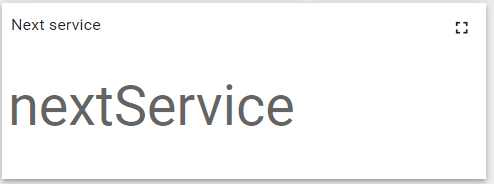
My assumption was that I would click the widget to set the value. But nothing happens when I click the widget. What am I missing?
mfalkvidd
on 31 Jul 2018
hi @mfalkvidd ,
just verify that the datakey is an attribute not a time series, and the dashboard must be not in edit mode to display the dialog box to set the new value.
if (dataKey.type == 'attribute') {
....
self.ctx.attributeData.valid = true;
//console.log(JSON.stringify(self.ctx.attributeData));
}
the function executed to display the dialog box:
self.ctx.$scope.showPrerenderedDialog = function() {
if (self.ctx.attributeData.valid) {
if (!self.ctx.isEdit) {
self.ctx.$scope.dialogData.value = self.ctx.$scope.newValue;
self.ctx.oldValue = self.ctx.$scope.newValue;
self.ctx.$scope.progressDisabled=true;
$mdDialog.show({
contentElement: $('#myStaticDialog',self.ctx.$container),
parent: angular.element(
document.body)
});
}}
};
an other thing: i suppose that your attribute is not instantiated yet , so there is no value: in this case you have to click on the right side of the widget (value cell like the card widget) not the label 'nextService'
nabil-rejeb
on 31 Jul 2018
hi,
I modified the previous widget to display the dialog box when you click on the label
nabil-rejeb
on 31 Jul 2018
Hi @nabil-rejeb , why don't you submit a PR with this widget to be part of main repo? We can help to support and improve it if needed. Definitely valuable widget.
 ashvayka
on 1 Aug 2018
ashvayka
on 1 Aug 2018
Sorry @ashvayka , i'm new to github
i have to undestand how to make a pull request.
nabil-rejeb
on 1 Aug 2018
@nabil-rejeb thanks. The updated widget works better. My guess is that since the attribute did not exist, no value was shown and therefore there was no value to click on to edit.
However, when trying to set the value I get the following error:

I have tried some different values (50000, 1, 0) and got the same result.
mfalkvidd
on 3 Aug 2018
Hi @mfalkvidd ,
I think it's a problem of entity alias (entityType undefined : different from "DEVICE", "ASSET" and "CUSTOMER" ).
so you can activate the line
console.log(JSON.stringify(self.ctx.attributeData));
in the submit function to view the subscription object (entityType , entityId ) in the browser log;
As a test you can change the code below
 var requete = attributeService.saveEntityAttributes(
            self.ctx.attributeData.entityType,
            self.ctx.attributeData.entityId,
            self.ctx.attributeData.Scope,
            self.ctx.attributeData.dataKey);
with
 var requete = attributeService.saveEntityAttributes(
            "DEVICE",
            "e5eedbd0-9252-11e8-a23a-31ae8d8809cb", //you device Id
            "SHARED_SCOPE",
            self.ctx.attributeData.dataKey);
Best regards.
nabil-rejeb
on 3 Aug 2018
Thanks. I don't know why, but I am no longer able to reproduce the problem. Even when the attribute does not exist, the console.log statement prints
{"valid":true,"Scope":"SHARED_SCOPE","entityType":"DEVICE","entityId":"f20fdc60-f938-11e7-a50e-df16d292953f","dataKey":[{"key":"nextService"}]}
and the attribute is set to the value I selected.
mfalkvidd
on 3 Aug 2018
Hi,
Could anyone let me know how to add "step size" value for a widget?
For example: If I want to create a Knob Control widget with a minimum value of 0 and a maximum value of 100, I want to add a step size of 10 so that i can vary in steps of 10.
Thanks in advance!!
 rajvm92
on 12 Sep 2018
rajvm92
on 12 Sep 2018
hi @rajvm92,
take a look at http://anthonyterrien.com/knob/
nabil-rejeb
on 13 Sep 2018
hi @nabil-rejeb
I looked at the above-mentioned link. I couldn't find any related information. Could you let me know what is actually present in the link?
Thank you
rajvm92
on 16 Sep 2018
Hello All,
@nabil-rejeb
I'm following this topic with great interest.
I have tested the Widget code presented here and I am using it to modify the CLIENt_SCOPE attributes.
But It doest'work. :(
when I use it to edit SHARE attributes it works without problems.
It is not clear to me whether the call below can be used for client side attributes or not
var commandPromise = self.ctx.$scope.$injector.get('attributeService').saveEntityAttributes( self.ctx.attributeData.entityType,
self.ctx.attributeData.entityId,
self.ctx.attributeData.Scope,
self.ctx.attributeData.dataKey
);
I run it in an authenticated context and therefore I do not understand why it should not be possible.
Best regards
Mirko
 MirkoUgoliniDev
on 11 Oct 2018
MirkoUgoliniDev
on 11 Oct 2018
Hi @MirkoUgoliniDev
Scope can only be SERVER_SCOPE or SHARED_SCOPE otherwise the service controller return an "invalid scope error"
explanation:
\application\src\main\java\org\thingsboard\server\controller\TelemetryController.java
    private DeferredResult<ResponseEntity> saveAttributes(EntityId entityIdSrc, String scope, JsonNode json) throws ThingsboardException {
        if (!DataConstants.SERVER_SCOPE.equals(scope) && !DataConstants.SHARED_SCOPE.equals(scope)) {
            return getImmediateDeferredResult("Invalid scope: " + scope, HttpStatus.BAD_REQUEST);
        }
Best regards
Nabil rejeb
nabil-rejeb
on 13 Oct 2018
hi .
how can i fix a push putton please help me.
I have a problem with Java script and schema.
 m0o0
on 14 Oct 2018
m0o0
on 14 Oct 2018
Hi, I want to make an alarm based on the attribute. If the aribut "active" = false, this is alarm, if "active" = true, this is not alarm.I tried to do, but I did not succeed, can you help?
 AndriiHavrylyak
on 31 Oct 2018
AndriiHavrylyak
on 31 Oct 2018
This is a great widget. Thanks for sharing. Has anybody already made a version for string attributes?
 brandlyze
on 27 Nov 2018
brandlyze
on 27 Nov 2018
@nabil-rejeb what about editing string attributes?
 xmas3
on 10 Dec 2018
xmas3
on 10 Dec 2018
This is a great widget. Thanks for sharing. Has anybody already made a version for string attributes?
@brandlyze Did you figured out how to do it?
xmas3
on 11 Dec 2018
hi @xmas3
Input widgets including strings are now part of thingsboard in v2.2 please take a look at demo.thingsboard.io
nabil-rejeb
on 11 Dec 2018
@nabil-rejeb thank you! Im running 2.2 PE and there were not included ;)
xmas3
on 11 Dec 2018
@xmas3 Input Widget Bundle is available in the Open source and PE (since 2.2 version).
Please recheck and write if you do not have it.
 vparomskiy
on 12 Dec 2018
vparomskiy
on 12 Dec 2018
Is there any way to get this input widget to automatically save values as they are entered by users?
I have noticed that users do not see or forget to press the tick button when they are updating values.
 adambforbes
on 4 Jun 2019
adambforbes
on 4 Jun 2019
Related issues
 gopirathnamt
·
26Comments
gopirathnamt
·
26Comments
 untilbit
·
18Comments
untilbit
·
18Comments
 mehranq
·
52Comments
mehranq
·
52Comments
 dejwoo
·
14Comments
dejwoo
·
14Comments
 nitinware
·
21Comments
nitinware
·
21Comments