Themekit: Themekit still hangs at 97% when deploying theme
I have the same issue I described here: https://github.com/Shopify/themekit/issues/579. My themes (All of them in all our stores) still hangs when updating.
Is there any recommended ignored files or any guide i should follow? It worked like a charm until a month ago when this "bug" appeared. No matter what I do themekit stucks at 97% on all themes (3 in total).
 jabel-riera
All 23 comments
Please fill out the template provided for the bugs they help me so I don't have to ask all of the follow up questions. I cannot solve issues without any information except that it isn't working.
What operating system are you on,
What version of themekit are you using? (Note that the bug is only fixed in a non-released version, are you on that verison)
What are your ignored files?
If you are using v0.8.1 then please update to the prerelease theme update --version=v1.0.0-pre to fix your problems.
 tanema
on 7 Nov 2018
tanema
on 7 Nov 2018
Hi @tanema
Sorry, nothing has changed since then, that's why I did not post all it again:
OS (including version): Mac OS X 10.13.4 (17E202)
Themekit version: ThemeKit 0.8.1 darwin/amd64
Editor (including version): ATOM 1.23.3
I do not have any ignored files
The thing is that if I update it to non-released version then some files get skipped, it does not upload ALL the theme...That is why back to 1 month ago I rolled back to the released one.
jabel-riera
on 8 Nov 2018
Can you give me an example of the files skipped then, please. Can you please describe what exactly is happening, you are uploading and you notice js files are uploaded but not liquid, ect.
I cannot update your 0.8.1 in place so it will continue to hang unless you update. Opening a new issue for the same problem even though you have a solution is not helpful. Please update and then give me information on your files not being uploaded.
tanema
on 8 Nov 2018
I'm also experiencing this on themes: Boundless, Minimal and Brooklyn. Freshly downloaded, too. No modifications.
I had just updated it via brew as well.
They all hang around the high 80's to mid 90's.
Here's the results of theme deploy -v for the theme "Boundless":
[development] Updated templates/password.liquid
[development] Updated snippets/bgset.liquid
[development] Updated snippets/social-sharing.liquid
[development] Updated layout/password.liquid
[development] Updated sections/custom-html.liquid
[development] Updated snippets/collection-grid-item.liquid
[development] Updated templates/search.liquid
[development] Updated sections/header.liquid
[development] Updated sections/list-collections-template.liquid
[development] Updated sections/collection-list.liquid
[development] Updated snippets/svg-definitions.liquid
[development] Updated templates/customers/register.liquid
[development] Updated locales/da.json
[development] Updated locales/es.json
[development] Updated snippets/social-meta-tags.liquid
[development] Updated snippets/onboarding-featured-collection.liquid
[development] Updated templates/customers/login.liquid
[development] Updated snippets/featured-products.liquid
[development] Updated templates/list-collections.liquid
[development] Updated sections/sidebar-menu.liquid
[development] Updated sections/password-header.liquid
[development] Updated templates/customers/activate_account.liquid
[development] Updated snippets/product-grid-width.liquid
[development] Updated templates/customers/account.liquid
[development] Updated snippets/comment.liquid
[development] Updated templates/product.liquid
[development] Updated templates/404.liquid
[development] Updated assets/ajax-loader.gif
[development] Updated snippets/home-content.liquid
[development] Updated snippets/image-style.liquid
[development] Updated templates/cart.liquid
[development] Updated locales/fr.json
[development] Updated sections/product-template.liquid
[development] Updated snippets/pagination.liquid
[development] Updated templates/gift_card.liquid
[development] Updated templates/customers/reset_password.liquid
[development] Updated snippets/onboarding-featured-blog.liquid
[development] Updated sections/slideshow.liquid
[development] Updated sections/featured-collection.liquid
[development] Updated sections/footer.liquid
[development] Updated assets/icons.eot
[development] Updated sections/featured-video.liquid
[development] Updated assets/icons.json
[development] Updated sections/article-template.liquid
[development] Updated sections/featured-blog.liquid
[development] Updated locales/ja.json
[development] Updated templates/blog.liquid
[development] Updated locales/it.json
[development] Updated templates/index.liquid
[development] Updated assets/icons.svg
[development] Updated locales/pt-PT.json
[development] Updated sections/feature-row.liquid
[development] Updated assets/icons.ttf
[development] Updated templates/article.liquid
[development] Updated templates/customers/order.liquid
[development] Updated locales/nl.json
[development] Updated assets/lazysizes.min.js
[development] Updated snippets/product-grid-item.liquid
[development] Updated templates/customers/addresses.liquid
[development] Updated templates/page.liquid
[development] Updated assets/theme.js.liquid
[development] Updated assets/icons.woff
[development] Updated config/settings_schema.json
[development] Updated sections/collection-template.liquid
[development] Updated locales/de.json
[development] Updated sections/announcement-bar.liquid
[development] Updated sections/cart-template.liquid
[development] Updated assets/ico-select.svg.liquid
[development] Updated sections/password-content.liquid
[development] Updated assets/theme.scss.liquid
[development] Updated snippets/action-bar.liquid
[development] Updated sections/action-bar.liquid
[development] Updated sections/newsletter-signup.liquid
[development] Updated sections/rich-text.liquid
[development] Updated layout/theme.liquid
[development] Updated sections/search-template.liquid
[development] Updated templates/collection.liquid
[development] Updated sections/map.liquid
[development] Updated locales/pt-BR.json
[development] Updated sections/featured-product.liquid
[development] Updated templates/page.contact.liquid
[development] Updated locales/en.default.json
[development] Updated assets/vendor.js
[development] Updated assets/hero_slide_1.jpg
 VizualAbstract
on 9 Nov 2018
VizualAbstract
on 9 Nov 2018
Running theme update --version=v1.0.0-pre has helped, but...
Updating from 0.8.1 to v1.0.0-pre
I'm getting messages like:
[development] (layout/theme.liquid) this file is critical and removing it would cause your theme to become non-functional
And my theme now breaks because of missing files!
VizualAbstract
on 9 Nov 2018
Running theme update --version=v0.7.5
And instead of deploy, I'm running theme replace --force
Results:
An update for Themekit is available. To update please run `theme update`
17:44:16 Unexpected changes made on remote.
Diff:
    New Files:
        - templates/blog.liquid [Nov 8 6:41PM 2018]
        - templates/cart.liquid [Nov 8 6:41PM 2018]
        - templates/product.liquid [Nov 8 6:41PM 2018]
        - assets/theme.js [Nov 8 8:34PM 2018]
        - config/settings_data.json [Nov 8 6:41PM 2018]
        - config/settings_schema.json [Nov 8 6:41PM 2018]
        - layout/theme.liquid [Nov 8 6:41PM 2018]
        - templates/collection.liquid [Nov 8 6:41PM 2018]
        - templates/gift_card.liquid [Nov 8 6:41PM 2018]
        - templates/index.liquid [Nov 8 6:41PM 2018]
        - templates/page.liquid [Nov 8 6:41PM 2018]

You can solve this by running 'theme download' to get the most recent copy of these files.
Running 'theme download' will overwrite any changes you have made so make sure your work is
commited to your VCS before doing so.

If you are certain that you want to overwrite any changes then use the --force flag
So I ran theme replace --force
And now I'm getting this:
An update for Themekit is available. To update please run `theme update`
[development]: 1 / 10 [======>-------------------------------------------------------------]  10 %
[development] Asset Perform Remove to templates/gift_card.liquid at host repario.myshopify.com
    Status: 403 Forbidden
However, theme upload -f works fine, but I'd rather replace all files and make sure all loose files are also removed, so I'm hoping we can get replace in this version, or deploy in the new version working.
Thanks for all your hard work. I hope this has helped.
VizualAbstract
on 9 Nov 2018
Hi @tanema,
Sorry for not attaching all the info that you are asking. The thing is that on the last issue that I opened I already specified that when using the unreleased version lots of .liquid files where skipped. As they were not even listed on the deploy -v output it had no sense to share the whole list with you because those files were not there.
In any case your answer then was the one that follows, which I still do not understand (Maybe I am missing something, _that is why I asked if I should use any specific configuration or ignore any specific files_):
Excellent, if that was your problem then I will close this issue and keep the other one open. This fix will be available in the next release but you can continue to use that prerelease until then.
English is not my native language and I understand it may be a little confusing, but summerizing:
- With the latest release:
deployhangs at 97%. No message, no error, it just stays on 97% eternally. - With the non-released last version:
deployis apparently successfull but .liquid files are randomly skipped, so you think everything is alright but it is not. I happens mostly on .js.liquid files and .scss.liquid files, I didn't see any template like page.templateName.liquid file fail.
Thank you again!
jabel-riera
on 9 Nov 2018
@jabel-riera Do you have files that have both extensions in your folder? For instance you might have a file named cart.js and cart.js.liquid in the same folder? If so you cannot do this because when cart.js.liquid gets uploaded to shopify. It gets processed and is saved as cart.js
@VizualAbstract Can you run theme deploy --verbose with version v1.0.0-pre. If it is trying to delete that file, that means it does not exist in your project which I doubt is true. Do you have any other config for your theme other than store, password and theme?
tanema
on 9 Nov 2018
@tanema Trying with theme deploy --verbose and I can see the file log, lots of files deleted, lots of 'em updated. No problems running it. That seems fine.
No additional config options within config.yml.
Is it possible that Shopify's system is getting cranky for deploying too many times? Those 403 errors seem to be inconsistent with anything, except maybe lessen up if I don't upload after a few minutes.
VizualAbstract
on 9 Nov 2018
@VizualAbstract not at all, I have pinned themekit to be behind the throttle limit, you will be able to deploy at any time and not get a 499 error. I am not sure why it would have tried to deleted that file, especially if it exists in your project.
The reason for the hang is a bug in themekit that doesn't handle an edge case gracefully. The edge case is when you have renamed a file from something like .js.liquid to .js, Shopify will throw an error saying that you cannot upload over a compiled asset. so fir the .js.liquid file needs to be deleted on shopify before the .js file is uploaded. Themekit hangs when trying to delete the .js.liquid
This is why you are probably seeing some delete operations, but your layouts/theme.liquid should not be deleted for this reason.
Is your problem fixed now though? You are not having problems uploading?
tanema
on 9 Nov 2018
@tanema Thank you for the explaination -- I'm using theme deploy --verbose, but I'm receiving this error occasionally:
[development] (templates/product.liquid) this file is critical and removing it would cause your theme to become non-functional
On several files.
VizualAbstract
on 9 Nov 2018
@VizualAbstract can you confirm that those files both exist in your project, and have content inside of them. What happens when you run theme deploy templates/product.liquid? If this is currently blocking you as well you can run theme deploy --no-delete
tanema
on 9 Nov 2018
@tanema (sorry about the delay, was in a meeting) - I can confirm that those files had content in them. I included the content of the file at the end of this comment.
Results of theme deploy templates/product.liquid:
$ theme deploy templates/product.liquid
[development] 1|1 [==============================================================================]  100 %
Check out the site https://repario.myshopify.com/?fts=0&preview_theme_id=43997986875
Contents of templates/product.liquid:
{% comment %}
  The contents of the product.liquid template can be found in /sections/product-template.liquid
{% endcomment %}

{% section 'product-template' %}

<script>
  // Override default values of theme.strings for each template.
  // Alternate product templates can change values of
  // add to cart button, sold out, and unavailable states here.
  window.productStrings = {
    addToCart: {{ 'products.product.add_to_cart' | t | json }},
    soldOut: {{ 'products.product.sold_out' | t | json }}
  }
</script>
@tanema I updated my comment, had an error on something
@tanema I think I've found the issue, and hopefully it's not related to anything on this script, and just the config having the wrong theme_id -- sounds weird, but I'm going to verify and report back later. Let's put a pin in my issues until I can debug further.
Right now it seems to be working fine.
VizualAbstract
on 9 Nov 2018
@tanema Yep, theme_id was incorrect. Config theme_id was set to "1" for the past issue I was experiencing. It's strange that it was showing that it was uploading files?
Either way, it's working for 1.0.0-pre with theme deploy --verbose
Thanks for your help.
VizualAbstract
on 9 Nov 2018
@jabel-riera Do you have files that have both extensions in your folder? For instance you might have a file named
cart.jsandcart.js.liquidin the same folder? If so you cannot do this because whencart.js.liquidgets uploaded to shopify. It gets processed and is saved ascart.js
Yes I do have both .js and .js.liquid (And also some .scss and .scss.liquid) files in the same folder. However I do not have the cart.js neither cart.js.liquid files. Should I add the compiled js and scss files to an ignore list ?
Sorry if the question is too obvious, it was not a problem until a month ago so I did not add any file to the ignored files list on the project.
Thank you in advance for all the time and explanation given!
 Jabelriera
on 10 Nov 2018
Jabelriera
on 10 Nov 2018
@jabel-riera Sorry I mean do you have files that are named the same with different extensions? With both [name].js.liquid and [name].js or [name].scss and [name].scss.liquid.
tanema
on 10 Nov 2018
Yes Tim, I do :-/
Jabelriera
on 10 Nov 2018
It is not possible for you to have both and expect them to be uploaded. This has always been the case. You will have to rename your files. I will put something in themekit to raise an error or warning if any files are named like this so this will not trip anybody up in the future.
tanema
on 11 Nov 2018
Thank you for your patience Tim. I do not understand how is it possible that it has worked fine during so much time but it's fine. From now on then, I should add the compiled .js and .scss files to an ignore list or how should I proceed ?
jabel-riera
on 12 Nov 2018
Hey @jabel-riera sorry about the late reply, I was away. I am relieved we have figured out what was causing issues. If you do not need the .js and .scss files on shopify then yes you can add them to your ignore list. If however you are expecting to use them on shopify then you will have to rename them to something else.
tanema
on 19 Nov 2018
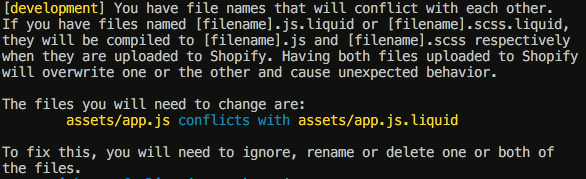
@jabel-riera I will be adding an error now to themekit so that if your file exist like this in the future, you will get an error message describing what is wrong and how to fix it. https://github.com/Shopify/themekit/pull/596
This will be the output:
tanema
on 19 Nov 2018
Thank you so much for all your time and explanations Tim, they really helped me. You can consider it closed :)
jabel-riera
on 20 Nov 2018
Related issues
 crissmancd
·
5Comments
crissmancd
·
5Comments
 IllidanMalar
·
5Comments
IllidanMalar
·
5Comments
 bhekuwenza
·
8Comments
bhekuwenza
·
8Comments
 raulmontejo
·
4Comments
raulmontejo
·
4Comments
 amit0001
·
3Comments
amit0001
·
3Comments