Themekit: "theme new" fails: "src is empty"
What happened
Running theme new --password=[your-password] --store=[your-store.myshopify.com] (with my details) failed:
James$ theme new --password=####### --store=#####.myshopify.com
[#####.myshopify.com] creating new theme "Timber-latest" from https://github.com/Shopify/Timber/archive/v2.2.2.zip
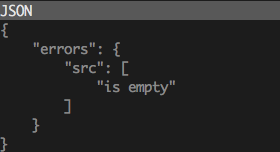
src is empty
What I expected to happen
A new template based on Timber to be created in my store, and downloaded to my local folder.
Steps to reproduce
- Create private app
- Use new app password in
theme new --password=[your-password] --store=[your-store.myshopify.com] - shrug and instead download existing theme and find success
My Environment
OS (including version): macOS 10.13.6 (17G65) (High Sierra)
Themekit version: ThemeKit 0.8.0 darwin/amd64 (installed via Homebrew)
Ignore Files(if any): None that I know of
 jameswood
All 31 comments
🤦♂️ I was able to reproduce this bug, I will have a fix for you in a moment
 tanema
on 30 Aug 2018
tanema
on 30 Aug 2018
Don't rush on my account... I installed Timber manually onto the site and pulled it down with Theme. Just thought I'd report it! loving local editing. Thank you!
jameswood
on 30 Aug 2018
Actually it looks like themekit is sending the right data but it looks like Timber has been archived which might cause this, or this may be a shopify bug! 🤔
Edit: Confirmed that it is not that Timber has been archived, it seems to be a Shopify bug.
tanema
on 30 Aug 2018
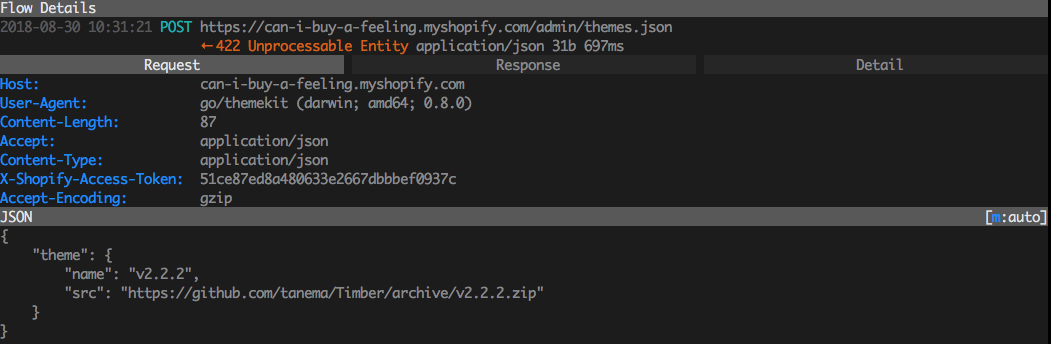
Reference for Shopify folk:
Request:
Response:
tanema
on 30 Aug 2018
Holy hell this has been a day. This is actually because Github stopped sending Content-Length headers in the Timber zip file releases
tanema
on 30 Aug 2018
Okay I am working on shipping a fix in shopify to fix this issue.
tanema
on 30 Aug 2018
Daaaaaaamn... you really had to go down the rabbit hole. Nice work! (so far!)
jameswood
on 31 Aug 2018
Hey, thanks for taking care of this. Just wondering: Do you have an ETA for a fix? I'm just getting started using Themekit and am wondering whether to wait for a fix or use something else (like slate) to get started. Or is there a viable workaround?
 beheist
on 3 Sep 2018
beheist
on 3 Sep 2018
My workaround was to manually install the Timber theme onto my site, then use Theme to pull a local copy. You could also pull any other theme from your site, you don't have to start with Timber.
jameswood
on 3 Sep 2018
@beheist Sorry about this, the issue is not currently a straightforward fix but I will keep you updated when I have information. If you are just getting started developing themes, I recommend slate though. They have a more opinionated workflow that is a little less daunting to get started.
tanema
on 4 Sep 2018
My first time with shopify and am getting same error. I get an empty config.yml file too. I am ok with trying slate, but have no idea what/where yarn is (on Ubuntu).
hal@lancelot:~/Sites/blofish$ yarn create slate-theme my-new-theme
ERROR: [Errno 2] No such file or directory: 'create'
 halburgiss
on 4 Sep 2018
halburgiss
on 4 Sep 2018
@halburgiss this worked for me:
npm install -g @shopify/slate
slate theme <my-theme-name>
cd < my-theme-name >
Run theme new --password=<password here> --store=<store name>
 justiny
on 4 Sep 2018
justiny
on 4 Sep 2018
You shouldn't have to run theme new after running slate. I believe it would have already created the theme for you.
tanema
on 4 Sep 2018
@tanema right, my bad. you just need to go into config.yml and add details. then run yarn start.
justiny
on 4 Sep 2018
Is yarn an npm module? I have a "yarn" but it doesn't sound right:
yarn - scenario testing of Unix command line tools
halburgiss
on 5 Sep 2018
Okay so github got back to me somewhat unhelpfully
there are no guarantees for whether a retrieved archive will be sent chunked (no content length known ahead of time), or non-chunked-with-length.
This is an issue currently because all of shopify's asset fetching, check content-length before downloading the whole file, and I do not have a way forward currently for changing that, I will have to change how theme new operates for the next version.
tanema
on 10 Sep 2018
Okay I think I will need to create a new solution for this, and may end up creating and uploading a new theme from local files. This will be a big change into the way themekit works so that will have to be for version 1.0.0 so this change will not be in the next release (scheduled for next week)
tanema
on 14 Sep 2018
Any workaround for this?
 LucasKovacs
on 18 Sep 2018
LucasKovacs
on 18 Sep 2018
You can download an archive of timber (if that is what you want to start with) and create it on the online store with the "Upload theme" button
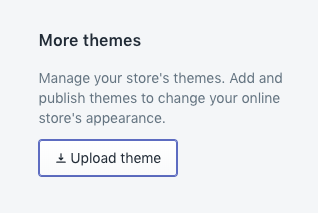
I know that is annoying and I apologize for that. I hope to have a solution soon.
tanema
on 18 Sep 2018
Okay I am working on new functionality for theme new to just generate the files locally and upload to a blank theme. Did everyone like Timber as a starting point or did you end up deleting a lot of the initial files to get started?
tanema
on 3 Oct 2018
I like your idea because when I start a new project I have to delete almost every initial file like CSS, replace all class in HTML file
 zzfortezz
on 11 Oct 2018
zzfortezz
on 11 Oct 2018
The current format of the new command that I am working on puts the simple theme template in the root directory. You can check it out here https://github.com/Shopify/themekit/tree/new_command/theme-template Please give me feedback on it! Also I am hoping that in the future this will make it easier for theme developers to submit PRs on the theme template to a better starting point.
tanema
on 11 Oct 2018
@tanema Just ran into this issue myself. I'm developing a new theme for a client and to answer your 'Starting Point' question... i most preferably like to develop from scratch, so just the basic file structure and template files. Generally i like to use assets/scss then use gulp to rename my theme.scss into theme.scss.liquid among other workflow methods. For me at least in an ideal world theme new would just create said directories and the config.yml then i'd be good to go!
 mattsince87
on 11 Oct 2018
mattsince87
on 11 Oct 2018
I am trying to ride a line as well. I want to provide all the required files for a new theme and make it easy to start from scratch but also put in a few helpful directions for someone newer to theme development. So I left the customer templates blank because I assumed it would be a while for a newer theme developer to get to them, but on the main pages, I put the minimum amount of code in each to display what they should display. I could probably pare down the cart page though.
tanema
on 11 Oct 2018
@tanema Sounds good to me, let me know if u need any help/contribution with any of this as i'm a huge advocate of ThemeKit over Slate 😃
mattsince87
on 11 Oct 2018
Okay everyone I have merged changes to the new command, You can try it out by running theme update --version=v1.0.0-pre
It will:
- create an empty theme on shopify
- generate files locally (It will not overwrite files so if you run
theme newin an existing theme, you will be able to easily duplicate a theme. - upload those files to shopify to make your new theme valid.
- create/update the config
If there are no surprises in how this works, I will close this issue and you can open new issues for bugs, and changes in the command or theme template.
tanema
on 12 Oct 2018
Hey @tanema thanks for all your hard work.
Unfortunately, it looks like my files were not generated to my root directory.
 jeroesguerra
on 13 Oct 2018
jeroesguerra
on 13 Oct 2018
It adheres to any directory config you have so if you passed a --dir flag or you have a config.yml with a directory config in it, (in the environment you specified) then it will generate the files there. Otherwise it will generate the files in the directory that you run the command in.
tanema
on 13 Oct 2018
Hey @tanema, I can confirm it works after updating to 1.0.0-pre and adding the new --name parameter. Thanks for your work!
beheist
on 29 Oct 2018
Thanks for confirming! It will be another couple of weeks before the next version is released. I have a few more bugs and one last feature before it is fixed.
tanema
on 29 Oct 2018
Version 1 has now been deployed! Thanks for all your help!
tanema
on 8 Jan 2019
Related issues
 justinmetros
·
9Comments
justinmetros
·
9Comments
 crissmancd
·
5Comments
crissmancd
·
5Comments
 OliverHuntsman
·
4Comments
OliverHuntsman
·
4Comments
 evvvritt
·
11Comments
evvvritt
·
11Comments
 hatsumatsu
·
5Comments
hatsumatsu
·
5Comments
Most helpful comment
Okay everyone I have merged changes to the new command, You can try it out by running
theme update --version=v1.0.0-preIt will:
theme newin an existing theme, you will be able to easily duplicate a theme.If there are no surprises in how this works, I will close this issue and you can open new issues for bugs, and changes in the command or theme template.