Themekit: Feature Request: Live reload with `theme watch`
Hi, just voicing a request to add a livereload feature to the theme watch function. Thanks!
 evvvritt
All 11 comments
Duplicate of #236
 tanema
on 17 Jan 2017
tanema
on 17 Jan 2017
I dont think this is a duplicate, Livereload is like Browsersync. Slate https://shopify.github.io/slate/ uses Browsersync but you are tied in to Slates way of doing things which is a good or bad thing depending on your preferences I guess...
 78doog
on 19 Apr 2017
78doog
on 19 Apr 2017
Reopening because it is a good point that themekit should enable any workflow and not be as opinionated as slate.
tanema
on 1 May 2017
This is difficult now that I am actually looking into the implementation of this. Since the code is not served locally, it is really hard to figure out how to reload a page. If it was served locally it would be non trivial, I would setup a websocket to force the page to refresh. Since theme kit is only concerned about transferring file data to shopify and back there is currently no way I can think of to reload the webpage. I will keep this open a little while longer to think about it or for suggestions if anyone has any.
tanema
on 1 May 2017
I have talked to some of our frontend devs and it seems like a lot of these tools starts up a proxy on another port that you would load in your browser. Then the proxy would inject JS with websocket interaction so that live-reload functionality can be inserted. This is definitely doable but I will have to experiment a bit with this feature.
tanema
on 8 May 2017
Hi Tim, thanks for all your work on this project, it's hugely helpful. I have a question that relates to this. I use Sublime Text with Live Reload chrome plugin. I want to use the --notify command but I can't for the live of me figure out which file to notify! Also, do you have any recommendations on being able to develop shopify on localhost? The only option I can think of would be firing up an nginx server, but thought I'd ask if you knew of any better ways? Thanks!
 dave4jr
on 6 Jun 2017
dave4jr
on 6 Jun 2017
you can pass any file path into notify. For instance you can pass theme watch --notify=/tmp/themekit the provide that path to whatever you use to reload your browser. What this will do is
When watch becomes idle
- create the file if it does not exist
- touch the file if it already exist to emit a change event
This allows you to trigger another program for whatever reason you may choose. I am not sure exactly how you could do this with livereload because I have not used it.
tanema
on 6 Jun 2017
I'm using prepros with themekit and it works great. perhaps this feature is not needed inside themekit.
 keyurshah
on 15 Jun 2017
keyurshah
on 15 Jun 2017
@keyurshah do you have a guide for setting up themekit with prepros. I am starting to think that there are a huge amount of live reload tools out there and to keep themekit from reinventing the wheel and keep it un-opinionated I should stay away from implementing this.
I think the best option for this is to document how to use the most popular tools with themekit. Slate uses BrowserSync so I could document how to set that up. I could probably document a live reload chrome plugin with a notify file as well.
tanema
on 4 Aug 2017
sorry, just saw this in my inbox.
I was about to add screenshots for my setup, but found this guide by Shopify's Tiffany Tse that already exists:
but in summary, here is how I am setting it up in Prepros:
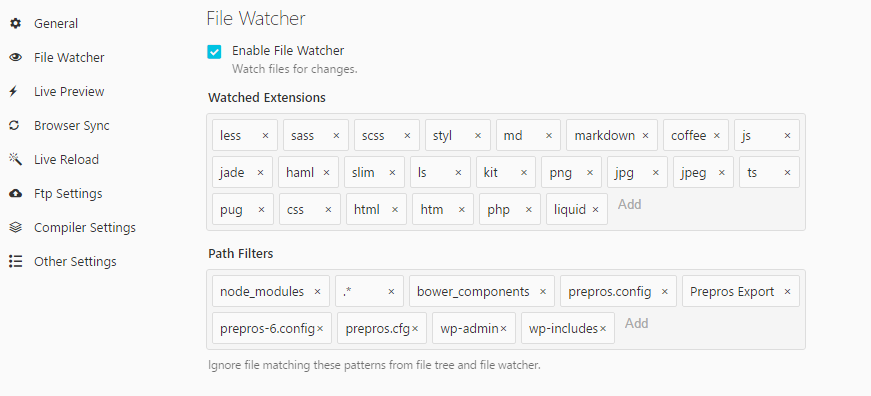
Here are the sections for each setting to configure:
File Watcher
add .liquid to my watchers
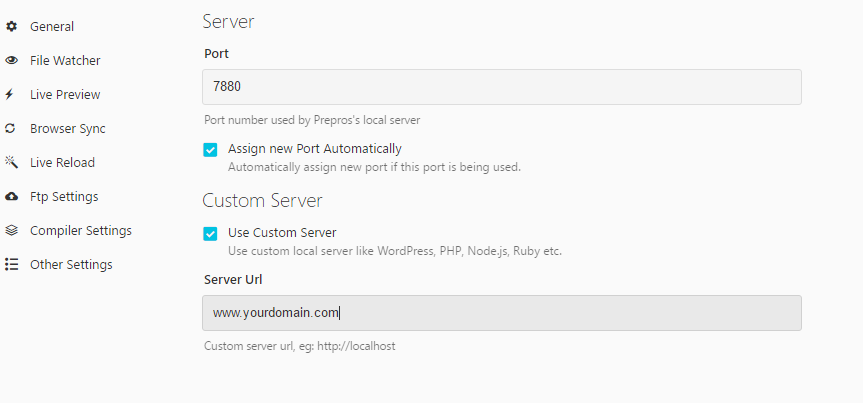
Live Preview
Enter your domain name to preview
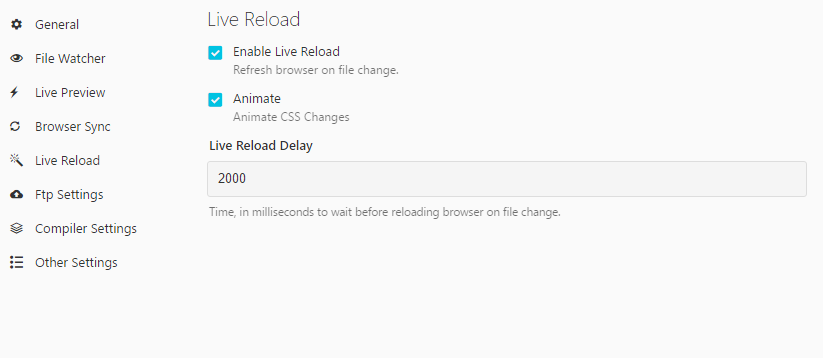
Live Reload
I set mine for 2000 ms (2 seconds) but can configure as needed per your network connection. If it's too quick then it won't capture the changes on loading.
One thing to keep in mind is that you have to publish changes to your live theme to see the changes.
You can configure that in your themekit settings. I publish to the live theme setting
Here is a good guide to use
http://www.brettchalupa.com/shopify-theme-development-workflow
keyurshah
on 14 Aug 2017
one nice thing about prepros is that you can also have it concatenate multiple files into one and use it to process .less or .sass as well before uploading. You don't need to rely on uploading to shopify and then have it processed.
keyurshah
on 14 Aug 2017
Related issues
 mcpatten
·
12Comments
mcpatten
·
12Comments
 DanPete
·
4Comments
DanPete
·
4Comments
 hatsumatsu
·
5Comments
hatsumatsu
·
5Comments
 jamesmthornton
·
5Comments
jamesmthornton
·
5Comments
 IllidanMalar
·
5Comments
IllidanMalar
·
5Comments
Most helpful comment
This is difficult now that I am actually looking into the implementation of this. Since the code is not served locally, it is really hard to figure out how to reload a page. If it was served locally it would be non trivial, I would setup a websocket to force the page to refresh. Since theme kit is only concerned about transferring file data to shopify and back there is currently no way I can think of to reload the webpage. I will keep this open a little while longer to think about it or for suggestions if anyone has any.