Themekit: Download => Exceeded 2 calls per second for api client
What happened
Downloading results in Exceeded 2 calls per second for api client.
What I expected to happen
Downloading the theme without errors. Works without hickups on other stores with exact same setup.
Steps to reproduce
theme downloadusing password from private app
2.
error downloading asset: Asset Perform Retrieve to  at host leo-no.myshopify.com
        Status: 429 Too Many Requests
        Errors: Exceeded 2 calls per second for api client.
My Environment
OS (including version): macOS
Themekit version: ThemeKit 0.7.5 darwin/amd64 or @shopify/themekit 0.6.12
Ignore Files(if any):
src/*
node_modules/*
config.yml
config.yml.example
README.md
package.json
.gitignore
.git
.DS_Store
themekit_ignores
webpack.config.js
yarn.lock
npm-debug.log
yarn-error.log
config/settings_data.json
assets/happyending.js
assets/bold-memberships-salt.liquid
 larsenwork
All 7 comments
Update: also happens on some of my other stores.
larsenwork
on 21 Dec 2017
Are you running multiple themekit instances? I may have to tweak the throttle again but themekit right now is supposed to be pinned at 2 calls per second
 tanema
on 21 Dec 2017
tanema
on 21 Dec 2017
@tanema no, only running one. Any way I can increase the throttling to make sure it doesn't happen?
Screenshot of terminal (restarted my computer, just before to be 100% sure there wasn't any other processes running)
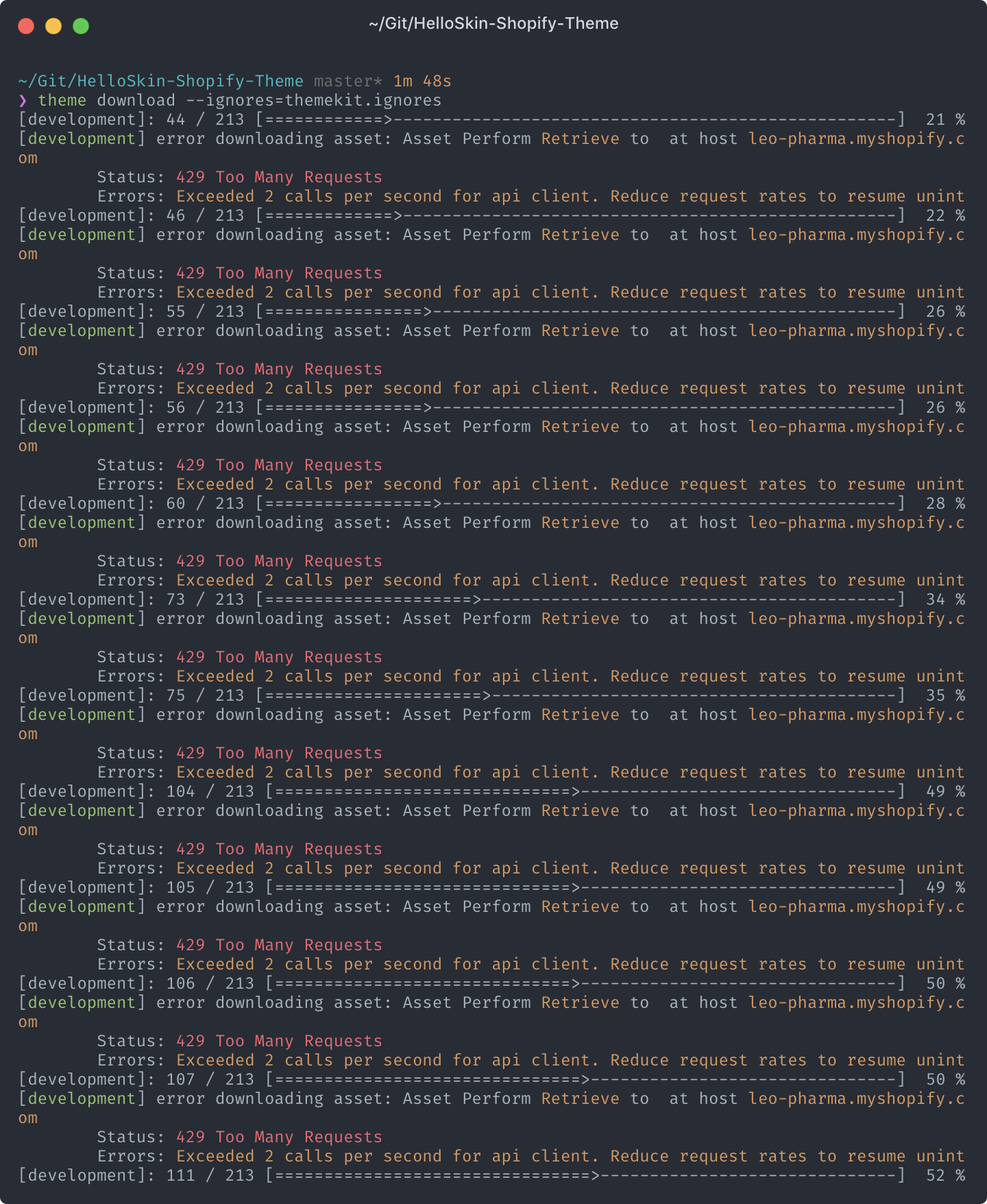
UPDATE: Seems to be a hyper terminal specific issue (https://hyper.is/). When switching to the default macOS terminal it doesn't happen. Both are Zsh terminals so shouldn't be any difference.
larsenwork
on 21 Dec 2017
Can't reproduce any more, not sure if hyper or you guys updated/changed anything but I'll close for now and comment if it reappears.
larsenwork
on 3 Jan 2018
@tanema This may not be related, and I'm keeping this issue closed but I thought I'd chime in. We had this crop up when multiple developers shared one "private app" access key. Each was unware of having stepped on the others' toes. creating a private app for themekit per-developer resolved this.
 Sanfam
on 4 Dec 2018
Sanfam
on 4 Dec 2018
This happened to me. What caused this is that I was watching changes via theme watch and downloading at the same time with theme download. I think this tried to upload each file it just downloaded, which led to the warning. After stopping the watch tool I was able to download again without issue.
 cjreeve
on 2 Apr 2019
cjreeve
on 2 Apr 2019
on windows .. you should only have one themekit.exe running. Ending the others fixed my issue

 milkymura
on 12 Jul 2019
milkymura
on 12 Jul 2019
Related issues
 illia108
·
3Comments
illia108
·
3Comments
 bhekuwenza
·
8Comments
bhekuwenza
·
8Comments
 ingueferroque
·
6Comments
ingueferroque
·
6Comments
 tbeseda
·
3Comments
tbeseda
·
3Comments
 IllidanMalar
·
5Comments
IllidanMalar
·
5Comments
Most helpful comment
This happened to me. What caused this is that I was watching changes via
theme watchand downloading at the same time withtheme download. I think this tried to upload each file it just downloaded, which led to the warning. After stopping the watch tool I was able to download again without issue.