Theia: Find & Replace is not fully functional for keyboard users.
Bug Description:
In both Theia and VS Code pressing enter in the focused input(where the new value is entered in find and replace) does not replace the contents I have to manually click on the small icon next to the input. I was expecting it to work when the enter key is pressed.
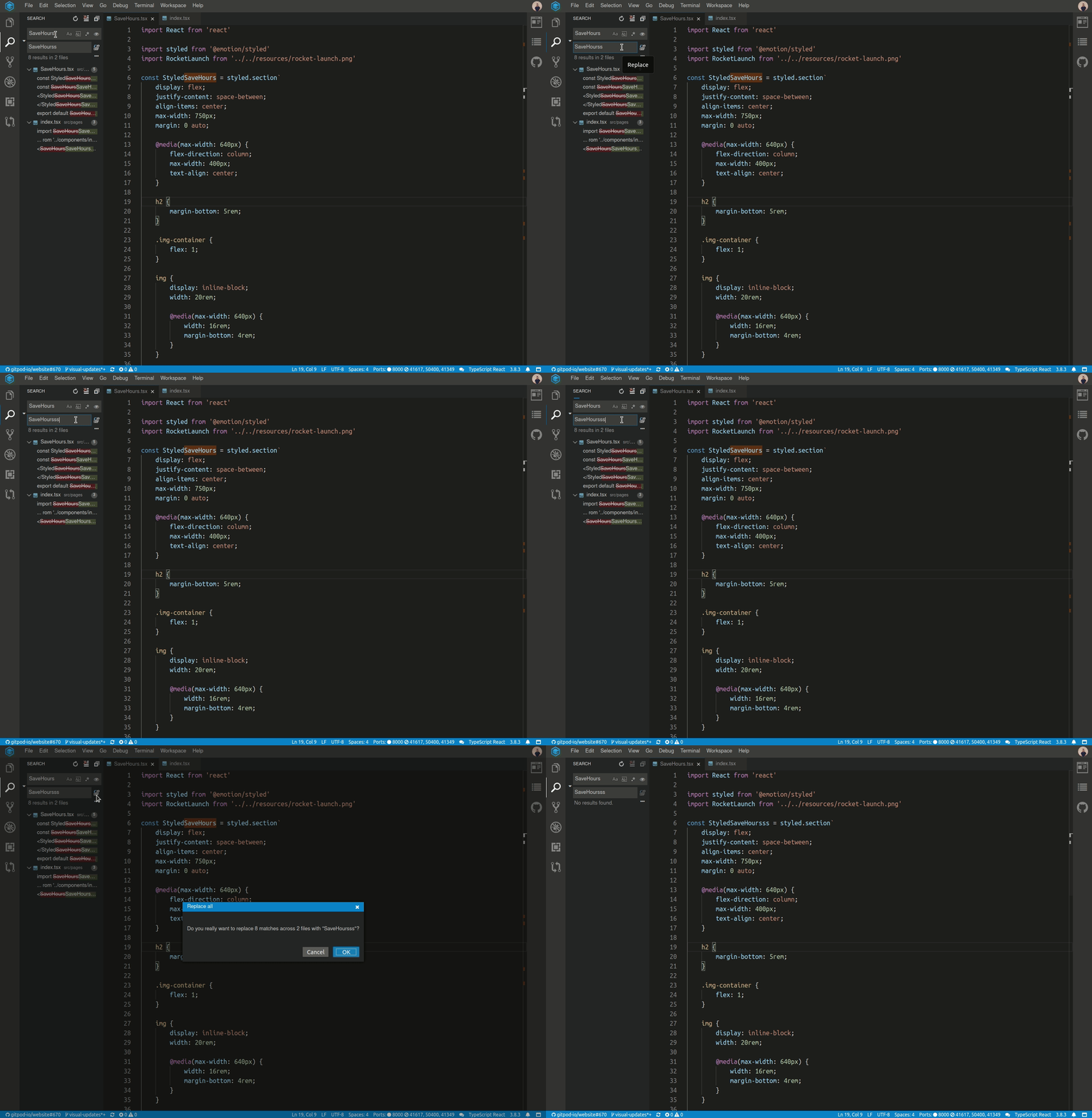
To me, it looks like a serious accessibility issue for Keyboard users and generally, it would be great if the whole Theia IDE is accessible for those users who only use a keyboard and can't use a mouse.
Steps to Reproduce:
- Open a Gitpod workspace.
- Try to find and replace some text via the Keyboard.
Additional Information
- Operating System:
- Theia Version:
 nisarhassan12
All 7 comments
@akosyakov I would love to make a PR for this but don't know what files to change and so on. Would be nice if you can outline steps or mention what files to change and so on? Thanks
nisarhassan12
on 19 Jun 2020
@nisarhassan12 in vscode the search-in-workspace options are accessible when pressing tab, is this the type of implementation you want to go for? At the moment, when pressing tab we toggle between the available inputs and the search results but never the options.
 vince-fugnitto
on 19 Jun 2020
vince-fugnitto
on 19 Jun 2020
Thanks! @vince-fugnitto the VS Code implementation looks ok.
This issue is specifically about not being able to replace the contents when pressing the enter key.
Generally, it would be great if all parts of Theia are fully accessible and usable via a Keyboard without having to use a mouse (i.e Jumping to the different parts of the IDE using skip links and so on and having all the interactive things tab-able with keyboard).
nisarhassan12
on 19 Jun 2020
This issue is specifically about not being able to replace the contents when pressing the enter key.
The issue I see with enter is that it is reserved to search, and an action like replace all is actually uncommon as it will potentially modify multiple files (that is why we add the safeguard dialog to confirm the choices). The enter to replace all only works in vscode if the option is currently focused.
Generally, it would be great if all parts of Theia are fully accessible and usable via a Keyboard without having to use a mouse (i.e Jumping to the different parts of the IDE using skip links and so on and having all the interactive things tab-able with keyboard).
I agree, the accessibility should always be improved and work well :)
vince-fugnitto
on 19 Jun 2020
that is why we add the safeguard dialog to confirm the choices
So maybe when the new Value field is focused and the enter key is pressed take the keyboard focus to the confirmation prompt ?
The enter to replace all only works in vscode if the option is currently focused.
or maybe make the icon focusable with Tab.
nisarhassan12
on 19 Jun 2020
I think in general a good usability improvement would be to make the different options (icons) be focusable with tab. It will not only fix the issue, but will also improve the functionality of the other icons as well (and is likely to be the simplest fix).
vince-fugnitto
on 19 Jun 2020
I will make a PR for this.
nisarhassan12
on 19 Jun 2020
Related issues
 akosyakov
·
3Comments
akosyakov
·
3Comments
 fangnx
·
3Comments
fangnx
·
3Comments
 vinokurig
·
3Comments
vinokurig
·
3Comments
 kittaakos
·
3Comments
vince-fugnitto
·
3Comments
kittaakos
·
3Comments
vince-fugnitto
·
3Comments
Most helpful comment
I think in general a good usability improvement would be to make the different options (icons) be focusable with tab. It will not only fix the issue, but will also improve the functionality of the other icons as well (and is likely to be the simplest fix).