Theia: Missing button/context menu to close minibrowser side area
Description
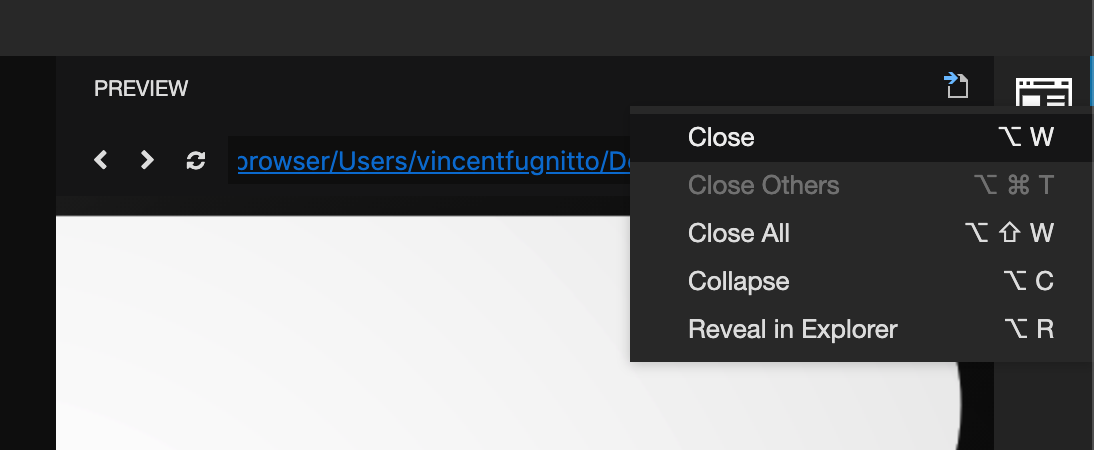
Currently, we don't have a very intuitive way to close the minibrowser widget, one has to use the context menu, i.e. right click on the icon in the side area.
It would be nice to have the close icon there and also the context menu should work from the title the same way as in the main area.

Reproduction Steps
- Go to > Preview: Open Url
- Type any URL
- There is no close icon and also no context menu
OS and Theia version:
Theia 0.8.0
 joazvsoares
All 8 comments
Generally, it is not nice that a widget toolbar in side areas does not provide the same actions like the toolbar in the main area. For first time user it is confusing to find.
 akosyakov
on 5 Nov 2019
akosyakov
on 5 Nov 2019
@eclipse-theia/eclipse-theia Does anyone oppose an idea or have a better idea? If not i could guide how to implement it.
akosyakov
on 5 Nov 2019
I guess it's just something that is understood the more you use the IDE regularly.
It will only be confusing at the beginning if at all.
If we were to fix the issue however, it should be for all widgets, not only the preview.
 vince-fugnitto
on 6 Nov 2019
vince-fugnitto
on 6 Nov 2019
@eclipse-theia/eclipse-theia Does anyone oppose an idea or have a better idea? If not i could guide how to implement it.
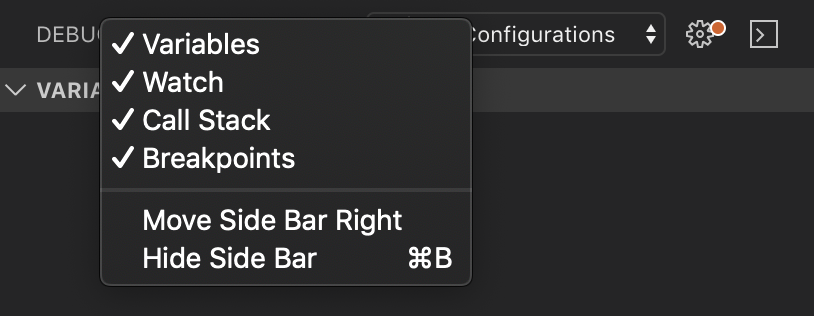
Perhaps for sidebar widgets, right-clicking the tabbar title (preview label in this case), can trigger a context menu with the ability to close? Not sure how much more intuitive this is either.
 vince-fugnitto
on 6 Nov 2019
vince-fugnitto
on 6 Nov 2019
Perhaps for sidebar widgets, right-clicking the tabbar title (preview label in this case), can trigger a context menu with the ability to close? Not sure how much more intuitive this is either.
Yes, I also was thinking about the separate action group in the toolbar context menu.
I'm a bit unsure about close button for all widgets. It makes sense for editors and previews, but for views it does not feel good somehow. I have not seen such button in side areas in other IDEs.
akosyakov
on 7 Nov 2019
@akosyakov have you decided on the approach we should take for this issue? Maybe I can collaborate if you can provide some guidance on the implementation.
joazvsoares
on 13 Nov 2019
@joazvsoares I think everybody agrees that having a group in the context menu will be nice. Let's do it first. I will investigate what should be done and write down here.
Adding a close button is not so clear, it makes sense for some widgets but not others, i.e. views.
akosyakov
on 14 Nov 2019
That's a bit tricky because of view containers, i.e. the navigator and scm, since they are hijacking the context menu rendering for tab bars already.
But if you are up to it there are 2 steps:
- Customize
SidePanelToolbarto renderSHELL_TABBAR_CONTEXT_MENUcontext menu for the title container: https://github.com/eclipse-theia/theia/blob/71c11c36171398975779c925bbc0ca3910189853/packages/core/src/browser/shell/side-panel-toolbar.ts#L25.
- You can look at the standard tab bar for the inspiration: https://github.com/eclipse-theia/theia/blob/71c11c36171398975779c925bbc0ca3910189853/packages/core/src/browser/shell/tab-bars.ts#L397
- Change the view container to contribute its action group to
SHELL_TABBAR_CONTEXT_MENUwhen necessary instead of rendering own. Such action group should go before other actions in the context menu.
akosyakov
on 15 Nov 2019
Related issues
akosyakov
·
3Comments
 marechal-p
·
3Comments
marechal-p
·
3Comments
 kittaakos
·
3Comments
kittaakos
·
3Comments
 vinokurig
·
3Comments
vinokurig
·
3Comments
 jeanlucburot
·
3Comments
jeanlucburot
·
3Comments
Most helpful comment
@joazvsoares I think everybody agrees that having a group in the context menu will be nice. Let's do it first. I will investigate what should be done and write down here.
Adding a close button is not so clear, it makes sense for some widgets but not others, i.e. views.