Theia: [c/c++] cursor appearing in wrong position
When using theia as a c++ editor, I am getting strange issues with cursor spacing. The cursor is out of line with the text, with the cursor being in the middle of characters.

The longer the string of text, the more the cursor gets shifted to the right. This occurs on Chrome 70.0.3538.110 on chromeOS, but I have duplicated this issue on a Chrome 70 on Ubuntu. This occurs on Theia version 0.3.17.
 boomanaiden154
All 27 comments
Do you have any additional information? Operating system and browser version? It does not seem to occur on my windows 10 machine, but it does on ChromeOS.
Sent from my iPhone
On Jan 11, 2019, at 00:58, Graham Shapiro notifications@github.com wrote:
I was having the same issue. I resolved it by installing the Advanced Font Settings extension in chrome and setting the Fixed-width font size to 14pt which matches the 14pt in the Theia settings. I am not sure why this would matter since css should determine font size.
—
You are receiving this because you authored the thread.
Reply to this email directly, view it on GitHub, or mute the thread.
boomanaiden154
on 13 Jan 2019
I am also having the same issue with Chrome OS version 71.0.3578.94 (32-bit) on arm.
I have noticed that when you click on a line to edit it for the first time, the font size and or character spacing of that line will increase slightly (or decrease slightly if the page scale is very high). The only workaround i found is to set the scale of the web page to 80% and then increase the size of the font to 14pt.
Also this is not just the c++ extension, it is also happening with Python

You can see the problem on the second line. The text is expanded and the cursor and parenthesis boxes are in the wrong place.
It is hard to reproduce consistently, however it will surely occur within the first 5 mins of editing.
 virtualgraham
on 13 Jan 2019
virtualgraham
on 13 Jan 2019
@boomanaiden154 @virtualgraham Are either of you able to successfully reproduce this issue?
 caseyflynn-google
on 5 Feb 2019
caseyflynn-google
on 5 Feb 2019
@caseyflynn-google Did you pin on the purpose? Now everybody see it on https://github.com/theia-ide/theia/issues. I've unpinned it. This feature seems to be to highlight 3 most important issues repo-wide.
 akosyakov
on 6 Feb 2019
akosyakov
on 6 Feb 2019
@caseyflynn-google Did you pin on the purpose? Now everybody see it on https://github.com/theia-ide/theia/issues. I've unpinned it. This feature seems to be to highlight 3 most important issues repo-wide.
Apologies, I didn't realize.
caseyflynn-google
on 6 Feb 2019
@caseyflynn-google The common link seems to be ChromeOS. I cannot duplicate the issue with Chrome on Windows, but I can duplicate the issue in ChromeOS easily.
boomanaiden154
on 9 Feb 2019
Yeah, it can be consistently reproduced on Chrome OS (though it may take a
couple of mins). I have not encountered the error on Chrome for Mac.
On Sun, Feb 10, 2019 at 6:56 AM boomanaiden154 notifications@github.com
wrote:
@caseyflynn-google https://github.com/caseyflynn-google The common link
seems to be ChromeOS. I cannot duplicate the issue with Chrome on Windows,
or Ubuntu, but I can duplicate the issue in ChromeOS easily.—
You are receiving this because you were mentioned.
Reply to this email directly, view it on GitHub
https://github.com/theia-ide/theia/issues/3796#issuecomment-462086946,
or mute the thread
https://github.com/notifications/unsubscribe-auth/Aqb0UJ7IsFzs6SEJtfxu--mYvJ-G7oewks5vL1ITgaJpZM4ZL3fw
.
virtualgraham
on 10 Feb 2019
@boomanaiden154 @virtualgraham What version / build of ChromeOS are you able to duplicate this on? I have been unable to reproduce on 71.0.3578.127
caseyflynn-google
on 11 Feb 2019
I think I have just more or less reproduced it, and it has to do with spaces vs tabs for indents in the editor. If you are editing a file that has been indented with spaces, and you create a new line than the font spacing will be off. However, if you re indent the line with tabs, then the font spacing issue will not occur.
boomanaiden154
on 12 Feb 2019
I think I have just more or less reproduced it, and it has to do with spaces vs tabs for indents in the editor. If you are editing a file that has been indented with spaces, and you create a new line than the font spacing will be off. However, if you re indent the line with tabs, then the font spacing issue will not occur.
@boomanaiden154 I was unable to reproduce by following the steps you provided. Can you provide some more detail on the file content you are dealing with, your Theia settings, and your Chrome font settings?
caseyflynn-google
on 12 Feb 2019
I created a new text file from the terminal, with spaces for the indent(four of them, formatting is screwed up in the markdown render below)
echo " testing" >> test.txt
I then opened it in the editor, and when I created a new line below I was able to observe the issue.
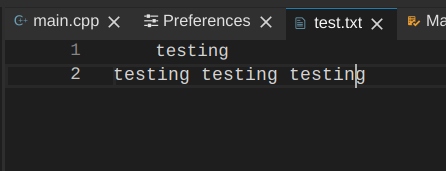
Chrome version 71.0.3578.127.
Theia 0.3.17 with default settings.
boomanaiden154
on 12 Feb 2019
Same issue for me on ChromeOS; I installed Linux Firefox in crostini, and that works fine - so it's a Chrome/ChromeOS thing. I'm also currently stuck with Chrome71, when my chromebook updates I'll test and try to remember to report back.
 parsley42
on 22 Feb 2019
parsley42
on 22 Feb 2019

Still an issue w/ Chrome 72.0.3626.117 on Chromebook. Note that if I just move the cursor around on the line, it seems fine; once I edit the line, the text shrinks a little and the cursor position is way off. It's very touchy; the text size seems to vary slightly.
parsley42
on 26 Feb 2019
I found a fix for this with my Chromebook, wondering if it works for others. I found that for some reason my Chromebook had display scaling turned on for the internal display; "Display Size" was set to 110%. When I set it instead to 100%, the issue disappeared and I couldn't reproduce it.
parsley42
on 4 Mar 2019
From my experience it can be worked around using the in-browser scaling by
finding the scale sweet spot which is around 110% as David Parsley said.
This may very well be an issue with chrome os and not with Theia. However,
i feel Theia's ability to work on Chrome OS is one of its core strengths.
On Tue, Mar 5, 2019 at 5:00 AM David Parsley notifications@github.com
wrote:
I found a fix for this with my Chromebook, wondering if it works for
others. I found that for some reason my Chromebook had display scaling
turned on for the internal display; "Display Size" was set to 110%. When I
set it instead to 100%, the issue disappeared and I couldn't reproduce it.—
You are receiving this because you were mentioned.
Reply to this email directly, view it on GitHub
https://github.com/theia-ide/theia/issues/3796#issuecomment-469419700,
or mute the thread
https://github.com/notifications/unsubscribe-auth/Aqb0UGcWEZip7H3K8sLHajfPKPS_Hhwtks5vTYlugaJpZM4ZL3fw
.
virtualgraham
on 5 Mar 2019
Ugh - this bug is really touchy. Turns out, I had to have set my font size to 16; the default (14 I think) still exhibited the bug for me. So, Display size = 100%, Font size = 16 -> works for me.
parsley42
on 5 Mar 2019
I experience that bug too (JavaScript code in my case). When first opening Theia everything is fine. After a bit of work (tabbing between windows etc.) the bug appears. (ChromeOS, PixelBook, Page zoom: 100%, "Looks like" 1714 x 1143)

 perguth
on 28 Mar 2019
perguth
on 28 Mar 2019
Confirmed this is an issue with ChromeOS when scaling the screen resolution. It looks like Monaco recently exposed API to remeasure character widths which should be invoked when the devicePixelRatio changes: https://github.com/Microsoft/vscode/commit/d8bc1fa0ff04ec74bbfac8431699765b18f2d41e @akosyakov could you provide some information on how I would go about patching this into Theia?
caseyflynn-google
on 9 Apr 2019
@caseyflynn-google We cannot update Monaco yet, it is long chain of dependencies :( We are using https://github.com/Microsoft/vscode/tree/standalone/0.14.x now. If CSSBasedConfiguration is there, you can expose it (and its internal) in monaco extension as we expose other APIs and trigger when necessary.
akosyakov
on 10 Apr 2019
It looks like there are actually two problems here. One is with Monaco cursor placement calculation, the other may be a CrOS rendering issue: https://bugs.chromium.org/p/chromium/issues/detail?id=949299&can=2&start=0&num=100&q=owner%3Ame&colspec=ID%20Pri%20M%20Stars%20ReleaseBlock%20Component%20Status%20Owner%20Summary%20OS%20Modified&groupby=&sort=&hotlist_id= The Repro case on the ticket is for Theia in Google Cloud Shell, but it can be reproduced in the same manner on GitPod.
caseyflynn-google
on 11 Apr 2019
@caseyflynn-google If we fix Monaco part would it help or without CrOS fixes it does not make sense? I wonder is there API to get notified about display resolution changes to clean Monaco cache?
akosyakov
on 12 Apr 2019
I will confirm, but I think we can resolve all issues if we ensure all fonts are loaded before rendering Monaco (This will fix CrOS rendering two separate fonts) in addition we will need to call the API to invalidate the cache if/when the devicePixelRatio changes (if a user changes screen resolution, or drags Theia to another device on CrOS).
caseyflynn-google
on 12 Apr 2019
Just change the zoom on the page. After I tried to find a way to put it back in its pos. I changed the zoom on my chrome page
 GDJason12
on 15 Apr 2019
GDJason12
on 15 Apr 2019
CTRL+Shift+-
GDJason12
on 15 Apr 2019
I think I found a simple solution for this problem.
The problem also occurs on gitpod.io as well, which is using the Theia IDE and I posted my solution there first.
To solve the problem I simply changed the default font setting for the editor to:
"editor.fontFamily": "'Noto Sans Mono', 'Droid Sans Mono', 'monospace', monospace, 'Droid Sans Fallback'"
So I added Noto Sans Mono to the font list, to make sure the default monospace font of chromebooks Cousine is not used.
The Cousine font metrics seem to confuse the Theia editor somehow. But with other monotyped fonts there is no problem.
I want to suggest updating the default fonts in the editor preferences for Linux to make the fallback to work also for ChromeOS.
I would just change
const DEFAULT_LINUX_FONT_FAMILY = '\'Droid Sans Mono\', \'monospace\', monospace, \'Droid Sans Fallback\'';
to
const DEFAULT_LINUX_FONT_FAMILY = '\'Droid Sans Mono\', \'monospace\', monospace, \'Droid Sans Fallback\', \'Noto Sans Mono\'';
I could add a pull request for this.
 davemecha
on 14 May 2019
davemecha
on 14 May 2019
@caseyflynn-google does it sound reasonable? @davemecha yes, PRs are welcomed, adding a fallback font should not hurt even if it does not fix the issue completely
akosyakov
on 15 May 2019
This may help, but I don't think it resolves the underlying race condition that causes the issue (Monaco is added to the page before the fonts have completed downloading).
caseyflynn-google
on 24 May 2019
Related issues
 pwFoo
·
3Comments
pwFoo
·
3Comments
 dhananjayharel
·
3Comments
dhananjayharel
·
3Comments
 tetchel
·
3Comments
tetchel
·
3Comments
 vince-fugnitto
·
3Comments
tetchel
·
3Comments
vince-fugnitto
·
3Comments
tetchel
·
3Comments
Most helpful comment
I think I found a simple solution for this problem.
The problem also occurs on gitpod.io as well, which is using the Theia IDE and I posted my solution there first.
To solve the problem I simply changed the default font setting for the editor to:
So I added
Noto Sans Monoto the font list, to make sure the default monospace font of chromebooksCousineis not used.The
Cousinefont metrics seem to confuse the Theia editor somehow. But with other monotyped fonts there is no problem.I want to suggest updating the default fonts in the editor preferences for Linux to make the fallback to work also for ChromeOS.
I would just change
to
I could add a pull request for this.