Theia: How to include php-language-server in theia
Can someone guide me on how to include php-language-server in thiea?
I am using theia in my project and the IDE has to support php language(and also other languages).
Thanks in advance.
 ankitmithu007
All 11 comments
@ankitmithu007 You should add @theia/php as a dependency to your app, like here: https://github.com/theia-ide/theia-php-extension/blob/master/browser-app/package.json
And make sure that the tools needed for php are installed, for example composer. Here is Dockerfile which is used to develop php extension: https://github.com/theia-ide/theia-php-extension/blob/fc321884b1da2f805c187b2722e1c0068445076c/Dockerfile.gitpod#L29
@meysholdt can correct me if I'm wrong
 akosyakov
on 16 Aug 2018
akosyakov
on 16 Aug 2018
Thanks, @akosyakov for such a quick response.
I have a question :
In this case, I was lucky to have a theia-extesnion for php.
Say if there is language xyz and LSP for the language(xyz) is present.
Is there any documentation to create a theia-extension for present LSP?
ankitmithu007
on 16 Aug 2018
@ankitmithu007 Unfortunately, there is no such doc yet. We should add it, let's keep this issue for it.
But you can look at language extensions in this repo, as cpp, java, typescript/javascript, python, as well as at external language extensions: https://github.com/topics/theia-language-extension
akosyakov
on 16 Aug 2018
@akosyakov
I was trying to build an extension for few LSP.
I kept on getting the below error for each theia-lsp-extension while building:
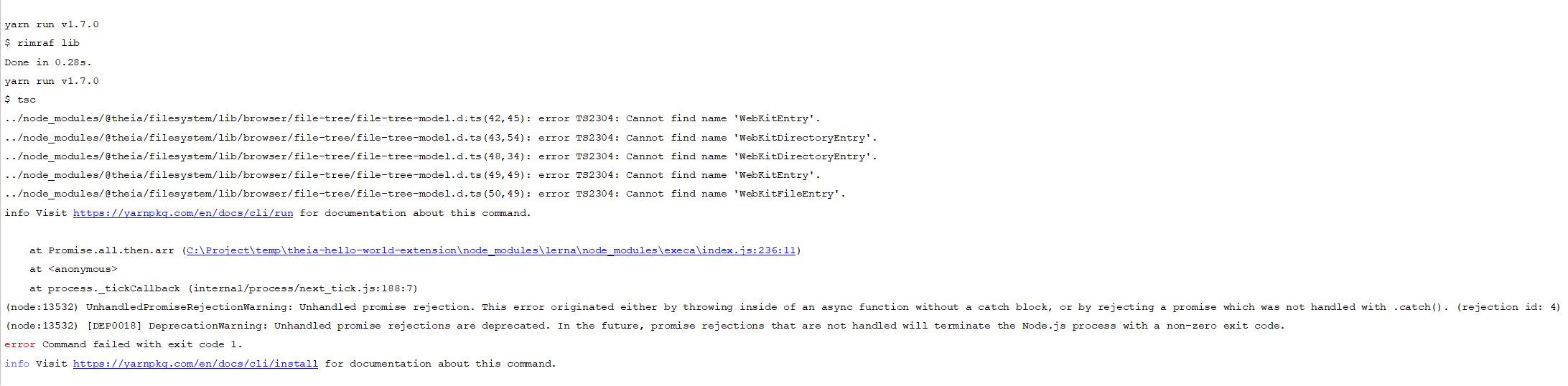
Can you please help me out?
ankitmithu007
on 17 Aug 2018
Please stick to typescript 2.9.x for now, we did not migrate 3.x yet or enable skipLibCheck in your tsconfig.
akosyakov
on 17 Aug 2018
Thanks, @akosyakov the typescript error got fixed.
But I am getting Promise.all error when I try building(running yarn from root folder) the extension.

ankitmithu007
on 18 Aug 2018
Please enable skipLibCheck in tsconfig for now: https://github.com/theia-ide/theia/issues/2614
It also will speed up a build since typescript won't check d.ts files of your dependencies which are usually correct.
akosyakov
on 18 Aug 2018
Adding a (perhaps) related question here, once you have added a theia extension according to the examples - do you have any hints on how to troubleshoot the stdio based versions?
Standalone using sockets worked fine, but the pipe/stdio version fails for some reason. Most likely due to some unwanted printout happening (?). But any ideas where to troubleshoot from within theia? I can already see the "java-side-of-things". The language server is an xtext-based one.
Thanks in advance for any pointers or advice. :-)
 AndersDala
on 18 Aug 2018
AndersDala
on 18 Aug 2018
@akosyakov
I have already added skipLibCheck in my tsconfig file but still, I am getting the error.
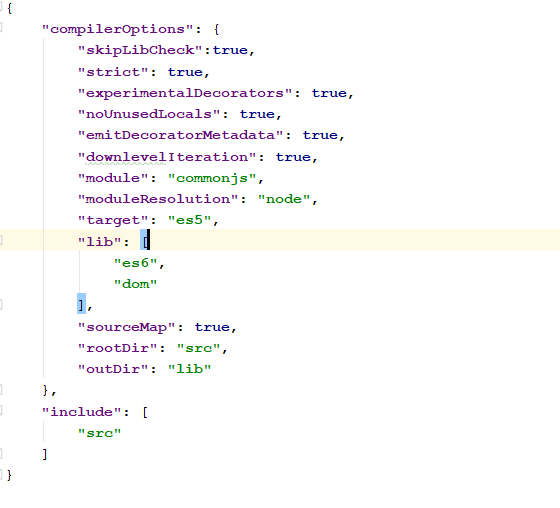
When I removed "@theia/monaco" from my pakcage.json of extension folder, it started working.
Can you please explain what's happening here?
Let's take a step back here and let me try to explain what I am trying to achieve.
I am trying to mimic @theia/json in hello-world-extension by just copying and pasting the code.
In package.json of @theia/json , @theia/monaco is present and it's working fine.
When I am trying to mimic the same code it's giving me the error.
ankitmithu007
on 19 Aug 2018
ok, I've got it wrong, I was thinking that it is just TS compilation errors, but I assume you get it from webpack. Could you check which tool reports it?
We are using vscode-languageclient for bridging LSP and Monaco, but it relies on vscode namespace at runtime. We prvode an implementation of vscode namespace with Monaco but it should be properly hooked during bundling with Wepback. It should actually happen automatically since we generate webpack config with adjusted module resolution: https://github.com/theia-ide/theia/blob/842196b5b18ce340f6b1beaea9e9a7ddbe2fd96f/dev-packages/application-manager/src/generator/webpack-generator.ts#L129
I wonder how do you get it. Could it be that you are using newer @theia/monaco package than @theia/cli? Could you make sure to use the same version?
akosyakov
on 19 Aug 2018
@akosyakov
Nice catch.
You are right, @theia/monaco and @theia/cli version were not in sync.
After changing the version it's working fine.
Thanks.
ankitmithu007
on 20 Aug 2018
Related issues
 kittaakos
·
3Comments
kittaakos
·
3Comments
 cekvenich
·
3Comments
cekvenich
·
3Comments
 marechal-p
·
3Comments
marechal-p
·
3Comments
 jankeromnes
·
3Comments
akosyakov
·
3Comments
jankeromnes
·
3Comments
akosyakov
·
3Comments
Most helpful comment
@akosyakov
Nice catch.
You are right, @theia/monaco and @theia/cli version were not in sync.
After changing the version it's working fine.
Thanks.