Thegreatsuspender: [Feature request] Suspend/Unsuspend tab keyboard shortcut toggle to work for both single and multi-selected tabs
As discussed in person :)
Make the keyboard shortcut toggle for suspending/unsuspending a tab work for multi-selected tabs.
Where the selected tabs are a mix of both suspended and unsuspended tabs, make them do whatever the selected tab should do (don't invert each tab's current state).
You could then kill off the separate keyboard shortcuts for suspend/unsuspend selected tabs. There We shouldn't need these really.
Could also do this with 'don't suspend for now' option which seems to also be a toggle now.
 liamjohnston
All 8 comments
This only problem I have with this is around the wording:
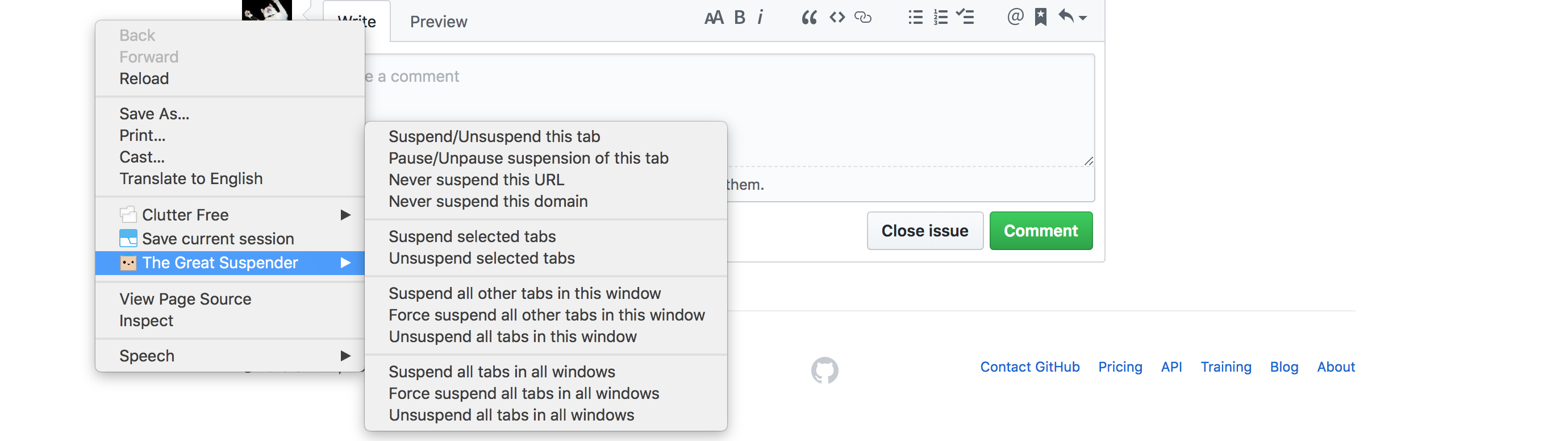
Should it now read:
Suspend/Unsuspend selected tab(s)
Pause/Unpause suspension of selected tab(s)
Never suspend this URL
...
As always, this will also require some translation work. In 5 languages :(
 deanoemcke
on 26 Mar 2019
deanoemcke
on 26 Mar 2019
I like it :)
liamjohnston
on 26 Mar 2019
@deanoemcke, could the text be changed at the time of right click depending on the number of selected tabs? if yes then "this tab" when there's only current and "selected tabs" when else + no need for translation, "selected tabs" is already translated so just cut it from either of two Suspend or Unsuspend selected tabs options. If not then the change from "this tab" may be confusing for most users coz I suspect not that much use or even know of tab selection in Chrome. And so if it's decided to go that way I'm for:
Suspend/Unsuspend selected tabs
Pause/Unpause suspension of selected tabs
the use of plural form coz imho it covers single or current tab + again no translation needed.
Personally I like how the things are now with menus.
 Jollfye
on 26 Mar 2019
Jollfye
on 26 Mar 2019
@Jollfye Great point about "this tab"
liamjohnston
on 26 Mar 2019
I agree with this feature suggestion. I also think that auto-unsuspend should work differently with multi-tab selections. I talk about it further in issue #910.
 inarius
on 5 Apr 2019
inarius
on 5 Apr 2019
This is the only feature I still feel is missing from the Great Suspender.
I've set the hotkey for "Pause/Unpause suspension of active tab" to Ctrl+Q, so I can quickly alternate between Ctrl+Q and Ctrl+Tab to do this now. But it would be so much better to be able to just select the tabs, and pause suspension that way.
 kankaristo
on 15 Apr 2019
kankaristo
on 15 Apr 2019
I support this as long as it's easily configurable, because I'm using Chrome OS which has some different key mappings than what Windows would use plus I use vimium which maps most of the letters on the keyboard to standard functions.
 nathgit
on 25 May 2020
nathgit
on 25 May 2020
This is the only feature I still feel is missing from the Great Suspender.
I've set the hotkey for "Pause/Unpause suspension of active tab" to Ctrl+Q, so I can quickly alternate between Ctrl+Q and Ctrl+Tab to do this now. But it would be so much better to be able to just select the tabs, and pause suspension that way.
@kankaristo How did you set the hotkey? I can't see the settings.
 lsycxyj
on 1 May 2021
lsycxyj
on 1 May 2021
Related issues
 lookfirst
·
3Comments
lookfirst
·
3Comments
 togakangaroo
·
4Comments
togakangaroo
·
4Comments
 quentincaffeino
·
3Comments
quentincaffeino
·
3Comments
 hzhongmj
·
4Comments
hzhongmj
·
4Comments
 minig0d
·
4Comments
minig0d
·
4Comments
Most helpful comment
@deanoemcke, could the text be changed at the time of right click depending on the number of selected tabs? if yes then "this tab" when there's only current and "selected tabs" when else + no need for translation, "selected tabs" is already translated so just cut it from either of two Suspend or Unsuspend selected tabs options. If not then the change from "this tab" may be confusing for most users coz I suspect not that much use or even know of tab selection in Chrome. And so if it's decided to go that way I'm for:
Suspend/Unsuspend selected tabs
Pause/Unpause suspension of selected tabs
the use of plural form coz imho it covers single or current tab + again no translation needed.
Personally I like how the things are now with menus.