Thegreatsuspender: Chrome window changes focus when suspending tabs
Since some weeks, the addon results in focusing a Chrome window when it suspends a tab. This randomly jumps the window in the forground while I am using a different Chrome window in that moment. I hope this isnt a (security) change by new Chrome version. This would mean the death of this addon.
Windows 10 64bit, latest stable
 makedir
All 59 comments
Same here and gets pretty unnerving since I usually have a lot of tabs and that's the reason I need TGS in the first place. Lots of random hopping between Chrome windows...
 avatards
on 16 Feb 2019
avatards
on 16 Feb 2019
The issue appears could be with Chrome now bringing to the front the window where active tab has just changed, so if a tab gets suspended then another, non-suspended one from the same window receives focus and Chrome forcefully brings the whole thing to foreground. This focus stealing is evidently not a graceful behavior since it is intrusive and goes contrary the established custom of flashing the taskbar entry for apps that need attention, but instead of hoping it will get rectified in Chrome maybe a workaround could be implemented in TGS that would simply prevent Chrome from switching to a non-suspended tab?
avatards
on 19 Feb 2019
Duplicate of: https://github.com/deanoemcke/thegreatsuspender/issues/865
Also, I am unable to replicate this on my windows 10 machine (TGS v7.0.109 and v7.0.172, and chrome v72.0.3626.109)
@avatards @makedir Could you please provide an exact extension version number, operating system, and chrome version?
And would it be possible for either of you to capture this behaviour in a video (screenToGif is a good application to do this)? Please see my video of the steps I am taking to try (and failing) to replicate this issue. Am I missing something here?

 deanoemcke
on 21 Feb 2019
deanoemcke
on 21 Feb 2019
@deanoemcke try to use this to recreate:
Open-as-Popup - Chrome Web Store
https://chrome.google.com/webstore/detail/open-as-popup/ncppfjladdkdaemaghochfikpmghbcpc
 02030pllolipop
on 21 Feb 2019
02030pllolipop
on 21 Feb 2019
@kliop00023 I'm not sure I follow. How would that extension help me recreate this bug?
deanoemcke
on 21 Feb 2019
@deanoemcke
Extension v7.0.109
Chrome 72.0.3626.109 /64 bit
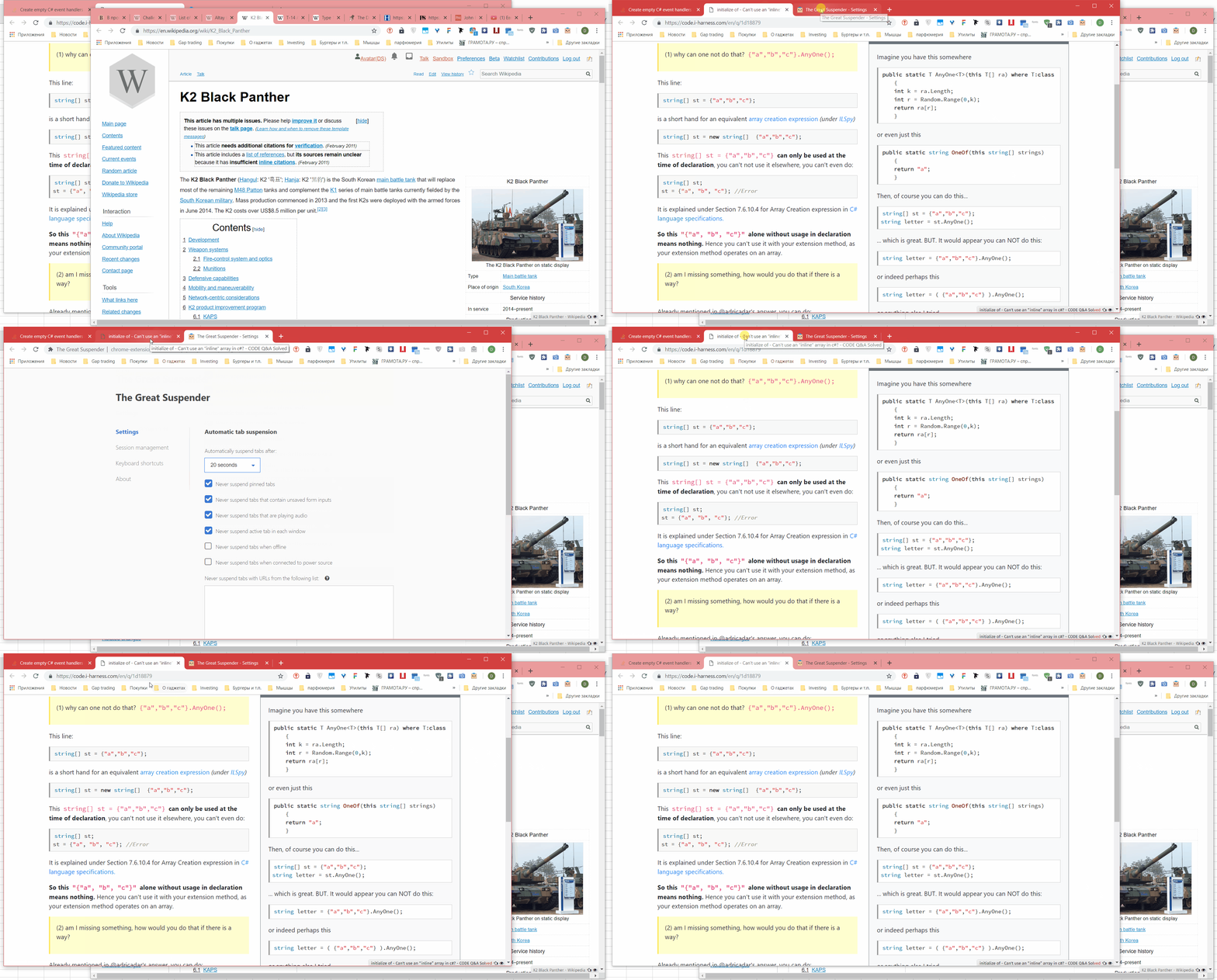
Please watch the attached video I made to reproduce this bug per your request.
In the video I have two windows. I switch with my mouse to a window that contains a TGS settings page demonstrating the 20-second automatic suspension time-out and a few tabs, one of them suspended. I then unsuspend this tab, switch to another tab in same window and then go back to another window with my mouse. After the 20-second time-out while I do nothing the focus switches back to the window without my intervention. I then show that the background tab that I previously unsuspended has just been suspended again which is the obvious cause of unintended focus switching that happened.
avatards
on 21 Feb 2019
@avatards thanks for the video. i agree that it definitely seems to be TGS that is causing the window focus.
however, i'm still unable to recreate this on my windows 10 machine! here is another screen capture of my attempts to replicate your process.
OS: Windows 10 Pro (64bit)
Browser: Google Chrome v72.0.3626.119 (64bit)
Extension: TGS v7.0.109

i'm struggling to work out what to do next. I'll do some googling to see if I can find something but otherwise, can you think of anything on your system that might be different to me?
Some things to try:
- does chrome itself steal focus if you no longer have it as the focused application? ie. you've switch to notepad or something else.
- can you try to install chrome dev, and/or chrome canary and see if the same thing happens?
- go to chrome:flags and reset all your flags to their default settings.
deanoemcke
on 22 Feb 2019
@deanoemcke glad u read my post.
Try to pop up a few tabs w/ that thing and wait for the suspensions. Then click one tabs and then another to see it reproduce or not especially w/ text box focus. U can combine the switches by using OS window switcher. Make sure that u are using older Chromium and resize the windows.
02030pllolipop
on 22 Feb 2019
@deanoemcke none of the chrome flags matter i afraid.
02030pllolipop
on 22 Feb 2019
I cant reproduce this with just one or two simple tabs and two windows. The bug seems to happen just when you do some more tabs and then randomly click around between the windows maybe even do a scroll to the other window without clicking it (move mouse over it scroll) with the other window still has focus. I also noticed another bug, that randomly TGS just does nothing and doesnt suspend a tab at all. Could also happen it jumps focus to the window but doesnt suspend the tab. If I open two windows, open 10 tabs on each, then randomly click around hold mouse down, scrolling, scroll over in the background window without focusing it, clicking in the focus one, this bug happens more often and I can reproduce it maybe with 80%.
makedir
on 22 Feb 2019
I have the exact same issue, however only when I'm using my Mac. My Windows Desktop doesn't seem to issue. From the past I remember that changes might hit different OS' at different times, so maybe the Windows version is not yet affected.
On OSX it even seems to steal focus from other applications, switching back to Chrome. If you think tab switching sucks, this is a freaking nightmare :D
 noctarius
on 6 Mar 2019
noctarius
on 6 Mar 2019
No, I am on Windows 10. Version 72.0.3626.121 (Official Build) (64-bit). And yes, it IS a nightmare.
makedir
on 6 Mar 2019
Interesting, my Windows Desktop is still on 72.0.3626.119 (and it doesn't seem to have this weird behavior), whereas my OSX Chrome is on 72.0.3626.121.
It sounds like it was a recent change from 119 to 121.
noctarius
on 6 Mar 2019
No... I have this issue since months. Maybe a change from 70 to 71 or 71 to 72.
makedir
on 6 Mar 2019
PS: Looking at the Chrome git repository, I see some change related to "popup at unload". Unloading sounds like something TGS would do on suspending a tab: https://chromium.googlesource.com/chromium/src/+/bb2f12167701f588f92621abf86ea4c11e70c9d5%5E%21/#F1
maybe it is related somehow
noctarius
on 6 Mar 2019
@makedir mh ok, the actual change regarding popups on unload was added on Nov 2018, does that about match up with your feeling of "since months"?
https://chromium.googlesource.com/chromium/src/third_party/+/1ce8cace106443751862cb14efb940fa64d7bf5d%5E%21/#F5
noctarius
on 6 Mar 2019
Yes that seems to match.
makedir
on 6 Mar 2019
@deanoemcke my guess is, that the new _CreateWindowDelegate_ function, which unfortunately is virtual - so no idea how many implementations exist, is the issue. Probably, at least, one wrapper implementation behaves weird. But well, just my guess :)
noctarius
on 6 Mar 2019
I'm having this issue as well after having updated to Chrome Version 72.0.3626.121 on MacOSX High Sierra
 austinhutchison
on 7 Mar 2019
austinhutchison
on 7 Mar 2019
I am also having this issue;
MacOS Version 10.12.6 (16G1710)
Chrome Version Version 72.0.3626.121 (Official Build) (64-bit)
Great Unloader Version 6.30
This is also happening to me on;
Linux Mint which I unfortunately don't have the version information for.
If there is anyway I can help, please let me know, as this is a very annoying issue for an extension I love.
 aghebert
on 7 Mar 2019
aghebert
on 7 Mar 2019
@makedir @avatards @kliop00023 @noctarius @austinhutchison @aghebert
I can think of one obvious cause for this issue. With that in mind, I've created a new branch with an optimistic fix: https://github.com/deanoemcke/thegreatsuspender/tree/bugfix/stealing-focus
Unfortunately, because I cannot reproduce, I can't test it.
Can as many of you as possible try loading the extension from the source of this branch and see if you still have issues? The branched version is 7.0.176.
deanoemcke
on 8 Mar 2019
I'm on it, trying it right away. I see you removed the history manipulation, even though it would fix it, too me this is only a temp workaround and still a bug in the newer versions of chrome ;)
edit: @deanoemcke alright, tried it and yeah that seems to work around the actual issue - so yeah fixed. Please create a version, at the same time we should try to file an issue with the Chrome team, except you'd say "ah f... it, this functionality isn't important at all" :D
noctarius
on 8 Mar 2019
@noctarius so glad it's fixed it.
actually, the issue was with a hack I was using to prevent a history entry being created when i suspended the tab. instead of using chrome.tabs.update(tabId, suspendedUrl) to change the url, i was calling window.location.replace(suspendedUrl).
the history stuff was just some code i was playing around with to try to remove this redundant history entry via chrome.history.deleteUrl instead.
not sure if there really is a chromium bug here. i think it's reasonable for them to expect that window.location.replace should only be called when the tab already has focus - most likely as a result of a user action.
deanoemcke
on 8 Mar 2019
Fair enough, but I think it's definitely a NO-GO to capture foreground focus for an application which is in the background and put itself in the foreground. Anyways, thanks for fixing it so fast :)
noctarius
on 8 Mar 2019
The fix for this has now been merged into master (v7.0.177)
deanoemcke
on 8 Mar 2019
Nice that it was fixable via a workaround. I guess Chrome wont change or revert it, because of security reasons. If a script reloads a page I guess the devs want the user see it, could be a malicious script for example in the background.
When will this be avaibale in the Chrome store? I guess it will take weeks? Is there a build version I can download?
makedir
on 8 Mar 2019
@makedir, you can clone the repository and tell chrome to load the src subdirectory (I think dev mode must be activated in the extensions page first). This will load it as a local extension. Make sure to disable the original version until it is fixed.
Making a new version available is generally a thing of a few minutes, but depending on the changes that are in the master repository some testing might be necessary before pushing it
noctarius
on 8 Mar 2019
What testing? I thought this was fixed. Why is there no build on https://github.com/deanoemcke/thegreatsuspender/releases ?
makedir
on 8 Mar 2019
Testing of other stuff that is in master. As you see under releases "pre-7.1 beta" ;) Give him a day or two or whatever he needs. Never forget, we're all just doing that kind of stuff in our free time, I'm just lucky to (at least partly) be paid for open source stuff :)
noctarius
on 8 Mar 2019
I just started getting this problem in the last week or two, and so moral of the above story is that the issue is known, it's more or less been fixed, and it will be pushed to users soonishly? How do I update the extension when it's ready? Just closing and opening the browser window?
Thanks for all the help!
 tiggert45
on 22 Mar 2019
tiggert45
on 22 Mar 2019
There are two ways to get the extension after it is pushed to the webstore:
- Uninstall and reinstall the extension. Note if you do this, you should UNsuspend your suspended tabs first, or they will be lost for ever.
- Wait for it to auto-update. Note: the latest webstore version hasn't yet been rolled-out to all users, and won't be until the developer is satisfied that it's safe to continue the rollout (e.g. serious issues like tab loss are resolved or deemed very rare). It's a gradual rollout, and only a small % of random users (a % set by the developer) have been targeted. But you can avoid this delay just by following step 1 above :) - that is, if the version you're hoping to get has actually been pushed to the webstore...!
 liamjohnston
on 22 Mar 2019
liamjohnston
on 22 Mar 2019
Is this bug fix included in the new 7.1.0 release in Chrome store? It isnt listend in the changelog (v7.0-beta.180): https://github.com/deanoemcke/thegreatsuspender/releases even though this was the most important bug to mention.
makedir
on 22 Mar 2019
@makedir sorry, it is in both the v7.0-beta.180 release, and the v7.1 webstore release.
The fix was in these two commits:
https://github.com/deanoemcke/thegreatsuspender/commit/890ef1a8506ae0286d9f7b9c12648a70408318a0#diff-051a8a7bcae8db1e4cee8eb09b52e619
https://github.com/deanoemcke/thegreatsuspender/commit/6ba1b6e0b2f6423f81f5826e809fca1c5c894956#diff-051a8a7bcae8db1e4cee8eb09b52e619
I have updated the release details to reflect this.
deanoemcke
on 22 Mar 2019
Facing same issues on windows 10. Installed the latest release from github. Any other ideas?
 ineedfuture
on 12 May 2019
ineedfuture
on 12 May 2019
Can confirm this issue.
TGS: v7.0.109
macOS: 10.14.5
Chrome: Version 74.0.3729.169 (Official Build) (64-bit)
 wmayner
on 19 Jun 2019
wmayner
on 19 Jun 2019
I'm experiencing this issue as well.
TGS: 6.30
macOS: 10.14.5
Chrome: Version 76.0.3809.36 (Official Build) beta (64-bit)
 acitrano
on 21 Jun 2019
acitrano
on 21 Jun 2019
Same problem here (and driving me around the bend, especially when I'm typing something elsewhere).
TGS: 7.0.109
OS: Linux (Ubuntu 18.04.2 LTS)
Chrome: 75.0.3770.100 (Official Build) (64-bit)
 Mex5150
on 23 Jun 2019
Mex5150
on 23 Jun 2019
I still have this problem... Too disturbing when working on something else, unsinstalling the extension
 paulalbertdev
on 25 Jun 2019
paulalbertdev
on 25 Jun 2019
Thank god I found this thread I though I had some virus.
It was impossible to use my chrome anymore.
The problem is much worse when you have many tabs open in chrome, the more tabs you have the more focus changes happen.
in my case I noticed it was always the very first tab that took focus.
I'm on chrome 75 , tgs 7.1
In my case I found out that the culprit was "Revolver - Tabs" plugin extension.
I don't know where it came from but suddenly it was on my system.
Just wanted to let people know that it was not the great suspender
 sebastienbo
on 29 Jun 2019
sebastienbo
on 29 Jun 2019
I had this problem and found out that Chrome wasn't updating the extension. I manually removed it and installed it again.
Remember to unsuspend all tabs before removing it, or you'll lose every suspended tab.
 fgilio
on 10 Jul 2019
fgilio
on 10 Jul 2019
I had this problem and found out that Chrome wasn't updating the extension. I manually removed it and installed it again.
Remember to unsuspend all tabs before removing it, or you'll lose every suspended tab.
Also remember to save your whitelist and sessions, they will be removed on a reinstall.
 xtoq
on 7 Aug 2019
xtoq
on 7 Aug 2019
Yeah same issue, I was stuck on 6.3 or so, and Chrome was not auto-updating to 7.1. Re-installed it updated the extension.
 seanhamlin
on 14 Aug 2019
seanhamlin
on 14 Aug 2019
There are two ways to get the extension after it is pushed to the webstore:
- Uninstall and reinstall the extension. Note if you do this, you should UNsuspend your suspended tabs first, or they will be lost for ever.
- Wait for it to auto-update. Note: the latest webstore version hasn't yet been rolled-out to all users, and won't be until the developer is satisfied that it's safe to continue the rollout (e.g. serious issues like tab loss are resolved or deemed very rare). It's a gradual rollout, and only a small % of random users (a % set by the developer) have been targeted. But you can avoid this delay just by following step 1 above :) - that is, if the version you're hoping to get has actually been pushed to the webstore...!
Thank you for clarifying this. The store update apparently happened in March and my extension had still not updated. In the extensions page there even is an 'Update' button, but that doesn't seem to do anything. Yaay google :-/
 jmbreuer
on 14 Aug 2019
jmbreuer
on 14 Aug 2019
Thank you for clarifying this. The store update apparently happened in March and my extension had still not updated. In the extensions page there even is an 'Update' button, but that doesn't seem to do anything. Yaay google :-/
I'm also having this issue and I've reported it to Google. Uninstalling the extension and then reinstalling it from the web store will force it to the latest version.
 jay
on 15 Aug 2019
jay
on 15 Aug 2019
having this issue too, my god has it annoyed me for months!!
Ah just read about removing it and reinstalling it.. christ it will feel like a luxury -.-
 Smir
on 16 Aug 2019
Smir
on 16 Aug 2019
Me too, gawd, been driving me crazy for months, and finally googled and found this :) I also was stuck on an old 6.3 version. Thanks for fixing it!
 shanness
on 18 Aug 2019
shanness
on 18 Aug 2019
+1 I'm experiencing this as well, and it actually just started seemingly when I updated from OSX 10.13.x -> OSX 10.14.6. I can't say for sure if Chrome / TGS updates happened at the same time but I don't think anything else changed. I also have many tabs open, however this hasn't changed from when I wasn't experiencing the bug till now.
TGS: 7.0.109
Chrome: 76.0.3809.100
OS: OSX 10.14.6
I just removed + re-added TGS to get it to v7.1 which sounds like it will probably resolve it. I'll update this comment if it does not.
 faoiseamh
on 20 Aug 2019
faoiseamh
on 20 Aug 2019
I can confirm that Upgrading from v7.0 to v7.1 fixes this issue via the method @faoiseamh mentioned.
Though do make sure all your tabs are Unsuspended or all the suspended tabs will disappear when you remove the extension.
 SimeonC
on 20 Aug 2019
SimeonC
on 20 Aug 2019
Chrome must have done something, because TGS updated itself automatically for me yesterday.
 richardmtl
on 25 Aug 2019
richardmtl
on 25 Aug 2019
I'm on 7.1.0 and still seeing this issue on Mac. Any steps I need to take?
 jonhorton
on 8 Sep 2019
jonhorton
on 8 Sep 2019
Started happening to me yesterday on Chrome Canary (79) on macOS running TGS 7.1.0.
I also have regular Chrome (77) running with TGS 7.1.0 where I do not have this problem.
Any fix or suggestion of setting change would be much appreciated.
 kierate
on 26 Sep 2019
kierate
on 26 Sep 2019
Set the Chrome flag "Proactive Tab Freeze and Discard" to "Disable" solved the problem for me (on Chrome 77 and TGS 7.1.0).
chrome://flags/#proactive-tab-freeze-and-discard
 PixFX
on 27 Sep 2019
PixFX
on 27 Sep 2019
Set the Chrome flag "Proactive Tab Freeze and Discard" to "Disable" solved the problem for me (on Chrome 77 and TGS 7.1.0).
chrome://flags/#proactive-tab-freeze-and-discard
Where is this setting as of Chrome 78? It appears to be missing. Google has a history of renaming flags, but this one seems gone.
 koitsu
on 9 Nov 2019
koitsu
on 9 Nov 2019
@koitsu You could try enabling chrome://flags/#temporary-unexpire-flags-m76 and see if that flag reappears.
 Clonkex
on 9 Dec 2019
Clonkex
on 9 Dec 2019
@koitsu You could try enabling chrome://flags/#temporary-unexpire-flags-m76 and see if that flag reappears.
Appreciate the recommendation. When the above flag is enabled, aforementioned flag (proactive-tab-freeze-and-discard) does not appear. This was tested with Chrome 78.
However, as of Chrome 79 (which is now out; I upgraded today), there is now chrome://flags/#proactive-tab-freeze that lets you pick different values.
Please see this Reddit post which actually explains Chromium and/or Google removing features temporarily, then permanently, then re-adding them under other names -- you know, the usual behaviour: https://www.reddit.com/r/chrome/comments/dogypx/so_what_happened_to/f5o6124/
koitsu
on 11 Dec 2019
Issue in Building and Publishing Suspender extension to chrome webstore.
Hi All,
Can any one help me in publishing The Great Suspender extension to chrome webstore.
As all other extension I have created zip of the source code and trying to upload to webstore. But getting error from the chrome webstore as shown Below
Error:
_An error occurred: Failed to process your item.
Files outside directory with manifest TGS-Support-Stage/src/ are not allowed: TGS-Support-Stage/Gruntfile.js, TGS-Support-Stage/LICENSE, TGS-Support-Stage/package.json, TGS-Support-Stage/README.md.._
Below you can find the source code format from which i have created zip file.
Format:
TGS-Support-Stage(Root Folder)
src(Folder which contains html,js & manifest,json file)
Gruntfile.js(file)
LICENSE(file)
package.json(file)
README.md(file)
I'm new to extension development, Is there any other way we have to follow here to create zip folder and to do deployment.
As per readme.md file, it says clone the repository and run these commands while executing " npm run generate-key" it says script generate-key is not found. Can you please provide more details about how to build and deploy this particular extension in chrome browser not in chromium.
npm install
npm run generate-key
npm run build
Thanks in advance. If any details is missing please ask me.
 sujanssp
on 2 Apr 2020
sujanssp
on 2 Apr 2020
It is published for a long time. However, plenty of people had to remove the extension from Chrome and reinstall it (after restarting Chrome) to receive the latest version. Afterwards the extension is auto updating again.
noctarius
on 2 Apr 2020
In client domain we are using suspender application which follows almost similar code structure. So I'm not sure how build it and publish. Can you help me in this?
sujanssp
on 2 Apr 2020
It is published for a long time. However, plenty of people had to remove the extension from Chrome and reinstall it (after restarting Chrome) to receive the latest version. Afterwards the extension is auto updating again.
Thanks for the response.
sujanssp
on 2 Apr 2020
Related issues
 philoupd
·
3Comments
philoupd
·
3Comments
 togakangaroo
·
4Comments
togakangaroo
·
4Comments
 geirman
·
4Comments
geirman
·
4Comments
 quentincaffeino
·
3Comments
quentincaffeino
·
3Comments
 squidbe
·
4Comments
squidbe
·
4Comments
Most helpful comment
I had this problem and found out that Chrome wasn't updating the extension. I manually removed it and installed it again.
Remember to unsuspend all tabs before removing it, or you'll lose every suspended tab.