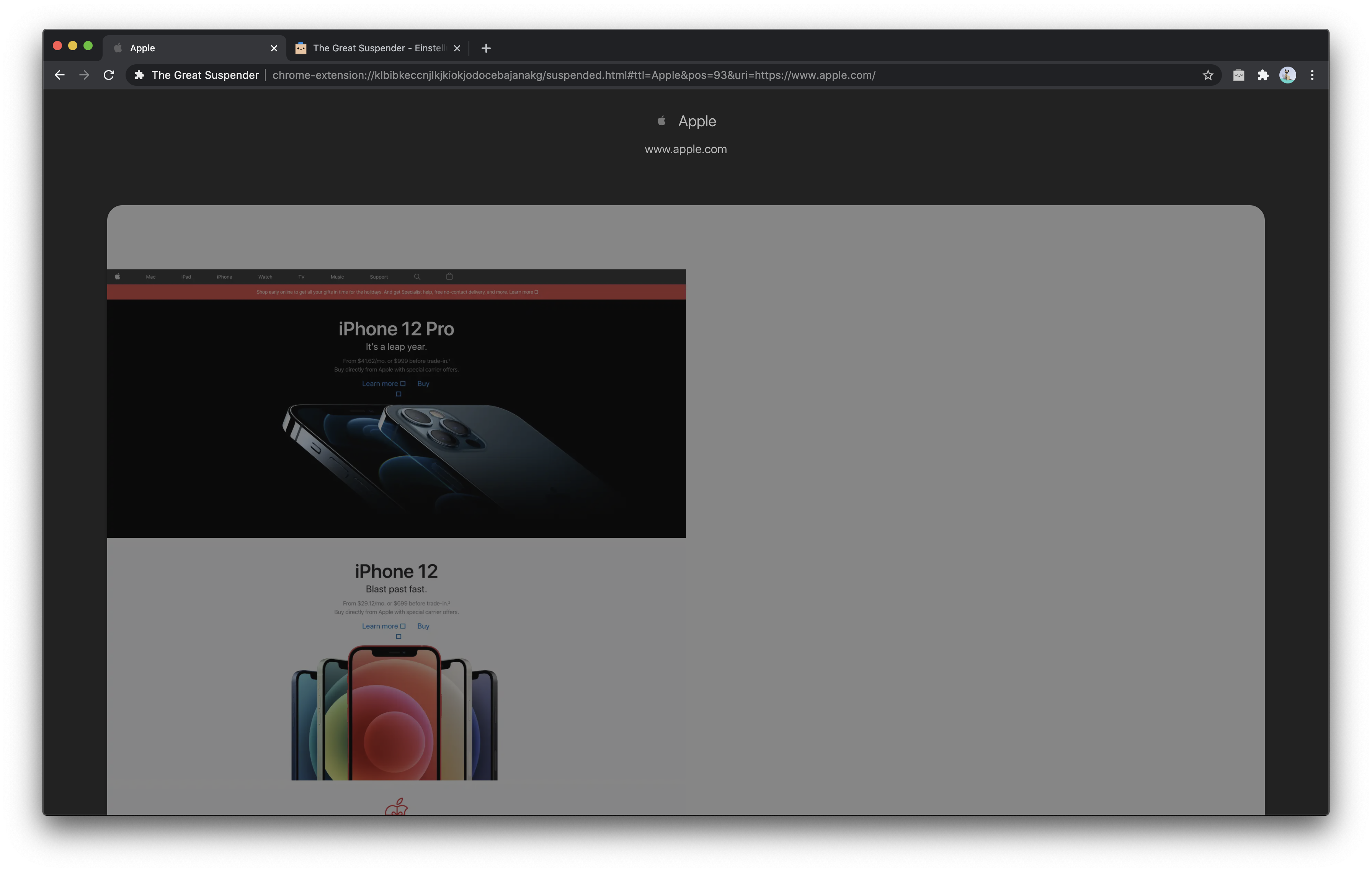
Thegreatsuspender: Screen capture always half sized on the left of the window
Suspended tabs do always show half sized sceen caps on the left side of the window leaving the right side blank (white).
This happens for some month now no matter what combination of settings is applied in dark and in light mode and without any other chrome extensions installed.
- Extension version: 7.1.9
- Browser name & version: Chrome 86.0.4240.198 (Official Build) (x86_64)
- Operating system & version: macOS Catalina 10.15.7
 philoupd
All 3 comments
my guess would be that this is related to automatic hi-dpi scaling.
 ossilator
on 19 Nov 2020
ossilator
on 19 Nov 2020
Since you apparently have no idea, @philoupd .. and our dear friend @ossilator couldn't be bothered to tell you, I would like to warn you that anything past version 7.16 of this extension is widely agreed upon to be malicious. Please see the discussions here:
https://github.com/greatsuspender/thegreatsuspender/issues/1263
and here:
https://github.com/greatsuspender/thegreatsuspender/issues/1175
Version 7.16 can be found here:
https://github.com/greatsuspender/thegreatsuspender/releases/tag/v7.1.6
Instructions for installing it directly from the source code are in the README for the extension, located here:
https://github.com/greatsuspender/thegreatsuspender#install-as-an-extension-from-source
If you choose to install 7.16, make sure that you unsuspend all suspended tabs before disabling / removing the current version.
 XxX-Force
on 22 Nov 2020
XxX-Force
on 22 Nov 2020
Thanks for the hint. Installing 7.1.6 makes me feel much better now and also fixes my issue.
philoupd
on 25 Nov 2020
Related issues
 atorresbr
·
4Comments
atorresbr
·
4Comments
 togakangaroo
·
4Comments
togakangaroo
·
4Comments
 spmedia
·
4Comments
spmedia
·
4Comments
 TheMageKing
·
3Comments
TheMageKing
·
3Comments
 RachelHendy
·
3Comments
RachelHendy
·
3Comments
Most helpful comment
Since you apparently have no idea, @philoupd .. and our dear friend @ossilator couldn't be bothered to tell you, I would like to warn you that anything past version 7.16 of this extension is widely agreed upon to be malicious. Please see the discussions here:
https://github.com/greatsuspender/thegreatsuspender/issues/1263
and here:
https://github.com/greatsuspender/thegreatsuspender/issues/1175
Version 7.16 can be found here:
https://github.com/greatsuspender/thegreatsuspender/releases/tag/v7.1.6
Instructions for installing it directly from the source code are in the README for the extension, located here:
https://github.com/greatsuspender/thegreatsuspender#install-as-an-extension-from-source
If you choose to install 7.16, make sure that you unsuspend all suspended tabs before disabling / removing the current version.