Thegreatsuspender: Tab being unsuspended right after was suspended during loading
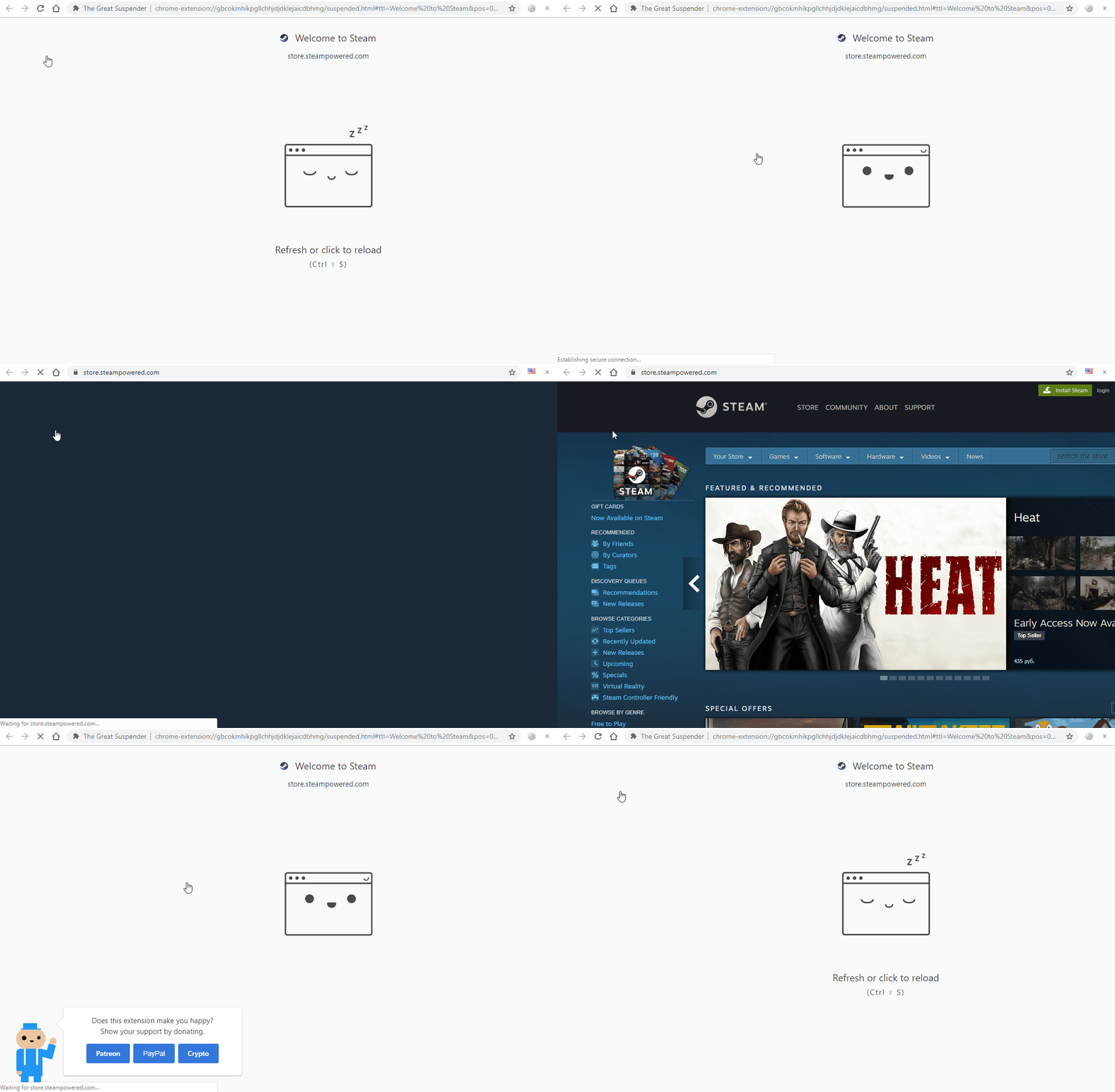
Well not for long there was no any issues for me 😅 Just noticed this problem, when suspend tab while it's still loading it gets unsuspended right away and loaded anyway, made a gif for u. Idk maybe it's ok Chrome behavior, but if it's not I hope there's could be smth done like when tab being suspended stop all ongoing loadings/connections for this tab if there's any. Also I guess it could conflict with screen capturing feature coz the site should be loaded first before making any screenshots and suspending? But maybe it could be possible to make screeny right after connections stopped? Yeah it could be distorted as site wasn't fully loaded but still like it was user's decision to abruptly suspend tab and have it that way? Just thoughts of potential inconsistencies as I'm personally never used screenshot feature. Oh well here's the gif:
- Extension version: 7.0.161
- Browser name & version: 73.0.3679.0 (Official Build) dev (64-bit)
- Operating system & version: Win 10 1809 17763.253
 Jollfye
All 21 comments
I can confirm the same error under the same setup.
 boniboni
on 1 Feb 2019
boniboni
on 1 Feb 2019
I confirm the problem. I will clarify that if i use the same button from the extension panel, then everything is OK.
 MonsterNya
on 3 Feb 2019
MonsterNya
on 3 Feb 2019
Can you try the latest build (v7.0.164). This is hopefully now resolved.
 deanoemcke
on 4 Feb 2019
deanoemcke
on 4 Feb 2019
@deanoemcke, installed the latest 164 build, looks like the issue is gone, so let's consider it's fixed now, thanks!
Jollfye
on 5 Feb 2019
@Jollfye @MonsterNya I've actually just made some more changes in this area which will have affected the earlier code fix for this issue.
Could you retest with the latest version (v7.0.165) ?
deanoemcke
on 5 Feb 2019
@deanoemcke
v.165. until the tab is fully loaded
context menu - suspend the tab only after the full page load (bad for my slow internet)
extension menu - does not suspend if the page is not fully loaded or will not be loaded in the next second
MonsterNya
on 5 Feb 2019
@MonsterNya You're saying that somethings changed and now you can't suspend tabs at all via popup or context menu while the tab is loading?
There is some code to say that if this tab has never been suspended before, then it MUST wait for the tab to finish loading before suspending, otherwise it can't get the proper page title (or screen capture if that setting is enabled).
However, if you're trying to suspend a loading tab that has already suspended before (based on url), then it SHOULD let you suspend it immediately, regardless of whether you use the keyboard shortcut, popup menu, or right click context menu.
It works as described above for me. What URL are you trying with? Perhaps if the tab is under heavy load then it may take a while for the suspend command to reach it?
But it shouldn't be any worse than it was.
deanoemcke
on 6 Feb 2019
@deanoemcke updated to the latest 165, all works as described above by you, previously suspended sites being suspended immediately while loading if told to with my issue starting bug fixed (so not being reloaded right after), also new sites have to completely load as u said to suspend, not being suspended while loading (if commanded to), I think it's rational considering title and screen capture reasons, checked with several new sites, and again, all works.
@MonsterNya idk what were u talking here, but if u still have the described bug, even with updated TGS to 165 version, well give more info, u could even record gif video like I did with this little program: ScreenToGif.
Jollfye
on 6 Feb 2019
There is some kind of dependence on URL, some pages are suspended perfectly. but when compared to the previous version, something has definitely changed.

MonsterNya
on 6 Feb 2019
@MonsterNya thanks for the video and I guess that's exactly what was described by dev here:
There is some code to say that if this tab has never been suspended before, then it MUST wait for the tab to finish loading before suspending, otherwise it can't get the proper page title (or screen capture if that setting is enabled).
so check if it suspends immediately (as it should, also described by dev in the next paragraph of his answer above) for the second time for the same latest 165 instance of TGS extension (without switching to older 160), after it was loaded or manually stopped (X pressed after <- -> at Chrome top left) for the first time
Jollfye
on 6 Feb 2019
@Jollfye
only if this code appeared after version 160. but this does not refute the fact that through the extension menu the tab does not remember command will suspend.
MonsterNya
on 6 Feb 2019
@MonsterNya bout code I got u, but what r u talking after, can u explain, maybe show?
Jollfye
on 6 Feb 2019
code, programmer code. talked about by @deanoemcke
There is some code to say that if this tab has never been suspended before, then it MUST wait for the tab to finish loading before suspending,
MonsterNya
on 6 Feb 2019
@MonsterNya r u talking bout that if u pressed/commanded tab to suspend while it's still loading for the first time it doesn't remember ur command and doesn't suspend right after loading is done as u think it should and so u have to command it to suspend again to have it finally suspended or what r u talking here?
Jollfye
on 6 Feb 2019
@MonsterNya I don't think the issue is related to the recent version change, or whether you suspend via the popup or the rightclick context menu.
In your video, the reason why it works for the old version is probably because those links have already been suspended before (which is why it suspends so quickly).
In the second part, I think that what _could_ be happening is that the suspend request times out (after 1 minute). So if the page takes longer to load than 60 seconds, it will no longer suspend after it's finished loading. Is that possible?
deanoemcke
on 7 Feb 2019
@deanoemcke
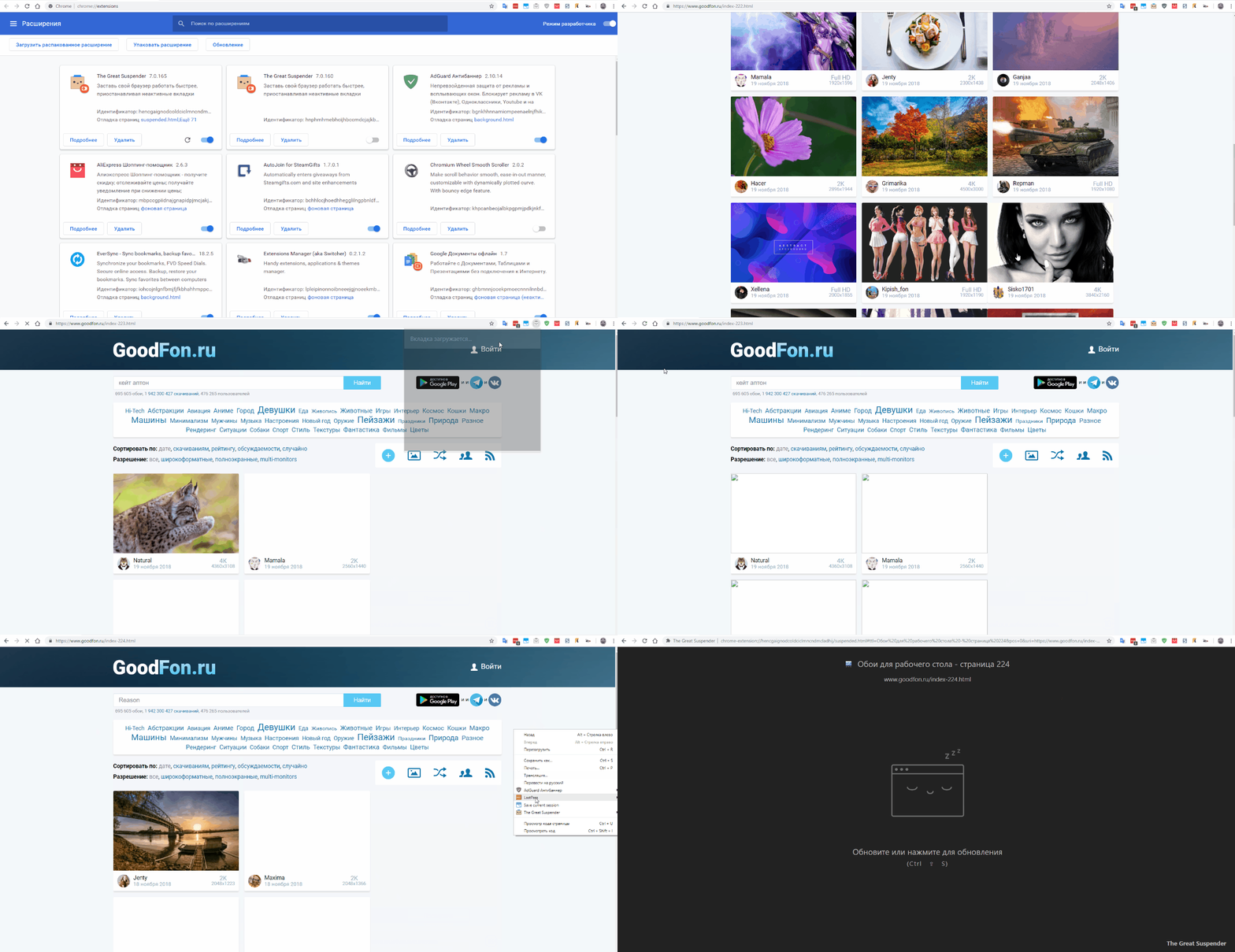
All pages for both versions were new and did not load earlier.
download was less than 60 seconds.
I confirm that re-opening a tab immediately suspends it (v165)
but I still do not understand why version 160 is not waiting for the end of the page loading.
MonsterNya
on 7 Feb 2019
@MonsterNya ok, i can see something is definitely not right for you. not sure what. can you try to replicate the issue and send me a copy of the debug log as it happens?
there's a wiki on how to enable the debug log here: https://github.com/deanoemcke/thegreatsuspender/wiki/How-to-enable-the-debugging-log
deanoemcke
on 7 Feb 2019
@deanoemcke
thx for the explanation. sorry for the long answer
log.txt
At first I tried to use the extension menu, then the context menu.
MonsterNya
on 8 Feb 2019
@MonsterNya Thanks for the log. Good news - I think I've worked it out!
Firstly, apologies from me as I think it was an issue with the popup 😬.
It turns out to be a Windows quirk, as chrome'swindows.onFocusChanged event operates differently on Windows vs OSX.
Should be fixed now in v7.0.170
Let me know if you're still having issues. And thanks for helping me debug this one.
deanoemcke
on 11 Feb 2019
@deanoemcke now everything is fine!
could you explain to me once again about the never loaded pages?
Concerning the function "screen capture", everything is clear, it needs to see the whole page.
But if I just want to put a tab to suspend, why should I wait for the download to end? I can always forcibly stop the download and everything seems to be okay?
I think I remember cases when, instead of the title of the page, I saw a URL.
Should I wait for the page to load to avoid this?
MonsterNya
on 12 Feb 2019
@MonsterNya
That is exactly right. i cannot guarantee that I will have the page title until the page has finished loading. And it's also true for the favicon (if that domain has never been visited before).
There is possibly a way to slightly shortcut this process but it's not worth adding the extra complexity. You may find it still works if you cancel loading of the page early, but there will be cases when this does not work. And I need to be 100% sure.
Once a url has fully loaded, I cache the page title and favicon, so that next time we can interrupt loading and suspend instantly.
deanoemcke
on 12 Feb 2019
Related issues
 TheMageKing
·
3Comments
TheMageKing
·
3Comments
 philoupd
·
3Comments
philoupd
·
3Comments
 togakangaroo
·
4Comments
togakangaroo
·
4Comments
 hzhongmj
·
4Comments
hzhongmj
·
4Comments
 codemedic
·
3Comments
codemedic
·
3Comments
Most helpful comment
@MonsterNya
That is exactly right. i cannot guarantee that I will have the page title until the page has finished loading. And it's also true for the favicon (if that domain has never been visited before).
There is possibly a way to slightly shortcut this process but it's not worth adding the extra complexity. You may find it still works if you cancel loading of the page early, but there will be cases when this does not work. And I need to be 100% sure.
Once a url has fully loaded, I cache the page title and favicon, so that next time we can interrupt loading and suspend instantly.