Thegreatsuspender: Error 400 on Google sites (YouTube, Maps, Search etc)
I am a big youtube content consumer, when i wakeup, i put all my interesting new video from subscription into a new tabs, recently, it have a certain limit before error 400 block my access to youtube because of this plugin, so i am sure there might be some chance your code was altered.
Temporary fix i used was flushing last hour history and stuff (work a little more time) and when i cannot do it anymore, i flush all the cookie from youtube.
It's becoming annoying a lot and i am trying to clear my tab in case you don't fix it soon so i could disable the extension for a while.
The chrome store support page of this extension seem to indicate i am not alone with this problem.
 H0R1Z0N
All 287 comments
Looks like this is related to how TGS stores scroll position in the cookie(i.e. it shares the same one as the current domain), if you have too many open but suspended tabs, eventually the size of cookie will reach a limit and users start to get 400.
Any other way to store the scroll position? Maybe local storage?
 mike-athene
on 17 Jun 2017
mike-athene
on 17 Jun 2017
It started happening after the breach or the update after that one, i have around 100-500 tabs open, mostly all suspended with 80% being youtube tabs.
H0R1Z0N
on 18 Jun 2017
What's the dev doing, i might has well start to compile a previous version and upload it instead....
H0R1Z0N
on 23 Jun 2017
I wonder if this will ever see a fix...
and I don't have 100+ tabs open, just ~6 YT tabs and yet it's happening. I guess I'll need to search for another suspend extension soon. :/
 bxkx
on 29 Jun 2017
bxkx
on 29 Jun 2017
Hi. Sorry for the delay on this. I can confirm that it is indeed an issue caused by how the scroll position is recorded in the cookie (exactly as @mike-athene described).
The cookie will get cleared on a browser restart, unless you have the 'continue where i left off' setting checked in chrome.
The workaround for now (in the case of youtube) is to go to chrome://settings/content/cookies and type www.youtube.com in the 'search cookies' box, and then click on the trashcan to delete.
It would be nice to get some idea of how badly this is affecting average users. Are their any other sites that have similar issues?
I will work on a fix asap. I'm not sure just yet when that will find it's way into the chrome webstore. That depends on a few other changes that will be bundled into the same release.
 deanoemcke
on 30 Jun 2017
deanoemcke
on 30 Jun 2017
Oh and here I was thinking I was getting crazy.
 jaug1337
on 7 Jul 2017
jaug1337
on 7 Jul 2017
I'm having this problem too.
 m4gnify
on 11 Jul 2017
m4gnify
on 11 Jul 2017
@deanoemcke
The workaround for now (in the case of youtube) is to go to
chrome://settings/content/cookiesand typewww.youtube.comin the 'search cookies' box, and then click on the trashcan to delete.
Can confirm this works.
It would be nice to get some idea of how badly this is affecting average users. Are their any other sites that have similar issues?
I've only had the issue with youtube. No other sites have given me errors like this and I frequently have ~250 sites open, most of which are suspended (then I use vimium tab search to switch to them and return). However, youtube is a very common site so I would speculate it could have a pretty big affect on the userbase.
 brennebeck
on 13 Jul 2017
brennebeck
on 13 Jul 2017
For reference, to clean those cookies, I use Awesome Cookie Manager, then go to chrome-extension://hcpidejphgpcgfnpiehkcckkkemgneif/popup.html and search for Name=gsScrollPos-, then Select all -> Delete.
This way it'll clean for all websites.
@deanoemcke : maybe I missed the information, but without auto-update, how to know if there's an update ? By checking the release date ?
 Alex131089
on 22 Jul 2017
Alex131089
on 22 Jul 2017
Can you release a bugfix to the chrome store? This issue is kind of a show stopper right now
 fzimmermann89
on 1 Aug 2017
fzimmermann89
on 1 Aug 2017
It also happens with Google Books, which is pretty bad as then I don't know what I was looking at.
Doug
 DougWeller
on 4 Aug 2017
DougWeller
on 4 Aug 2017
It's still fixed, why after more than a week the update has not been push
to webstore already ? Do google manually check the source code or the dev's
planning to self destroy his own work.
On Fri, Aug 4, 2017 at 12:09 PM, DougWeller notifications@github.com
wrote:
It also happens with Google Books, which is pretty bad as then I don't
know what I was looking at.
Doug—
You are receiving this because you authored the thread.
Reply to this email directly, view it on GitHub
https://github.com/deanoemcke/thegreatsuspender/issues/537#issuecomment-320288705,
or mute the thread
https://github.com/notifications/unsubscribe-auth/AFphh8RmA2wA3rHE66e4NRU2_7PHYmd6ks5sU0I_gaJpZM4N7oaM
.
H0R1Z0N
on 4 Aug 2017
been dealing with this issues since the whole hacker debacle more or less. i generally have a couple hundred or more tabs open, and a lot of them are youtubes. i am constantly in the habit of making multiple youtube playlists, and having to delete cookies and resign in to every damn website i use after words is more than a little frustrating :(
hoping for a fix soon!
 soybomber
on 7 Aug 2017
soybomber
on 7 Aug 2017
The fix is tied up in a dev branch along with a lot of other new code. I'm tying it all up now and want to give the whole release a thorough test before putting in on the chrome webstore. I'm really sorry for the delay everyone.
deanoemcke
on 8 Aug 2017
>
The fix is tied up in a dev branch along with a lot of other new code.
Best I remember, that's a big no-no.
Fix the bug, then write new code.
(unless, of course, the fix necessitates new code)
(but don't cheat!)
 PMH232
on 9 Aug 2017
PMH232
on 9 Aug 2017
I really like your plugin, it is a life saver for such an obsessive multi-tasking tab opener as me. For that - many thanks! BUT I also really like when I do not need to delete all google and youtube cookies every half a day. Is there any chance you could pull a feature branch and just hotfix it on the master? This issue is VERY annoying.
 afedulov
on 11 Aug 2017
afedulov
on 11 Aug 2017
I'm glad you're fixing this @deanoemcke. Please practice better version management in the future though.
This scenario is precisely the reason that patch/bug fix releases have separate versioning in the typical _major.minor.patch_ version scheme. If the released version is 1.0.0 then you should always be able to release a 1.0.1 version to fix bugs in 1.0.0 while simultaneously continuing new feature development for 1.1.0.
 Inverness
on 13 Aug 2017
Inverness
on 13 Aug 2017
😞
that is not actually the whole story however.
you may or may not be aware of the current extraordinarily painful process receiving an automatic update of this extension can be: https://github.com/deanoemcke/thegreatsuspender/issues/526
well the good news is that there was an obvious way to solve this the whole time, but it is going to take 2 new releases before it takes effect (ie. it only kicks in once you have the next new version already installed, and are about to receive the subsequent new version).
so i have been very reluctant to push ANY new version that did not have this new update handling feature. unfortunately, and there is no apologising for this, a lot of other new features ended up creeping into this release at the same time.
@afedulov a temporary hotfix on master IS an option, but i would not want to force the update on anyone automatically. so it would require manual installation. AFAIAA, the only way to update to said version would be to uninstall the extension and reinstall it. this means losing your settings, whitelist, and session history. and the only people that would be doing this are the few of you on this thread.
it's probably not a crazy amount of work to do, so if you really insist i'll do my best.
and once again, big apologies for not handling this in the best manner. semantic version control wasn't even part of my vocabulary when i started this extension - which explains why it's v6.30 :(
deanoemcke
on 14 Aug 2017
So it is caused by this extension, huh..
2nd time it's happened to me; hoping that update's out soon.. with a way to preserve our data!
Edit: Clearing cookies is alright, but we lose things stored in them, which for youtube I think contains our watched/resume history. For someone like me, that's really important, so if the cookies do contain the data, we're forced to manually delete the problematic sections of the cookies rather than wipe them entirely.
 DAOWAce
on 29 Aug 2017
DAOWAce
on 29 Aug 2017
This awesome addon is my way to arginate the weight of internet content on my browser, I have to use an average number of tabs and id' like to return to use it in yt too.
This is in response to:
It would be nice to get some idea of how badly this is affecting average users. Are their any other sites that have similar issues?
 ziobbe
on 5 Sep 2017
ziobbe
on 5 Sep 2017
Yeah, it also affect store.playstation.com (PSN store from Sony) after 70 cookie, it would take while before it happen. Youtube's affected at 40 cookie and use at less 10 cookie from account login.
H0R1Z0N
on 5 Sep 2017
I have that problem as well. Why is it not getting fixed? It's extremely annoying.
 RaygeXZ
on 9 Sep 2017
RaygeXZ
on 9 Sep 2017
I have this problem too for the past few weeks now. It took me a while to figure out the problem was from this Chrome extension. In my case I have a quick workaround (using EditThisCookie extension to ban the first Youtube gScrollPos cookies found). Still, I would like to see the fix released soon, especially if it requires two updates like mentioned above.
 Froyok
on 10 Sep 2017
Froyok
on 10 Sep 2017
@deanoemcke
I am also getting error 400 on youtube pages. I am also using incognito mode in Chrome Browser.
Do I have to restart the Chrome Browser for changes to YouTube to take effect?
If I delete the cookies or cache, will I have to restart for the changes to take effect or will the Youtube pages start working immediately without having to restart the browser?
Do I delete the cookies or the cache?
Please get back to me as soon as you can.
 volt55
on 14 Sep 2017
volt55
on 14 Sep 2017
@volt55
The workaround for now (in the case of youtube) is to go to chrome://settings/content/cookies and type www.youtube.com in the 'search cookies' box, and then click on the trashcan to delete.
you will not need to restart the browser for this to work.
alternatively, a browser restart will also fix it (without having to manually delete the cookies)
deanoemcke
on 15 Sep 2017
I'm kinda sad it's not fixed yet, was'nt event sure it was because of this extension. I was just clearing cookies on Youtube from time to time. And FIY there is also problem when you try to use 'Search Google for image' by right-clicking on image. Clearing Google cookies helps.
 epixcz
on 18 Sep 2017
epixcz
on 18 Sep 2017
I'm seeing this issue on other google sites as well now. When I goto gmail.com it redirects to https://www.google.com/gmail/ and the 400 error appears as well as https://www.google.com/drive.
Strangely going to youtube.com doesn't give me an error.
 Optiri
on 19 Sep 2017
Optiri
on 19 Sep 2017
I think this happens on all google services if you wait long enough.
Maps, mail, youtube, docs...
 reijin90
on 25 Sep 2017
reijin90
on 25 Sep 2017
Yep, I need to use incognito mode to use maps, youtube, etc...
 gnzlbg
on 27 Sep 2017
gnzlbg
on 27 Sep 2017
@gnzlbg Cleaning all google related cookies is much better than be forced to use incognito.
epixcz
on 27 Sep 2017
Going to -> chrome://settings/cookies/detail?site=www.youtube.com and deleting all cookies prefixed with gScrollPos- did it, also, why can't it use localStorage other than cookies? This seems to be affecting the youtube/google maximum header size and therefore causing this error. It seems to happen when the amount of cookies grow too big.
 ernani
on 3 Oct 2017
ernani
on 3 Oct 2017
Just happened to me yet again this morning and I was forced to do a manual clearing of all the gsScrollPos cookies again, of which there were around 40 different ones.
It's effectively happening to me about once a month.
Upon looking at my cookies with that extension mentioned above, I see there's numerous "gsScrollPos" entries for various sites which I don't have suspended, and even haven't visited in weeks. Are they all from the addon? I'll probably just delete all of them. Why they haven't been deleted upon session end, as they state, is beyond me.
I think it's time I switch to the dev version with this fix, especially seeing as it's been untouched for a month now.
As per my original comment edit: Clearing cookies is alright, but we lose things stored in them (ie; login session), which for youtube I think contains our visited/watched/resume history (can someone confirm?). For people like me, that's really important, so if the cookies do contain the data, we're forced to manually delete the problematic sections of the cookies rather than wipe them entirely.
DAOWAce
on 3 Oct 2017
Happens to me too.
As for the workaround, here's a better alternative in my opinion:
install EditThisCookie (or similar addon)
In youtube you lock these cookies with the padlock: APISID, HSID, LOGIN_INFO, PREF, SAPISID, SID, SSID. If you use the theater mode then also lock wide.
Now, next time you encounter the error 400, wipe YT's cookies using the trashcan on EditThisCookie.
The cookies you locked will be preserved but everything else will be purged.
I'm not 100% sure if all of those cookies need to be locked..
I tested it and if you wipe ALL the cookies and then visit YT "for the first time", there are 4 generic cookies.
Make note of them and then login, set your languages, autoplay, theater mode or whatever and look at the cookies again.
These were the cookies that were added after I did all that.
Not sure what most of them do but at least everything is working honky dory now. No issues so far.
Edit: Then there's of course the option to block the dang gsScrollPos cookies if you want. I don't know how it would affect things but you can do it.
 Lagittaja
on 3 Oct 2017
Lagittaja
on 3 Oct 2017
You can also access cookies for a domain by clicking on the left side of the URL bar (between URL and the button bar).
 Herst
on 3 Oct 2017
Herst
on 3 Oct 2017
This still happens on the Dutch Google Maps and YouTube. For YouTube, you have to clean the YouTube gsScrollPos cookies, but it's different from maps as I posted in https://plus.google.com/+JeroenPluimers/posts/GtqDLZbSAUz :
When +Google Nederland maps only fills none or part of the map tiles at https://maps.google.nl, but https://maps.google.com works fine, then remove any gsScrollPos cookies from www.google.nl.
I need to do this every couple of days to keep maps.google.nl working.
 jpluimers
on 5 Oct 2017
jpluimers
on 5 Oct 2017
Is this getting fixed?
afedulov
on 6 Oct 2017
It is already fixed, deanoemcke has to publish new version (there seem to be some issues regarding auto-updates that need to be fixed, so it will take some time)
A workaround is compiling the extension from source and using it in developer mode., but you will loose all your settings and saved tabs
tgs-7.3.0.zip
-unpack the zip file,
-open the extension setting
-remove thegreatsuspender
-check developer mode
-use "load unpacked extension" to install the new version by selecting the directory you unpacked the zip to
You will get a notification on each startup of chrome about an unsigned extension
fzimmermann89
on 7 Oct 2017
interesting this bug just affected me today... dev hasn't updated since ext broke, guess he didn't get enough donations...
 adotland
on 9 Oct 2017
adotland
on 9 Oct 2017
This has been affecting me for weeks on Google image requests (fixed now I removed 83 gsScrollPos cookies from Google) and started affecting me with Twitter last night (fixed now I removed 68 gsScrollPos cookies). It's pretty disappointed to see that there's still not been a fix pushed out to all of us after 4 months.
 owenblacker
on 16 Oct 2017
owenblacker
on 16 Oct 2017
I've been having to reset the cache and cookies every other week or so due to this issue.
 AaronClover
on 17 Oct 2017
AaronClover
on 17 Oct 2017
@AaronClover Just deleting the cookies for www.youtube.com is enough. You can access them by clicking on the left part of the URL bar.
Herst
on 17 Oct 2017
for the problem with youtube, and as Herst says you need only delete the cookie folder for www.youtube.com as this folder stores only the scrollPos data (and one other file). All your youtube history and login details are stored in the _youtube.com_ folder or elsewhere (note the lack of a www prefix for reasons unknown to me) and will be retained.
The quickest way that works for me is >>
click the area left of the site address,
click cookies
scroll down for www.youtube.com
delete (remove) that entire folder.
 edsilmon
on 20 Oct 2017
edsilmon
on 20 Oct 2017
Hmm, so I never really had this issue with Youtube, that is probably because I have it white listed, but I have it with google search itself.
The most annoying thing is, that you CAN NOT use some services from google, like reverse image search (this one is the most annoying) etc. even if the google search itself works. It just spews out an error about malformed request.
I figured out it was caused by cookies some time ago, just never really bothered to actually investigate what is causing it...
Also, I do use Edit This Cookie, but the Awesome Cookie Manager is much easier and faster way to get rid of those cookies, so I am keeping that one till the fix is pushed do the web store.
 MiChAeLoKGB
on 22 Oct 2017
MiChAeLoKGB
on 22 Oct 2017
Hi everyone,
I think we’ve established the easiest way to fix this. It’s pretty clear that editing the cookies, via the chrome settings page or an extension, is the easiest/quickest approach, though you can also build the extension yourself with the official* fix and then just install via dev mode. Why don’t we post a ‘canonical fix’ in a post here so users can just be directed to that until the fix is published?
@deanoemcke could you at least give some feedback on why the fix hasn’t been pushed?
*Edit due to autocorrect
brennebeck
on 22 Oct 2017
@deanoemcke could you at least give some feedback on why the fix hasn’t been pushed?
He explains up thread in this comment.
tl;dr: https://github.com/deanoemcke/thegreatsuspender/issues/526 is blocking.
 reasonabledoubt
on 22 Oct 2017
reasonabledoubt
on 22 Oct 2017
@reasonabledoubt yup, saw that. Was hoping for additional info since his last update on either issue was a while back.
brennebeck
on 22 Oct 2017
@deanoemcke is it feasible to add a settings option to disable gsScrollPos cookies entirely across the board? I don't need TGS to ever save my scroll position, and I'd rather not send unexpected cookies to sites (especially when I'm developing them and trying to debug cookies). Thanks!
 pirate
on 24 Oct 2017
pirate
on 24 Oct 2017
@pirate the new release will not involve cookies at all. it should never have been coded with cookies. i must have been eating magic cookies at the time :/
the issue really is just getting this new release out onto the web store. i'm trying my best, but don't want to push to all users until it has been thoroughly tested (due to upgrading pain points).
there's not a day i don't think about this issue thread and resolving this. it is just that i have very limited time available.
deanoemcke
on 26 Oct 2017
@deanoemcke no worries, take your time! I totally understand as a fellow FOSS maintainer with very little free time outside my day job. We all really appreciate the amazing effort you've put into this extension, it's invaluable to (tens/hundreds of?) thousands of people.
pirate
on 26 Oct 2017
Just a +1 for experiencing this bug. Get a 400 error every few days and have to have a clear out of cookies, affects google maps too amongst others, so can't really just selectively delete. Appreciate your work, really do, it's a life saver, just the cons beginning to outweigh the pros so may have to delete soon. Hope you manage to push a new version soon. Will this auto-update?
 swoivey
on 27 Oct 2017
swoivey
on 27 Oct 2017
Just want to also give a 🙇, as @pirate mentioned we are all super appreciative of the project.
brennebeck
on 29 Oct 2017
A very annoying issue for me too but as @pirate and @brennebeck mentioned, take your time @deanoemcke! AMAZING job!
 danilo1105
on 4 Nov 2017
danilo1105
on 4 Nov 2017
Thanks for the awesome work @deanoemcke
Thought I'd share another workaround for Windows, in case anyone wants to script this and be lazy like me until the fix can be pushed out. From what I understand, Chrome stores cookies in a sqlite database at ''~AppDataLocalGoogleChromeUser DataDefaultCookies". I ran this query to clear out the gsscollpos cookies:
delete from cookies where name like 'gsScrollPos-%'
Couple things to keep in mind:
- I have a very limited knowledge of Chrome/sqlite
- Chrome does need to be closed to delete the cookies
- Probably best to make a backup copy of the file before you mess with it
- I used Powershell and the PSSqlLite module from @RamblingCookieMonster(https://github.com/RamblingCookieMonster/PSSQLite)
Script: https://gist.github.com/jonkyops/17de48ead0c2452156b96ded3871abf7
 jonkyops
on 5 Nov 2017
jonkyops
on 5 Nov 2017
@deanoemcke is there anything we can do to help with testing/any other things to speed up the update?
 roastchicken
on 5 Nov 2017
roastchicken
on 5 Nov 2017
+1 for this bug, but i love the great suspender too much to part ways with it. please fix! disabling/deleting cookies works, but then you lose all helpful (and unhelpful) cookies :(
 WillPascucci
on 6 Nov 2017
WillPascucci
on 6 Nov 2017
I signed up just for this thread. This bug just hit me 2 days ago and I can't get rid of it. It's affecting me on youtube as it is with the others, but it's being very specific. There's only a couple youtube channels I can't get to without a 400.
For instance, I go to my youtube tab, suspender loads it up, I'll see new videos from Pat The NES Punk, I click on the channel name, 400.
However, I go to my sidebar, click the channel name from there, loads channel page, click videos link, 400.
For some reason most other channels work fine but I just cant get Pat's to work right.
Looking forward to the update~
 ChocolateMisu
on 11 Nov 2017
ChocolateMisu
on 11 Nov 2017
Ok guys no need to keep commenting "+1" if you're experiencing this issue, it's well known and a fix is on the way, just 👍 the original post. @deanoemcke you may want to lock this thread to prevent replies until you're ready to post an update.
pirate
on 11 Nov 2017
+1. It just started happening to me today.
 Mihajlo961x
on 20 Nov 2017
Mihajlo961x
on 20 Nov 2017
+1 Still not fixed.
RaygeXZ
on 25 Nov 2017
This is affecting me as well. But this is not just a +1 comment. (Maybe it's a dumb question but) I'd like to know if you have an ETA for this to be on chrome web store?
Also, as @roastchicken said, is there anything we can do to help? It has been more than 5 months since this issue was created and I'm pretty sure all of us here want to help in any way we can to make it happen faster.
I also promise to make a donation after this gets fixed to help you. :) (but just a buck or 2, since my currency is devalued...)
Edit: I've also forgotten to mention that I've posted about it on YouTube forum before reading this issue: https://productforums.google.com/forum/#!topic/youtube/k7jWaQcbpgU;context-place=forum/youtube)
 jvschiavo
on 27 Nov 2017
jvschiavo
on 27 Nov 2017
Sorry to double post but just one more thing I've found:
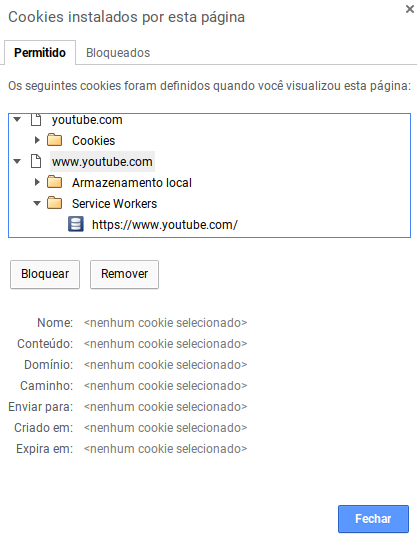
Whats happens if I block ("Bloquear" button) www.youtube.com on this page? Maybe this is the best workaround/quick fix possible?
jvschiavo
on 27 Nov 2017
You could always download the extension from the github repo and load it into chrome (after enabling the developer tools in the extension screen
bxkx
on 27 Nov 2017
Easy temporal fix: to quickly delete all offending cookies, install Awesome Cookie Manager, type gsScrollPos in name, and delete all the matching cookies. Voila!
You have to do this even after getting rid of the Great Suspender (gah, and that's one of the last extensions of many I disabled during the long time it took to hunt down this pesky bug... having favorites bites back! I'll give a try to the dev version now.)
 Chematronix
on 5 Dec 2017
Chematronix
on 5 Dec 2017
Wanted to report I also got this error, took some time to find out it was this extension. Still loves the extension but also strange that it is not fixed. I totally understand #526 is blocking, but why not autoupdate it, and put a button in it that explaines all tabs will be closed if you want this fixed (as a quick solution).
 johanbrunius
on 8 Dec 2017
johanbrunius
on 8 Dec 2017
Just uninstalled after reading this thread.
Update the store with the fix already. Especially since its been fixed since august.
 ehatle
on 8 Dec 2017
ehatle
on 8 Dec 2017
Update with fix please.
Getting sick of having to delete all these stupid cookies.
Even if it just stops recording them, i don't care about saving scroll position.
 LiamKarlMitchell
on 11 Dec 2017
LiamKarlMitchell
on 11 Dec 2017
I was trying to figure out why I kept on getting error messages like "Your client has issued a malformed or illegal request.", having issues with Youtube not working until I deleted all related cookies, and Google Maps failing to load the actual map!
This isn't a minor bug, this is a huge bug. This has been a known bug for over half a year, a fix was written by the author and I find that the fix hasn't been pushed to the Google Play store despite the problem being solved in a dev branch? This is like something out of Monty Python or Douglas Adams, because the fix might as well be stored in a drawer marked 'Beware of the Leopard'.
I was a really big fan of this extension, as were the other 1.2 million people that downloaded it, but this is nuts. I am uninstalling it ASAP and I suggest to anyone else that is hit by this bug that you do the same, because there's no point on waiting god knows how long for an actual fix to be pushed to prod. This is the kind of shoddy development work that the author believes is reasonable. Over half a year for a show stopping bug that has a known fix. What nonsense.
 jamesberger
on 15 Dec 2017
jamesberger
on 15 Dec 2017
Yeah, I agree. It's gone beyond a joke now and not due to time constraints, just laziness. Uninstalling.
swoivey
on 15 Dec 2017
@jamesberger, but what are the alternatives to this extension?
 AlexWayfer
on 15 Dec 2017
AlexWayfer
on 15 Dec 2017
Folks, just install the zip version provided here while the new release gets published. Read stuff up above. That makes the error goes away.
ernani
on 16 Dec 2017
@AlexWayfer The Great Discarder ? Tiny Suspender ? Many exist, and while most of them don't have as many features, they don't introduce major bugs stopping users from watching videos or browsing Maps.
 pwnorbitals
on 16 Dec 2017
pwnorbitals
on 16 Dec 2017
Honestly, the entitlement some people in this thread have is just astonishing.
The Great Suspender has obviously benefited many of us immensely, and deanoemcke chooses to spend his time developing it and gives it away for free. Yet you whine about Dean's 'laziness' because he wants to wait before pushing a breaking change to the Chrome Webstore? Come on.
If it affects you so much as to spur you to leave a comment complaining about it, why not put in a tiny bit of and install it from source where the bug is already fixed?
Yes, it is irritating that a fix for this bug exists but has not been added to the production version. It would be easier for us if we didn't have to install from the repository. But it is Dean's project and if he doesn't feel it's ready to be pushed, that's his prerogative. There is a clear solution to your problem, and it only takes a minute; use it.
roastchicken
on 16 Dec 2017
That's exactly what I meant some threads up above yet someone thumbed it down. Some people just don't deserve the waste of our time.
ernani
on 16 Dec 2017
Roastchicken: This being the internet I have no obligation to maintain loyalty to an extension that I downloaded. Voicing disapproval of the devs lack of activity is perfectly acceptable and switching to another extenaion that is being maintained by active devs should be encouraged not scoffed at.
I enjoyed it while it lasted, now its time for something new
ehatle
on 16 Dec 2017
tfw you star an issue to get updates on it, but instead get an inbox of
whining FeelsBadMan
On Sat, Dec 16, 2017 at 12:44 PM Emil notifications@github.com wrote:
Roastchicken: This being the internet I have no obligation to maintain
loyalty to an extension that I downloaded. Voicing disapproval of the devs
lack of activity is perfectly acceptable and switching to another extenaion
that is being maintained by active devs should be encouraged not scoffed at.
I enjoyed it while it lasted, now its time for something new—
You are receiving this because you are subscribed to this thread.
Reply to this email directly, view it on GitHub
https://github.com/deanoemcke/thegreatsuspender/issues/537#issuecomment-352206524,
or mute the thread
https://github.com/notifications/unsubscribe-auth/AAE61tJ6FLMlPjonz3JkljS5uMxBLvCGks5tBB2egaJpZM4N7oaM
.
 PatrickKennedy
on 17 Dec 2017
PatrickKennedy
on 17 Dec 2017
@deanoemcke I installed the latest release v7.0-alpha.72
Thanks for the fix, it works almost perfectly.
But when having a lot of suspended youtube tabs I sometimes get:
- That’s an error.
Your client has issued a malformed or illegal request. That’s all we know.
Unlike in the previous version it's not happening a lot and usually a refresh or two will fix it (in the old version it won't fix itself)
 erezesk
on 18 Dec 2017
erezesk
on 18 Dec 2017
I'm trying to whitelist youtube.com for now, see if that would at least workaround this issue until the issue is fixed
 pencilcheck
on 21 Dec 2017
pencilcheck
on 21 Dec 2017
Does anyone know any better apps or extensions for putting tabs to sleep or hibernating beside this one? This extension just isn't worth it. Getting the error 400 message and the fact that I can only have just barely over 200 tabs making my browser become unresponsive isn't worth keeping this extension. I'm willing to pay or donate for a good tab hibernation extension, but I prefer free extensions, so I can decide whether donating is worth it.
I use anywhere from 100-500 tabs for multiple browsers each.
volt55
on 25 Dec 2017
@volt55 I too use many tabs like 400 tabs but it keeps crashing the browser for me BUT if you're willing to pay for it then I am will make it happen and publish a hibernation extension ASAP!
 x5engine
on 25 Dec 2017
x5engine
on 25 Dec 2017
@meteorplus Thanks for the offer, but I am looking for an already existent extension or app that other users already use and can refer and recommend. Does anybody know of a better extension paid or free that can let me easily have over 500 tabs without making the chrome browser become unresponsive?
volt55
on 25 Dec 2017
Hi!
One solution is to use the Vivaldi webbrower which has this feature built in. Vivaldi is built ontop of Chrome. (Disclamer, I havn't tried this myself, just read about it). Or you can install the new version of the great suspender (see zip file in this thread) and delete the cookies, and the error is gone and everything back as usual.
Regards
Johan
johanbrunius
on 26 Dec 2017
Probably should have mentioned that Google will implement this feature in the upcomming Chrome aswell: https://gizmodo.com/the-latest-version-of-chrome-will-prevent-tabs-from-kil-1793292163
Regards
Johan
johanbrunius
on 26 Dec 2017
@johanbrunius Do you know any tab extension that will easily let me have over 500 tabs open, with most of them being hibernated of course and not make my Chrome browser unresponsive?
I am using the great suspender and Chrome became completely unresponsive with only 220 tabs, most of them suspended.
volt55
on 26 Dec 2017
Try the Vivaldi broser, you can also use this extension: https://chrome.google.com/webstore/detail/tab-hibernate/ammlihljcndoijbkoobiobhjgoopiidn
Just post details of what you found here.
Regards
Johan
johanbrunius
on 26 Dec 2017
@johanbrunius How did you become aware of this extension? Did someone tell you? Does it receive good feedback and reviews?
volt55
on 26 Dec 2017
@johanbrunius I'm back to report about the browser extension you linked, titled "Tab Hibernate" by developer dcohenb. The extension just does not work as apparently intended. The "auto hibernate" feature does not work at all as far as I can see. The "display screenshot in hibernating tabs" option also does not work most of the time, it only works for some tabs, which is rare. The "disable" features for hibernating current pages and websites just does not work at all, or at best only sometimes works. The only options or features that will work 100% of the time are the main options to "Hibernate this Tab" (the current tab), "Hibernate All Tabs" and "Wakeup All" Tabs. Unless I am just using this extension wrong, which I don't think I am, this extension is just shoddy for most of it's features. But once again, if a potential user just wants to hibernate all tabs with the click of a button, or hibernate their current tab, or wakeup all tabs, with the click of a button then this will be a sufficient extension for those simple features. It's just the auto-hibernate feature does not work at all, so keep that in mind.
volt55
on 26 Dec 2017
@johanbrunius
I also want to add 3 important things:
That when "Tab Hibernate" hibernates tabs and then is disabled in the Google Chrome Browsers any tabs that are still hibernating are closed.
It actually can not be used in incognito mode. It does not work in incognito mode. The tabs do not hibernate correctly and can't be hibernated.
Some websites or pages just can not "hibernate" correctly and hence don't hibernate, in both normal browsing or incognito mode.
I give the extension a solid 2/10. It's just not good and doesn't work correctly.
volt55
on 27 Dec 2017
I have the version 7.3 and I have no gScrollPos cookie but still youtube just renders the video part only. Not a cookie problem. If I uninstall the extension it doesn't matter, I will have to reinstall the full browser I guess.
ernani
on 1 Jan 2018
@ernani probably another extension is causing you problems. Maybe an ad-blocker. Try in incognito mode (with no extensions), if it works try disabling some of your extensions until you find the problematic one.
jvschiavo
on 1 Jan 2018
@jvschiavo I've removed all other extensions and the problem remains, using a pvt tab works though. I may need to reinstall everything from scratch I guess.
ernani
on 1 Jan 2018
there are known problems with TSG for chrome incognito that are waiting for release. It's mentioned by the author further up in this chat I think...
edsilmon
on 3 Jan 2018
Does anybody know if the Chrome extension "The Great Discarder" is good? If it is good, what are some drawbacks about the extension?
volt55
on 4 Jan 2018
@volt55 The Great Discarder is by the same developer. It has a similar UI.
The key difference is that it uses the API for chrome's in-built discarding functionality (which was actually inspired to some degree by The Great Suspender - you can read about that here: https://developers.google.com/web/updates/2015/09/tab-discarding#inspiration_hey_there_great_suspender )
Discarder gives you less functionality. For instance, you can't 'view' a discarded tab in its 'click to reload' state, as viewing a tab un-discards it. That's just a limitation of the API. There are other feature limitations compared to The Great Suspender, I can't recall all of them right now.
So for most people, switching to Discarder would be a bit disappointing.
There is a new version of TGS one of these days, sit tight... :)
 liamjohnston
on 4 Jan 2018
liamjohnston
on 4 Jan 2018
@liamjohnston I was already aware that they are by the same developer.
My main confusion between the two is "discarding a tab" for The Great Discarder as apposed to "suspending a tab" for The Great Suspender. What is the difference between "discarding" and "suspending"?
Does "discarding" , for instance, quit a tab?
I just don't know the difference.
Also I need to be able to have more than 200-500 tabs open without taking up a lot of memory or making my browser become unresponsive, by using a tab hibernating extension enabled of course. I actually would like to have 1000+ tabs open. Is the updated version of TGS going to be able to handle 1000+ tabs open with 95-99% of them being suspended or hibernated?
I need to have hundreds of tabs open, but inactively suspended, without crashing or making my browser unresponsive. Will TGS be able to accomplish this? Because right now it is not handling more than 250+ tabs, most of them being suspended. My browser still becomes completely unresponsive even with the TGS extension enabled and I have to do a Force Quit on my browser, Chrome in this case.
So will TGS be able to handle 1000+ tabs?
Also is it even worth installing TGD? What are the worthwhile advantages to using TGD rather than TGS? (If you don't mind stating them)
volt55
on 4 Jan 2018
@liamjohnston wow, thanks man! I've just installed The Great Discarder and it looks so much better right now! Thanks a lot!
Btw, I've met The Great Suspender extension because of this article from Google you've sent haha, and now I'm meeting The Great Discarder because you talked about it and mentioned the same article!
@volt55 I suggest you to read the article he linked. It answers almost all questions you have. I don't know if it can handle 1000+ tabs, but maybe it can! It looks so much better!
Edit: I almost forgot. I also suggest you the extension OneTab. I use it always and I really love it. It can save your life as it saved mine. (Or destroy it, since I have now 1500+ tabs saved and I'm not willing to get rit of them haha I'm actually right now literally trying to save an HD just to get 900+ saved tabs back. It is literally the only piece of data that I don't have a recent backup and I need back from it)
jvschiavo
on 4 Jan 2018
@jvschiavo Thanks. I was actually right in the middle of reading the link when you sent your comment. Also, I already have OneTab.
I assume that maybe software will not be able to resolve my concern and that I will need to upgrade my hardware, such as getting more RAM for instance. I assume software can only do so much and might not let me get up to 1000+ tabs without upgrading my hardware.
volt55
on 4 Jan 2018
@volt55 I'm not sure why you need 1000+ tabs open if you already use OneTab. But whatever, if The Great Discarder can't solve your problem you could try the new version of Firefox. They said they can do something like that now. Or you can try forks of Chromium that are lighter. Just some suggestions. But I'm actually convinced TGD may solve your problem. If not, upgrade your RAM. :P
I'm also a tab hoarder myself, I'm going to get 16GB of RAM just because of that.
jvschiavo
on 4 Jan 2018
@jvschiavo Sorry, I meant to say I have OneTab, but I don't really use it. I have only used it a few times. I easily get carried away and get into 1000+ tabs, but I usually go through each tab and close out tabs when I am done looking at them or using them. But, like I said I get into 1000+ tabs or rather I use to get to 1000+ tabs, but my computer could not handle it, so I had to stop using so many tabs. I have forced myself to only use around 200 tabs open at most even with TGS enabled. I would like to be able to use much more, 1000+ tabs for instance.
volt55
on 4 Jan 2018
@jvschiavo Why do you think I should use The Great Discarder?
volt55
on 4 Jan 2018
@volt55 why can't you just install updated TGS directly from here?
It took me 30 seconds and I haven't had my browser crash or tabs screw up since...
edsilmon
on 4 Jan 2018
@edsilmon I can, and I will, and I'm about to, but I was just asking if the new updated version will be able to handle more tabs. Does the updated version handle more tabs than the current version?
volt55
on 4 Jan 2018
@jvschiavo What are all the versions of Chromium and where can I download them?
volt55
on 4 Jan 2018
without intimately knowing the code (which I don't) i can't see there being any difference between the old than the new(er) TGS. read the release notes. i know its supposed to work a bit better but for what, IDK.
I feel like you first mentioned this last year and you still haven't done anything about it!
You probably won't need a different chrome if updated TGS does what you want, unless you're trying to be more power-efficient
edsilmon
on 4 Jan 2018
@edsilmon I just would like a definitive answer to my question where I asked if the updated or future update to TGS will be able to handle more tabs, more than it can now, because if it will, I just want to make sure the zip file has the feature included or if it is possible for it to be in any future update to TGS. Because right now, I can barely push out 250 tabs with TGS enabled.
I don't really mind the error 400 (I can just delete cookies). It's the ability and feature to have more tabs open, that I really care about.
I'm just trying everything that I can software-wise because I can't afford more RAM or hardware at this time. My browser keeps becoming unresponsive and I have to force quit it because of this problem.
volt55
on 4 Jan 2018
@edsilmon Also, if the zip file does not have the ability to have more tabs open and a future update does, then I would like to know that so I can wait for that update. Like I said, the error 400 is just not a big deal for me anymore. I can easily just delete cookies. If a future update has the feature to have more tabs then I'll just wait for it. I might just install the zip file anyway. It's just not a big deal one way or another just for fixing error 400.
volt55
on 4 Jan 2018
@volt55 just out of curiousity, how much RAM does your computer have?
I agree with @edsilmon that the next update most likely will not increase the number of tabs you can have open. It's almost definitely not in the alpha updates which you can download right now, as such a change is not mentioned in those release notes.
Unfortunately, I don't think you'll ever find a way to quadruple the number of tabs you can have open without making hardware changes. Google's (experimental? soon-to-come?) tab discarding feature will probably be more performant than any third-party extensions developed for it, but from what I've heard and experienced in my use of it over the years Chrome is just a memory intensive browser (might not be so true anymore). Not needlessly; it utilizes sandboxing which I believe is the main cause of that. Perhaps your best solution is to change your habits so you have less tabs open.
I don't mean to be condescending, and perhaps your use case is simply vastly different than mine, but even with me opening almost every link I find interesting and using my tabs as a backlog of things I want to check out: I rarely exceed 50 tabs, and only maybe once or twice have I gone above 100. I make a conscious effort to close the tabs that I've finished reading or are no longer interested in. One thing I do, is if I've opened a bunch of tabs that I'm not going to look at right now I move them all to a new window (shift-click select and drag them) and 'Bookmark all tabs'. This way they take up a negligible amount of RAM, if any at all. Granted, if I do that I often don't ever get back to them. But maybe they weren't that important to me after all.
roastchicken
on 4 Jan 2018
@roastchicken My computer has 16 GB. I guess 16 GB is a lot, but my computer or just the Browser applications itself, such as Chrome, continues to become unresponsive and I have to force quit it if I go over 200+ tabs. So apparently it isn't enough.
Yes, I agree with you on making a conscious effort to limit the amount of open tabs, but as I have said I get carried away. And believe it or not I sometimes and quite frequently look at way more than 50 tabs sometimes upward to 150+ (use to be much more; 300-500 easily) tabs interchangeably and constantly and need to have many tabs open. But, like you may have implied I guess limiting my tabs really is the only way to operate my computer without my browser or computer becoming unresponsive or crashing.
volt55
on 4 Jan 2018
@roastchicken Do you know what advantages The Great Discarder has over TGS?
Also do you know where I can download all the different versions of Chromium like @jvschiavo mentioned?
volt55
on 4 Jan 2018
The only advantage TGD has over TGS that I know of is that it makes use of chrome API for the exact purpose. Which I guess means it's less likely to stop working in a Chrome update for instance. Though given how many Chome staffers rely on TGS to keep their Chromebooks running, I don't see it breaking any time soon 😎
TGS is totally bespoke. TGS's concept of suspending is just 'OK this has been open a while (or whatever your rules are), navigate to some URL that basically stores the proper URL, so we know where to go when you unsuspend it'. Or something like that.
Chrome's native discarding I believe looks at actual system CPU usage - when it gets low, it 'discards' the tab, which is similar to suspending. I.e. it removes what it can from memory, then when the tab is viewed, it reloads it (possibly quicker than a full page refresh would be?). TGD gives you SOME control over when/how things get discarded.
I can't quite recall the functionality differences between TGS and TGD - install TGD, have a look at the settings page, and that question will be answered. But TGD is less feature-rich.
liamjohnston
on 5 Jan 2018
@liamjohnston So basically TGD stores less memory when tabs are 'discarded' than TGS, yet somehow loads tabs quicker when clicked on to view than TGS?
volt55
on 5 Jan 2018
@volt55 I never said TGD's discarded tabs use less memory than TGS's suspended tabs. I have no idea, but if I had to take a guess I'd maybe think TGS's tabs use less memory. But I don't know. Also it may well differ based on the content of the tab and other factors. The developer probably has a better idea.
liamjohnston
on 5 Jan 2018
@liamjohnston Ok, sorry I guess I am just misunderstanding. It's kind of confusing me. The difference between TGS and TGD I mean.
volt55
on 5 Jan 2018
@liamjohnston Sorry for prolonging this conversation, but is TGD more effective in any way than TGS and how? Again, this is a tad confusing for me, sorry for asking a lot of questions or repeating myself, I just don't quite understand.
volt55
on 5 Jan 2018
@volt55 The main differences are a) functionality (TGS has more) and that TGD uses new chrome functionality to do its suspending (discarding).
I don't know any more than that, e.g. performance / memory usage.
liamjohnston
on 5 Jan 2018
@liamjohnston Ok thanks. Got it.
volt55
on 5 Jan 2018
@liamjohnston I don't know if this is fairly obvious, but can I enable TGS and TGD at the same time? Will they interfere with each other or cause a problem if they are both turned on and enabled?
volt55
on 5 Jan 2018
You _can_ - they're completely different extensions with no knowledge of each other. You can even have different of TGS running concurrently (e.g. the webstore version and a dev version).
BUT I wouldn't recommend it. Might do weird stuff.
liamjohnston
on 5 Jan 2018
Here is a workaround for this to never happen until an official fix is available
x5engine
on 6 Jan 2018
@meteorplus You know that this issue is already fixed and latest version should not store the scroll position in the cookie anymore? The problem is not that this cannot be fixed...the problem is that it can't easily be pushed to the people. See: https://github.com/deanoemcke/thegreatsuspender/issues/537#issuecomment-322084994
So even your workaround can't be pushed to people easily...
 WolfspiritM
on 13 Jan 2018
WolfspiritM
on 13 Jan 2018
FWIW everyone, in my experience, simply clicking on the extension icon while visiting YouTube and selecting "never suspend for this site" also ameliorates the issue.
Mihajlo961x
on 15 Jan 2018
It seems like even google maps is getting 400. I'm not sure if this is really related though...
pencilcheck
on 16 Jan 2018
It seems like even google maps is getting 400. I'm not sure if this is really related though...
Probably all Google services have this issue. ;) I can confirm Youtube and Maps at least.
It's very likely that these issues is related as both of them are due to large cookies.
FWIW everyone, in my experience, simply clicking on the extension icon while visiting YouTube and selecting "never suspend for this site" also ameliorates the issue.
Sure, this is a workaround, but that is just disabling the extension for these sites.
reijin90
on 16 Jan 2018
I know this might be a little off topic, but does anybody know where I can get questions answered about SessionBuddy?
volt55
on 16 Jan 2018
Could someone update the issue title to include at least all popular google services to avoid duplicate issue filings.
I can confirm the issue affects:
Maps
Search (All variant)
Youtube
 eugenesan
on 28 Jan 2018
eugenesan
on 28 Jan 2018
i don't think it's google specific services, just everything and affects google products more as ppl use it more...
edsilmon
on 29 Jan 2018
@edsilmon Google returns 400 after cookies parsing, I think.
AlexWayfer
on 29 Jan 2018
@volt55 if you're having trouble having lots of tabs with TGS even though you have 16gb ram then I think the problem is something else on your computer or in the browser, like the cpu or other browser extensions. I love this extension because I use as many tabs as you and my laptop has 16gb ram, maybe you just have too many not suspended tabs at once, chrome uses tons of ram, so you have to make sure that you're suspending everything you're not currently using, I think my laptop can handle about 50-100 "working" tabs without causing major failures depending on what they are. (some sites you might not expect use a lot of ram) but when they're suspended I can easily go up to 1000 without lagging. maybe you have too many windows, when I have 1000 tabs that's usually about 4-5 windows, if you use more or less than that it might be the problem? the problems that occur for me seem to be more the cpu (but because I'm usng a thin laptop even my i7 isn't as fast as a lot of desktops) problem is how many are "working" and how many are suspended. I usually only crash chrome by doing something myself (like trying to paste 2m likes of code haha), since upgrading to 16gb and using TGS I haven't seen chrome crash from running out of memory since then. for you I would make the suspend time as short as possible and make sure if I'm opening lots of tabs that the old ones are suspended first. just thought I'd see if I could help.
Thanks dean for the fix, this new version looks pretty too haha, hope to see it as a webstore update some time soon. I'm not sure if it's possible but it would be nice to have a "suspend tab" or if suspended "unsuspend tab" on the right click menu for the tab bar
 audi4444player
on 29 Jan 2018
audi4444player
on 29 Jan 2018
@audi4444player Thanks for your input. I actually suspend at least 90% of all my tabs that are open, maybe even more like 95-97%. And I usually open around 100-200 currently. I use to be able to do more without even using TGS, such as 500-700 tabs, but my computer and browser application (Chrome) eventually started to crash and become unresponsive more and more as time went on. I would and still have to force quit out of my browser and even force shut down or restart my computer. My computer is only about 3 years old. I usually also have only around 4 or 5 windows at most open at any given time.
The thing is, the problem for me might actually be that I have multiple browsers open. But, I need someone else to confirm this. At least two of the browsers usually have around 100-200 tabs open, they are typically Chrome Browsers. Not to mention I have around 4-7 different non-browser applications open such as a notepad app, photos app, settings app, and music app open most of the time. I usually have 3 or even 4 different browsers open. I have the regular version of Chrome, Chrome Canary, Firefox, and a few others. The Chrome Browsers are where I usually open the most tabs over 50-200. I really don't think that is too taxing on my system or computer is it? I don't know too much about computers, but I have a Intel core i5 processor. Is the i5 processor a part of this problem?
volt55
on 29 Jan 2018
@deanoemcke @liamjohnston What features does the zip file and future update have besides not storing gsScrollPos cookies?
volt55
on 29 Jan 2018
if there are lag spikes that aren't caused by chrome you need to watch the task manager and filter it to see what is using CPU. you may well be maxing it out. you may also be maxing out the 16gb of ram too.
you are probably better using your time taking your pc to a trusted expert to have a quick look over tbh or register on some PC forums and/or just read the forums for slowdown problems or something like that. even microsoft could help you to determine some slowdown issues in a live chat. then try chrome live chat or firefox etc.
Without watching you use your computer noone can really say what your problem is without spending literally hours explaining things.
edsilmon
on 29 Jan 2018
@edsilmon To be honest, I like forums, but my dislike of using them outweighs the positives because most of them are incredibly tedious to find the answer I am looking for and I don't even know where to look because there is just too many threads at most forums and it takes up way too much time to look through and find the right threads.
I guess that really is the only way resolve my issues. I can't upgrade my hardware at this time. And I would prefer to avoid go to a PC expert to look at my pc until I back up everything on my computer, which isn't anytime soon. So, I'll might try to look at forums or just use google search for more info to hopefully remedy the issue.
volt55
on 29 Jan 2018
Some info regarding what is coming up in the update can be gleaned by reading changelog/timeline.
I understand that forums can be tedious to search through but for the ones with public posts simply google search for your problem and include (tag) it with the name of the forum and you will see what is has to offer. the first search may not give you the answers you want but may help to refine the search terms so next time your search is more accurate.
"Slow computer" is probably the top IT issue searched for online as people tend not to want to pay for a better computer and try to optimise what they have already; many people cannot afford to upgrade.
There are so many factors involved with the issue that unless you are prepared to either pay someone to repeatedly "fix" your computer or just upgrade it randomly to the point that it doesn't slow down you need to learn what is happening yourself so you can spot the signs in future.
Computers are not going away so it is _probably_ time well spent...
edsilmon
on 30 Jan 2018
@edsilmon Yes, I do use the search function on most forums, but there is still many results that come back and most of the time even with specific keywords none of the result say explicitly the question I am asking or give the answer I am looking for in the title or even have similar phrases, so I usually have to go into tens and sometimes hundreds or even thousands of threads, each with dozens or even hundreds of posts, just to be looking and reading threads that usually have nothing to do with my original question, even if I am just skimming them over. I don't have the time or patience to do that. Sometimes it works and I find the answer to my questions, sometimes it doesn't. But I don't have hours to spend looking for the answer to my specific question. That's why I prefer not to use forums. They are very tedious to use most of the time.
It's not that my computer is necessarily slowing down because it is a "slow computer". It's my browser that is slowing down my computer because I have a lot of tabs open and even becoming completely unresponsive where I have to force quit the browser. That's why I am on this Issues page for TGS. To find a way to have more tabs open without my browser crashing or becoming unresponsive to the point of force quitting. I just want to find a way to accomplish this with a extension or app. Or have a way I can to optimize the browser with as much tabs open as possible. I just can't upgrade hardware currently. I know upgrading hardware probably is the way to go though.
volt55
on 30 Jan 2018
@deanoemcke I have noticed that the screen capturing setting is automatically disabled for incognito mode windows whenever the browser is relaunched. Can you fix this? Did you know about this?
volt55
on 31 Jan 2018
@volt55 Can we please stay on topic here? I'm getting notified for each new post here to find out if this gets resolved and nearly all new posts are NOT about the 400 error on youtube/google. I would really appreciate if you can open new issues for whatever you think is an issue or use stackoverflow or at least new issues for questions unrelated with this problem. Thank you.
WolfspiritM
on 31 Jan 2018
@WolfspiritM Sure, I'll try to do that, I'm not that familiar with this site, but it shouldn't be hard. The error 400 has already been resolved however. The zip file for the fix has been posted already, linked somewhere in the comments above.
volt55
on 31 Jan 2018
I didn't see this thread right away and started my own. Someone there pointed me to a reddit thread where they had an alternate way to get to your cookies for the website:
- From the page you get the 400 error, Press Ctrl+Shift+I.
- Expand cookies on the left and select the site (YouTube, Maps, Search,...).
- Select the cookie(s) for the site in the list with "gs..." and hit the delete key. Alternatively, you can select the Clear all (Circle with the line) the clear all cookies.
 sflesch
on 31 Jan 2018
sflesch
on 31 Jan 2018
@sflesch Instead of CTRL+SHIFT+I just use F12 for dev tools :-)
WolfspiritM
on 31 Jan 2018
If you want to remove all of these cookies from Chrome, you can do something like below.
First exit Chrome (to be sure that there is no open file handle on the Cookies file), then run a script something like this on a Mac:
#!/bin/bash

# Be sure you have quite Chrome first just in case.

# Remove "The Great Suspender" cookies that begin with "gsScrollPos-" from the Chrome cookie database.
# This assumes a mac with sqlite3 installed

cookie_file=./Cookies
cookie_file=~/Library/Application\ Support/Google/Chrome/Default/Cookies

ls -l "$cookie_file"
echo -n "Count of gsScrollPos- cookies before removal: "
echo "SELECT COUNT(*) FROM cookies WHERE cookies.name LIKE 'gsScrollPos-%';" | sqlite3 "$cookie_file"
echo "DELETE FROM cookies WHERE cookies.name LIKE 'gsScrollPos-%';" | sqlite3 "$cookie_file"
 jkleckner
on 31 Jan 2018
jkleckner
on 31 Jan 2018
If you want to remove these cookies from a single site, you can open the console as described above and paste something like this javascript into it:
var clearGsScrollPos = function(){
  let splitCookie = document.cookie.split('; ');
  console.log(splitCookie);
  let scrollCookies = splitCookie.filter(
    function(el) {
      return(el.startsWith('gsScrollPos'))
    }).map(
    function(el) {
      return(el.replace(/=.*/,''))
    });
  console.log(scrollCookies);
  scrollCookies.map(function(el) {
    // From: https://stackoverflow.com/a/10593045/541202
    document.cookie = el + '=;expires=Thu, 01 Jan 1970 00:00:01 GMT;';
  });
  scrollCookies;
}
clearGsScrollPos()
I can confirm that deleting the scroll position cookie does the trick (in my case for Google Maps). Previously I resorted to use Google Maps Lite which didn't show the issue.
@deanoemcke I'm grateful for the extension and your work on it. Do you have an idea of when a next public major release could happen? Your post above on the 4th Aug 2017 suggested a new major release soon while the version in the Chrome Store is v6.30 from 6th June 2017. The latest alpha is from 29 Nov 2017 which sounds promising.
Thanks a bunch!
 ds-clearago
on 13 Feb 2018
ds-clearago
on 13 Feb 2018
this is a very big issue for me. it affects me every 2 weeks or so. deleting the scroll position cookie always works. i really wish the fix lands soon.
 kalyanac
on 18 Feb 2018
kalyanac
on 18 Feb 2018
Until this is formally resolved I use a bookmarklet to clear the offending cookies. Simply right-click on your bookmarks bar, go to “Add Page”, set the name to something like “Fix Google Cookies” and replace the URL field content with the following:
javascript:(function(){var n=document.cookie.split("; "),t=n.filter(function(n){return n.startsWith("gsScrollPos")}).map(function(n){return n.replace(/=.*/,"")});t.map(function(n){document.cookie=n+"=;expires=Thu, 01 Jan 1970 00:00:01 GMT;"})})();
When you're done, it should look something like this:
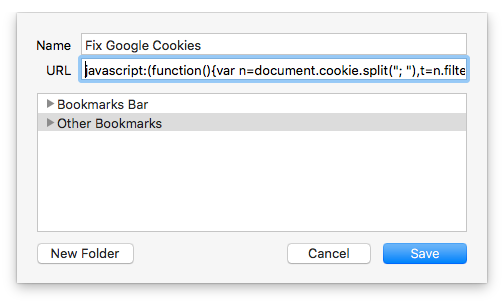
Then when you run into the issue again you can click the button once and refresh the page and you're good to go.
Note: The above bookmarklet code is an adaptation of what @jkleckner shared above.
 coreyward
on 15 Mar 2018
coreyward
on 15 Mar 2018
@coreyward Nice improvement, thanks!
jkleckner
on 16 Mar 2018
Hrm, the bookmark code thing isn't working for me. Getting tired of having to nuke all of google cookies and readd all my accounts.
 ur-vile
on 16 Mar 2018
ur-vile
on 16 Mar 2018
@ur-vile Are you using it when you're on the affected page? If so, which browser? Can you screen cap the bookmark-edit dialog and check the dev console for errors?
coreyward
on 16 Mar 2018
@coreyward It looks like you might have an extra parens in the snippet. This worked for me in Chrome 64.0.3282.119:
javascript:(function () { var n = document.cookie.split("; "), t = n.filter(function (n) { return n.startsWith("gsScrollPos") }).map(function (n) { return n.replace(/=.*/, "") }); t.map(function (n) { document.cookie = n + "=;expires=Thu, 01 Jan 1970 00:00:01 GMT;" }) })();
Cc: @ur-vile
jkleckner
on 17 Mar 2018
@jkleckner @coreyward That fixed it!
ur-vile
on 17 Mar 2018
@jkleckner Ah, good spot. Updated my post for future readers.
coreyward
on 17 Mar 2018
Javascript code doesn't work. Chrome version 65.0.3325.162
 DDot
on 20 Mar 2018
DDot
on 20 Mar 2018
@DDot Try now; a semicolon was dropped where it shouldn't have been.
coreyward
on 20 Mar 2018
It's coming up on a year and this still isn't fixed. I'm tired of clearing the cookies and having to sign in with all my emails. Now I'm having an issue with menus moving looking like they are shaking and the site data drop down is just progressively getting bigger and bigger on some sites. If I let it sit there it will go across across the entire screen.
I have autism and this extension is becoming a nightmare.
How is one extension able to cause such havoc on someone's browser. Shouldn't be allowed to happen.
Why aren't you even replying or keeping people updated anymore?
Like I mentioned I have autism. I lack appropriate social convention and I mean well I'm just really aggravated. I rely on this extension so much but the chaos it's causing is getting out of hand.
@deanoemcke
 dragonspirit1185
on 29 Mar 2018
dragonspirit1185
on 29 Mar 2018
@deanoemcke Where is this "dev branch" so that one can at least review the change and give it a spin, I don't see any branch with anything remotely related to this. Maybe we can help out untangle the code from the other depending changes you wrote about.
This is a blocker and should be released with the highest priority.
 joekohlsdorf
on 10 Apr 2018
joekohlsdorf
on 10 Apr 2018
@joekohlsdorf by 'dev' i mean 'master' :(
the latest tagged alpha release will have what you're after and should be 'reasonably' stable.
deanoemcke
on 17 Apr 2018
@deanoemcke is it going to be fixed soon or not? You opened my post and didn't even bother to reply.
dragonspirit1185
on 17 Apr 2018
@dragonspirit1185 GitHub Issues are not an appropriate avenue to harangue and harass the developer of an open source, free Chrome Extension you've come to rely on. If you'd like to encourage Dean to spend his free time developing software for you to use, you may find the carrot works better than the stick.
For what it's worth, your original post suggests you are experiencing something others in this thread are not. While I cannot entirely rule out the possibility that TGS is causing the issue, you're not providing adequate information in a suitable place to provide any assistance. I suggest searching for others experiencing similar problems (either with TGS or otherwise) and seeking out a solution that's already been published. If you're unable to find anything, gather as much information as you can (e.g. disable TGS and see if the problem with menus getting larger persists) and create a new Issue with all of the data and (politely) ask if anybody can help you find the root cause.
Keep in mind that Github is a platform for _collaboration_. While creators and maintainers of open source projects ultimately set the course and cadence, the community (that's you and I!) contributes time and effort into triaging issues, finding bugs, fixing bugs, creating new features, and so on. In other words, this is a two way street; if you don't like Dean's timeline, you're encouraged to contribute a solution on a timeline that works better for you.
coreyward
on 17 Apr 2018
It's this issue and other issues
On Tue, Apr 17, 2018, 2:04 AM Dean Oemcke notifications@github.com wrote:
@joekohlsdorf https://github.com/joekohlsdorf by 'dev' i mean 'master'
:(
the latest tagged alpha release will have what you're after and should be
'reasonably' stable.—
You are receiving this because you commented.
Reply to this email directly, view it on GitHub
https://github.com/deanoemcke/thegreatsuspender/issues/537#issuecomment-381856249,
or mute the thread
https://github.com/notifications/unsubscribe-auth/AkJ1hx_bPbM1G5niOBJwVqJm9nXenkq3ks5tpYXUgaJpZM4N7oaM
.
dragonspirit1185
on 18 Apr 2018
It has been a long time since this remains a problem.
I know it isn't prioritised, and I am not sure if I understood the whole story correctly.
but if gsscroll is a problem, maybe we could just have an option in the extension to simply disable scroll position? everybody wins.
 hiuwo
on 21 Apr 2018
hiuwo
on 21 Apr 2018
@deanoemcke Thanks for a great extension! And I gotta say, you have incredible patience. Is there a milestone checklist of required changes somewhere that myself and others could use to start writing and submitting contributions for? I would really like to help offload some of your burden for the new functionality, even if it's just menial, boring stuff.
 curtiszimmerman
on 22 Apr 2018
curtiszimmerman
on 22 Apr 2018
Come on please do a release, it has almost been a year now
 ForsakenHarmony
on 22 Apr 2018
ForsakenHarmony
on 22 Apr 2018
I am also still experiencing this issue.
It has been a year. A bugfix patch release is a reasonable thing to do for this kind of issue.
Barring that, as @curtiszimmerman commented - what's the guidance for community players starting to take on some of this work? I use this extension enough that if it's a matter of pulling out the necessary commits for a patch release to get this issue fixed, I'd do it.
 fenixnet-net
on 7 May 2018
fenixnet-net
on 7 May 2018
@fenixnet-net
My understanding s that it's been fixed, on master.
The process of updating the extension on the webstore is extremely painful in that everyone will lose all of their suspended tabs. See #526. With well over 1m users that's a lot of lost tabs and a lot of unhappy people. The author is rightly being careful not to release this fix willy nilly. It will happen. In the meantime, try out master? Unsuspend or backup your tabs first.
liamjohnston
on 7 May 2018
If building from master is an option I'll go have a try with it.
I definitely understand not wanting to blow up the world. I run ops at a global scale - this isn't new to me. What troubles me is that an abundance of caution seems to have caused what looks like paralysis, at least when I look at the timeline thus far elapsed.
I don't publish stuff in the chrome webstore, so I can't speak to how that process sucks (although I don't doubt that it does in whatever special ways it has), but a year seems excessive.
I'll see if I can build master. Thank you for the warning about un-suspending tabs. That might've bit me to my great sorrow.
fenixnet-net
on 7 May 2018
@fenixnet-net Hey, just a quick update, I was able to mitigate this with a pretty simple workaround. I use EditThisCookie (on Chromium/Chrome) and I have set a filter up so that any cookie matching gsScrollPos* is blocked from being set on any site. (Edited to fix typo)
curtiszimmerman
on 7 May 2018
HUH. Well THAT's neat. I just noticed that I could avoid destroying my sessions by only nuking the gsScroll cookies. Blocking them seems useful. I don't really care about scroll resumption that much....
Yesssss, clever! I'll have a go building from master, but if I decide to stick with the webstore version I'll definitely use this. Thanks!
fenixnet-net
on 7 May 2018
Build from master successful. Running on the build and have removed the webstore version. I'll see if the issue recurs with this code.
If mitigating explosions is an open issue, if it's something that help is wanted with I can see what I can do.
fenixnet-net
on 7 May 2018
@curtiszimmerman
I just added EditThisCookie extension in chrome.
But i am not sure how to block gsScrollPol*.
I went to "Blocked coockies" and then under Domain, Name, value in all these 3 field i entered
gsScrollPol* and saved.
Is that correct?
 sanketgroup
on 16 May 2018
sanketgroup
on 16 May 2018
I went to "Blocked coockies" and then under Domain, Name, value in all these 3 field i entered
gsScrollPol* and saved.
Is that correct?
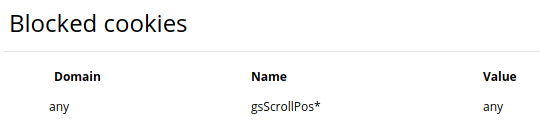
No. gsScrollPos* should be only in the Name field. Also, there is misprint: Pos*, not Pol* (greatsuspenderScrollPosition)
AlexWayfer
on 16 May 2018
@coreyward AND anyone attempting to use the javascript bookmark/bookmarklet to fix their error400 woes: if you are on a google "side" site, like Google Maps, in my case... you have to run/execute it from the root google.com website. Or at least I had to. Once I ran it there, (and refreshed), Google Maps suddenly started showing appropriate map tiles, as it should.
 jasonbuechler
on 17 May 2018
jasonbuechler
on 17 May 2018
I wish the author would just publish a v2 if he has cold feet about updating the current one in the store, with clearly stated incompatibility in the description... until then, EditThisCookie seems to actually fix the issue. Thanks for the tip, AlexWayfer!
 nagi603
on 4 Jun 2018
nagi603
on 4 Jun 2018
until then, EditThisCookie seems to actually fix the issue. Thanks for the tip, AlexWayfer!
Thanks, but I just gave detailed explanation of the tip from @curtiszimmerman. 😁
AlexWayfer
on 4 Jun 2018
The latest version has fixed it; you must enable developer tools, _IMPORTANT_ >> unsuspend all tabs in all windows and install it manually. no cookie editing required... https://github.com/deanoemcke/thegreatsuspender/releases/tag/v7.0-alpha.85
IDK exactly why the app hasn''t been officially updated but I think it has something to do with Google having to re-assess it.
The developer would have done this already if it was easier and has said this several times in this very thread...
edsilmon
on 5 Jun 2018
It's not due to any requirement from Google. It's because the current version in the chrome store will break all suspended tabs on update, and there doesn't appear to be any good way to publish that update without it being installed automatically and immediately smashing users' sessions.
Specifically addressed by the owner here: https://github.com/deanoemcke/thegreatsuspender/issues/537#issuecomment-322084994
fenixnet-net
on 5 Jun 2018
I've edited my comment. Forme its not a big deal to enable developer tools. I'd like to be able to disable the developer tools warning message every time I launch my browser but it's a small price to pay for the tab suspension
edsilmon
on 5 Jun 2018
Why can't the developer just release a toggle in the suspender's settings menu to simply not store the gScrollPos anymore?
Specifically addressed by the owner here: #537 (comment)
so i have been very reluctant to push ANY new version that did not have this new update handling feature.
ANY
AlexWayfer
on 6 Jun 2018
He could add the toggle setting to the current build that's on the store
How existing users will get this code/build, if they already have current version installed? Any upgrade == breaking.
AlexWayfer
on 6 Jun 2018
Dean is hamstrung by the way Chrome performs updates. And I certainly can't blame him for putting the update off--the spam from comments on this issue is probably nowhere near as bad as all the support requests from ~1.3 million users who will complain when all their suspended tabs disappear!
 yrro
on 6 Jun 2018
yrro
on 6 Jun 2018
The raw URL for the suspended website is kept at the end of the suspended URL. He even explains this at the very end of the big breakdown post. Any breaking update he pushed could easily be coded to check the URL of new/loaded tabs and see if they have The Great Suspender's URL structure and generate a new entry for it in its DB, or in the least just trim off everything from the &uri= part back and load the website fresh, letting it get naturally suspended over time again.
I've coded a fair amount of Chrome and FF extensions in my day, this isn't a complicated task. I understand he has lots of worries due to how big the userbase is, but you can't just sit around forever, locked out from doing updates because you're afraid to settle on a decision. Eventually he's going to have to update the extension for other reasons in the future. It's better to pull the band-aid off now instead of delaying as the userbase continues to grow even more, only adding more pressure on him.
 Invertex
on 6 Jun 2018
Invertex
on 6 Jun 2018
Alternatively, if updating this extension is simply too painful, the updated version could be pushed onto a new chrome extension, under a new name ("The improved great suspender" or something), the old extension could be deprecated, and an upgrade procedure could be documented for everyone who is stuck on the old extension.
But I agree with others that "doing absolutely nothing", "recommending to manually install the non-automatically-updatable development extension" or "waiting until the Chrome developers change their minds and decide to solve my problem" is not really helping either current users or new users of this extension.
 wizeman
on 6 Jun 2018
wizeman
on 6 Jun 2018
the updated version could be pushed onto a new chrome extension, under a new name
@wizeman "The Greatest Suspender"
 WhatsThatItsPat
on 6 Jun 2018
WhatsThatItsPat
on 6 Jun 2018
@Invertex I already submitted a PR for this and they said it's already fixed but I don't know why they couldn't update the extension in chrome store?
but maybe this could be fixed next decade?
x5engine
on 6 Jun 2018
@meteorplus Are you retarded? Or do you just not read any of the posts in an issue?
curtiszimmerman
on 6 Jun 2018
You have to release this at some point so please just fucking do it
ForsakenHarmony
on 6 Jun 2018
@ForsakenHarmony You are demonstrating the height of technical incompetence by complaining about this bug when there are multiple ways of easily mitigating it.
curtiszimmerman
on 6 Jun 2018
He said he has a fix for updates in the future (after this update) and this is fixed as well, he has to release it at some point
ForsakenHarmony
on 6 Jun 2018
Welp, we've reached the point of namecalling. Time to mute the thread.
Remember, you all paid NOTHING for this dev's work. If you don't like how they do business you're free to stop using the software. Abusing them for doing stuff with their spare time and volunteer efforts you don't like is the height of entitled bullshit.
Do better.
fenixnet-net
on 7 Jun 2018
some people did pay for TGS.
I did, however I'm not complaining...
edsilmon
on 7 Jun 2018
@fenixnet-net It's the only way to guarantee getting an issue closed.
curtiszimmerman
on 7 Jun 2018
@curtiszimmerman you're a lead engineer ? lol
insulting can't solve anything, just give me less than 24h and I'll solve this issue ;)
x5engine
on 7 Jun 2018
@meteorplus Yes, I've been doing this for many years, long enough to know that insults get issues closed, which is what this issue needs. Locked to contributors. It's getting hammered by people that don't read the comments -- which, by the way, contain more than one easy workaround -- and just complain about not getting an update. It's open source. If it's such a hot-button issue for you, use one of the workarounds, or fix it yourself and install the fix. And saying that isn't the same thing as the "if you don't like systemd, well, just write your own" nonsense. It's JavaScript, for crying out loud, in a Chrome extension! But people are being unusually abrasive here, despite this probably being one of the easiest problems to hack around that I've ever seen. The developer even made a thorough post documenting the specific reasons why there isn't a fix available, answering the question you posted earlier. The developer -- who has been kind enough to donate his time and effort and technical skill to solve a gnarly problem -- has made everything clear in this very issue, if you'd only read the comments.
curtiszimmerman
on 7 Jun 2018
The real problem here is that GitHub does not make it easy to find important comments. There are 193 comments on this thread. Most people won't spend the time to read through them all. Please email GitHub to complain about this problem, preferably with a suggestion on how to solve it.
As a workaround, perhaps OP could edit their post to add a paragraph, right at the top of this thread, listing ways to mitigate the problem and why the fix hasn't been pushed out yet, or maybe the author could add that right at the bottom of the thread and then use the GitHub option to limit the conversation to collaborators.
 Pascal666
on 7 Jun 2018
Pascal666
on 7 Jun 2018
what would be good is if there was a solution tag for a/many posts as I've been following this since about 20 posts and the thread is now a 3 hour read especially for non native english speakers.
that being said I guess people could search page for the word "fix" or "solution".
edsilmon
on 7 Jun 2018
@curtiszimmerman This isn't about there being personal solutions to the problem. I modified things to solve the issue for myself, that doesn't mean the update shouldn't happen, because I care about this plugin being able to actually update itself properly in the future and not require personal workarounds, and the issue affects many people around the world who wouldn't know enough to know that TGS is even causing the issue for them. It's an important issue to fix for the future of the extension, so try to be a little more mature in your discussion please.
Invertex
on 7 Jun 2018
@edsilmon you can read it as a novel since you have everything here like insults and feedback and arguments and all.
Just lovely!
x5engine
on 7 Jun 2018
@Invertex I guess you also didn't read the other comments here. This is sort of not unexpected, really pretty typical when the dumb avatar crowd shows up to abuse the developer into doing something they are not willing to do (or not capable of doing) themselves. I won't stand for dumb behavior and comments borne out of ignorance from not having read what's right here. The social experiment running at Github the last couple of years might be over, but that doesn't mean it's not our responsibility to police up stupid behavior. My replies are a version of RTFM. We are, by the way, the community that results from our own policing. If some tiny specific parts of my posts offend your sensibilities, well, you go ahead and push the little thumbs-down and have a nice day. You're part of the problem by posting here asking a question about an update that's been answered in this post. RTFM.
curtiszimmerman
on 7 Jun 2018
@curtiszimmerman I love that you're accusing me of the very thing you're doing, classy. If you'd actually read my previous comments like you're telling me to do, you'd have seen I in fact had read the previous comments and the breakdown of the "reasons why" that the developer made and was commenting on his choices. There was no "abusing" of the developer with these comments. It was a fair, adult discussion until you came in. Resorting to name-calling and arrogance isn't "policing", it's just immature and makes you look bad.
Also, nice bias you have there basing your view of people on what avatar they have, again, quite mature of you. And quite classy that you seemingly blocked me (since I can't tag you anymore), yet say I'm the one with delicate sensibilities. 👌
Please, get off your high-horse and learn to behave like a professional.
I'm sorry to everyone who has had to deal with notifications from this thread, I'm sure most have turned them off at this point. I realize I'm contributing to it by replying to him, but that kind of rude behavior needs to be challenged. I won't be replying to any more of his replies though.
Invertex
on 8 Jun 2018
_y'all a bitchass_
 arcelm
on 8 Jun 2018
arcelm
on 8 Jun 2018
Switching off the extension until it's fixed; sorry YouTube is my home.
 zixith
on 11 Jun 2018
zixith
on 11 Jun 2018
To me the best possible solution would be to upload the newever version of great suspender under a similar name. People can just switch on their own then and no-one will need to lose data. (maybe if it can search and replace the extension id on all the users bookmarks.)
 BlackJoe23
on 15 Jun 2018
BlackJoe23
on 15 Jun 2018
Problem still persists. How we can fix this problem without deleting the cookies ? Why its keeping this information ?
 mbpakalin
on 17 Jun 2018
mbpakalin
on 17 Jun 2018
https://thehackernews.com/2018/06/chrome-extension-intallation.html?utm_source=feedburner&utm_medium=feed&utm_campaign=Feed%3A+TheHackersNews+%28The+Hackers+News+-+Security+Blog%29&_m=3n.009a.1764.sd0ao05zrv.12rx ] Will this cause those people who are using the "unofficially" updated developer tools version to be disabled?
edsilmon
on 17 Jun 2018
When is this update coming to the Chrome Store? Yes it will destroy sessions as per old comment but it has to come through eventually. Using an old version of the extension and installing other third party extensions as a workaround is not a good solution to this constant issue. Cannot recommend the extension to anyone non-technical as it requires a lot of troubleshooting until the chrome store is updated to the latest build.
 agret
on 22 Jun 2018
agret
on 22 Jun 2018
Problem still persists.
mbpakalin
on 6 Jul 2018
I'm also running into this issue, it's very annoying!
Also btw, when I wake up a suspended tab, it doesn't even restore its scroll position, it is scrolled all the way to the top!
 Boscop
on 11 Jul 2018
Boscop
on 11 Jul 2018
Is this project abandoned ?
mbpakalin
on 21 Jul 2018
@mbpakalin Nope. A quick glance at the commit history will show it is actively being worked on.
As for why the chrome webstore version hasn't been updated lately, see https://github.com/deanoemcke/thegreatsuspender/issues/526 ... an update is coming at some stage.
liamjohnston
on 22 Jul 2018
This issue has been "fixed" but not released for what looks like a year. If no release is forthcoming, can anyone suggest an alternative extension that they like? Additionally @deanoemcke is this a project you actively want to maintain? Are you willing to allow other users to take over or help with managing this project?
 log0ymxm
on 26 Jul 2018
log0ymxm
on 26 Jul 2018
@log0ymxm The extension is actively maintained. See #526 for an explanation of why the webstore version is not getting frequent updates.
@deanoemcke I suggest we close this issue...
liamjohnston
on 26 Jul 2018
The data of Tampermonkey extension can be saved during extension update which it use chrome.storage api (https://developer.chrome.com/apps/storage) . Does it can solve the updating problem? It might help on the next and next version update.
 hermanho
on 26 Jul 2018
hermanho
on 26 Jul 2018
@liamjohnston infrequent updates are okay, but no update at all?
is there something blocking right now? you have to release it eventually
ForsakenHarmony
on 26 Jul 2018
@ForsakenHarmony Did you read the comments? By pushing the update, everyone loses their existing suspended tabs.
sflesch
on 26 Jul 2018
I know ffs, but is the solution to never release anything ever again?
ForsakenHarmony
on 26 Jul 2018
I think the idea is to first find a fix for losing suspended tabs during updates before releasing the next update. I'm not sure how many people are affected by the bug in this issue, but 100 % of the userbase would lose their tabs with the next update. That's probably the only thing delaying a release.
People would still probably lose their suspended tabs during the next update (I think this is unavoidable?), but updates after that one wouldn't break things.
In the meantime, you can download the Git version of this extension, where the bug in this issue is fixed (?). Or use the cookie workaround in the above comments.
I agree with @liamjohnston that this issue should be locked (and closed, if the bug really is fixed). This issue is mostly talking about https://github.com/deanoemcke/thegreatsuspender/issues/526 at this point.
@deanoemcke could write a final comment with workaround instructions and Git version install instructions (most people probably won't bother with reading all of the comments).
 kankaristo
on 26 Jul 2018
kankaristo
on 26 Jul 2018
Wait I though I read somewhere that losing tabs would be fixed after the next release
https://github.com/deanoemcke/thegreatsuspender/issues/537#issuecomment-322084994
"
well the good news is that there was an obvious way to solve this the whole time, but it is going to take 2 new releases before it takes effect (ie. it only kicks in once you have the next new version already installed, and are about to receive the subsequent new version).
"
if that's not the case I apologise
ForsakenHarmony
on 26 Jul 2018
@ForsakenHarmony It will be fixed in the next update, but the problem is THAT next update will cause the tabs to be lost. Catch22.
sflesch
on 31 Jul 2018
@deanoemcke I've had this issue for over a year, and usually cleared cookies to solve it, and just now discovered that it's caused by this extension.
So, I'm guessing that gsScrollPos is used to remember the scroll position?
Why can't there just be a setting to remember the scroll position that is turned off by default (and an explanation about the current cookie issue when it is turned on)?
 TiredFalcon
on 5 Aug 2018
TiredFalcon
on 5 Aug 2018
@Spyridox because when the update is pushed everyone will lose all their tabs and so far there is no workaround for this. The gscrollpos thing has already been dealt with but requires a "destructive" update to become live.
if you want a fix just read the instructions on how to manually install the latest git archive... 0.7 v85 i think
https://github.com/deanoemcke/thegreatsuspender/releases
edsilmon
on 5 Aug 2018
@edsilmon but there are ways to restore the suspended tabs after an update, right? The main problem is that the suspended tabs are just removed. So, is it not possible to automatically unsuspend all tabs before the update? Or to save the links of those pages somewhere and restore them after the update?
If there is a way to do it, then there should be also a way to automate it, or not?
TiredFalcon
on 5 Aug 2018
@Spyridox, please, read this thread before posting.
AlexWayfer
on 5 Aug 2018
@AlexWayfer it is too long. However, I realised that to include any kind of automated restoring of tabs, if it is possible, it is necessary to release an update, which would destroy the tabs on the first place.
TiredFalcon
on 5 Aug 2018
However, I realised that to include any kind of automated restoring of tabs, if it is possible, it is necessary to release an update, which would destroy the tabs on the first place.
Yep, that's correct. Any next update can't be delivered safely, as I understood.
AlexWayfer
on 5 Aug 2018
Last question: Was a separated release considered, e.g. The Great Suspender 2.0?
TiredFalcon
on 5 Aug 2018
After watching this issue for a while, seeing that nothing is moving I have reported this extension as abusive because it hurts the Google and Chrome product.
I recommend that you do the same.
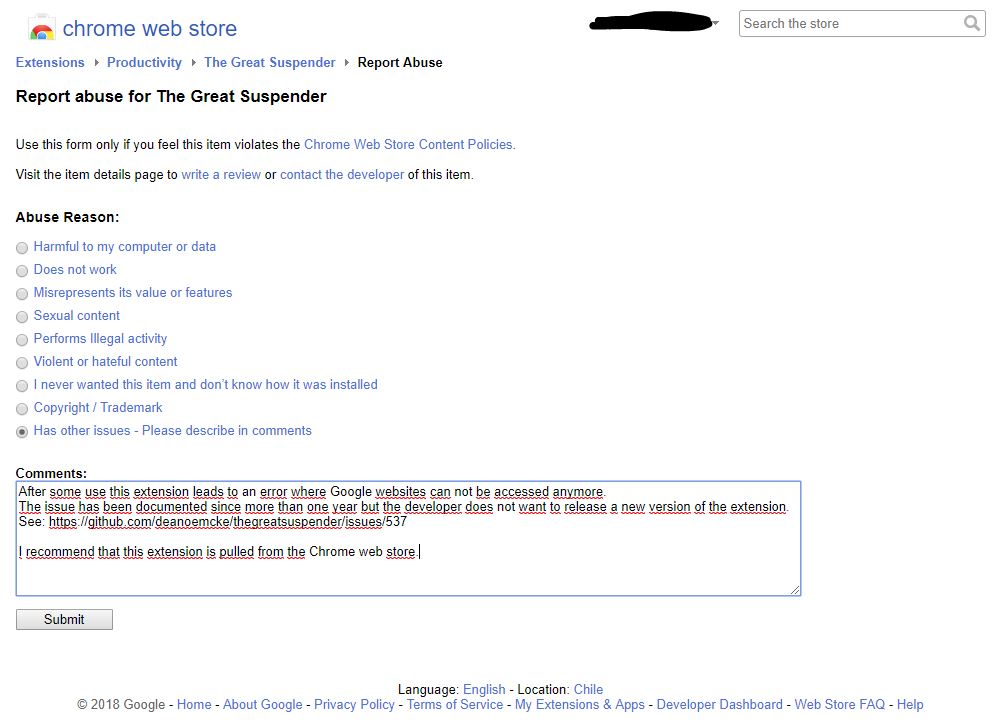
joekohlsdorf
on 5 Aug 2018
Last question: Was a separated release considered, e.g. The Great Suspender 2.0?
Good suggestion in my opinion.
AlexWayfer
on 5 Aug 2018
the problem still exists for all with tgs 1 however and releasing a 2.0 may delegitimise 1.0.
anyway its up to deano. if this is pulled for butchering google sites it'd be nice to know when 2 is up so i can stop getting this dumb developer tools message which i haven't looked into deeply enough to figure out how to get rid of yet...
edsilmon
on 6 Aug 2018
@edsilmon, yes, and anyone with this problem should be able to find that 2.0 exists. And 1.0 _should_ be delegitimised, since it has this bug, it will never be updated and is therefore effectively deprecated. It still works, but it is deprecated.
The description of version 2.0 could list important information about how to switch (unsuspend all tabs, etc.).
TiredFalcon
on 6 Aug 2018
That this issue is still unresolved on the webstore fills me with shame :(
It is now my highest life priority to resolve this asap (barring any unforeseen family emergencies).
My main reservation at this point is a lack of testing on the current dev version (if only i had unit tests).
I will give an update on this thread at the end of the week with a progress report.
Sorry once again everybody.
deanoemcke
on 6 Aug 2018
How is progress going? Excited for this fix.
 aamistak
on 13 Aug 2018
aamistak
on 13 Aug 2018
There is a new beta release available: https://github.com/deanoemcke/thegreatsuspender/releases/tag/v7.0-beta.94
I will spend the next few days testing this.
deanoemcke
on 13 Aug 2018
Will the tabs be recoverable after the update by the user in Chrome? If yes, after the update installs a page including recovery instructions could be opened.
 kabalage
on 14 Aug 2018
kabalage
on 14 Aug 2018
Chrome stores a list of open tabs in case it crashes. I wonder if an extension can access this list, and how often Chrome updates it. Maybe TGS could read it in right after the update and reopen any TGS tabs listed. We may get a couple extra tabs the user already closed, but that is certainly better than losing them all.
Pascal666
on 15 Aug 2018
All suspended tabs should be automatically recovered after the update. However, in practice I've found that there's always a few people for whom this process fails.
@kabalage: After the update, the extension should have saved a session of the tab state before the update. And there is some instructions directing the user to the session management page if they had any trouble with lost tabs.
There seems to be one other case where people also have all their saved and current sessions disappear. If this happens there's really nothing I can do. It would be a matter of going through your chrome history and trying to recover from there.
Of course, if you want to be safe, you can always install a session manager like session buddy. This should protect you from any tab loss as long as you use it to back up your tab sessions.
deanoemcke
on 15 Aug 2018
For me, this extension never even restores the scroll position on a page btw..
Boscop
on 15 Aug 2018
@Boscop use the latest version (you will have to manually install it as a developer tool) and don't forget to unsuspend all tabs before you do...
this is all explained many times in the posts above...
edsilmon
on 15 Aug 2018
But shouldn't the scroll position restoring also work with the current version?
Isn't that what the gsScrollPos cookie is used for?
Boscop
on 15 Aug 2018
If you leave the current version installed, and then install a beta version from GitHub, you can use these steps to switch the tabs from the current extension to the beta one without unsuspending them all (which in my case would make my laptop very sad): https://github.com/deanoemcke/thegreatsuspender/issues/689#issuecomment-413263494
Just don't uninstall the webstore version before switching the tabs. Otherwise you'll lose all of them.
 fwextensions
on 15 Aug 2018
fwextensions
on 15 Aug 2018
yes and it was disabled in the versuion you have -as a tempiorary fix. As is said before it is all explained in the posts abov. just search for the words (ctrl+f on windows...) or you can look at the versions that have been released and read the accompanying notes
edsilmon
on 15 Aug 2018
New beta release is out: https://github.com/deanoemcke/thegreatsuspender/releases/tag/v7.0-beta.103
Almost finished my testing script. Not expecting to find any more bugs at this point.
If all goes to plan then I'll release to a small portion of users tomorrow night 😬
There's a few outstanding github issues which worry me. But i've been unable to reproduce them so I'm hoping that they're not going to affect many people.
Feedback on these issues is welcome:
https://github.com/deanoemcke/thegreatsuspender/issues/706
https://github.com/deanoemcke/thegreatsuspender/issues/646
https://github.com/deanoemcke/thegreatsuspender/issues/659
https://github.com/deanoemcke/thegreatsuspender/issues/464
deanoemcke
on 21 Aug 2018
Wow! It's just automatically upgraded to v7.0.104 without loss of any data for me! Unbelievable! Great work, @deanoemcke. :heart:
AlexWayfer
on 23 Aug 2018
Upgraded to the store version (7.0.104) and had no issues. I did unsuspend all my tabs beforehand though, just to be sure.
Great work!
 sakishrist
on 23 Aug 2018
sakishrist
on 23 Aug 2018
Thanks for the feedback. I have rolled out to 5% of existing users. I will investigate a few possible issues and then continue the rollout to the rest.
There is a change that those of you who already have the update may receive another one very shortly. Apologies for this in advance.
The good news is the new version you now have has the ability to warn you before updating :D
deanoemcke
on 23 Aug 2018
I will investigate a few possible issues and then continue the rollout to the rest.
I realized that shortcuts (like Ctrl+Shift+S) were lost… But it's not critical for me.
AlexWayfer
on 23 Aug 2018
@AlexWayfer thanks. i suspect i know why that might be. i've created an issue to handle this: https://github.com/deanoemcke/thegreatsuspender/issues/726
deanoemcke
on 23 Aug 2018
For all those still waiting on a fix for this on the chrome webstore, I have rolled out the new release to a select group of users.
The feedback has been pretty good in general, but there's still some issues that i'm investigating which could be worth fixing before continuing the rollout to the rest of you.
If you want to get the current version from the webstore (v7.0.109) then you can force it to update by uninstalling and reinstalling the extension.
REMEMBER, make sure you unsuspend or backup all tabs before this! A session backup utility that saves suspended urls will be fine. And restoring a session of suspended urls will be significantly faster than unsuspending them all.
Just bear in mind if updating, that there will probably be a subsequent update forced out to you in the near future with a few (non-critical) bug fixes.
deanoemcke
on 29 Aug 2018
Which session backup utility allows restoring the tabs from the urls in the correct window configuration etc?
Is it correct that there won't be any automatic update that will cause us to lose any suspended tabs if we're still on the old version?
Boscop
on 30 Aug 2018
@Boscop if you're still on the old version from the Chrome webstore, it will eventually get automatically updated when it's enabled for a larger percentage of users.
fwextensions
on 1 Sep 2018
@Boscop Yeah, what @fwextensions said. There's no way to _not_ get an update of a chrome extension once it's available to you. This is true of all chrome extensions AFAIK.
There's also no guarantee that the update won't nuke your tabs or cause other weird behaviour (e.g. ordering of tabs changing). The vast majority of users will not experience these issues, but some people have and will. It's a problem that's tricky to avoid and is well documented in this repo.
My recommendation is to continue to use the web store version but have a tab backup system in place using another chrome extension, e.g. "Tabs Backup and Restore". That's not an official endorsement, I've never used it :)
If you're not OK with the risks associated with automatic chrome web store updates, you can run a dev version of the extension instead, and then only update it if/when you want to. Instructions to 'install as an extension from source' can be found here here:
https://github.com/deanoemcke/thegreatsuspender#install-as-an-extension-from-source
liamjohnston
on 1 Sep 2018
@fwextensions Does that mean when the new version is pushed to the Chrome extension store, it might cause my suspended tabs to be lost?
@liamjohnston Do you mean this one?
https://chrome.google.com/webstore/detail/tabs-backup-restore/dehocbglhkaogiljpihicakmlockmlgd
Will it also backup my suspended tabs so that I can restore them (as un-suspended tabs)?
Boscop
on 1 Sep 2018
@Boscop I believe that's the one others have recommended, yeah. I haven't had the need for it so I don't know.
As for whether it backs up suspended tabs, you'd need to experiment. Or someone else here may know more 😊
liamjohnston
on 1 Sep 2018
True however I've never had any extensions do this to tabs or cause this
much chaos.
I prefer to delete the cookies every once in a while than walk away for a
little bit and come back and tabs are gone.
I walked away to do something for an hour and came back and there was so
many tabs gone. The only think I did was lock the laptop.
On Fri, Aug 31, 2018, 11:11 PM Liam notifications@github.com wrote:
@Boscop https://github.com/Boscop Yeah, what @fwextensions
https://github.com/fwextensions said. There's no way to not get an
update of a chrome extension once it's available to you. This is true of
all chrome extensions AFAIK.There's also no guarantee that the update won't nuke your tabs or cause
other weird behaviour (e.g. ordering of tabs changing). The vast majority
of users will not experience these issues, but some people have and will.
It's a problem that's tricky to avoid and is well documented in this repo.My recommendation is to continue to use the web store version but have a
tab backup system in place using another chrome extension, e.g. "Tabs
Backup and Restore". That's not an official endorsement, I've never used it
:)If you're not OK with the risks associated with automatic chrome web
store updates, you can run a dev version of the extension instead, and then
only update it if/when you want to. Instructions to 'install as an
extension from source' can be found here here:https://github.com/deanoemcke/thegreatsuspender#install-as-an-extension-from-source
—
You are receiving this because you were mentioned.
Reply to this email directly, view it on GitHub
https://github.com/deanoemcke/thegreatsuspender/issues/537#issuecomment-417828499,
or mute the thread
https://github.com/notifications/unsubscribe-auth/AkJ1h5ETIzajLL17m5-ShyspsImxxpALks5uWfrNgaJpZM4N7oaM
.
dragonspirit1185
on 1 Sep 2018
Most chrome extensions don't do what The Great Suspender does, @dragonspirit1185
The gsScrollPos cookie bug was very serious. Only the very tech savvy would be able to find out how to fix it. And it was a pain for those people to have to continually fix it.
The issues you've experienced with the extension updating do not effect most people, and only occur when the extension updates. Though @deanoemcke has made updating less prone to failure, there's always going to be some risk. Updates will be kept top a minimum because of this, but be aware that the current webstore version is not the final version. There are more bugfixes to come that have come out of this partial rollout.
If you don't want to get unexpected updates, follow my suggestions further up:
https://github.com/deanoemcke/thegreatsuspender/issues/537#issuecomment-417828499
liamjohnston
on 1 Sep 2018
@Boscop please refer to this thread for information on recommended session backup extensions: #742
Although if you want a tldr;
- If you want a good well maintained extension for _manually_ making session backups, use Session Buddy. Just make sure you make a backup just before switching TGS from webstore version -> github version.
- If you want a non-maintained but still working extension for _automatically_ making session backups, use Tabs Backup and Restore (your webstore link is the correct one).
Neither of these extensions is going to be able to backup your tabs in an unsuspended state. However, as long as you have at least one version of TGS installed, then after reloading a saved session with suspended tabs, using the 'unsuspend all' button in TGS should reload all the suspended tabs, regardless of which version of TGS they were suspended from.
One final note. If you do want an export of all the original urls, you can the the 'Session management' feature of The Great Suspender to do this. It will export original urls only - not suspended ones. These exports should be compatible for import into other session managers as it exports simply as one url per line with windows separated by an extra newline.
deanoemcke
on 2 Sep 2018
I don't understand why this bug has persisted for over a year.
It's as simple as creating an exclusion for Google-related sites, a blacklist, that doesn't write gsScrollPos entries.
Is there any reason why this hasn't been fixed for year that actually makes sense?
 DFNCTSC
on 3 Sep 2018
DFNCTSC
on 3 Sep 2018
@DFNCTSC actually, the simpler fix is just to not use cookies at all to store this information.
There's a couple of reasons i can give you for the delay. I'm not saying I made the right choices, and it's up to you whether they make sense or not.
Firstly, updating this extension is hell for the users. See #526 for an illustration of this. This means that i try to keep updates down to a minimum (zero ideally). So I do not take updates lightly, and while coding the fix is trivial, releasing it is not.
Having this in mind, when I went to produce a 'fixed' version, I wanted to also fix as many other things as i could at the same time, to keep the updates required down to just 1 for the majority of users.
The reality is that there was some scope creep, and bugfixing turned into refactoring, and some extra features being added which produced additional bugs.
Add to that, that this is mostly a one-man project and I have a full time job and kids. And voila, here we are one year later.
As I've mentioned before, this issue has weighed on me pretty heavily for the past year. So I'm really glad to see it finally getting across the mark. But I realise 1 year is a pretty ridiculous amount of time to have taken.
deanoemcke
on 4 Sep 2018
@deanoemcke Thanks for the reply. I appreciate all your work and taking into consideration the situation others can find themselves in. TGS definitely helps a lot of people manage their computer usage. Glad to see things moving in a positive direction now. :)
DFNCTSC
on 4 Sep 2018
I posted this on #573 before realizing it was a duplicate of this. I created a userscript (for tampermonkey/greasemonkey) which deletes gsScrollPos-X cookies when you load a page. It's available here if any of you think it would be helpful.
 Ratismal
on 6 Sep 2018
Ratismal
on 6 Sep 2018
@deanoemcke After I update to the new webstore version (via uninstall/reinstall), will the next "non-critical" update also cause us to lose our suspended tabs?
 bro3234
on 8 Sep 2018
bro3234
on 8 Sep 2018
@bro3234 it shouldn't cause you to lose tabs, but there's a chance. This is why IMO you're best to wait until the next (hopefully final for a while) version is released and makes it to you, to save going through the update process more times than necessary.
liamjohnston
on 8 Sep 2018
@liamjohnston Kind of figured that but I couldn't wait. Hopefully, we'll get some kind of warning again like this time.
bro3234
on 8 Sep 2018
@bro3234 Have you considered using something like Session Buddy to export the session? It's fairly easy to get the URL out of a suspended tab in the Session Buddy export, and actually generally just works (i.e. click the link in Session Buddy and it opens the suspended tab, still suspended and will properly reload when clicked, etc. -- anecdotal, of course.
brennebeck
on 15 Sep 2018
@brennebeck I do use Session Buddy. Didn't realize that it saved suspended tabs too though. Thanks for the tip.
bro3234
on 15 Sep 2018
@bro3234 yup, it does. And I expect it should for most others, but YMMV, of course. 👍
brennebeck
on 17 Sep 2018
@bro3234 yup, it does. And I expect it should for most others, but YMMV, of course. 👍
works great for me. every single time.
kalyanac
on 17 Sep 2018
@bro3234 @kalyanac just a heads up with session buddy. for me it fails to backup automatically. it seems to only backup when chrome is restarted, which is often quite out of date.
see this issue thread for more information on alternative session backup extensions: #742
deanoemcke
on 17 Sep 2018
@deanoemcke Thanks. I'll check that out.
bro3234
on 18 Sep 2018
@deanoemcke thanks for that. I was unaware, actually. (I've mostly switched to FF Dev for daily use now.)
brennebeck
on 19 Sep 2018
For those with many chrome windows, make sure to check beforehand if your backup utility not only keeps tabs but also order and windows, else you will end up with 800 tabs in one windows like this:

 Kiina
on 27 Nov 2018
Kiina
on 27 Nov 2018
For those with many chrome windows, make sure to check beforehand if your backup utility not only keeps tabs but also order and windows, else you will end up with 800 tabs in one windows like this:
I suggest using Session Buddy to avoid this problem. It allows to save windows (or also not) and to export save files.
TiredFalcon
on 27 Nov 2018
I suggest using Session Buddy to avoid this problem. It allows to save windows (or also not) and to export save files.
Well I tried the build in session manager because
These exports should be compatible for import into other session managers as it exports simply as one url per line with windows separated by an extra newline.
but turns out it just exported one long file without any newlines for new windows.
Kiina
on 27 Nov 2018
@Kiina what i meant by that was that the data in the export is very basic and easily interpretable by other session managers. i do not expect them however, to automatically interpret an extra newline as a new browser window.
you could manually fix this by editing the session backup and putting each group of tabs into its own file, and then importing them one file at a time.
either that, or reimport the file with the great suspender. it will interpret the file correctly.
deanoemcke
on 28 Nov 2018
either that, or reimport the file with the great suspender. it will interpret the file correctly.
I did exactly that, didn't work. Guess the export didn't correctly add the newline
Kiina
on 28 Nov 2018
The gscrollpos bug was a constant problem for me, I thought it was google that had the bug...
WRT backing up sessions, this works fairly well:
- Move all your tabs to a single window (I use Tab Organizer to do this quickly)
- Suspend all tabs (right click, suspend other tabs)
- Bookmark all tabs to a new folder (Bookmarks -> Bookmark All Tabs...)
- To restore tabs, open bookmarks manager and hit "Open all tabs in new window"
 ibash
on 9 Dec 2018
ibash
on 9 Dec 2018
Why are cookies used on all these sites to restore the scroll position? It makes no sense to me, and it's super annoying. It could easily be set in the url, where it belongs.
I don't even care about the scrollposition for suspended tabs.
 jrz
on 2 Jan 2019
jrz
on 2 Jan 2019
@jrz search this thread for posts by the addon author. afaik it's 10+ years old and the author was a noob when they made it the first time 🙃 you're welcome
edsilmon
on 2 Jan 2019
so has this issue been fixed in the latest store version yet? or will it continue to nuke youtube? I've seen reviews claiming it is fixed
 noahbaxter
on 3 Jan 2019
noahbaxter
on 3 Jan 2019
It's fixed in the current dev version, AND the latest web store version. However, most people aren't on the latest web store version yet because the rollout isn't complete. The dev wants to iron out the last of the major issues (and test) before rolling out to all users.
If you don't want to wait: you can uninstall and reinstall the program extension from the web store to get the latest version with this fix. However be sure to unsuspend or backup all suspended tabs first, or they'll disappear when you uninstall.
liamjohnston
on 3 Jan 2019
@liamjohnston Thanks for the tip. I was running version 6.3 and by removing and installing I'm up to version 7. It seems really odd workaround that it is actually fixed but doesn't get rolled out automatically.
 krisdahl
on 21 Jan 2019
krisdahl
on 21 Jan 2019
@krisdahl did you read liam's comment?!
edsilmon
on 21 Jan 2019
@krisdahl did you read liam's comment?!
Yeah. I understand the issue.
I just think it is lame that multi-year old bugs are actually fixed, but can't be shipped. I think it is more important to roll out bug fixes, and communicate the issue of losing the tab state. Or bite the bullet to fix the tab state on rollouts (sounds like easier said than done).
But between choices of having known bugs or losing my tabs? I'd rather have the bug fixes.
krisdahl
on 22 Jan 2019
@krisdahl Unfortunately there isn't a way to communicate with people. There's some 'update warning' functionality like this built into the _new_ version, but there's still no guarantee people will see/read it before the update happens. And people on the old (6.x) verison won't see this on their next update. The vast majority of TGS users are normal webstore folks, not Github lurkers.
Only a small percentage of people experience tab loss during an update. The last webstore update was only updated for 5% of webstore users as a trial. But a small percentage of 5% of 1.5m people is still a lot of people, and so it still turns into a shitstorm.
I understand it's frustrating but, but there's a lot of responsibility on the dev's shoulders and it this isn't his full time job. Please bear with us.
liamjohnston
on 22 Jan 2019
I just got a 431 error (headers too big) trying to post an annotation on the Halfbakery due to dozens of gsScrollPos cookies. After deleting them it worked fine. So, in case anybody is seeing an HTTP 431 response instead of 400 like OP did, this could be the cause of that too.
 pointyointment
on 3 Feb 2019
pointyointment
on 3 Feb 2019
Is tab loss the only problem with rolling out an upgrade? Are there other problems?
IS there an issue for the tab loss bug?
ibash
on 3 Feb 2019
afaik there's were some other bug fixes so technically yes there were/are other problems but the biggest dealbreaker is fixed and there's no tab loss issue at all if you use the tab saver thing also from these guys. it's all in the text above anyway if you just search for comments by deano
edsilmon
on 3 Feb 2019
@ibash @edsilmon There have been some other breaking changes since this issue first appears, due to changes in chrome. Most notably, around the favicons not updating and every tab having the default extension icon as it's favicon.
The codebase has been quite significantly rewritten since then, which has introduced it's own host of new bugs. These have mostly been resolved now and I'm currently trying to get this new release out once and for all.
deanoemcke
on 4 Feb 2019
@deanoemcke that's great to hear. Might I suggest you create a github milestone?
That should make it far easier for everyone to track the progress towards the final release, and even make it easier for people wanting to help get the release out there figure out what they can work on, since the milestone would contain what you're requiring to be finished for the new release.
Following that, you could make a final comment on this issue linking to said milestone (ideally along with a summary of the whys behind the big delay, since currently the explanations are fragmented and mixed in among the 250+ comments), and then lock the conversation to prevent anymore "wtf is it not released yet?!" style messages :)
For bonus points, you could attach a deadline to the milestone, as I'd imagine that would please the community greatly.
 G-Rath
on 4 Feb 2019
G-Rath
on 4 Feb 2019
i learned that ctrl+tab switches between tabs because of the favicon bug and adding shift reverses lol. i've just been holding it down for a few seconds to scroll through all my tabs...
edsilmon
on 4 Feb 2019
There is now a milestone for the upcoming release that contains a fix for this youtube issue (and many others): https://github.com/deanoemcke/thegreatsuspender/milestone/1
@G-Rath thanks :)
deanoemcke
on 6 Feb 2019
Related issues
 geirman
·
4Comments
geirman
·
4Comments
 ducc-coder
·
3Comments
ducc-coder
·
3Comments
 yuanstanley
·
4Comments
yuanstanley
·
4Comments
 brycenesbitt
·
4Comments
brycenesbitt
·
4Comments
 spmedia
·
4Comments
spmedia
·
4Comments
Most helpful comment
Hi. Sorry for the delay on this. I can confirm that it is indeed an issue caused by how the scroll position is recorded in the cookie (exactly as @mike-athene described).
The cookie will get cleared on a browser restart, unless you have the 'continue where i left off' setting checked in chrome.
The workaround for now (in the case of youtube) is to go to
chrome://settings/content/cookiesand typewww.youtube.comin the 'search cookies' box, and then click on the trashcan to delete.It would be nice to get some idea of how badly this is affecting average users. Are their any other sites that have similar issues?
I will work on a fix asap. I'm not sure just yet when that will find it's way into the chrome webstore. That depends on a few other changes that will be bundled into the same release.