Theano: configuring systems GPU for Theano crashes
Hello,
I am very new to theano and working on gpu.
However, I have managed to follow the instructions given here https://lepisma.github.io/2015/07/30/up-with-theano-and-cuda/. Attached is my theanorc file .theanorc.txt.
When I 'import theano' it crashes and I get something like this. (see the picture attached)

My versions:
Theano 1.0.0rc1
pygpu 0.6.9
Not able to install pycuda (raise SSLError(e, request=request)
requests.exceptions.SSLError: HTTPSConnectionPool(host='www.lfd.uci.edu', port=443): Max retries exceeded with url: /~gohlke/pythonlibs/ (Caused by SSLError(SSLError("bad handshake: SysCallError(-1, 'Unexpected EOF')",),))
I am working on windows 10.
Your help is appreciated.
Regards
Pranita
 pranitapradhan91
All 9 comments
Hi. First of all, there are more up-to-date installations instructions on Theano website : http://deeplearning.net/software/theano_versions/dev/install_windows.html
(you should not need to install neither pycuda nor Visual Studio with the latest theano version)
Also, 2 other remarks:
- To get a compiler, the recommended conda package is
m2w64-toolchaininstead ofmingw - pygpu
0.6.9is too old and should not work with theano1.0.0rc1. The latest pygpu version is0.7.4and can be installed via conda channelmila-udemwith following command:
conda install -c mila-udem pygpu
Could you retry to install with updated instructions and then check if you still have problems ?
 notoraptor
on 7 Nov 2017
notoraptor
on 7 Nov 2017
Thank you for your quick help.
Below I have explained the ways I tried from the link you sent and also your suggestions.
- First thing tried (without pygpu)
PACKAGES VERSION
python 2.7.14
numpy 1.12.0
scipy 1.0.0
m2w64-toolchain 5.3.0
mkl-service 1.1.2
Theano 1.0.0rc1
import theano
error--- no module numpy
- Second thing (without pygpu and updated numpy)
PACKAGES VERSION
python 2.7.14
numpy 1.13.0
scipy 1.0.0
m2w64-toolchain 5.3.0
mkl-service 1.1.2
Theano 1.0.0rc1
import theano
WARNING (theano.tensor.blas): Using NumPy C-API based implementation for BLAS functions.
But does not work with gpu yet.
- Third thing (installed pygpu 0.7.4, this updated numpy to 1.13.3)
PACKAGES VERSION
python 2.7.14
numpy 1.13.3
scipy 1.0.0
m2w64-toolchain 5.3.0
mkl-service 1.1.2
Theano 1.0.0rc1
import theano
RuntimeError: To use MKL 2018 with Theano you MUST set "MKL_THREADING_LAYER=GNU" in your environement.
How can I do this?
Fourth thing (installed Theano==0.9.0 with conda)
PACKAGES VERSION
python 2.7.14
numpy 1.13.3
scipy 1.0.0
m2w64-toolchain 5.3.0
mkl-service 1.1.2
Theano 0.9.0
import theano
works without error, however does not use gpu. And when I run theano.test() I get following errors (.txt file attached).
errors.txt
*Everything was done in a virtual environment and .theanorc.txt file was same as in my earlier comment and was kept in home directory.
Is there anything I am still failing to do?
Waiting for suggestions. Thank you in advance.
Best,
Pranita
pranitapradhan91
on 7 Nov 2017
You should go with the third thing:
Third thing (installed pygpu 0.7.4, this updated numpy to 1.13.3)
PACKAGES VERSION
python 2.7.14
numpy 1.13.3
scipy 1.0.0
m2w64-toolchain 5.3.0
mkl-service 1.1.2
Theano 1.0.0rc1
About the error:
import theano
RuntimeError: To use MKL 2018 with Theano you MUST set "MKL_THREADING_LAYER=GNU" in your environement.
It is related to a bug recently found with latest versions of mkl package. You just need to set the environment variable as suggested by the error message. On a command line:
set MKL_THREADING_LAYER=GNU
Or via Windows Control Panel (set system environment variables), create a system variable named MKL_THREADING_LAYER with value GNU.
Also, to run theano.tests(), you may need to install package parameterized via pip:
pip install parameterized
NB: From your theanorc:
[global]
floatX = float32
device = cuda
mode=FAST_RUN

[cuda]
root = C:\Program Files\NVIDIA Corporation\Installer2\CUDAToolkit_9.0.{AE85B8EA-C063-4E5E-B333-151BFFB28009}


[nvcc]
flags = -LC:\Users\si62qit\AppData\Local\Continuum\Anaconda2\libs
compiler_bindir = C:\Program Files (x86)\Microsoft Visual Studio 14.0\VC\bin
fastmath = True
If CUDA is correctly installed, you should not need [cuda] and [nvcc] sections. Consider having just this code into your theanorc:
[global]
floatX = float32
device = cuda
Thank you.
This worked. But now I face another problem which is similar to the issue
https://github.com/Theano/Theano/issues/5768

Therefore I changed my .theanorc file
.theanorc.txt
Any suggestions? Waiting for reply.
Regards
Pranita
pranitapradhan91
on 7 Nov 2017
Have you already downloaded and installed cuDNN in any directory ? If not, it seems you need it.
If so, you may need to tell Theano where to find cuDNN libraries and headers, with config variable dnn.base_path. In theanorc, add these lines:
[dnn]
base_path=C:\Users\notoraptor\data\libraries\cudnn-8.0-windows10-x64-v7.0.3\cuda
(replace value of base_path with path to folder when you have installed cuDNN).
notoraptor
on 7 Nov 2017
Thank you for the reply.
I installed cuDNN. So basically here is what I did.
- cudnn64_7.dll file is kept in C:Program FilesNVIDIA GPU Computing ToolkitCUDAv9.0bin
- cudnn.h is kept in C:Program FilesNVIDIA GPU Computing ToolkitCUDAv9.0include
- cudnn.lib is kept in C:Program FilesNVIDIA GPU Computing ToolkitCUDAv9.0libx64
Is this correct? Also .theanorc file remained same. As I included cuDNN in the toolkit folder as shown above.
.theanorc.txt
And now it runs.
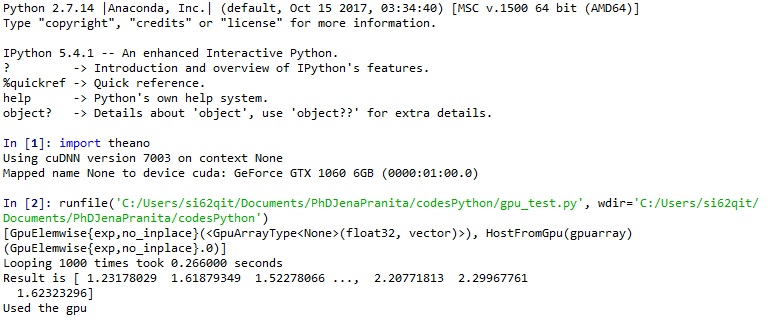
Thank you very much for your help.
pranitapradhan91
on 8 Nov 2017
Yes, it should be correct, now. But your cuda root seems quite strange in your theanorc (C:\Program Files\NVIDIA Corporation\Installer2\CUDAToolkit_9.0.{AE85B8EA-C063-4E5E-B333-151BFFB28009}).
If you encounter some problems in the future, consider simplifying the theanorc file as I suggested above.
notoraptor
on 8 Nov 2017
@notoraptor
In a virtual environment created by conda, I have almost exact versions of these libraries as in the previous post:
python 2.7.14
numpy 1.13.3
scipy 1.0.0
m2w64-toolchain 5.3.0
mkl-service 1.1.2
Theano 1.0.1
pygpu 0.7.5
However I still have the warning message: Using NumPy C-API based implementation for BLAS functions.
At this stage, I did not use a theanorc file yet. I'm on Windows.
Any idea how to fix my issue?
Thanks!
 wqp89324
on 30 Mar 2018
wqp89324
on 30 Mar 2018
Related issues
 asimkievich
·
7Comments
asimkievich
·
7Comments
 aloctavodia
·
8Comments
aloctavodia
·
8Comments
 lucianopaz
·
8Comments
lucianopaz
·
8Comments
 aditsanghvi94
·
3Comments
aditsanghvi94
·
3Comments
 aviveise
·
6Comments
aviveise
·
6Comments
Most helpful comment
You should go with the third thing:
About the error:
It is related to a bug recently found with latest versions of
mklpackage. You just need to set the environment variable as suggested by the error message. On a command line:Or via Windows Control Panel (set system environment variables), create a system variable named
MKL_THREADING_LAYERwith valueGNU.Also, to run
theano.tests(), you may need to install packageparameterizedvia pip: