The-turing-way: Improvements to zero-to-binderhub workshop
Summary
After going through the instructions of the workshop Zero-to-BinderHub, I have compiled a series of comments. Some are just suggested improvements, others are typos/errors, others are things that might not work as expected, depending on the platform/software used:
What needs to be done?
Suggestions
While the workshop is not intended to be stand-alone material, it will be useful to give a little bit of background information, in particular:
- [x] why it might be useful to create your own BinderHub rather than using mybinder.org, for example. What's the use case for creating your own BinderHub?
- [x] a high level description on what is to be done to have this up and running, i.e., the big picture of the following sections. This is not given even in the BinderHub Docs, except in one brief sentence. What's Kubernetes used for? Why is it needed? And Docker? And JupyterHub (this is the only obvious one)? How do these things relate to each other?
Things that might not work as expected
DEPLOYING KUBERNETES CLUSTER ON AZURE
- [x] STEP 1:
az login --output nonemight not actually log in if you don't have a subscription, even if you successfully go through the login process via de Browser (tested with Safari). No idea why. My workaround for this was doing the login in the CL withaz login -u your_user_nameand then writing your password. - [x] STEP 5: This step seems to create two other different resource clusters that the one created in STEP 3. After following these two steps to the letter, I have in my Azure
testhub,NetworkWatcherRGandMC_testhub_hubcluster_westeuroperesource clusters.
TEARING DOWN YOUR BINDERHUB DEPLOYMENT
- [x] STEP 3: As there are more resource groups than expected, one of them,
NetworkWatcherRGis not deleted in this step.
Errors/Typos
- [x] STEP 2: The commented line
"s/<jupyter-ip>/${jupyter_ip}/"should go AFTER theconfig-template.yaml > config.yaml, otherwise thesedcommand hangs. In STEP 4, after setting the IP, that line, uncommented, has to be put back before the config-template line.
Who can help?
- @sgibson91
Updates
Lorem ipsum dolor sit amet, consectetur adipiscing.
 dalonsoa
All 10 comments
STEP 3. After following these two steps to the letter, I have in my Azure testhub, NetworkWatcherRG and MC_testhub_hubcluster_westeurope resource clusters.
Yeah, I don't know why that happens and neither does @trallard. @leestott any ideas why this happens? Most of the time they are empty resource groups, you can just delete them - either through the portal or with az group delete <group-name>.
 sgibson91
on 21 May 2019
sgibson91
on 21 May 2019
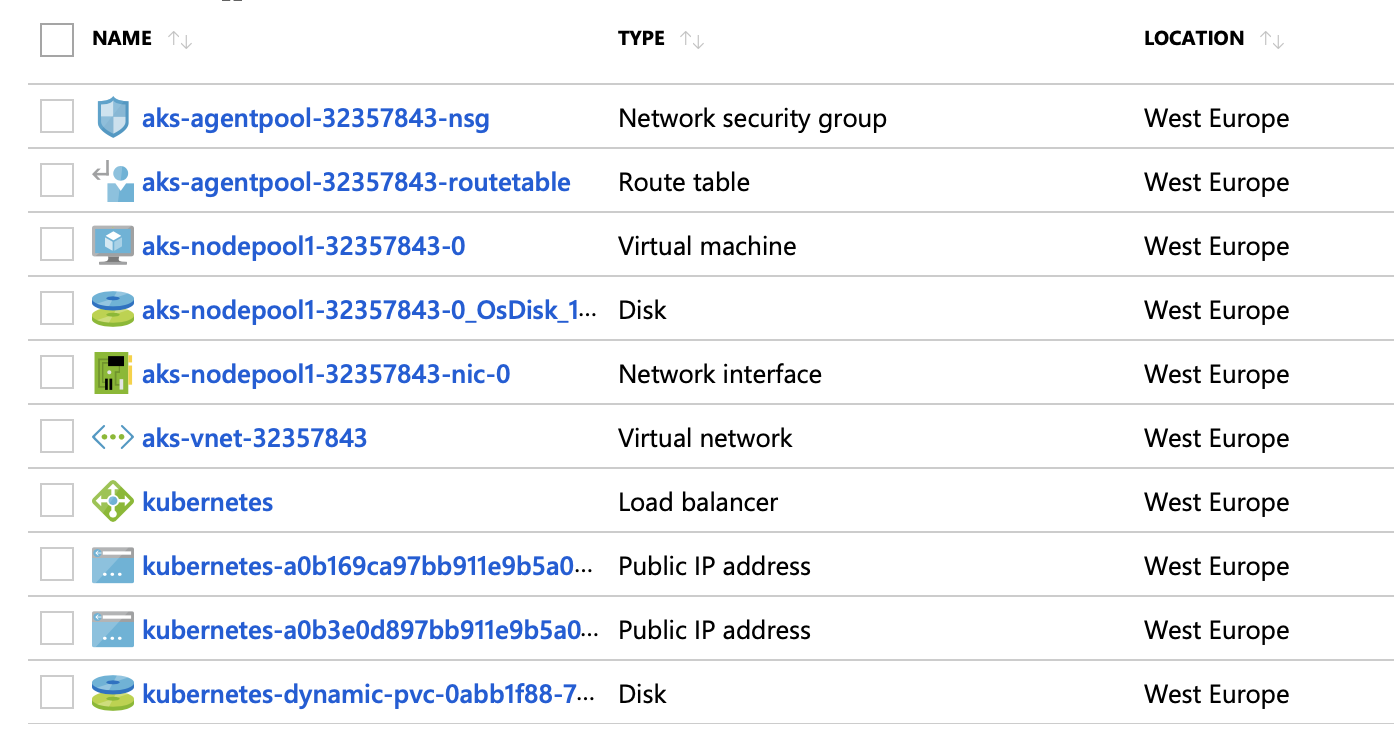
This is my MC_testhub_hubcluster_westeurope cluster. Certainly not empty. NetworkWatcherRG is indeed empty.
dalonsoa
on 21 May 2019
Oh yes, MC won't be empty, I don't know why it's created separately though. However, it will be deleted when you delete the resource group that contains the Kubernetes Service. NetworkWatcher can be safely deleted. Sometimes a group called DefaultResourceGroup_<location> is created too. It's quite annoying that these extra groups come out of nowhere.
sgibson91
on 21 May 2019
Comments from Lee and Antony are that these resource groups are created with the idea that you will be extending your service in the future, which may be applicable in other Azure cases but not the BinderHub case. Antony will raise an enhancement request with the product team that these resources should be logically linked to the service that created them in such a way that they can be automatically deleted with the main resource group making tidying up after a service much easier.
sgibson91
on 21 May 2019
I also want to say THANK YOU for going through this and having such amazing feedback, it's really helpful! ✨
sgibson91
on 21 May 2019
- [ ] a high level description on what is to be done to have this up and running, i.e., the big picture of the following sections. This is not given even in the BinderHub Docs, except in one brief sentence. What's Kubernetes used for? Why is it needed? And Docker? And JupyterHub (this is the only obvious one)? How do these things relate to each other?
I'm going to link to these docs in PR #531
sgibson91
on 23 May 2019
@all-contributors please add @dalonsoa for ideas, review
sgibson91
on 23 May 2019
@sgibson91
I've put up a pull request to add @dalonsoa! :tada:
![allcontributors[bot] picture](https://avatars0.githubusercontent.com/in/23186?v=4&s=40) allcontributors[bot]
on 23 May 2019
allcontributors[bot]
on 23 May 2019
@all-contributors please add @dalonsoa for ideas, review
sgibson91
on 24 May 2019
@sgibson91
I've put up a pull request to add @dalonsoa! :tada:
allcontributors[bot]
on 24 May 2019
Related issues
 KirstieJane
·
4Comments
KirstieJane
·
4Comments
 malvikasharan
·
3Comments
malvikasharan
·
4Comments
malvikasharan
·
5Comments
malvikasharan
·
3Comments
malvikasharan
·
4Comments
malvikasharan
·
5Comments
 annakrystalli
·
3Comments
annakrystalli
·
3Comments
Most helpful comment
I also want to say THANK YOU for going through this and having such amazing feedback, it's really helpful! ✨