The-seo-framework: Having small ? inside black circles for hovertips?
I am now on the SEO Settings - General Settings - Layout.
Looking at SEO Bar Settings. Wondering if I should click the Display the SEO Bar in the SEO Settings metabox. Through out the settings there could be small black circles with ? in them. Hovering over these can bring up a tool tip help text. OR just hovering over the text could bring up a tooltip. So lets say that I hovered over "Display the SEO Bar in the SEO Settings metabox" then at tooltip could show up giving extra info.
Hmm I am hesitant with the above suggestion. As it might not look that good visually.
 paaljoachim
All 7 comments
I've been playing with such elements in extensions:
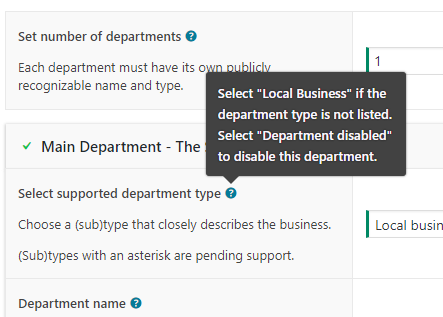
I do think all those circles will be overwhelming (i.e. seen as bloat) by some users.
That said, the tooltips you speak of are being shipped with 3.0 😄
 sybrew
on 17 Nov 2017
sybrew
on 17 Nov 2017
Personally, I don’t think there is such a thing as “too much help” when it comes to SEO. TSF caters to various users with widely different levels of expertise. One clear downside is that the sheer amount of tooltips piles up new strings for translators, potentially hindering the initial adaptation of TSF among non–English speakers.
 LeBaux
on 17 Nov 2017
LeBaux
on 17 Nov 2017
@LeBaux From TSF 3.0 only 559 strings are translatable ☺️
sybrew
on 17 Nov 2017
Good to hear that tooltips will be included in 3.0!..:)
paaljoachim
on 17 Nov 2017
I've played with the Dashicons as a replacement, and they'll be very overwhelming:
- There will be many of them.
- WordPress' flat and generic layout doesn't play nicely with inline bold icons.
We might ever replace them with intuitive links, like within explanatory sentences.
Alternatively, we need to update the layout to what the Extension Manager is using, which isn't generic. Now, the rise of Gutenberg's new interface will be another great starting point.
I'm closing this indefinitely as the proposed implementation doesn't fit within the current layout. We'll see where the road will lead us when we change the complete layout.
sybrew
on 9 Aug 2018
Hey Sybre. Put me on your beta/alpha testing list as I would like to help out. I do have feedback in regards to the extension page as it just feels to tight. I will look into it and create an issue for it.
paaljoachim
on 10 Aug 2018
There will be a beta announcement made via Twitter. Details will follow 😃
sybrew
on 10 Aug 2018
Related issues
 samburgers
·
6Comments
sybrew
·
5Comments
samburgers
·
6Comments
sybrew
·
5Comments
 tescz
·
3Comments
sybrew
·
6Comments
tescz
·
3Comments
sybrew
·
6Comments
 nateonawalk
·
6Comments
nateonawalk
·
6Comments