Thanos: [Compact] Downsampled blocks still exist after disabling + setting a low retention
- Environment: Debian Buster on a Linux AMD64 host
- Storage: Ceph bucket
- Thanos version: v0.12.2
- Go version: 1.14
I run multiple Prometheus to scrape a sharded Consul catalog (using Prometheus' hashmod relabel config), and I use Thanos to present a whole query view on the shards. I'm not interested in long term retention (older than 30d) - I'm using Thanos + Ceph since my usecase is that at our org, the most recent 30d of metrics is growing fast and it's easier to add disks to Ceph than to upgrade the SSD capacity on Prometheus pollers one at a time.
This has been working very well so far.
I recently learned I inadvertently created lots of space use in the bucket by running the compactor with the following settings:
--retention.resolution-raw=30d \
        --retention.resolution-5m=30m \
        --retention.resolution-1h=30m \
I've read the docs/github issues on downsampling (and why it's recommended to not disable it), and I'm agreeing the most with this use case:
Since object storages are usually quite cheap, storage size might not matter that much, unless your goal with thanos is somewhat very specific and you know exactly what you're doing.
The docs mention downsampling may occupy 3x space, and my Ceph bucket reached 40TB used, so I needed to immediately save on space.
So, anyway, let's assume I'm justified in picking these new settings to get rid of downsampled blocks, and only keep 30d raw:
--retention.resolution-raw=30d \
        --retention.resolution-5m=1m \
        --retention.resolution-1h=1m \
        --downsampling.disable \
        --delete-delay=0s \
After running with this, and letting the compactor delete marked blocks, the 40TB used dropped to 27TB - a big improvement.
However, I still see downsampled blocks in the thanos bucket web tool:
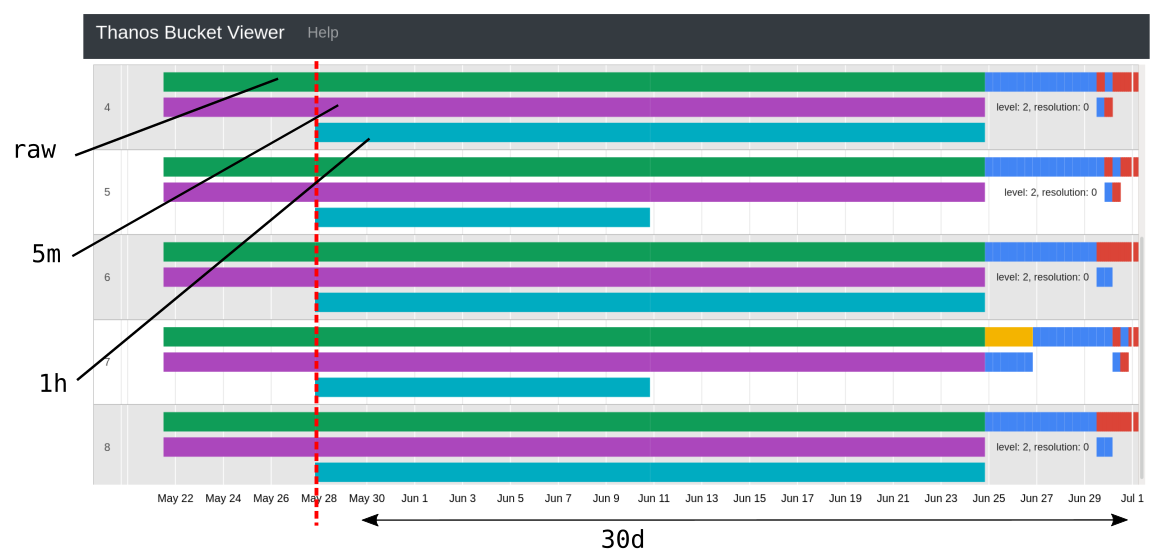
Should those be deleted as well? As my 5m/1h retentions are both 1m?
 sevagh
All 3 comments
Hi! Setting the retention periods to such low times means that the blocks will _still be_ produced however they will be deleted almost immediately after being produced. However, the old ones should be deleted AFAIK. Could you please paste the maxTime of those 1h / 5m blocks + the current date on the machine that runs Thanos Compactor?
 GiedriusS
on 1 Jul 2020
GiedriusS
on 1 Jul 2020
Sure. The date of the host running the compactor is:
$ date
Wed 01 Jul 2020 01:31:04 PM PDT
I've attached a txt file with thanos bucket inspect command output, showing the same blocks from the screenshot.
compact_output.txt
sevagh
on 1 Jul 2020
@GiedriusS thanks for taking a look
In fact I ran a new deletion only* run of the compactor today, and it took care of these blocks. Problem solved:
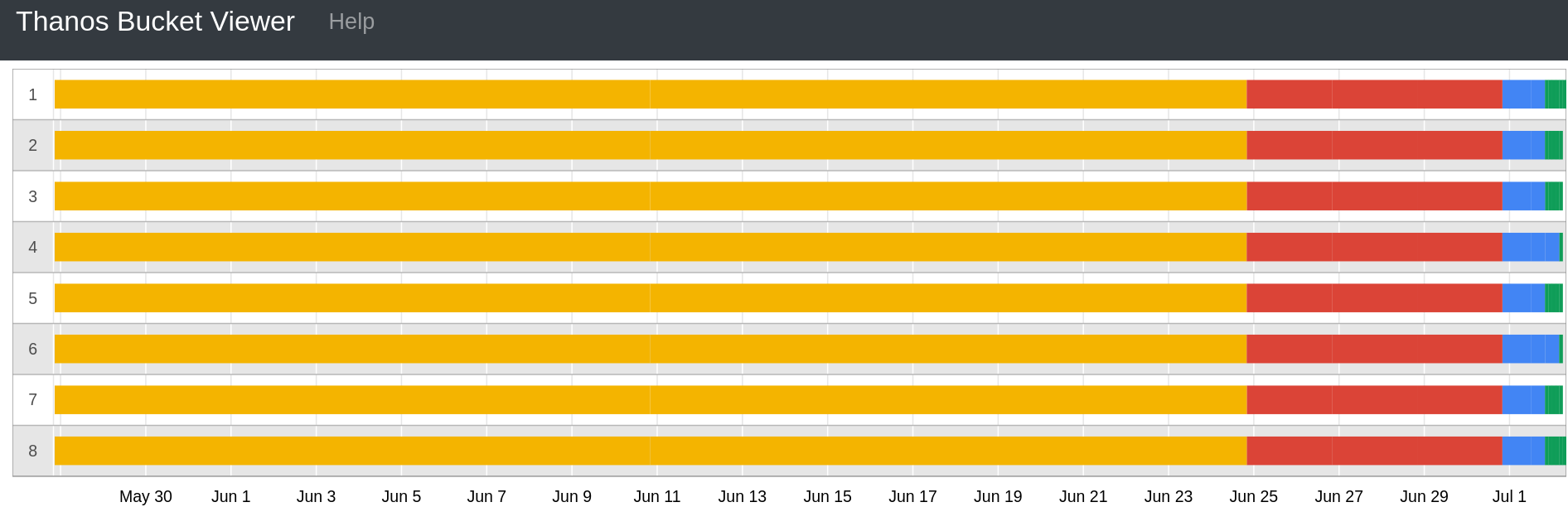
I believe after the normal compactor finished its compactions, it would have corrected the situation (since its this compactor which marked the blocks for deletion in the first place).
So really the problem here is similar to https://github.com/thanos-io/thanos/issues/2605 - on big buckets, the compaction takes a long time until any deletions are done.
*: https://github.com/thanos-io/thanos/issues/2605#issuecomment-652193438
This is my description of the "deletion only" compactor, it's pretty simple.
I'm using systemd to create mutually conflicting services so that I don't create race conditions.
Normal compactor:
[Unit]
Description=Thanos Compactor
Conflicts=thanos-compact-delete.service

[Service]
ExecStart=/opt/prometheus2/thanos compact \
        --data-dir=/thanos-compact \
        --objstore.config-file=/etc/prometheus2/thanos_bucket_config.yml \
        --http-address=0.0.0.0:10910 \
        --retention.resolution-raw=30d \
        --retention.resolution-5m=1m \
        --retention.resolution-1h=1m \
        --downsampling.disable \
        --delete-delay=0s \
        --wait
LimitNOFILE=65536
Deletion-only (oneshot, intended to run in a space-saving emergency):
[Unit]
Description=Thanos Custom Compactor/Deleter
Conflicts=thanos-compact.service

[Service]
ExecStart=/opt/prometheus2/thanos-custom-compactor compact \
        --data-dir=/thanos-compact \
        --objstore.config-file=/etc/prometheus2/thanos_bucket_config.yml \
        --retention.resolution-raw=30d \
        --retention.resolution-5m=1m \
        --retention.resolution-1h=1m \
        --downsampling.disable \
        --compacting.disable \
        --delete-delay=0s
Type=oneshot
LimitNOFILE=65536
Related issues
 gburek-fastly
·
4Comments
gburek-fastly
·
4Comments
 pstibrany
·
4Comments
pstibrany
·
4Comments
 bwplotka
·
4Comments
bwplotka
·
4Comments
bwplotka
·
4Comments
bwplotka
·
4Comments
 MrD2
·
3Comments
MrD2
·
3Comments
Most helpful comment
@GiedriusS thanks for taking a look
In fact I ran a new deletion only* run of the compactor today, and it took care of these blocks. Problem solved:

I believe after the normal compactor finished its compactions, it would have corrected the situation (since its this compactor which marked the blocks for deletion in the first place).
So really the problem here is similar to https://github.com/thanos-io/thanos/issues/2605 - on big buckets, the compaction takes a long time until any deletions are done.
*: https://github.com/thanos-io/thanos/issues/2605#issuecomment-652193438
This is my description of the "deletion only" compactor, it's pretty simple.
I'm using systemd to create mutually conflicting services so that I don't create race conditions.
Normal compactor:
Deletion-only (oneshot, intended to run in a space-saving emergency):