Tf-pose-estimation: 3d human pose from tf-pose-estimation
@ildoonet thanks for the great work, there is now the possibility to estimating 3d human poses by using the 2d estimated output from forked _tf-pose-estimation_ in 3d-pose-basline, check simple change diff for more information
thx
 ArashHosseini
All 56 comments
@ArashHosseini
hi, i had changed those .py follow yours, and there is still no json file. can you tell me what i should do?
 highway007
on 12 Feb 2019
highway007
on 12 Feb 2019
@highway007 what is the your command?
ArashHosseini
on 12 Feb 2019
@ArashHosseini
thx for reply...my mistake was that i didn't use the absolute path(output_json)
now i got json file recording 'pose_keypoints_2d' not 'pose_keypoints_3d', like:
{"people": [{"pose_keypoints_2d": [812, 176, 806, 278, 723, 270, 723, 395, 841, 290, 889, 278, 907, 387, 919, 462, 741, 571, 0.0, 0.0, 0.0, 0.0, 812, 575, 0.0, 0.0, 0.0, 0.0, 788, 160, 830, 160, 759, 172, 859, 168]}]}
is there any ways to get the 'pose_keypoints_3d' json file?
highway007
on 12 Feb 2019
@highway007 you have to forward the json to 3d-pose-basline
ArashHosseini
on 12 Feb 2019
Can I piggyback on this issue and ask how you got the 2D .json output, what those values represent, and if they can be 'translated' to "Caffe Openpose's" keypoints .json file?
 Sindreedelange
on 12 Feb 2019
Sindreedelange
on 12 Feb 2019
@Sindreedelange check the changes in diff, the output is already matching the Openpose output....you can feed this as input json for 3d-pose-baseline
ArashHosseini
on 12 Feb 2019
@ArashHosseini, that is great!
I get the *_keypoints.json files, however they are empty:
{"people": []}
I believe I have copied everything from your link (and the ones for run_video.py) - do you know where I might have misstepped?
Here is my command
python run_video.py --video=./videos/jumping_jacks_2.mp4 --resolution=432x368 --model=mobilenet_thin --output_json tmp/
Sindreedelange
on 12 Feb 2019
@Sindreedelange Did you also followed this commit ?
ArashHosseini
on 12 Feb 2019
@ArashHosseini Yes.
Edit: Or else I probably would not have gotten the keypoints files, at all.
Sindreedelange
on 12 Feb 2019
@Sindreedelange can you See the joints in the retured Image from TfPoseEstimator.draw_humans func ?
ArashHosseini
on 12 Feb 2019
@ArashHosseini No. When --showBG = True it plays the video with no skeleton (and the FPS information), and --showBG = False gives just a black video player, with the FPS information.
Sindreedelange
on 12 Feb 2019
@Sindreedelange Can you change line 403 and 411 in drawHumans func to be similar to line 411 # npimg = cv2.line(npimg, centers[pair[0]], centers[pair[1]], common.CocoColors[pair_order], 3) ,lets debug the Image Issue first.....we collecting the keypoints during the drawing
line403
npimg=cv2.circle(npimg, center, 8, common.CocoColors[i], thickness=3, lineType=8, shift=0)
line411
npimg=cv2.line(npimg, centers[pair[0]], centers[pair[1]], common.CocoColors[pair_order], 3)
ArashHosseini
on 12 Feb 2019
@ArashHosseini Copied line 411 = cv2.line(npimg, centers[pair[0]], centers[pair[1]], common.CocoColors[pair_order], 3) and replaced line 403 = cv2.circle(npimg, center, 8, common.CocoColors[i], thickness=3, lineType=8, shift=0) with 411. There is no change in behaviour when running.
Sindreedelange
on 12 Feb 2019
@ArashHosseini I believe I have found the problem:
humans = e.inference(image) gives an empty array - I assume this is not intended?
Such that it never actually enters the for-loop: for n, human in enumerate(humans): in draw_humans()
Which means the problem most likely lies in estimator.inference(), no?
However, this is also quite strange, because when trying their "demo" in jupyter notebook:

It seems to work perfectly?
Note: I flip and store each frame from inputed video, so this is basically one of the frames it was not able to locate the human in.
Sindreedelange
on 12 Feb 2019
@Sindreedelange can you change the Logger Level to debug in estimator.py....
ArashHosseini
on 12 Feb 2019
@ArashHosseini
[2019-02-12 17:28:22,464] [TfPoseEstimator-Video] [DEBUG] initialization mobilenet_thin : /home/user/tf-openpose/models/graph/mobilenet_thin/graph_opt.pb
[2019-02-12 17:27:01,835] [TfPoseEstimator] [DEBUG] inference+ original shape=340x256
[2019-02-12 17:27:01,898] [TfPoseEstimator] [DEBUG] inference- heatMat=54x46 pafMat=54x46
[2019-02-12 17:27:01,898] [TfPoseEstimator] [DEBUG] estimate time=0.00013
Sindreedelange
on 12 Feb 2019
@ArashHosseini I get (seemingly) correct output when running:
python run.py --image=./videos/flipped/frame0_flipped.jpg --output_json=tmp/, which I guess is just restating the point made above from the Notebook, however I find it quite weird that the program is able to find the human in a frame, inputed by a path, but not by an array?
Sindreedelange
on 12 Feb 2019
@Sindreedelange, thx can you please make a fresh fork from Upstream or redo the Changes from the commits , then lets run run_video.py so we See the Image included joibts, assume there are People in Image........
ArashHosseini
on 12 Feb 2019
@ArashHosseini
git reset --hard, so that the only "new" file is tf_pose/pafprocess/pafprocess_wrap.cxx, which I understood from the README that was necessary.
The program is still __not__ able to recognize humans when running run_video.py, but still able when running run.py:
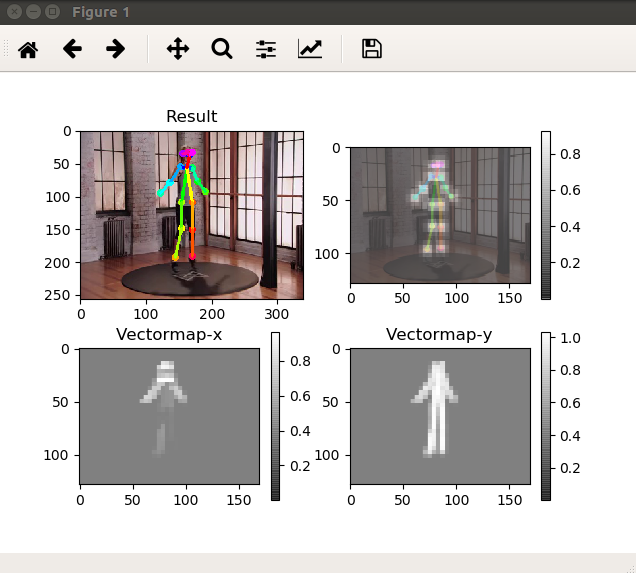
Sindreedelange
on 12 Feb 2019
https://github.com/ildoonet/tf-pose-estimation/blob/dbc89c7c7efdf5aaf56b3bb0f53ef32ea3eaff76/run_video.py#L48 , so you See the Image without drawing but with fps Label on it?
ArashHosseini
on 12 Feb 2019
@ArashHosseini That is correct.
So
humans = e.inference(image) gives humans = empty array.
ret_val, image = cap.read() gives image = not empty array.
Example:
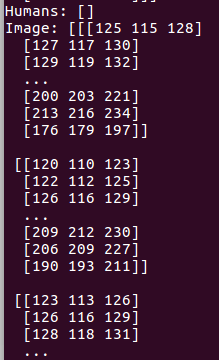
Sindreedelange
on 12 Feb 2019
@ArashHosseini It seems to be working now:
run_video.py
humans = e.inference(image)
-->
humans = e.inference(image, resize_to_default=(w > 0 and h > 0), upsample_size=args.resize_out_ratio) (copied from run.py)
and added
parser.add_argument('--resize-out-ratio', type=float, default=4.0, help='if provided, resize heatmaps before they are post-processed. default=1.0') (also copied from run.py)
Sindreedelange
on 12 Feb 2019
What is den lenght of pafprocess.get_num_humans() in
https://github.com/ildoonet/tf-pose-estimation/blob/dbc89c7c7efdf5aaf56b3bb0f53ef32ea3eaff76/tf_pose/estimator.py#L272 ...inference is calling it
ArashHosseini
on 12 Feb 2019
@Sindreedelange so its work now? Can you provide a diff...?
ArashHosseini
on 12 Feb 2019
@ArashHosseini Seems so.
Not sure what is the best way of providing a diff, but here is at least something:
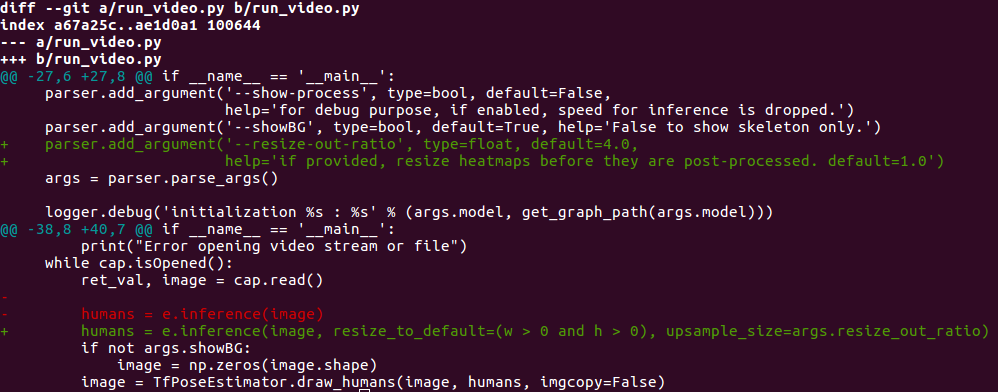
Please do let me know if there is a better way of doing this.
Sindreedelange
on 12 Feb 2019
@Sindreedelange its great, thx.......i guess now you can Start modify and write the frame-keypoints.json file.......
ArashHosseini
on 12 Feb 2019
@ArashHosseini Already done, and it works great! I think Openpose normalizes their values, so on to this now. Thank you so much!
Ps. Have you considered adding indent=4 when dumping the .json file, for improved readability?

Sindreedelange
on 12 Feb 2019
@Sindreedelange I'm glad that it works, I wish I could help you more, I'm on a 6 hour train ride, the only thing I had was my smartphone ....
ArashHosseini
on 12 Feb 2019
@ArashHosseini No worries, I truly appreciate your effort! Maybe you could explain to me why it works now, when you get to your computer, because I have no clue as to why it works - total shot in the dark.
Sindreedelange
on 12 Feb 2019
@ArashHosseini
Hey,
when i am trying to pass the json to the real time code by the following command
python3.5 src/openpose_3dpose_sandbox_realtime.py --camera_frame --residual --batch_norm --dropout 0.5 --max_norm --evaluateActionWise --use_sh --epochs 200 --load 4874200 --pose_estimation_json /home/drive/tf-pose-estimation-master/json
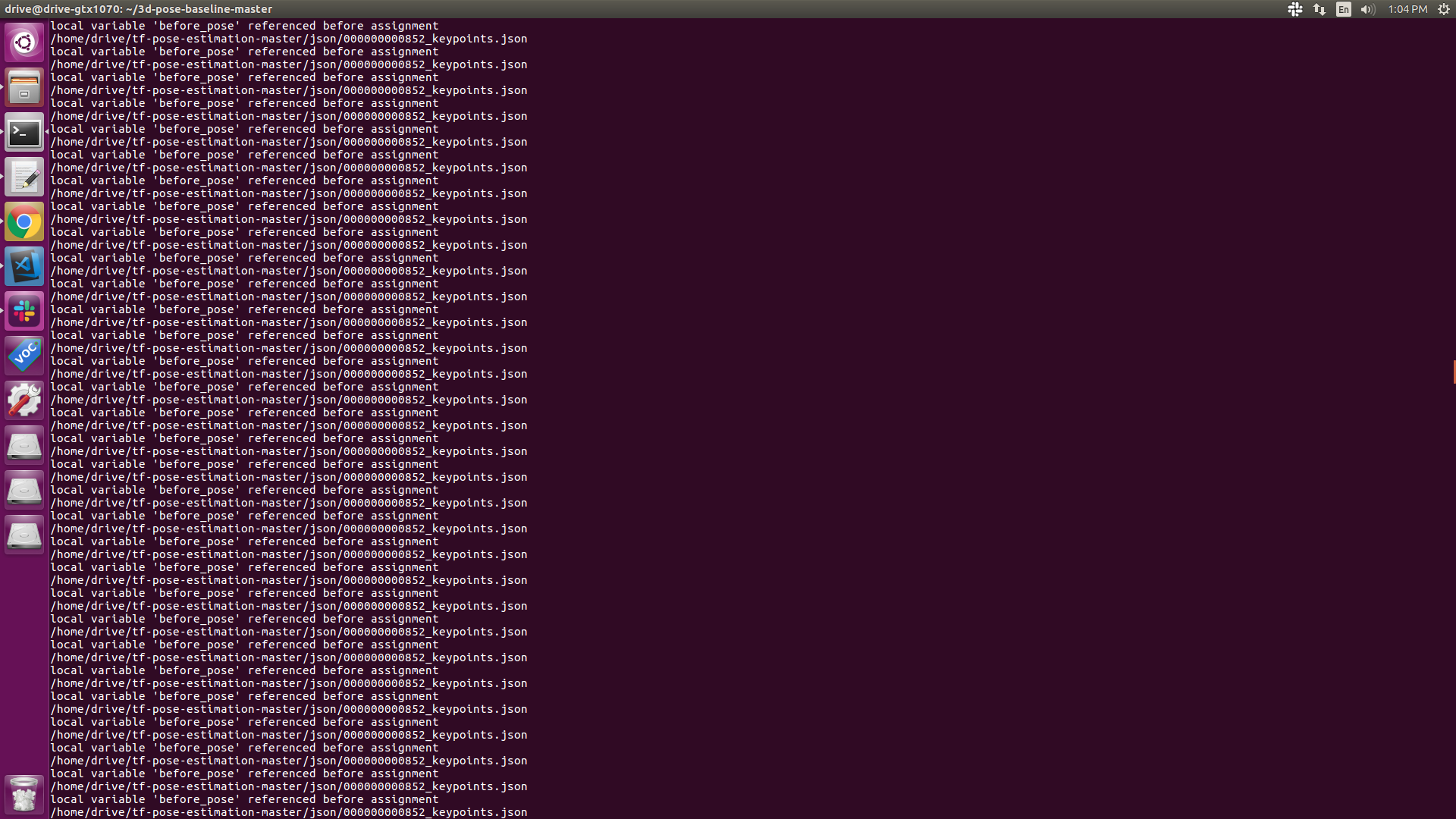
Can you help me here ASAP.
Thanks
 vishnu41
on 14 Mar 2019
vishnu41
on 14 Mar 2019
Hey @vishnu41, please replace “xy“ by “_data“ in line 86, let it me know if its working, thx
ArashHosseini
on 14 Mar 2019
Yea, i changed
But not working . same error
vishnu41
on 14 Mar 2019
@vishnu41, and you Start your Pose-estimator and 3D-baseline on the same Time?
ArashHosseini
on 14 Mar 2019
Yes, i did and i am getting this error
same time in the sense parallely in two terminals no?
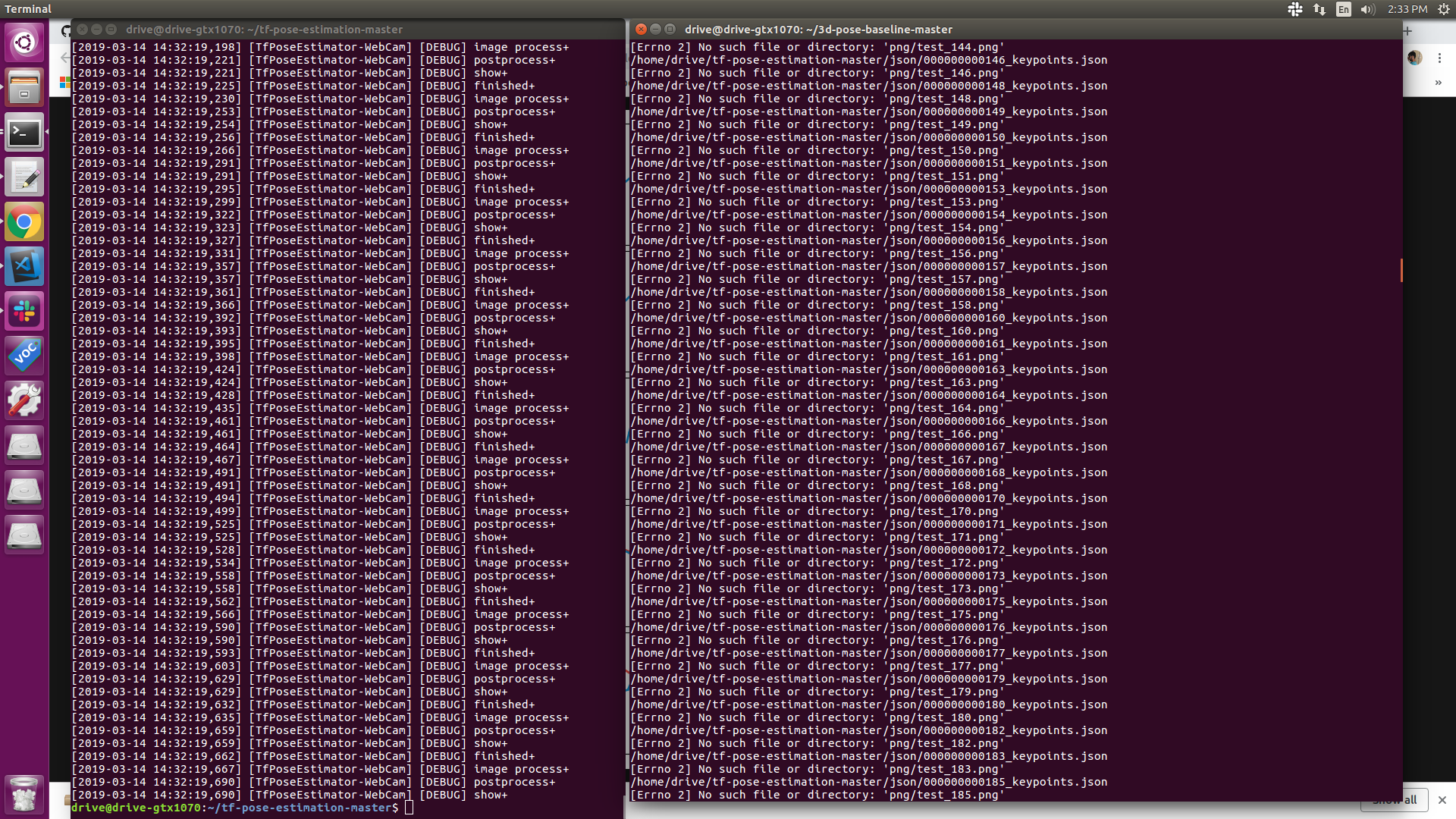
vishnu41
on 14 Mar 2019
@vishnu41 Yes tf-Pose-estimator is Writing and 3d-baseline is Reading and showing in parallel. The error has Changed.....you know why?
ArashHosseini
on 14 Mar 2019
@ArashHosseini Yea i understood that,But still it shows no image error, what should i do?
I thought program will automatically saves the image
vishnu41
on 14 Mar 2019
@ArashHosseini and i am getting only the tf openpose output in the window and not the 3d baseline
vishnu41
on 14 Mar 2019
@vishnu41,
Is the code writing any png?
Is the plt.show() in line 211 showing something?
Is the „not-realtime“ Version working correct with the same json‘s? (the First Frame Should Contain all joints?
ArashHosseini
on 14 Mar 2019
It writes png, but there is nothing in there,
And plt.show() shows images
sometimes its getting terminated automatically.
help me here and i need that interpolation thing also, thats not generating
vishnu41
on 14 Mar 2019
@ArashHosseini i was using your code to get the 3d coordinates , but the coordinates i am getting looks like 24 4d points, Tell me what change i should make to get the 3d points
My goal is to create bvh file , so i need the 3d coordinates, can you tell the steps
 madhuvaani
on 15 Mar 2019
madhuvaani
on 15 Mar 2019
@vishnu41, @madhuvanni, i can‘t touch the code until next week Tuesday, hope you forgive me...
ArashHosseini
on 15 Mar 2019
@vishnu41 can you please upload one of the json files? thanks
ArashHosseini
on 18 Mar 2019
@ArashHosseini not an issue
madhuvaani
on 19 Mar 2019
vishnu41
on 19 Mar 2019
@vishnu41. i have to ask for more, can you please upload the sequence as zip file?, thanks
ArashHosseini
on 19 Mar 2019
json.zip
these are the jsons only for the upper part , since i placed the camera in such a way.And what is that 4D points? Those are theta? , I am not getting 3d points
vishnu41
on 19 Mar 2019
@vishnu41, here the upper body output, is the assumption correct that no lower body parts are in the picture?, (you already mentioned it)
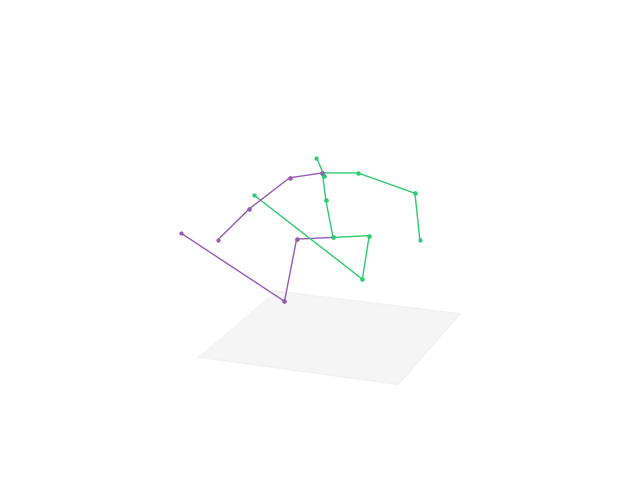
ArashHosseini
on 19 Mar 2019
@madhuvaani this question is often asked #108 I'm going to explain it a bit clearer, but it will take some time. thanks
ArashHosseini
on 19 Mar 2019
@madhuvaani this question is often asked #108 I'm going to explain it a bit clearer, but it will take some time. thanks
How do I extract the 3D coordinates in a json file?
 ironllamagirl
on 15 Apr 2019
ironllamagirl
on 15 Apr 2019
@Sindreedelange check the changes in diff, the output is already matching the Openpose output....you can feed this as input json for 3d-pose-baseline
What is this code used for? why multiply the x and y coordinates by the width and heigh and add 0.5?
body_part = human.body_parts[i]
                center = (int(body_part.x * image_w + 0.5), int(body_part.y * image_h + 0.5))
                centers[i] = center
ironllamagirl
on 25 Apr 2019
@Sindreedelange check the changes in diff, the output is already matching the Openpose output....you can feed this as input json for 3d-pose-baseline
@ArashHosseini Hi!
I have followed your code and it seems to work, however I do not understand fully where exactly in the pipeline of the network did we feed the 2D coordinate estimations to the 3d pose baseline?
3d pose baseline seems to use predictions from stacked hourglass.. it gets the 2d predictions from 3d ground truth data? In this case we will use our own predictions. Where is that intervention happening in the code?
I used the json files from openpose, but in the terminal I still get log info referring to stacked hourglass and human 3.6M dataset, in h5 files. A little lost and confused in the pipeline here. Any indication or explanation would be much appreciated!
ironllamagirl
on 25 Apr 2019
@ArashHosseini
thx for reply...my mistake was that i didn't use the absolute path(output_json)
now i got json file recording 'pose_keypoints_2d' not 'pose_keypoints_3d', like:
{"people": [{"pose_keypoints_2d": [812, 176, 806, 278, 723, 270, 723, 395, 841, 290, 889, 278, 907, 387, 919, 462, 741, 571, 0.0, 0.0, 0.0, 0.0, 812, 575, 0.0, 0.0, 0.0, 0.0, 788, 160, 830, 160, 759, 172, 859, 168]}]}
is there any ways to get the 'pose_keypoints_3d' json file?
where did you find the function to get output from image?
 igorgbs
on 9 Apr 2020
igorgbs
on 9 Apr 2020
@igorgbs what you mean exactly
get output from image?
ArashHosseini
on 9 Apr 2020
@Sindreedelange check the changes in diff, the output is already matching the Openpose output....you can feed this as input json for 3d-pose-baseline
Hi @ArashHosseini, thanks for the commit in your repo where you modified tf_pose/estimator.py to give it the option of converting the video to a JSON file. However, when I copied the relevant parts into the function, and tried to save the JSONs, it only saved the JSON of the first frame (000000000000_keypoints.json). In the original OpenPose (using Caffe), a JSON is saved for each frame of the video. So, we get multiple JSONs saved, one for each frame. Do you know how to go about recreating that functionality here? Many thanks in advance!
 PrashantSaikia
on 27 Aug 2020
PrashantSaikia
on 27 Aug 2020
Hi @PrashantSaikia,
check this line
    frame = 0
    while True:
        ret_val, image = cam.read()

        logger.debug('image process+')
        humans = e.inference(image, resize_to_default=(w > 0 and h > 0), upsample_size=args.resize_out_ratio)

        logger.debug('postprocess+')


        -->     image = TfPoseEstimator.draw_humans(image, humans, imgcopy=False, frame=frame, output_json_dir=args.output_json)
inside the while loop, we are calling tf_pose/estimator.draw_humans() with the frame and we are increasing the json here based on frame. check if you have all parts after copying
ArashHosseini
on 27 Aug 2020
Hi @ArashHosseini Yes, my bad, I had not copied the frame += 1 line, oops.
I have another (not related to this) issue that I am trying to resolve. I am not able to access/run the run_webcam.py function from outside the tf_pose_estimation directory. Any idea on how to get it working from outside this directory? I have detailed the issue here. I had faced the same issue with the original openpose as well, where I was not able to get OpenPoseDemo.exe running from outside the home directory, which I have detailed here.
If you could give some suggestions, that would be awesome! Thanks!
PrashantSaikia
on 4 Sep 2020
Related issues
 GreatGBL
·
4Comments
GreatGBL
·
4Comments
 jpizarrom
·
6Comments
jpizarrom
·
6Comments
 guofuzheng
·
6Comments
guofuzheng
·
6Comments
 tomercohen11
·
6Comments
tomercohen11
·
6Comments
 gavinzhang1995
·
6Comments
gavinzhang1995
·
6Comments
Most helpful comment
@ArashHosseini It seems to be working now:
run_video.py
humans = e.inference(image)-->
humans = e.inference(image, resize_to_default=(w > 0 and h > 0), upsample_size=args.resize_out_ratio)(copied from run.py)and added
parser.add_argument('--resize-out-ratio', type=float, default=4.0, help='if provided, resize heatmaps before they are post-processed. default=1.0')(also copied from run.py)