Tf-pose-estimation: What happened to my program caused me not to proceed? from estimator import TfPoseEstimator ImportError: cannot import name 'pafprocess'
(tfpose) C:Userslim_l_000Desktoptf-openpose>python src/run_webcam.py --model=mobilenet_thin_432x368 --camera=0
Traceback (most recent call last):
File "src/run_webcam.py", line 8, in
from estimator import TfPoseEstimator
File "C:Userslim_l_000Desktoptf-openposesrcestimator.py", line 5, in
from pafprocess import pafprocess
ImportError: cannot import name 'pafprocess'
 zerolim820
All 16 comments
please compile pafprocess first with swig inside the srf/pafprocess folder
 ouceduxzk
on 29 May 2018
ouceduxzk
on 29 May 2018
can teach me how to do it ...?
I am a beginner...
u mean is install swig ?
zerolim820
on 29 May 2018
This document contains details:
https://github.com/ildoonet/tf-pose-estimation/blob/master/src/pafprocess/README.md
 RitvikMandyam
on 30 May 2018
RitvikMandyam
on 30 May 2018
hi @ouceduxzk , @RitvikMandyam i have run the command in the srcpafprocess location:
swig -python -c++ pafprocess.i && python3 setup.py build_ext --inplace
but it shows the following error:
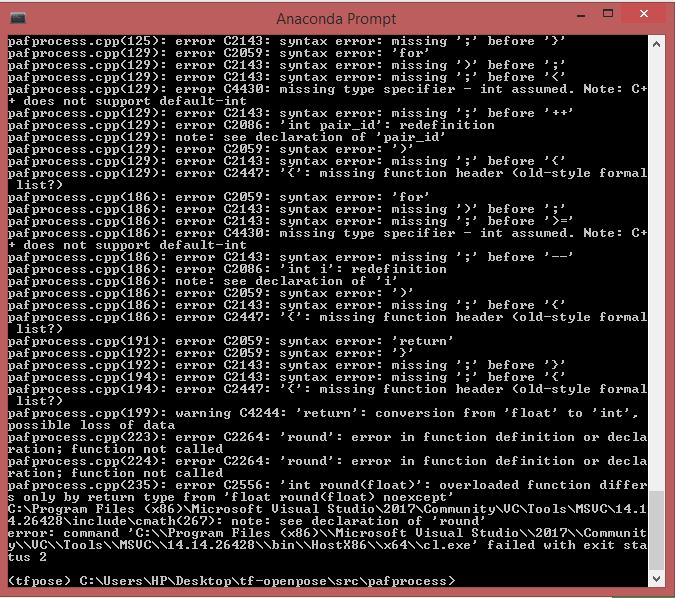
can you please help?
 siddharthrajpatel
on 31 May 2018
siddharthrajpatel
on 31 May 2018
I did that but it still has problems .....
(tfpose) C:Userslim_l_000Desktoptf-pose2tf_posepafprocess>swig -python -c++ pafprocess.i && python setup.py build_ext --inplace
running build_ext
building '_pafprocess' extension
swigging pafprocess.i to pafprocess_wrap.cpp
C:Program Filesswigwin-3.0.12swig.exe -python -c++ -o pafprocess_wrap.cpp pafprocess.i
error: Unable to find vcvarsall.bat
zerolim820
on 31 May 2018
@siddharthrajpatel Hi bro! I've someway managed this error by replacing (in pafprocess.cpp file) all "or" with "||" and all "and" with "&&". Also it need to change the round function name (i've named it as "rounds") beacuse it collides with cmath round function. Now you have just to run "swig -python -c++ pafprocess.i && python setup.py build_ext --inplace " and it will compile. Then should work everything (hope it!).
(On Windows 10 Os)
 riccardoPalumbo96
on 31 May 2018
riccardoPalumbo96
on 31 May 2018
@zerolim820
faced the same problem...
(tfpose) C:Userslim_l_000Desktoptf-pose2tf_posepafprocess>swig -python -c++ pafprocess.i && python setup.py build_ext --inplace
running build_ext
building '_pafprocess' extension
swigging pafprocess.i to pafprocess_wrap.cpp
C:Program Filesswigwin-3.0.12swig.exe -python -c++ -o pafprocess_wrap.cpp pafprocess.i
error: Unable to find vcvarsall.bat
 Nilanshrajput
on 2 Jun 2018
Nilanshrajput
on 2 Jun 2018
Try installing Visual Studio. If my memory serves, vcvarsall.bat is part of the VS package.
RitvikMandyam
on 2 Jun 2018
I tried that ,still showing that error
Nilanshrajput
on 2 Jun 2018
@riccardoPalumbo96 thanks, now the swig code is running :)
siddharthrajpatel
on 4 Jun 2018
This error always occurs.
(tfpose) C:Users15029Desktoptf-openposetf_posepafprocess>swig -python -c++ pafprocess.i && python setup.py build_ext --inplace
running build_ext
building '_pafprocess' extension
swigging pafprocess.i to pafprocess_wrap.cpp
C:Users15029Anaconda3Librarybinswig.exe -python -c++ -o pafprocess_wrap.cpp pafprocess.i
error: Unable to find vcvarsall.bat
 yinan-1
on 24 Oct 2018
yinan-1
on 24 Oct 2018
Try to compile directly from Visual Studio Prompt
This could be useful: https://blogs.msdn.microsoft.com/pythonengineering/2016/04/11/unable-to-find-vcvarsall-bat/
riccardoPalumbo96
on 24 Oct 2018
Thx. i reinstalled Visual Studio2017 and solved the problem.
yinan-1
on 25 Oct 2018
@yinan-1 when you reinstall VS2017, are u repeat all commands ?
 Ramo19
on 27 Oct 2018
Ramo19
on 27 Oct 2018
No, I'm just missing the C++ environment.
发件人: Omar El Manssouri
发送时间: 2018年10月28日 5:39
收件人: ildoonet/tf-pose-estimation
抄送: yinan-1; Mention
主题: Re: [ildoonet/tf-pose-estimation] What happened to my program causedme not to proceed? from estimator import TfPoseEstimator ImportError: cannotimport name 'pafprocess' (#191)
@yinan-1 when you reinstall VS2017, are u repeat all commands ?
—
You are receiving this because you were mentioned.
Reply to this email directly, view it on GitHub, or mute the thread.
yinan-1
on 29 Oct 2018
Hi,
I got problem when running command of either "python run_webcam.py --model=mobilenet_thin --resize=432x368 --camera=0" or "python3 run_webcam.py --model=mobilenet_thin --resize=432x368 --camera=0"
Error shown below when set root to run tf-pose:
"root@ired-IdeaPad-L340-15IRH-Gaming:/Downloads/tf-pose-estimation-master# python run_webcam.py --model=mobilenet_thin --resize=432x368 --camera=0
Traceback (most recent call last):
File "run_webcam.py", line 8, in
from tf_pose.estimator import TfPoseEstimator
File "/home/ired/Downloads/tf-pose-estimation-master/tf_pose/init.py", line 5, in
from tf_pose.runner import infer, Estimator, get_estimator
File "/home/ired/Downloads/tf-pose-estimation-master/tf_pose/runner.py", line 5, in
from functools import lru_cache
ImportError: cannot import name lru_cache
root@ired-IdeaPad-L340-15IRH-Gaming:/Downloads/tf-pose-estimation-master# python3 run.py --model=mobilenet_thin --resize=432x368 --image=./images/p1.jpg
Traceback (most recent call last):
File "run.py", line 6, in
from tf_pose import common
File "/home/ired/Downloads/tf-pose-estimation-master/tf_pose/init.py", line 5, in
from tf_pose.runner import infer, Estimator, get_estimator
File "/home/ired/Downloads/tf-pose-estimation-master/tf_pose/runner.py", line 4, in
import cv2
ModuleNotFoundError: No module named 'cv2'"
Could anyone tell me how to fix it please?
Thanks, Francis
 FrancisLeung
on 15 Jan 2020
FrancisLeung
on 15 Jan 2020
Related issues
 tomercohen11
·
6Comments
tomercohen11
·
6Comments
 juciny
·
3Comments
juciny
·
3Comments
 gen21kawa
·
5Comments
gen21kawa
·
5Comments
 manoharthondapu
·
4Comments
manoharthondapu
·
4Comments
 ildoonet
·
3Comments
ildoonet
·
3Comments
Most helpful comment
@siddharthrajpatel Hi bro! I've someway managed this error by replacing (in pafprocess.cpp file) all "or" with "||" and all "and" with "&&". Also it need to change the round function name (i've named it as "rounds") beacuse it collides with cmath round function. Now you have just to run "swig -python -c++ pafprocess.i && python setup.py build_ext --inplace " and it will compile. Then should work everything (hope it!).
(On Windows 10 Os)