Texstudio: Dark theme not consistent
Hi,
first of all thanks for the awesome work you are doing in maintaining this project, I love TeXstudio!
There is just one thing that bothers me: the diffuclty to set up a consistent dark theme in the editor.
I managed to edit my font colors so that now i have a nice dark combination, and setting the color combination to "modern" makes also the UI kind of dark, but still there is a big fat light gray frame around the page that i cannot get rid of:

It would be PERFECT if I could set up that frame to be black as the rest of the edtior, or at least make it disappear.
thanks,
francesco
 francescoboc
All 42 comments
Those elements are styled by the OS theme and currently cannot be modified separately.
You can deactivate the bottom bar using Config -> Adv. Editor -> Appearance -> Show State Panel.
 timhoffm
on 24 Feb 2018
timhoffm
on 24 Feb 2018
Hello Tim,
thanks for your kind answer. I deactivated the bottom bar and it already look better, indeed!
Are you planning to add the possibility to customize the colour of these bars in future releases?
TexStudio is amazing in terms of functionalities, but I have to say the UI looks a bit "outdated" when compared to other more "stylish" editors, like Atom for example:

Thank you very much. And also, is there a way I can try to contribute? I am no expert in C++, but I can try...
F.
francescoboc
on 25 Feb 2018
We have a basic support for Qt stylesheets. You can add a file stylesheet.qss to the settings directory.
E.g. stylesheet.txt (Note: you have to change the extension to .qss because github won't let me upload files with that extension.)

You can overwrite most style properties with this. It's basic in the sense that it's currently hard-coded to a single stylesheet.qss file. No switching or configuring via the options. Also, there's no guarantee that the style will play well with other UI elements such as a good visibility of icons or some highlighting colors.
Getting consistent good looking themes is a major effort, because it touches many aspects of the UI. I don't think we will have time to work on this in the foreseable future.
timhoffm
on 25 Feb 2018
Thanks Tim,
that screenshot looks amazing!
What do you mean for "settings directory", is it the one in "Programs" or in "AppData"?
Thanks
francescoboc
on 25 Feb 2018
It's the one in AppData (or the Program / config directory if you are using a portable version).
https://github.com/texstudio-org/texstudio/wiki/Frequently-Asked-Questions#where-are-the-settings-stored
timhoffm
on 25 Feb 2018
Thanks Tim,
it looks great! That's exactly what I was looking for!
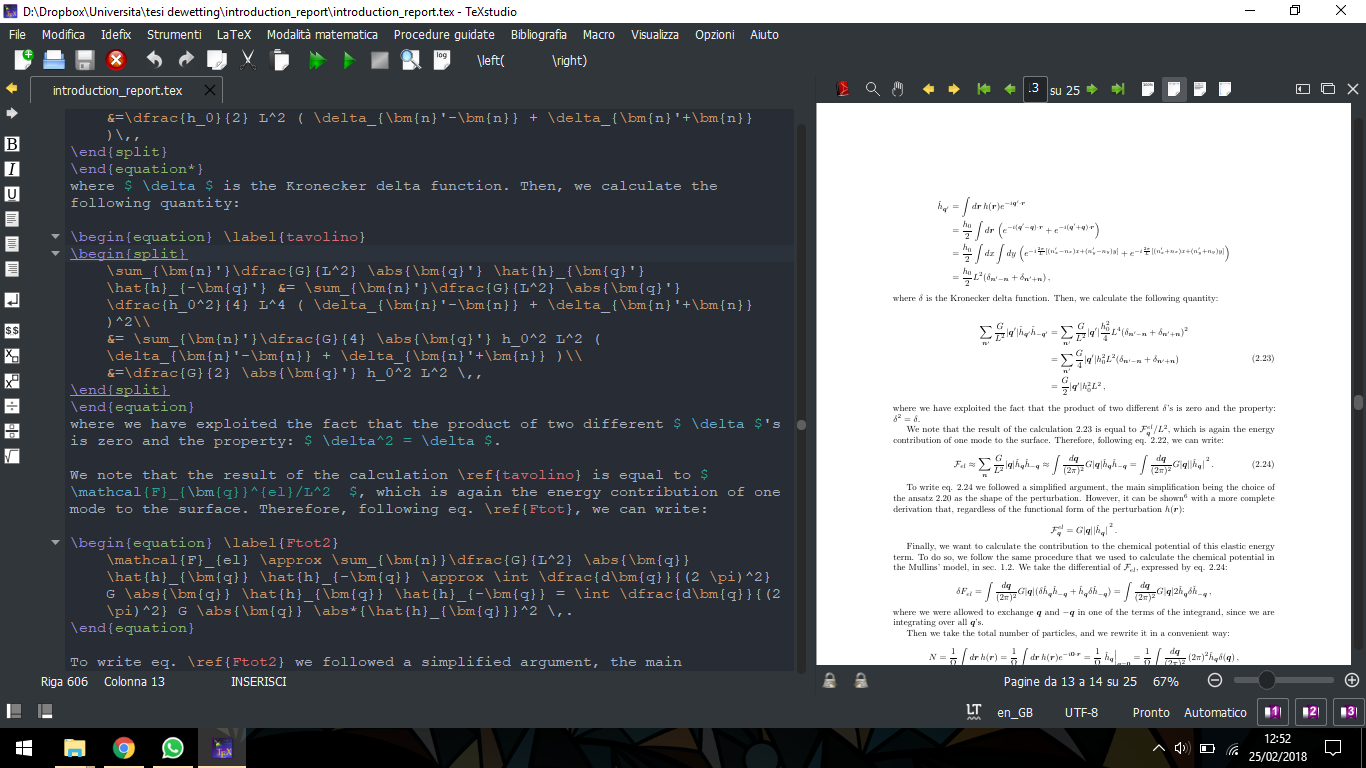
Thank you for your help and keep up the excellent work on this editor!
Francesco
francescoboc
on 25 Feb 2018
Would be nice if one could be able to easily load the nice Francesco's theme. (Out of topic: Francesco, you should replace the space between eq. and \ref{...} by a a ~; or, better, you could consider the cleveref package which provides \cref that would e.g. write for you "following eq.~..." with just following \cref{Ftot}).
 dbitouze
on 25 Feb 2018
dbitouze
on 25 Feb 2018
I made a rar archive with everything inside. You can download it here: https://www.dropbox.com/s/imkvx08gsjtzww8/TeXstudio_francesco_dark.rar?dl=0
Edit: just adding a final screenshot to show how it looks like if anybody else is interested in downloading the theme (i did some changes with respect to the previous screenshot, and I also updated the stylesheet of @timhoffm to the latest QDarkStyleSheet which has blue highlighted tabs and new icons)

Inside the .rar archive a README file explains quickly what you have to do to load the UI and the editor themes. Be careful that you have to edit some lines in the stylesheet putting your username instead of "franc", i know it's stupid but I couldn't find a better way to do it (%APPDATA% does not work for some obscure reason)...
PS. Thanks for the suggestion on the eq. /ref thing!
francescoboc
on 25 Feb 2018
@francescoboc Thanks for providing your theme. But I was asking more an integration in TXS in such a way users not comfortable with their computer may easily benefit from it. Currently, what you provide is Windows oriented and loading your profile may overwrite some customization made earlier.
dbitouze
on 26 Feb 2018
@dbitouze Yes, it would be nice to see the dark theme integrated in TexStudio. I have been using this UI theme since yesterday and It's working perfectly. All the elements are in the right place.
francescoboc
on 26 Feb 2018
BTW, if you want it to be really dark, you can invert the colors in the PDF viewer.
dbitouze
on 26 Feb 2018
Those elements are styled by the OS theme and currently cannot be modified separately.
yes, that's right. in that regard, on linux using recent qt5.10 and all qt5 before, theming in texstudio is not inherited from the OS. This happens to be common issue on some qt-based applications that migrated from qt4 (when OS-specific theming was correctly applied to a qt-gui-app) to qt5 (now lacking the possibility to use the OS theme).
I don't know if it ever worked when qt4 was used.
 Piraty
on 28 Feb 2018
Piraty
on 28 Feb 2018
@francescoboc Just a heads up that your profile change the interface language to Italian for everyone that loads your theme. To change that you need to open the file francesco_dark_win.txsprofile in a text editor and edit line 222 from "Interface\Language=it" to whatever language code you prefer (en_GB, en_US, de_DE etc) and reload the theme.
 anhility
on 7 Mar 2018
anhility
on 7 Mar 2018
@anhility Yes, I was expecting that. Actually, It will load also other things that I changed according to my needs, for example the paths for the dictionaries and for the external pdf reader... But right now, exporting a complete TeXstudio profile it's the only way to export a color scheme (I think!).
It would be nice to be able to export only the color scheme and not ALL the settings!
francescoboc
on 7 Mar 2018
you can edit the profile and remove anything which is not necessary (the ini keys are more or less self-explanatory)
The import of that file changes only the included values, the rest is ignored.
We have not bothered to extend the export-function to limit its scope as that is rather tedious and only a limited number of users may benefit
 sunderme
on 7 Mar 2018
sunderme
on 7 Mar 2018
Year ago I've made a fork from sourceforge, today I've moved to this repo:
new fork
I'm also using ColinDuquesnoy/QDarkStyleSheet
however, I've built some time ago special library to encapsulate whole styles into one place.
If someone want to help with building for Windows/MacOS this library and this fork, I would really appreciate - I don't have much time.
For Arch Linux users I maintain the special package in AUR repo.
Probably basic style sheets support has made this work useless :(
 suratovvlad
on 14 Mar 2018
suratovvlad
on 14 Mar 2018
No need for weird magic in linux, you can provide native qt-styles to texstudio.
For example, i have QT_STYLE_OVERRIDE. You can place sth like gtk2 or Adwaita-dark in there if you have the corresponding, qt-compatible version of adwaita.
Also, qt5ct may be of interest.
Additionally, -style=<style> can be added to texstudio as argument, if you like to use a special theme/style on texstudio only.
Here is mine:
QT_STYLE_OVERRIDE=gtk2, where gtk2 picks up adwaita-dark.

[EDIT]
As i found out, you still have to manually edit the highlighting config / import a theming part of the texstudio.ini file to make the editor view look nice
[EDIT2]
one of this mechanisms will work:
- make the env var available to texstudio, the QT framework will use it.
export QT_STYLE_OVERRIDE=Adwaita-dark
texstudio.
I set this in my shell's .rc so all QT apps spawned will use it.
- launch texstudio with a specific style to use:
texstudio -style=Adwaita-dark(-style=works with every QT application) - use software like qt5ct to configure QT applications system-wide
Piraty
on 15 Mar 2018
@francescoboc @timhoffm Everything is working fine. But the pop-up on hover are not dark. These are still white. How to make these dark ? ( In Windows 10 )


Thank you.
 Subratappt
on 22 Jun 2018
Subratappt
on 22 Jun 2018
The dark theme is not part of the official TeXstudio release and we cannot provide any help or support for it.
That said, I can only do a wild guess. The above theme includes styles QToolTips. It may however be that this does only work for simple tooltips, but not for HTML tooltips. You may check if simple tooltips are styled (e.g. hover over an editor tab to display the filename in a test-only tooltip. If that's the case, there's probably nothing we can do about it.
timhoffm
on 23 Jun 2018
Wow this is extremly cool! IT worked out of the box. I do however have a small question/request....
Is it possible to change the "save icon" only when i change has been made to a document such that it has a well readable color on the dark baground?
 JamesLarkinWhite
on 11 Jul 2018
JamesLarkinWhite
on 11 Jul 2018
This dark theme is really great. Do we need to form texstudio to publish a release with dark theme as first class citizen or is it possible to add it? The white kills my eyes when working at night!
 bf
on 19 Jul 2018
bf
on 19 Jul 2018
@francescoboc @timhoffm
Thank you for such a nice theme!! This is exactly what I looking for! But I can I ask some questions..?
1/ Every other font color is white and it is very readable. But the color of symbols in the side panel is still black so it is hard to recognize each symbol. Is it possible to change the color of symbols in the side panel from black to white?
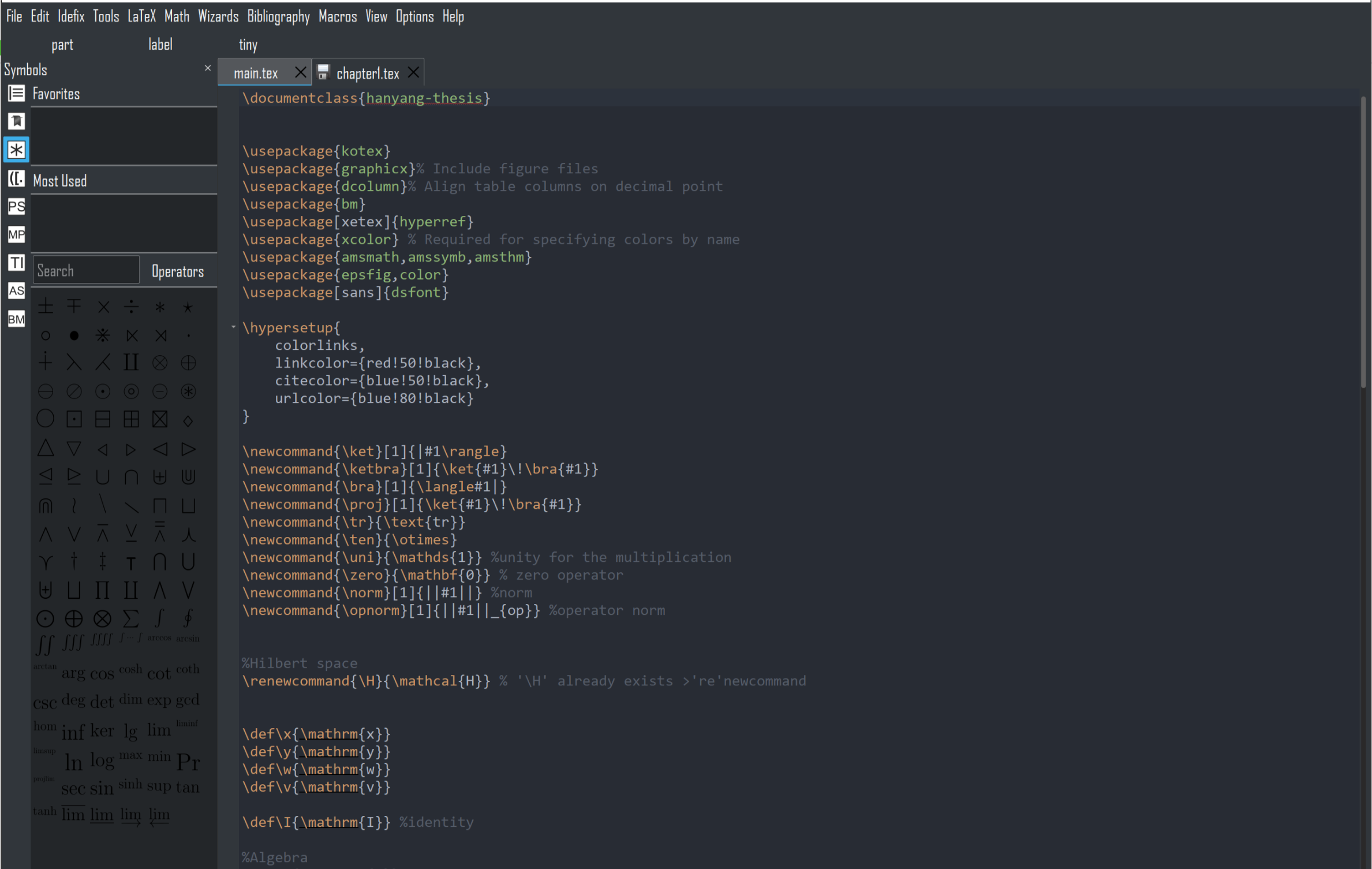
2/ The similar problem in 'Syntax Highlighting' in 'configure TeXstudio' in 'Options'. The background color is white and the color of entries of Identifier is also white...
Is it possible to change background color here from white to black just like the other menu tap in 'configure TeXstudio'? for instance, in 'general' tap the background color is well-defined as black color.


Thank you :)
 ghost
on 5 Aug 2018
ghost
on 5 Aug 2018
1) Symbol color
The symbols are SVGs with black symbols on transparent background. There's no out-of-the box way to fix that. One would have to either create light-colored copies of the SVGs or TXS would have to manipulate the SVGs before loading.
2) Background of highlighting table
This used hard-coded styles for the background. I've now added a patch that we do not adapt the style if an external style sheet is present, i.e. this is fixed in master and will be included in the next release.
timhoffm
on 13 Aug 2018
@timhoffm Considering that the default background colour of the symbols sidebar is white (#FFFFFF), would the team be open to accept a PR for changing all the symbol svg's to a white background instead of transparent?
Presumably these are the ones in the symbols and symbols-ng folder.
On the default user side, there should not be any visible changes, but would be extremely helpful for those implementing dark mode stylesheets.
I am also a little bothered by the fact that the symbols do not have equal width and height (cf. any up-down arrows vs. the left-right ones). I guess these could be fixed in the meantime as well?
I'm willing to undertake this work, but I want to know whether this would be acceptable / if there are any reasons for the symbol svgs background to remain transparent, first.
 thatlittleboy
on 15 Aug 2018
thatlittleboy
on 15 Aug 2018
changing all the symbol svg's to a white background instead of transparent?
IMO that's not the way to go. Apart from the mentioned aspect issue, I'm not sure that this will work borderless with varying magnifications. If we want to enforce a white background, we can simply hard-code the stylesheet for the symbol widget. That's much simpler than messing with the SVG backgrounds.
On the down side, we're sort of breaking the dark style with a white background.
timhoffm
on 15 Aug 2018
@timhoffm Okay, sure.
we can simply hard-code the stylesheet for the symbol widget.
Is the symbol widget accessible by stylesheet now, or is it still hard-coded as was the syntax highlighting table?
we're sort of breaking the dark style with a white background.
Currently, the icons in the math menu and the side panel also have white background and not transparent. They don't bother me much, and doesn't 'break' the dark style IMO. (They're pretty necessary in order to see the icons, And better than transparent, surely?)

On the theme of inconsistencies, icons for text font styles (\textbf, \textit) have white backgrounds, but icons for math font styles \mathrm, \mathit etc. are with transparent backgrounds.
thatlittleboy
on 15 Aug 2018
Is the symbol widget accessible by stylesheet now, or is it still hard-coded as was the syntax highlighting table?
Neither. I don't think you can define styles for individual widgets via a qss file. You can however set a style for an individual widget via code widget->setStyleSheet(text). This was the case for the highlighting table. If no style is set to the widget, the global style will be used.
My proposal for a fixed white background is exactly to widget->setStyleSheet("background: white"). On the symbol widget.
As for "breaking the style": The menu symbols are only small areas. Changing the background of all symbols would result in a large white area, which may be perceived as not style-compliant. Anyway the general issue of dark symbols on dark background is not trivially solved, neither in the symbol widget nor in the menus. This is actually one of the main reasons we do not natively support a dark theme.
timhoffm
on 15 Aug 2018
Changing the background of all symbols would result in a large white area, which may be perceived as not style-compliant.
Yes, that's true. I missed that point.
Your proposal sounds good.
Anyway the general issue of dark symbols on dark background is not trivially solved, neither in the symbol widget nor in the menus.
At least for the menu icons, there's no issue of the "large white area" if the backgrounds were set to white. The math accents and math font style icons can at least be made consistent, no? (presumably with the svgs, not stylesheet)
But yes, I understand the devs' POV of not natively supporting dark theme. All these are non-issues if one does not use a dark theme. I won't push this any further. :)
thatlittleboy
on 15 Aug 2018
Wow, so impressed. It worked for me, too.
And I am really looking forward for the next release, to get the highlighting table back.
Thank you very much for the effort!
 lhecht
on 15 Aug 2018
lhecht
on 15 Aug 2018
In the long run, I would like to improve the support for a dark theme (or maybe even include one). That means in particular to have a set of suitable menu icons, and thus a switching mechanism. We already have that partly for classic/modern. However, there's more to do to make it work smoothly. Pointing out or fixing open issues is worthwhile because we can gradually improve things.
timhoffm
on 16 Aug 2018
Thanks a lot for all your effort!! :)
ghost
on 20 Aug 2018
If using the dark sceme, the results displaced in the search bar are also obscured sometimes. If you search for a string , and it is not matched, the background turns red. The "search string" is not readable in this case.
JamesLarkinWhite
on 27 Aug 2018
In the long run, I would like to improve the support for a dark theme (or maybe even include one). That means in particular to have a set of suitable menu icons, and thus a switching mechanism.
If you are planing to support dark themes, have you considered switching to symbolic icons?
Those will work in bright and dark themes.
 NikoKrause
on 8 Oct 2018
NikoKrause
on 8 Oct 2018
FYI and for people that might arrive here via internet search.
If you want to have checkboxes/radio buttons/etc (icons) put the _rc_ folder from here inside the _dictionaries_ folder of your TeXstudio installation and change all file paths inside the stylesheet.qss from
image: url(":/qss_icons/rc/...
to
image: url("rc/....
Before:
After:

Why into the _dictionaries_ folder? Because, at least for me, it was the relative working directory of the texstudio.exe. I agree this is a hack, but I really wanted the checkboxes on the settings page back.
Note: There are still no arrows displayed as the names inside the stylesheet.qss do not match the names of the arrow files. After changing this the arrows were scaled inappropriately (too large), so I changed it back.
 Kardi5
on 23 Jul 2019
Kardi5
on 23 Jul 2019
I used this stylesheet in my fork https://github.com/suratovvlad/texstudio , but I do not provide windows build yet, only AUR package https://aur.archlinux.org/packages/texstudio-dark-git/
If it would be interesting, I could provide window build, as I do it for qbittorrent-dark fork.
suratovvlad
on 26 Jul 2019
I was trying to adopt @francescoboc and @timhoffm's comments to work on my TXS on macOS, but I was not able to find the location of the stylesheets to make the modifications. Would anyone be able to shed some light on where these are located? Would love to get @francescoboc's look on my TXS, and cannot unzip and use his archive for the same reasons.
I did try looking in Package Contents and all the resource folders on macOS, but could not find the files anywhere. I am not sure if I am missing something here.
 adwaraki
on 20 Aug 2019
adwaraki
on 20 Aug 2019
@adwaraki If the stylesheet.qss file does not exist, then just create a new one yourself and/or copy the one from the earlier comments. Place it in the config directory.
thatlittleboy
on 20 Aug 2019
@thatlittleboy Thank you for that info. I kinda had figured that out already, but what I am confused with are the paths in the stylesheet. For example,
QCheckBox::indicator:unchecked {
    image: url(C:/Users/XXXXX/AppData/Roaming/TeXstudio/rc/checkbox_unchecked.png);
}
I am not sure what path to replace here, since I am not able to find the TexStudio/rc folder on the macOS installation.
adwaraki
on 20 Aug 2019
@thatlittleboy Thank you for that info. I kinda had figured that out already, but what I am confused with are the paths in the stylesheet. For example,
QCheckBox::indicator:unchecked {
    image: url(C:/Users/XXXXX/AppData/Roaming/TeXstudio/rc/checkbox_unchecked.png);
}
I am not sure what path to replace here, since I am not able to find the TexStudio/rc folder on the macOS installation.
The path for macOS is
/Users/YourName/.config/texstudio

In VS Code editor, LaTeX Workshop extension is a very good alternative with a dark theme.
Subratappt
on 20 Aug 2019
@Subratappt
Ah, thank you. I mistakenly assumed that the .config folder was different from the TXS folder on Windows and was looking for it under Package-Contents. Silly me did not put 2 and 2 together.
Let me try to get this working. Appreciate the help once again.
adwaraki
on 20 Aug 2019
Worked like a charm. Thanks a ton!
adwaraki
on 20 Aug 2019
Hello.
Many thanks for the dark theme, works for TeXstudio v2.12.22 win10. There is a small but annoying detail. I have a paper with a few appendix sections. They are marked on the left tree view by a "greenish background" (#c8e6c8) and together comprise a bright spot with poorly readable text. It seems that appendix tree color is hard coded as it doesn't present in stylesheet.qss. Is there a way to change that color?

 buran21
on 23 Jun 2020
buran21
on 23 Jun 2020
Related issues
 kckennylau
·
3Comments
kckennylau
·
3Comments
 OsbertWang
·
6Comments
OsbertWang
·
6Comments
 daknuett
·
8Comments
daknuett
·
8Comments
 sjx95
·
7Comments
sjx95
·
7Comments
 homocomputeris
·
7Comments
homocomputeris
·
7Comments
Most helpful comment
We have a basic support for Qt stylesheets. You can add a file
stylesheet.qssto the settings directory.E.g. stylesheet.txt (Note: you have to change the extension to .qss because github won't let me upload files with that extension.)
You can overwrite most style properties with this. It's basic in the sense that it's currently hard-coded to a single
stylesheet.qssfile. No switching or configuring via the options. Also, there's no guarantee that the style will play well with other UI elements such as a good visibility of icons or some highlighting colors.Getting consistent good looking themes is a major effort, because it touches many aspects of the UI. I don't think we will have time to work on this in the foreseable future.