Testcafe: Error: Unable to establish one or more of the specified browser connections. This can be caused by network issues or remote device failure.
Since we upgraded TestCafe to 1.4.0, intermittently we are getting "Unable to establish one or more of the specified browser connections" error. It happens very frequently with latest TestCafe now and occurs mostly with 2+ browser instances.
This command is ran from CircleCI and giving the problem, this issue was never present with TestCafe 1.3.3. Is there any way to retry or recover command from this error? Please fix the issue if possible.
Error:
(node:549) Warning: Setting the NODE_TLS_REJECT_UNAUTHORIZED environment variable to '0' makes TLS connections and HTTPS requests insecure by disabling certificate verification.
Run command: --path /home/circleci/zm-x-web/tests/testcafe/tests -T Smoke chrome -c 6 -r html-testrail -S -s test-reports/smoke-testcafe-mobile -p ${TEST} - ${QUARANTINE_ATTEMPT}.png --env ZIMBRA8 --device MOBILE --language en_US --performance false --video false --configure true npm run serve

(node:549) [DEP0005] DeprecationWarning: Buffer() is deprecated due to security and usability issues. Please use the Buffer.alloc(), Buffer.allocUnsafe(), or Buffer.from() methods instead.
Error: Unable to establish one or more of the specified browser connections. This can be caused by network issues or remote device failure.
    at BrowserSet._waitConnectionsOpened (/home/circleci/zm-x-web/node_modules/testcafe/src/runner/browser-set.js:84:30)
    at /home/circleci/zm-x-web/node_modules/testcafe/src/runner/browser-set.js:107:35
    at invokeCallback (/home/circleci/zm-x-web/node_modules/pinkie/index.js:60:12)
    at Array.forEach (<anonymous>)
    at publish (/home/circleci/zm-x-web/node_modules/pinkie/index.js:147:32)
    at Array.publishFulfillment (/home/circleci/zm-x-web/node_modules/pinkie/index.js:152:2)
    at Immediate.asyncFlush (/home/circleci/zm-x-web/node_modules/pinkie/index.js:17:19)
    at processImmediate (internal/timers.js:441:21)
    at process.topLevelDomainCallback (domain.js:126:23)
Exited with code 1

Your Environment details:
- testcafe version: 1.4.0
- node.js version: 12.8
- chrome version: 76.0
 jiteshsojitra
All 36 comments
I have started to notice this issue 5 days ago on my automated tests that are running on SauceLabs and against the CI in our CI/CD pipelines
$ testcafe chrome:headless e2e/suites/
ERROR Unable to establish one or more of the specified browser connections. This can be caused by network issues or remote device failure.
Environment Specific Data
node version 10.16.0
yarn version 1.17.3
 artipsingh
on 12 Aug 2019
artipsingh
on 12 Aug 2019
Hello, @jiteshsojitra and @artipsingh
Thank you for reaching out to us.
Maybe, this problem is related to a change made in one of the recently published versions. Could you please specify the TestCafe version where everything works properly and the TestCafe version that produces such errors?
Also, clarify if this error occurs only when running tests in concurrency mode? Does it happen in CI or locally as well?
 helen-dikareva
on 12 Aug 2019
helen-dikareva
on 12 Aug 2019
TestCafe version:
1.3.3 - was always working fine.
1.4.0 - giving an issue intermittently.Also, clarify if this error occurs only when running tests in concurrency mode?
YesDoes it happen in CI or locally as well?
CI, i couldn't reproduce locally so far.
jiteshsojitra
on 12 Aug 2019
@helen-dikareva - The tests are failing only CI but are passing locally. We did not try to run the tests in concurrency mode.
We are presently downgrading tests to the last working version 1.2.1.
artipsingh
on 12 Aug 2019
Thank you for providing additional details.
We were able to reproduce this problem but we still have not identified its cause and need more time to investigate this issue.
I apologize for any inconvenience this issue might have caused you. Your patience is very appreciated.
helen-dikareva
on 14 Aug 2019
+1
In my case it is happening locally too. As the test starts, the communication between the browser and TestCafé suddenly halts. Note that it is intermittent.
I don't know if this helps, but I can see that the heartbeat requisitions in the Network tab continuously returns 400 (Bad Request)
It happens in all the browsers available in my case: Chrome, IE and Firefox.
 Vicnovais
on 17 Aug 2019
Vicnovais
on 17 Aug 2019
Thank you for the information. We are looking into this.
 VasilyStrelyaev
on 19 Aug 2019
VasilyStrelyaev
on 19 Aug 2019
@jiteshsojitra what's your node version? I fixed the same issue downgrading my version of node to 8.12, as of version 10 was installed and not working.
Vicnovais
on 19 Aug 2019
Like mentioned 12.8 and should work with latest, downgrading node version is not the solution in most of the cases.
jiteshsojitra
on 19 Aug 2019
We also ran into this issue on on our k8s cluster (tests run as cron) - using an alpine docker image.
firefox seems fine but firefox:headless and chrome+ chrome:headless gets the Unable to establish one or more of the specified browser connections Error.
Tried it with node v8.16.1, latest (12.9.1) and node LTS (10.16.3 LTS) - does not seem to make a difference.
We are using testcafe ^1.4.1
Edit: downgrading to testcafe 1.3.3 together with setting the concurrency to 1 did also not fix the issue
 steffenmllr
on 29 Aug 2019
steffenmllr
on 29 Aug 2019
Guys
We are still not able to reproduce the problem. Could somebody create an example with which we can reproduce it on a local machine?
 miherlosev
on 29 Aug 2019
miherlosev
on 29 Aug 2019
Hey @miherlosev
What were you trying to reproduce on your local?
Are you talking about the first issue in this thread by @jiteshsojitra or is it the most recent item logged by @steffenmllr?
artipsingh
on 29 Aug 2019
@miherlosev Mine might be k8s or docker related. I get mixed results locally and on our test environment
steffenmllr
on 30 Aug 2019
@artipsingh
For now we are talking about the problem with browser connections in general, since it's difficult to say anything precisely. We have some clues, but they don't allow us to determine the cause, so an example will be highly appreciated
 AlexKamaev
on 30 Aug 2019
AlexKamaev
on 30 Aug 2019
Hi @AlexKamaev, I am working on sending an example.
artipsingh
on 30 Aug 2019
I'm having the same issue and I'm unable to run my tests in docker container using runner class
 Pr60
on 7 Nov 2019
Pr60
on 7 Nov 2019
any movement on this? i'm still having this issue
 sjt003
on 7 Feb 2020
sjt003
on 7 Feb 2020
Hi @sjt003
The problem is still not reproduced because nobody provided an example. If you can provide an example, it will be very helpful.
miherlosev
on 10 Feb 2020
@miherlosev :
We are experiencing this issue intermittently - Not sure if this helps but with our current setup , this happen when u have existing browser windows open with connection lost and try to trigger testcafe` with the same browser, testcafe could not able to establish a connection
So the workaround that is currently working out for us is that we kill all of the existing session and then trigger the tests
 knanduri
on 11 Feb 2020
knanduri
on 11 Feb 2020
@knanduri
Please clarify your OS and TestCafe versions and what browsers you are using.
have existing browser windows open with connection lost
Could you please also elaborate on that?
Do you see a chrome crash page with a dinosaur or the TestCafe idle page with the disconnected status? It would be helpful to see screenshots or better a video that shows what is happening.
Does this issue relate to CircleCI? If not, could you create a separate issue and describe the issue there in greater detail?
 LavrovArtem
on 12 Feb 2020
LavrovArtem
on 12 Feb 2020
Hi! I run into the same issue locally. I hope the reproducible steps below help.
System info: Ubuntu 18.04.4 LTS, OS type: 64-bit
About firefox: 74.0 (64-bit)
_Reproducible steps:_
GIVEN this package.json file:
```{
"name": "testcafe-udemy",
"version": "1.0.0",
"description": "Test Automation with Testcafe",
"main": "index.js",
"scripts": {
"test:chrome": "testcafe chrome ./tests",
"test:firefox": "testcafe firefox ./tests"
},
"keywords": [
"Testcafe",
"Testing",
"Automation"
],
"author": "Arlinda Brahimi",
"license": "ISC",
"dependencies": {
"prettier": "^2.0.2",
"testcafe": "^1.8.3"
}
}```
WHEN I run $npm run test:chrome
THEN the tests run, as expected, successfully
BUT WHEN I run $npm run test:firefox
THEN I get error: ERROR Unable to establish one or more of the specified browser connections. This can be caused by network issues or remote device failure.
 brahimiarlinda
on 24 Mar 2020
brahimiarlinda
on 24 Mar 2020
Hi @brahimiarlinda,
Thank you for sharing your scenario. Unfortunately, I was not able to reproduce the behavior you described. Do you see this behavior occasionally or all the time?
 arubtsov
on 25 Mar 2020
arubtsov
on 25 Mar 2020
I don't know if my issue is the same like the others mentioned above, however its fixed!
Fixed by adjusting the script of running the tests on firefox. package.json file:
"test:firefox": "testcafe firefox:userProfile ./tests"
TesCafe documentation:
https://devexpress.github.io/testcafe/documentation/using-testcafe/common-concepts/browsers/user-profiles.html
brahimiarlinda
on 25 Mar 2020
@brahimiarlinda
Hello,
We are happy to hear that the issue is resolved. Thank you for informing us about your progress.
 Farfurix
on 25 Mar 2020
Farfurix
on 25 Mar 2020
Posting my 2 cents. Unlike many who have commented here, we are running the tests in a Kubernetes service. And I noticed similar behaviour(the intermittent issue as mentioned) with concurrent tests.
 pupudu
on 27 Apr 2020
pupudu
on 27 Apr 2020
Hi @pupudu,
Thank you for sharing your scenario. It would be very helpful if you send us a simple example where the issue is reproduced.
 alexey-lin
on 28 Apr 2020
alexey-lin
on 28 Apr 2020
I'm too getting the same error and I'm running locally. My next step is to run the tests on google cloud build.
Is this issue fixed?
 0xc0d3r
on 28 Apr 2020
0xc0d3r
on 28 Apr 2020
Yes, for us issue is resolved and works fine without any problem. We have removed networking background check as well. I reported this issue and now i'm confirming works very well using latest TestCafe v1.8.4. Running since 15-20 days.
jiteshsojitra
on 28 Apr 2020
@alexey-lin Thanks mate. Found the solution for my issue. In my case, I was reusing the const testcafe = await createTestCafe('localhost'); thing across tests (since I am using the testcafe programming API). Creating a fresh instance for each test run solved my issue. Now everything is working pretty well.
pupudu
on 29 Apr 2020
@jiteshsojitra @Farfurix
I am facing the same issue
we are getting this error
ERROR Unable to establish one or more of the specified browser connections. This can be caused by network issues or remote device failure.
when running from Jenkins on k8s
using node version 12.14.1
Testcafe version 1.8.4
- Chrome 77.0.3865.120 / Linux 0.0
Tests are working completely fine when executing in the above environment using chrome: headless
But for our requirements, we need to execute our tests on chrome
can anyone help if there is a workaround for this issue?
 prudhvidandamudi
on 29 Apr 2020
prudhvidandamudi
on 29 Apr 2020
@prudhvidandamudi
The original issue does not depend on whether tests run in headless or non-headless mode.
Could you please try your tests in firefox and firefox:headless? Does the error occur only in non-headless mode? Also, do you have xvfb installed?
I look forward to your reply.
AlexKamaev
on 29 Apr 2020
@prudhvidandamudi
The original issue does not depend on whether tests run in headless or non-headless mode.
Could you please try your tests in firefox and firefox:headless? Does the error occur only in non-headless mode? Also, do you havexvfbinstalled?I look forward to your reply.
Right now I am getting this error when I am running my tests on chrome and works fine when I ran them on chrome headless, no I don't have xvfb installed
prudhvidandamudi
on 29 Apr 2020
Hi @prudhvidandamudi
It looks like you are running your tests on Linux without the X Window Subsystem. In such an environment, you can run only a headless browser without any additional setup. If you set up Xvfb, you can run your tests in browsers in regular mode.
miherlosev
on 30 Apr 2020
Hi @prudhvidandamudi
It looks like you are running your tests on Linux without the X Window Subsystem. In such an environment, you can run only a headless browser without any additional setup. If you set up Xvfb, you can run your tests in browsers in regular mode.
Never used Xvfb and completely new to this concept, is there any documentation on installing the xvfb on testcafe?
I see there is a command mentioned to use in the documentation
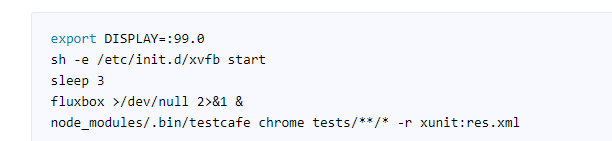
But how to install it on the Linux agent, via npm package?
let's say If I continue using the Jenkins and Linux K8 agent on headless browser, will testcafe still manages to capture pictures and video on Jenkins agent?
prudhvidandamudi
on 30 Apr 2020
xvfb is installed to your OS as a package (e.g., sudo apt-get install xvfb). It is not related to testcafe in any way.
Refer to the Screenshots and Videos topic to learn about prerequisites and requirements for screenshots and videos.
 AlexSkorkin
on 1 May 2020
AlexSkorkin
on 1 May 2020
Looks like the original issue was resolved: comment. Closing this thread for housekeeping purposes. If you still experience a similar issue, please submit a new bug report and provide an example that can be used to reproduce the problem.
 AndreyBelym
on 21 Jul 2020
AndreyBelym
on 21 Jul 2020
Related issues
 KaneMorgan
·
3Comments
KaneMorgan
·
3Comments
 marchugon
·
4Comments
marchugon
·
4Comments
 hinok
·
3Comments
hinok
·
3Comments
 chebum
·
3Comments
AndreyBelym
·
3Comments
chebum
·
3Comments
AndreyBelym
·
3Comments