Testcafe: Error: EACCES: permission denied, open '/tests/docker-test-results/res.xml'
Are you requesting a feature or reporting a bug?
Reporting a bug
What is the current behavior?
I created a docker-compose.yml for one of my projects that pulls testcafe/testcafe image and I'm not able to use xunit to create a report from my tests.
It works on my computer but doesn't work on circleci 🤒
Error reported on circleci:
Error: EACCES: permission denied, open '/tests/docker-test-results/res.xml'
Exited with code 1
I've found a similar topic https://testcafe-discuss.devexpress.com/t/error-eacces-permission-denied-mkdir-screenshots/347 which contains the same error.
What is the expected behaviour?
It should just work and report should be saved without error (using volumes defined in docker-compose.yml).
How would you reproduce the current behavior (if this is a bug)?
Create a docker-compose.yml file that pulls testcafe/testcafe image and connects to other services (I suppose that other services are not required but this what I'm doing in my project...).
Use volumes to share test results between the container and the host.
docker-compose.yml
version: '3.2'

services:

  e2e:
    image: testcafe/testcafe
    depends_on:
      - nginx
    volumes:
      - .:/tests
      - ./docker-screenshots:/tests/docker-screenshots
      - ./docker-test-results:/tests/docker-test-results
    environment:
      - WEBSITE_URL=${WEBSITE_URL}
      - MAIL_URL=${MAIL_URL}

  # ...other services like nginx etc
Create a shell script, something like:
run.sh
docker-compose down --volumes
docker-compose pull
docker-compose up -d
docker-compose run --rm e2e "chromium:headless --no-sandbox --disable-dev-shm-usage" tests/src -S -s /tests/docker-screenshots -r xunit:/tests/docker-test-results/res.xml
Provide the test code and the tested page URL (if applicable)
Tested page URL: N/A
Test code: N/A
Specify your
- operating system: macOS 10.13.6
- testcafe version: 0.21.1
- node.js version: 8.11.3
 hinok
hinok
All 3 comments
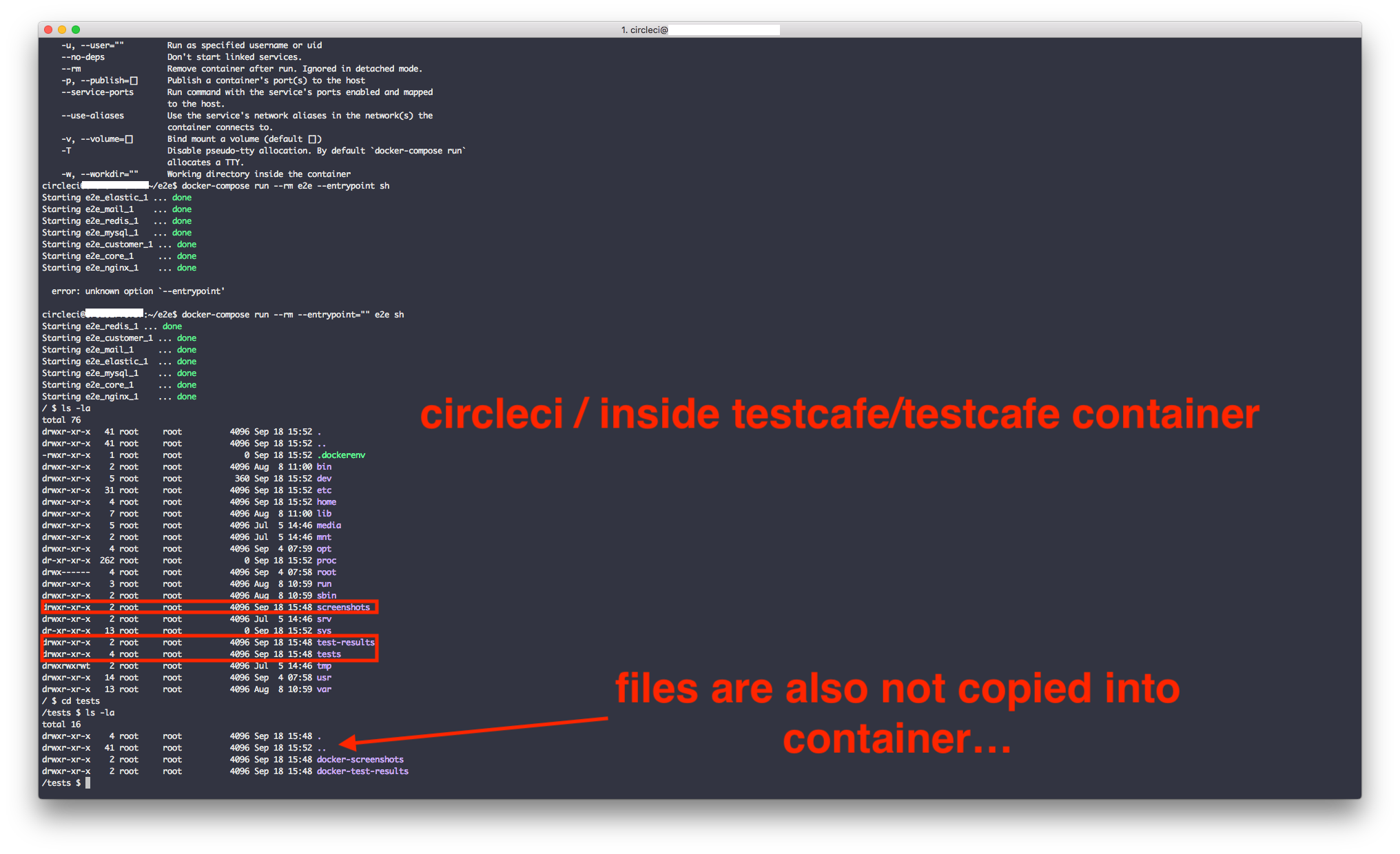
I found that on macOS when I do
docker-compose run --rm --entrypoint="" e2e sh
all newly created directories belongs to user where on circleci everything belogs to root.

Related issues
hinok
on 18 Sep 2018
Hi @hinok, I think it's because CirecleCI uses a fake root user to run builds. In this case, you can change the user that will be used to run using the -u argument of docker-compose.
run.sh:
#...
docker-compose run --rm -u root e2e "chromium:headless --no-sandbox --disable-dev-shm-usage" tests/src -S -s /tests/docker-screenshots -r xunit:/tests/docker-test-results/res.xml
 AndreyBelym
on 19 Sep 2018
AndreyBelym
on 19 Sep 2018
@AndreyBelym
This is exactly what I found yesterday. To fix permissions I had to add:
  e2e:
    image: testcafe/testcafe
    depends_on:
      - nginx
    volumes:
      - data:/tests
    environment:
      - WEBSITE_URL=${WEBSITE_URL}
      - MAIL_URL=${MAIL_URL}
    user: root # <---------------- this one...
and then permission problem is fixed.
To people who find this issue in the future and also want to use circleci. There is another issue if you'd like to run testcafe with docker-compose but it's strictly related to circleci mounting folders - https://circleci.com/docs/2.0/building-docker-images/#mounting-folders
It is not possible to mount a folder from your job space into a container in Remote Docker (and vice versa). You may use the docker cp command to transfer files between these two environments.
My solution includes using docker cp to copy files to a temp container and mounting external volume for testcafe like below:
docker-compose.yml
version: '3.2'

services:

  e2e:
    image: testcafe/testcafe
    depends_on:
      - nginx
    volumes:
      - data:/tests
    environment:
      - WEBSITE_URL=${WEBSITE_URL}
      - MAIL_URL=${MAIL_URL}
    user: root

  # ...other services

volumes:
    data:
        external:
            name: copy-data-volume # <----- Here is the name of the external volume that holds your tests file
Hope this will help someone.
hinok
on 19 Sep 2018
Related issues
 KaneMorgan
·
3Comments
KaneMorgan
·
3Comments
 ParachuteCat
·
3Comments
AndreyBelym
·
3Comments
ParachuteCat
·
3Comments
AndreyBelym
·
3Comments
 fnlctrl
·
3Comments
fnlctrl
·
3Comments
 Lukas-Kullmann
·
3Comments
Lukas-Kullmann
·
3Comments
Most helpful comment
@AndreyBelym
This is exactly what I found yesterday. To fix permissions I had to add:
and then permission problem is fixed.
To people who find this issue in the future and also want to use
circleci. There is another issue if you'd like to runtestcafewithdocker-composebut it's strictly related tocirclecimounting folders - https://circleci.com/docs/2.0/building-docker-images/#mounting-foldersMy solution includes using
docker cpto copy files to a temp container and mounting external volume for testcafe like below:docker-compose.yml
Hope this will help someone.