Testcafe: Button not clicked when .focus() called before
What is your Test Scenario?
I'm trying to toggle a button. If my input-field (ace-editor) calls .focus() before, the button will be hovered but not clicked. If I do not have the .focus() call, the button is correctly clicked. It works fine without testcafe.
What is the Current behavior?
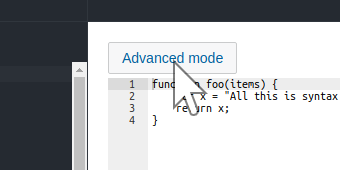
Button is not toggled, when .focus() is called on the editor. It is toggled in any other case.
What is the Expected behavior?
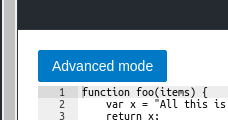
Click-Action from testcafe does not care about focus of components.
What is your web application and your TestCafe test code?
Your website URL (or attach your complete example): https://jsfiddle.net/3yafrzwL/2/
Your complete test code (or attach your test files):
fixture('Button Bug').page('https://jsfiddle.net/3yafrzwL/2/');

test('click button in jsfiddle', async (t) => {
  const selector = Selector('#advancedWrapper');
  await t
    .switchToIframe(Selector('[name=result]'))
    .wait(3000)
    .click(selector)
    .expect(selector.find('.oj-button').hasClass('oj-selected'))
    .ok()
    .wait(3000);
});
Screenshots:
I get:
I expect:
Steps to Reproduce:
- Execute the provided code. It will open https://jsfiddle.net/3yafrzwL/2/
Your Environment details:
- testcafe version: 0.23.1
- node.js version: 8.11.3
- command-line arguments: node --no-deprecation --inspect-brk=49693 node_modules/testcafe/lib/cli/index.js chrome jsfiddle.ts -e --test "click button in jsfiddle"
- browser name and version: Chrome 71.0.3578
- platform and version: Ubuntu 18.10
- other information: I'm using Oracle JET - Toggle Button (https://www.oracle.com/webfolder/technetwork/jet/jetCookbook.html?component=toggleButtons&demo=buttonCheckbox) and ace-editor. I cannot reproduce the problem without ace editor or with a normal button.
 dlangerenken
All 5 comments
Hello @dlangerenken,
Thank you for your detailed description. I've reproduced this issue on Windows 10 / Chrome. Our team will research it and check for a suitable solution.
Here is an example in which this problem is reproduced (without the switchToIframe method): example.zip
 Farfurix
on 25 Jan 2019
Farfurix
on 25 Jan 2019
Thanks @Farfurix . This is my temporary hack:
export const click = ClientFunction((selector: string) => {
  const elem = document.querySelector(selector) as HTMLElement;
  if (elem) {
    elem.click();
  }
});
@AndreyBelym not sure if related, but when I tried to upgrade from 1.0.0 to 1.1+ several issues appeared that seem to indicate clicking is no longer possible. I'd prefer not to use my workaround for all these scenarios if there is a better way!
Thanks!!
dlangerenken
on 18 Mar 2019
@dlangerenken
If some new issues appear and you think they are not related to this issue please feel free to submit a new bug report using the form
I agree that using the workaround cannot be a permanent solution, so we'll try to fix the issue in one of the nearest sprints.
 AlexKamaev
on 19 Mar 2019
AlexKamaev
on 19 Mar 2019
This thread has been automatically locked since it is closed and there has not been any recent activity. Please open a new issue for related bugs or feature requests. We recommend you ask TestCafe API, usage and configuration inquiries on StackOverflow.
![lock[bot] picture](https://avatars1.githubusercontent.com/in/6672?v=4&s=40) lock[bot]
on 11 Apr 2019
lock[bot]
on 11 Apr 2019
Related issues
 inikulin
·
32Comments
inikulin
·
32Comments
 nmackey
·
33Comments
nmackey
·
33Comments
 ludmilmm
·
54Comments
ludmilmm
·
54Comments
 janbaer
·
38Comments
janbaer
·
38Comments
 krzysiek-b
·
30Comments
krzysiek-b
·
30Comments