Testcafe: Response headers not set when using `RequestMock` to mock a response
Are you requesting a feature or reporting a bug?
Bug
What is the current behavior?
Custom headers are not set for the mocked response, and the request returns '222 unknown' status code due to CORS issue.
What is the expected behavior?
Request can be successfully mocked without any CORS issue, as I tried to set 'Access-Control-Allow-Origin' = '*' in custom headers.
How would you reproduce the current behavior (if this is a bug)?
Please check the pasted code
Provide the test code and the tested page URL (if applicable)
Tested page URL:
Test code
import {Selector, RequestMock} from 'testcafe';

const mock = RequestMock()
  .onRequestTo('http://localhost/api/1.0/login/')
  .respond((req, res) => { // a custom response
    res.headers["content-type"] = "application/json;charset=UTF-8";
    res.headers["Access-Control-Allow-Credentials"] = 'true';
    res.headers["Access-Control-Allow-Origin"] = "*";
    res.headers["Access-Control-Allow-Methods"] = "POST, GET, OPTIONS";
    res.headers["Access-Control-Allow-Headers"] = "X-Requested-With";
    res.headers["Access-Control-Allow-HeaderX-Frame-Options"] = "SAMEORIGIN";
    res.statusCode = 200;
    res.setBody({
        "status": "success",
        "jwt_token": "---custom token---",
        "message": "login success",
        "role": "ADMIN"
      });
    console.log(res);
  });

// A fixture must be created for each group of tests.
fixture(`Index page`)
  .page('http://localhost:8081')
  .requestHooks(mock);

test('login', async t => {
  await t
    .typeText(Selector('#login-username'), 'test-user')
    .pressKey('tab')
    .typeText(Selector('#login-password'), 'test-pwd')
    .click(Selector('#login-submit-btn'))
    .click(Selector('.user-avatar'));
});
Specify your
- operating system: Mac OSX
- testcafe version: 0.20.5
- node.js version: v10.2.1
 markselby9
All 10 comments
Hi @markselby9
I've investigated the issue and found the cause of the problem.
As workaround, try to specify all CORS headers in lowercase.
.respond((req, res) => { // a custom response
    res.headers["content-type"] = "application/json;charset=UTF-8";
    res.headers["access-control-allow-credentials"] = 'true';
    res.headers["access-control-allow-origin"] = "*";
    res.headers["access-control-allow-methods"] = "POST, GET, OPTIONS";
    res.headers["access-control-allow-headers"] = "X-Requested-With";
    res.headers["access-control-allow-headerx-frame-options"] = "SAMEORIGIN";
    res.statusCode = 200;
 miherlosev
on 31 Jul 2018
miherlosev
on 31 Jul 2018
Also, note that res.setBody(value) accepts only string parameter at present (see documentation).
I've create a suggestion to support additional parameter types.
miherlosev
on 31 Jul 2018
Hi @miherlosev , I've tried your workaround but still returns 222 unknown response code.
My code:
import {Selector, RequestMock} from 'testcafe';

const mock = RequestMock()
  .onRequestTo('http://localhost/api/1.0/login/')
  .respond((req, res) => { // a custom response
    res.headers["content-type"] = "application/json;charset=UTF-8";
    res.headers["access-control-allow-credentials"] = 'true';
    res.headers["access-control-allow-origin"] = "*";
    res.headers["access-control-allow-methods"] = "POST, GET, OPTIONS";
    res.headers["access-control-allow-headers"] = "X-Requested-With";
    res.headers["access-control-allow-headerx-frame-options"] = "SAMEORIGIN";
    res.statusCode = 200;
    res.setBody('test');
    console.log(res);
  });

fixture(`Index page`)
  .page('http://localhost:8081')
  .requestHooks(mock);

test('login', async t => {
  await t
    .typeText(Selector('#login-username'), 'test-user')
    .pressKey('tab')
    .typeText(Selector('#login-password'), 'test-pwd')
    .click(Selector('#login-submit-btn'))
    .click(Selector('.user-avatar'));
});
What I see in testcafe-live:

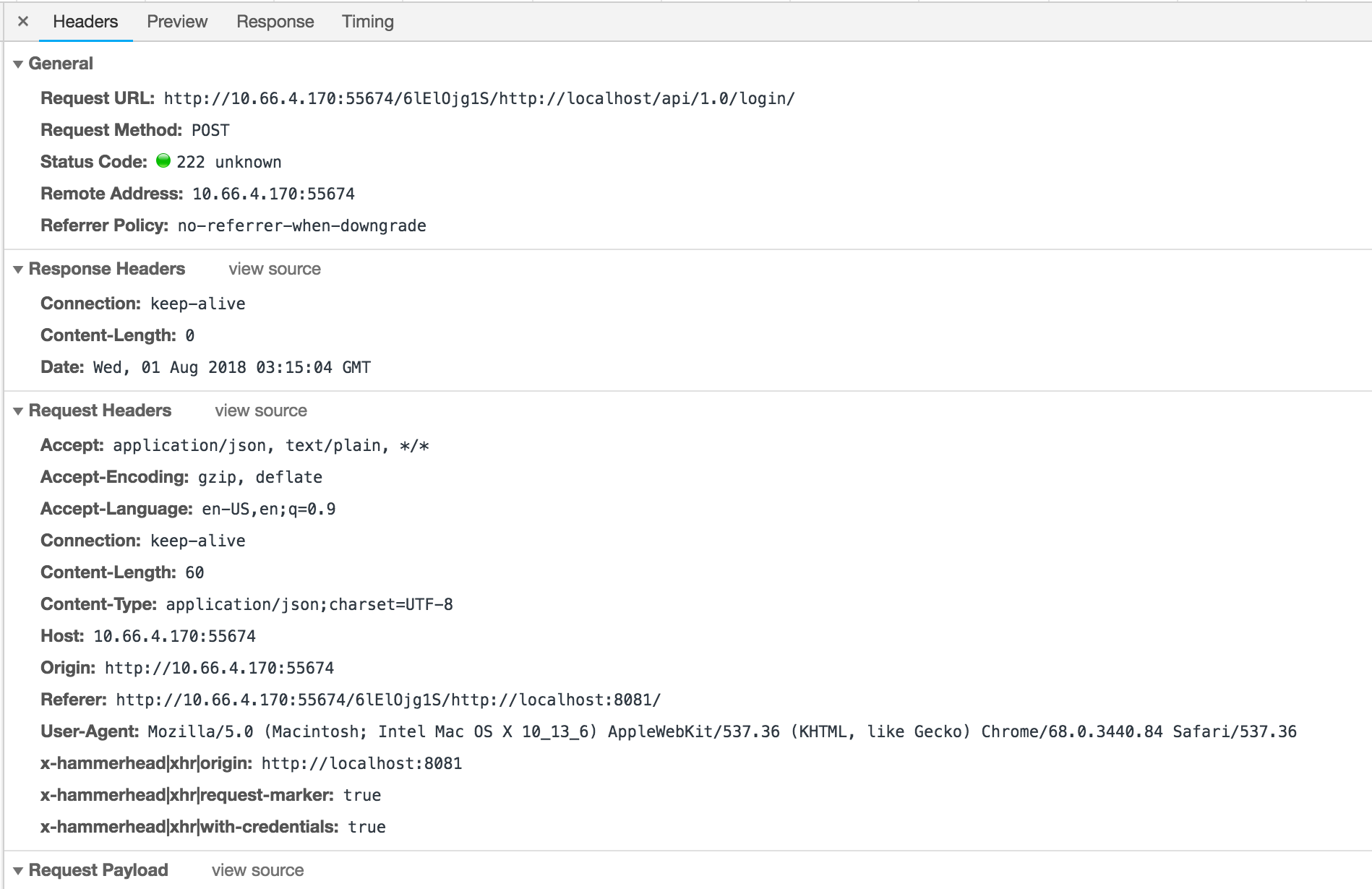
As you can see, the /login request still returns 222. The response headers are not shown in Chrome debugger. Please kindly have a look.
Thank you!
markselby9
on 1 Aug 2018
@markselby9
I cannot reproduce the problem using the code you provided (see example_i2681.zip).
Could you please provide a small runnable example where the problem is reproduced?
miherlosev
on 1 Aug 2018
Hi @markselby9
You may want to check the following file:
https://github.com/DevExpress/testcafe-hammerhead/blob/master/src/request-pipeline/xhr/same-origin-policy.js
There are a few origin policy checks for xhr requests.
In my case, I have a credentialed request with the allow-origin header set as '*'. and the request returns 222 because wild carding is not allowed for credentialed requests
 xipengyang
on 9 Aug 2018
xipengyang
on 9 Aug 2018
Hi @miherlosev @xipengyang , just resolved this issue by changing the code to:
import {Selector, RequestMock} from 'testcafe';
import _ from 'lodash';

const mock = RequestMock()
  .onRequestTo('http://localhost/api/1.0/login/')
  .respond((req, res) => { // a custom response
    res.headers["content-type"] = "application/json;charset=UTF-8";
    res.headers["access-control-allow-credentials"] = 'true';
    res.headers["access-control-allow-origin"] = ["http://localhost:8081", "http://10.66.4.170:52399"];
    res.headers["access-control-allow-methods"] = "POST, GET, OPTIONS";
    res.headers["access-control-allow-headers"] = "X-Requested-With";
    res.headers["access-control-allow-headerx-frame-options"] = "SAMEORIGIN";
    res.statusCode = 200;
    res.setBody({
        "status": "success",
        "jwt_token": "233",
        "message": "login success",
        "role": "ADMIN"
      });

    // for debug
    const reqOrigin = 'http://localhost:8081';
    const allowOriginHeader      = res.headers['access-control-allow-origin'];
    const allowCredentialsHeader = res.headers['access-control-allow-credentials'];
    const allowCredentials       = String(allowCredentialsHeader).toLowerCase() === 'true';
    const allowedOrigins         = _.castArray(allowOriginHeader);
    const wildcardAllowed        = allowedOrigins.includes('*');
    let result = true;

    // FAILED: Destination server doesn't provide the Access-Control-Allow-Origin header.
    // So cross-domain requests are denied
    if (!allowOriginHeader)
      result = false;
    console.log('result', result);

    // FAILED: Credentialed requests are not allowed or wild carding was used
    // for the allowed origin (credentialed requests should specify the exact domain).
    if (!allowCredentials || wildcardAllowed)
      result =  false;
    console.log('result', result);

    // FINAL CHECK: The request origin should match one of the allowed origins.
    result = wildcardAllowed || allowedOrigins.includes(reqOrigin);
    console.log('result', result);
  });

// A fixture must be created for each group of tests.
fixture(`Index page`)
  .page('http://localhost:8081')
  .requestHooks(mock);

test('login', async t => {
  await t
    .typeText(Selector('#login-username'), 'test-user')
    .pressKey('tab')
    .typeText(Selector('#login-password'), 'test-pwd')
    .click(Selector('#login-submit-btn'))
    .click(Selector('.user-avatar'));
});
I think the main causes are:
res.headers["access-control-allow-credentials"]need to keep lower letters when setting headers- Instead of using wildcard, use specific origins in
res.headers["access-control-allow-origin"] = ["http://localhost:8081", "http://10.66.4.170:52399"]
Thank you for your help!
markselby9
on 14 Aug 2018
@markselby9
Thank you for your detailed investigation. You described two problems.
One of them was already fixed (https://github.com/DevExpress/testcafe-hammerhead/issues/1704).
The second problem will be fixed in the next development sprint.
miherlosev
on 14 Aug 2018
Is there any plan to support objects types as parameter for the function setBody?
 noamaankhan
on 7 Mar 2019
noamaankhan
on 7 Mar 2019
@noamaankhan
We already have an issue for your use case: (https://github.com/DevExpress/testcafe-hammerhead/issues/1706).
This feature is not in our Road Map. It means I cannot provide you with an estimated time frame for this feature. If this feature is very important to you, you can try to implement it yourself. We will provide you all the necessary information.
miherlosev
on 11 Mar 2019
This thread has been automatically locked since there has not been any recent activity after it was closed. Please open a new issue for related bugs or feature requests. For TestCafe API, usage and configuration inquiries, we recommend asking them on StackOverflow.
![lock[bot] picture](https://avatars1.githubusercontent.com/in/6672?v=4&s=40) lock[bot]
on 27 Mar 2019
lock[bot]
on 27 Mar 2019
Related issues
 Lukas-Kullmann
·
3Comments
Lukas-Kullmann
·
3Comments
Lukas-Kullmann
·
3Comments
Lukas-Kullmann
·
3Comments
 fnlctrl
·
3Comments
fnlctrl
·
3Comments
 multivoltage
·
3Comments
multivoltage
·
3Comments
 inikulin
·
3Comments
inikulin
·
3Comments