Are you requesting a feature or reporting a bug?
bug
What is the current behavior?
when providing path from WSL, testcafe errors out,
$ npx testcafe path:/mnt/c/Program\ Files\ \(x86\)/Google/Chrome/Application/chrome.exe test.js

ERROR Was unable to open the browser "path:/mnt/c/Program Files (x86)/Google/Chrome/Application/chrome.exe" due to error.

maybe @bitcrazed can help us with some insights why may this happening from WSL perspective
What is the expected behavior?
make parth properly work from WSL
How would you reproduce the current behavior (if this is a bug)?
see attached gif
Specify your
- operating system: Win 10 CU with WSL - ubuntu 16
- testcafe version: [email protected]
- node.js version: 8.1.4
 Hotell
All 33 comments
Have you tried wrapping the entire path in quotes (due to the spaces)?
$ npx testcafe path:'/mnt/c/Program Files (x86)/Google/Chrome/Application/chrome.exe test.js'
 bitcrazed
on 21 Jul 2017
bitcrazed
on 21 Jul 2017
thanks for stepping in @bitcrazed . That didn't help unfortunately, same error. I guess issue is with testcafe implementation
npx testcafe path:'/mnt/c/Program Files (x86)/Google/Chrome/Application/chrome.exe' test.js
ERROR Was unable to open the browser "path:/mnt/c/Program Files (x86)/Google/Chrome/Application/chrome.exe" due to error.

Error: The specified browser name is not valid!
    at BrowserProviderPluginHost._callee3$ (/mnt/c/Users/hoche/Documents/Devel/test/testcafe-example/node_modules/testcafe/lib/browser/provider/built-in/path.js:159:35
)
    at tryCatch (/mnt/c/Users/hoche/Documents/Devel/test/testcafe-example/node_modules/regenerator-runtime/runtime.js:65:40)
    at Generator.invoke [as _invoke] (/mnt/c/Users/hoche/Documents/Devel/test/testcafe-example/node_modules/regenerator-runtime/runtime.js:303:22)
    at Generator.prototype.(anonymous function) [as next] (/mnt/c/Users/hoche/Documents/Devel/test/testcafe-example/node_modules/regenerator-runtime/runtime.js:117:21)
    at step (/mnt/c/Users/hoche/Documents/Devel/test/testcafe-example/node_modules/babel-runtime/helpers/asyncToGenerator.js:17:30)
    at /mnt/c/Users/hoche/Documents/Devel/test/testcafe-example/node_modules/babel-runtime/helpers/asyncToGenerator.js:28:13
    at <anonymous>
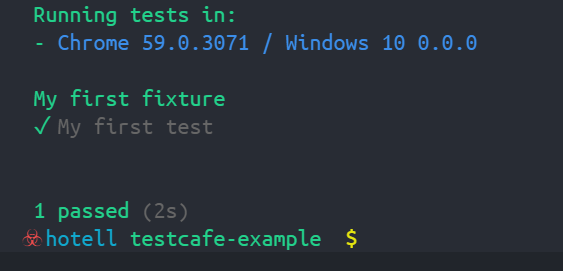
ha! so I've spent few minutes on debugging async/await compiled to es5 ( feels like shooting yourself in the head btw ehm .... ) and I found the issue and got it working :)
command:
npx testcafe path:"/mnt/c/Program Files (x86)/Google/Chrome/Application/chrome.exe" test.js --hostname localhost
So where is the issue?
-> _handleString
-> and most particular in this call of splitQuotedText
where splitChar param is set to ' ' which in will parse path to chrome badly -> like this
this ->
path:"/mnt/c/Program Files (x86)/Google/Chrome/Application/chrome.exe"
will be parsed to:
{ str: '/mnt/c/Program Files (x86)/Google/Chrome/Application/chrome.exe',
  args: [ 'Files', '(x86)/Google/Chrome/Application/chrome.exe' ],
  path: '/mnt/c/Program' }
which is of course wrong and whole script will error
So how to fix it?
Don't know why there is empty space as splitChar, but if we change it to for instance for comma , everything will start to work. I can submit PR if you want, this is indeed a deal breaker for my daily workflow as I'm using WSL 100% for work.
-var args = splitQuotedText(str, ' ', '`"\'');
+var args = splitQuotedText(str, ',', '`"\'');
cc @kirovboris
Hotell
on 22 Jul 2017
Hi @Hotell,
You've found a right way to pass a browser argument, but our code works as we expect.
Let me explain why (meanwhile I suppose it should be described in the docs).
You can pass a path to a browser executable file with some browser argruments in the following way:
path:path/to/chrome.exe --incognito. The _handleString function split this args by ' ', so it's ok.
To make it workable you should wrap it with quotes:
testcafe "path:path/to/chrome.exe --incognito" test.js
Since the path can contain spaces too you should be able to wrap the path with some other quotes.
As you can see from this line TestCafe allows to use three types of quotes: ', ", `.
So, to make your example workable you can just wrap the path with quotes:
testcafe "path:'path with space/to/chrome.exe' --incognito" test.js
You can see this type of using in our tests.
 AlexanderMoskovkin
on 22 Jul 2017
AlexanderMoskovkin
on 22 Jul 2017
Thanks for explanation why is ' ' , although your quotes doesn't work for all your type of quotes , also your test is covering just one use case, when using backticks `
following does not work:


the only combination that works is backticks + single quotes as a wrapper:

So either way:
- it's a bug ( that it handles correctly only 3rd usecase ? )
- it's demanded behaviour ( that it works solely with backticks ) and a PR to the docs needs to happen
Pls lemme know thx!
Hotell
on 23 Jul 2017
@Hotell You are right. We should check it
AlexanderMoskovkin
on 23 Jul 2017
I found it in docs actually ( my mistake that I didn't read thoroughly before :( ) but provided example doesn't work as I've mentioned
https://devexpress.github.io/testcafe/documentation/using-testcafe/command-line-interface.html#starting-browser-with-arguments
You can also specify arguments for portable browsers. If a path to a browser contains spaces, the path should be surrounded with backticks:
testcafe "path:`C:\Program Files (x86)\Google\Chrome\Application\chrome.exe` --start-fullscreen" tests/sample-fixture.js

Hotell
on 23 Jul 2017
Hello @Hotell! The example from docs was written for cmd shell, but it seems like you are using bash. The case with double quotes didn't work for you because backticks have special semantics in bash, and should be escaped with \ or should be inside single quotes (bash does some interpretation for strings inside " but not for strings inside '). I think we should fix docs at least, add an example for *NIX-like shells.
Also I'll try to improve quotes handling to allow using regular quotes to separate spaces-containing path and arguments in the path provider. Because experience shows that backticks are counter-intuitive, and people regularly runs into issues with them.
 AndreyBelym
on 1 Aug 2017
AndreyBelym
on 1 Aug 2017
sounds good @AndreyBelym, cheers !
P.S.: yes I'm using windows subsystem linux for development, so bash
Hotell
on 1 Aug 2017
I'm running into a similar issue with WSL:
$ testcafe "path:`/mnt/c/PROGRA~2/Google/Chrome/Application/chrome.exe`" ./tests

TestCafe Live watches the files and reruns
the tests once you've saved your changes.

You can use the following keys in the terminal:
'ctrl+s' - stop current test run;
'ctrl+r' - restart current test run;
'ctrl+w' - turn off/on watching;
'ctrl+c' - close browsers and terminate the process.


Test run is starting...

Make changes in the source files or press ctrl+r to restart test run.
ERROR: Error: Was unable to open the browser "path:" due to error.

TypeError: Cannot read property 'trim' of undefined
    at Object.callee$0$0$ (/mnt/c/Users/eliw00d/Documents/GitHub/project/node_modules/testcafe-browser-tools/lib/api/get-browser-info.js:54:42)
    at tryCatch (/mnt/c/Users/eliw00d/Documents/GitHub/project/node_modules/testcafe-browser-tools/node_modules/babel-runtime/regenerator/runtime.js:72:40)
    at Generator.invoke [as _invoke] (/mnt/c/Users/eliw00d/Documents/GitHub/project/node_modules/testcafe-browser-tools/node_modules/babel-runtime/regenerator/runtime.js:334:22)
    at Generator.prototype.(anonymous function) [as next] (/mnt/c/Users/eliw00d/Documents/GitHub/project/node_modules/testcafe-browser-tools/node_modules/babel-runtime/regenerator/runtime.js:105:21)
    at tryCatch (/mnt/c/Users/eliw00d/Documents/GitHub/project/node_modules/testcafe-browser-tools/node_modules/babel-runtime/regenerator/runtime.js:72:40)
    at invoke (/mnt/c/Users/eliw00d/Documents/GitHub/project/node_modules/testcafe-browser-tools/node_modules/babel-runtime/regenerator/runtime.js:146:20)
    at /mnt/c/Users/eliw00d/Documents/GitHub/project/node_modules/testcafe-browser-tools/node_modules/babel-runtime/regenerator/runtime.js:154:13
    at <anonymous>
It does actually open Chrome in Windows, but then the above error is thrown.
 eliw00d
on 2 Apr 2018
eliw00d
on 2 Apr 2018
If I change to single quotes, it has the following error after thinking for a good while:
$ testcafe 'path:`/mnt/c/PROGRA~2/Google/Chrome/Application/chrome.exe`' ./tests
ERROR Unable to establish one or more of the specified browser connections. This can be caused by network issues or remote device failure.
Hi @eliw00d, don't use backticks inside double quotes in bash, because shell will execute the text quoted with backticks as a command: https://www.gnu.org/software/bash/manual/html_node/Command-Substitution.html#Command-Substitution. Just use single quotes (') not double ones. We can't do much in this case because shell performs command substitution even before starting a TestCafe process.
To solve this problem, we need to find some argument syntax that is neutral to all major shells (bash, cmd.exe, PowerShell), convenient enough and has backward compatibility with current syntax.
AndreyBelym
on 2 Apr 2018
Yeah, sorry about that, I realized my error and tried again with single quotes but get a connection error now.
eliw00d
on 2 Apr 2018
@AndreyBelym What would cause the connection error I'm seeing above? Also, what do you look for in Linux when using the alias "chrome"? Is there a way I can create an environment variable that would work with that? I have $BROWSER set to /mnt/c/PROGRA~2/Google/Chrome/Application/chrome.exe for use with Hub, for example.
eliw00d
on 3 Apr 2018
@eliw00d we use simple which detection on Linux, so in theory if you add the Chrome from Program Files to the $PATH, it must be autodetected by TestCafe. Unfortunately, my Windows force me to upgrade for installing the WSL, so I need some time to test it.
To troubleshoot the infinite "Connected" screen I would recommend to check if and how remote browsers work. It means starting Chrome manually, opening DevTools and switching to the Network tab (also tick Preserve log flag in the toolbar) , then starting TestCafe with the remote argument: see in the docs. TestCafe will print remote connection URL to the reminal, navigate to it with the opened browser, and pay attention to requests in the Network tab in DevTools.
AndreyBelym
on 3 Apr 2018
@AndreyBelym So which chrome would not work because it would be chrome.exe due to WSL interop. For example, if I do which notepad I get nothing, but which notepad.exe gives me the Windows path:
eliw00d@eliw00d-PC:~$ which notepad
eliw00d@eliw00d-PC:~$ which notepad.exe
/mnt/c/Windows/System32/notepad.exe
I actually ended up adding the Chrome folder to my path to confirm this:
eliw00d@eliw00d-PC:~$ which chrome
eliw00d@eliw00d-PC:~$ which chrome.exe
/mnt/c/Program Files (x86)/Google/Chrome/Application/chrome.exe
I will troubleshoot the connected issue as you described and get back to you.
eliw00d
on 3 Apr 2018
@AndreyBelym Remote worked fine, not sure why using the chrome.exe path causes it to have connection errors.
eliw00d
on 5 Apr 2018
I've converted the issue to proposal.
Also I'll try to improve quotes handling to allow using regular quotes to separate spaces-containing path and arguments in the path provider. Because experience shows that backticks are counter-intuitive, and people regularly runs into issues with them.
 miherlosev
on 11 May 2018
miherlosev
on 11 May 2018
@eliw00d I had the same issue, wouldn't connect on WLS(windows linux subsytem), until I changed the getLinuxOpenCommand() method inside of open.js
'" 0<&- >/dev/null 2>&1 &'to '" >/dev/null 2>&1 &'
what is 0<&- ?
redirection
upon further non scientific/ non exhuastive investigation, it seems that when running _windows_ commands from wls, the 0<&- is not understood, is closing stdin really necessary for this command?
 mojjy
on 24 Oct 2018
mojjy
on 24 Oct 2018
@mojjy, if we don't close the stdin stream of a child process. the child_process.exec won't call its callback on real Linux systems until the child process is terminated. I think we should use child_process.spawn instead: https://github.com/DevExpress/testcafe-browser-tools/issues/159
AndreyBelym
on 7 Nov 2018
I'm running tests using the API - also finding issues launching Chrome on WSL - like @mojjy found the same issue.
 computamike
on 21 Mar 2019
computamike
on 21 Mar 2019
is there any update on this?
computamike
on 12 Apr 2019
@computamike
Hello.
We added this issue to "CLI suggestions" in Enhancements processing. Please stay tuned to our updates in this issue.
 Farfurix
on 15 Apr 2019
Farfurix
on 15 Apr 2019
Is there any workaround for now until the issue is fixed ?
 bogdan-calapod
on 11 Jul 2019
bogdan-calapod
on 11 Jul 2019
@bogdan-calapod
We haven't achieved any remarkable progress in implementing this suggestion. Moreover, additional difficulties were introduced since recent TestCafe versions use temporary profiles for testing in Chrome and Chrome for Windows doesn't allow using UNIX-style paths for temporary profiles.
For now, it's recommended to start the cmd.exe shell and use Node.js for Windows if you want to run Windows browsers from WSL, or install Chromium for Linux (sudo apt update && sudo apt install chromium) and run your tests in headless mode: testcafe 'chromium:headless --no-sandbox' tests
 LavrovArtem
on 11 Jul 2019
LavrovArtem
on 11 Jul 2019
I see. In the meantime I've found a way to make this work in WSL without needing to install a headless browser that works for my needs:
testcafe --ports 63305,63305 --live remote tests/
This keeps the testcafe on the same port (so that I can just bookmark the URL) and launches a remote server that I can connect to from the Windows side.
It's not ideal, but it works well enough that I can use it for daily dev. I thought others might be struggling with the same thing 😅
Might it be a good idea to place this in the README somewhere as a workaround for WSL-based setups, seeing as with the coming of WSL2 and such I expect more people would begin working in this environment/setup ?
bogdan-calapod
on 11 Jul 2019
We are happy that you have found a workaround. Thank you for sharing it with us. This thread is a good place to keep it for now.
 arubtsov
on 12 Jul 2019
arubtsov
on 12 Jul 2019
The workaround from @bogdan-calapod isn't working for me. I just get an immediate disconnect when I browse to the page. Any updates overall on using testcafe with WSL2?
 EricWardner
on 20 Apr 2020
EricWardner
on 20 Apr 2020
Eric, please try Artem's solution:
For now, it's recommended to start the cmd.exe shell and use Node.js for Windows if you want to run Windows browsers from WSL, or install Chromium for Linux (sudo apt update && sudo apt install chromium) and run your tests in headless mode: testcafe 'chromium:headless --no-sandbox' tests
https://github.com/DevExpress/testcafe/issues/1640#issuecomment-510491429
 SergeyShurygin
on 21 Apr 2020
SergeyShurygin
on 21 Apr 2020
Workaround: testcafe 'path:'/mnt/c/WINDOWS/explorer.exe' ./tests
This will launch the default browser on the Windows environment
 danielskeeled
on 26 May 2020
danielskeeled
on 26 May 2020
None of the previous workarounds worked for me.
Thanks to a coworker I'm just using:
- GitBash App // Bach app installed with Git
npx testcafe chrome ./tests
I continue using WSL to develop and for running tests I use that bash console.
 gabrielizalo
on 6 Jul 2020
gabrielizalo
on 6 Jul 2020
It seems that stdin redirection (0<&-) here prevents the Chrome executable from starting.
AndreyBelym
on 30 Oct 2020
Related issues
 jvanoostveen
·
4Comments
AndreyBelym
·
3Comments
jvanoostveen
·
4Comments
AndreyBelym
·
3Comments
 calisven
·
3Comments
calisven
·
3Comments
 KaneMorgan
·
3Comments
KaneMorgan
·
3Comments
 ParachuteCat
·
3Comments
ParachuteCat
·
3Comments
Most helpful comment
I see. In the meantime I've found a way to make this work in WSL without needing to install a headless browser that works for my needs:
This keeps the
testcafeon the same port (so that I can just bookmark the URL) and launches a remote server that I can connect to from the Windows side.It's not ideal, but it works well enough that I can use it for daily dev. I thought others might be struggling with the same thing 😅
Might it be a good idea to place this in the README somewhere as a workaround for WSL-based setups, seeing as with the coming of WSL2 and such I expect more people would begin working in this environment/setup ?