Testcafe: Add the capability to perform testing in multiple browser windows
Are you requesting a feature or reporting a bug?
Feature
What is the current behavior?
You can run test only in single window of the browser
What is the expected behavior?
It's useful to run test in multiple windows to simultaneously observe results from different users perspective. E.g. we test online chat or online game. The idea is to spawn new windows in test and switch test context to that window (It also we'll play well with Roles feature):
test('Multi-window', async t => {
     await t
           .switchRole(user1)
           .click('#start-game')

           .switchToWindow(1)   // Spawns new browser window if it wasn't used before
           .switchRole(user2)
           .click('#start-game')
           .click('#shoot')

           .switchToWindow(0); // Return to default window

    expect(await healthbar.value).eql(0);
});
The syntax is still a subject for bikeshedding. \cc @DevExpress/testcafe
 inikulin
All 93 comments
Is the as method above part of the proposal, or something existing?
Note that this may need to be two profiles rather than two windows. You may even want to test multiple windows of multiple profiles.
as(user1) would work pretty well if user1 were created with new BrowserProfile(). Since a new profile implicitly means new window, you wouldn't need switchToWindow until you wanted to support multiple windows within the same profile.
 jakearchibald
on 24 Oct 2016
jakearchibald
on 24 Oct 2016
Hi Jake.
Note that this may need to be two profiles rather than two windows. You may even want to test multiple windows of multiple profiles.
This is exactly what this function do, it's a part of upcoming Roles functionality.
Update: I've forgot that we decided to use switchRole() instead of as(). I'll edit the example in OP post.
inikulin
on 24 Oct 2016
Is this still on the list? Multiple browser window support would be awesome for things like auth0/google authentication.
Btw, I love TestCafe <3
 jadechip
on 17 Jan 2018
jadechip
on 17 Jan 2018
I really like testcafe, but this is something I would need to successfully test my application. Our application opens multiple windows and uses them to pass data around. I would also be curious to know the timeline for this particular feature as I'm still in the process of selecting a UI automation framework.
 Lukukas
on 17 Jan 2018
Lukukas
on 17 Jan 2018
Hi @skogman and @Lukukas
Unfortunately, I cannot provide a strong timeline.
We have plans to investigate the possibility of multiple window testing in one of the nearest sprints. We will publish investigation results as soon as they appear.
At present, you can try this workaround for the 'Logging in via a social network' case.
 miherlosev
on 19 Jan 2018
miherlosev
on 19 Jan 2018
@LavrovArtem
I have faced issue while clicking on a #googleSignInn button. It doesn't redirect to the google POPUP page.Below I attached my code
Expected Behaviour is to give my credentials in google popup page and then it should redirect to my homesite.
Thanks in advance
`import { ClientFunction, Role, Selector } from 'testcafe';
const patchAuth = ClientFunction(() => {
window['op' + 'en'] = function (url) {
var iframe = document.createElement('iframe');
iframe.style.position = 'fixed';
iframe.style.left = '100px';
iframe.style.top = '150px';
iframe.style.width = '600px';
iframe.style.height = '600px';
iframe.style['z-index'] = '99999999';;
iframe.src = url;
iframe.id = 'auth-iframe';
document.body.appendChild(iframe);
};
});
const googleAccUser = Role('https://merida-web.herokuapp.com/', async t => {
await patchAuth();
await t
.click("#LoggIn")
.click("#googleSignInn")
.switchToIframe('#auth-iframe')
.typeText('#identifierId', '[email protected]')
.click("#identifierNext")
.typeText('#password', 'maduraiboys007')
.click("#passwordNext")
.switchToMainWindow();
await Selector('#page-header-top-menu')();
});
fixture Merida E2E Testing
.page https://merida-web.herokuapp.com/
.beforeEach(async t => await t.useRole(googleAccUser));
test('first test', async t => {
await t.click(Selector('.dashboard-tab').nth(2));
});`
 MohamedRasool786
on 21 Jun 2018
MohamedRasool786
on 21 Jun 2018
Um, this _seriously_ needs to be on your front page! I mean, no way can I use your app unless this works. I wasted a lot of time trying out your tool--which I really liked--but this is an _total_ deal breaker... ugh.
 qualityshepherd
on 9 Jul 2018
qualityshepherd
on 9 Jul 2018
@AndreyBelym This issue was first addressed in Nov 2016... And its the feature thats going to add yet another feather to TC against Selenium. Waiting eagerly for this feature...
 vvedachalam
on 7 Aug 2018
vvedachalam
on 7 Aug 2018
Hi, does TestCafe support this ".switchToWindow(1)" method?
I am getting "TypeError: t.switchToWindow is not a function"
 amirse80
on 25 Oct 2018
amirse80
on 25 Oct 2018
@amirse80, this method is not implemented yet.
Today I've found that Xiaomi Mi Browser creates a new tab every time it navigates to a different URL. It means that TestCafe won't work in Mi Browser until this feature is implemented.
 AndreyBelym
on 25 Oct 2018
AndreyBelym
on 25 Oct 2018
Any update on this? Looking to test a live chat UI but unsure of how to do that without being able to have multiple instances of the browser running.
 bkd705
on 27 Dec 2018
bkd705
on 27 Dec 2018
@bkd705, I think this feature is not required if you want to test a live chat.
You can specify two browser instances when starting TestCafe:
testcafe chrome,chrome test.js
Then you can use the test context and conditional operators to perform different actions in different browsers:
const roles = [
{
name: 'User1',
free: true,
},
{
name: 'User2',
free: true,
},
];
fixture `fixture`
.page `example.com`
.beforeEach(async t => {
const currentRole = roles.filter(role => role.free)[0];
if (!currentRole)
throw new Error('Found no free role');
currentRole.free = false;
t.ctx.roleName = currentRole.name;
})
function actAsUser1 () {
console.log('I am User1');
}
function actAsUser2 () {
console.log('I am User2');
}
test('Do things', async t => {
switch (t.ctx.roleName) {
case 'User1': return actAsUser1();
case 'User2': return actAsUser2();
default: throw new Error(`Unknown role name "${t.ctx.roleName}"`)
}
});
@AndreyBelym @miherlosev Thank you for your possible solutions. Unfortunately, this still isn't enough for my use case. I need to be able to test client synchronization (like google docs). Having different users act on the same page is not enough. Also how the application behaves offline will need to be tested. Any advice is appreciated :+1: :pray:
 jsdevtom
on 4 Jan 2019
jsdevtom
on 4 Jan 2019
@bkd705 @inikulin The best solution that I have come up with is to use puppeteer for the other browser instance(s). Here is an example with the PageObject pattern:
test(`It should show the added question in the UI when the user adds a question
in a different client`, async t => {
const browser = await puppeteer.launch({ headless: false, ignoreHTTPSErrors: true });
const page: Page = await browser.newPage();
await page.goto('http://localhost:4200/login');
const questionText = 'Does this work?';
await t.expect(questionPage.dashboardQuestionCard.exists).notOk();
await loginPage.loginWithPuppeteer(page, username, password);
await questionPage.addQuestionPuppeteer(page, questionText, ['i hope so']);
await t.expect(questionPage.dashboardQuestionCard.exists).ok();
await t.expect(questionPage.dashboardQuestionCard.innerText).contains(questionText);
});
Any updates on this? Our sites are moving over to Google SSO for authentication and we will no longer be able to use TestCafe if we cannot get past the authentication.
 rmkranack
on 18 Jan 2019
rmkranack
on 18 Jan 2019
@rmkranack
Currently, we are researching if there is some workaround. We will inform you once we get any information.
 LavrovArtem
on 21 Jan 2019
LavrovArtem
on 21 Jan 2019
@rmkranack,
I've created a simple example that shows how to authorize using Google SSO. Please try it and inform us of your results.
import { Selector, Role } from 'testcafe'
const signInButton = Selector('.abcRioButtonContentWrapper');
const googleAccUser = Role('https://google-developers.appspot.com/identity/sign-in/web/demos/signin_contextual_simple?hl=en', async t => {
await t
.click(signInButton)
.typeText('input[type="email"]', '<your username>')
.click('#identifierNext')
.typeText('input[type="password"]', '<your password>')
.click('#passwordNext')
.wait(2000)
.navigateTo('https://google-developers.appspot.com/identity/sign-in/web/demos/signin_contextual_simple?hl=en');
}, { preserveUrl: true });
fixture `Google Sign-In`
.page`https://google-developers.appspot.com/identity/sign-in/web/demos/signin_contextual_simple?hl=en`
test('first test', async t => {
await t
.expect(signInButton.innerText).eql('Sign in')
.useRole(googleAccUser)
.expect(signInButton.innerText).eql('Signed in');
});
test('second test', async t => {
await t
.useRole(googleAccUser)
.expect(signInButton.innerText).eql('Signed in');
});
Hello Artem,
I am running into the same problem. I am able to authenticate but when I
attempt to enter our site, I get stuck on a blank page. I see this in the
url:
http://192.168.29.145:58159/qwKC7OJl6/https://accounts.google.com/o/oauth2/auth?redirect_uri=storagerelay%3A%2F%2Fhttps%2Fcoach-hub-ui-exos-coachhub.exos.biz%3Fid%3Dauth436613&response_type=permission%20id_token&scope=email%20profile%20openid&openid.realm=&client_id=283667247630-r49h7opf7bn5igkffqt6d7ob6f0k0b79.apps.googleusercontent.com&ss_domain=https%3A%2F%2Fcoach-hub-ui-exos-coachhub.exos.biz&fetch_basic_profile=true&gsiwebsdk=2
On Tue, Jan 22, 2019 at 7:26 AM Artem Lavrov notifications@github.com
wrote:
@rmkranack https://github.com/rmkranack,
I've created a simple example that shows how to authorize using Google
SSO. Please try it and inform us of your results.import { Selector, Role } from 'testcafe'
const signInButton = Selector('.abcRioButtonContentWrapper');const googleAccUser = Role('https://google-developers.appspot.com/identity/sign-in/web/demos/signin_contextual_simple?hl=en', async t => {
await t
.click(signInButton)
.typeText('input[type="email"]', '')
.click('#identifierNext')
.typeText('input[type="password"]', '')
.click('#passwordNext')
.wait(2000)
.navigateTo('https://google-developers.appspot.com/identity/sign-in/web/demos/signin_contextual_simple?hl=en');
}, { preserveUrl: true });fixture
Google Sign-In
.pagehttps://google-developers.appspot.com/identity/sign-in/web/demos/signin_contextual_simple?hl=en
test('first test', async t => {
await t
.expect(signInButton.innerText).eql('Sign in')
.useRole(googleAccUser)
.expect(signInButton.innerText).eql('Signed in');
});
test('second test', async t => {
await t
.useRole(googleAccUser)
.expect(signInButton.innerText).eql('Signed in');
});—
You are receiving this because you were mentioned.
Reply to this email directly, view it on GitHub
https://github.com/DevExpress/testcafe/issues/912#issuecomment-456440563,
or mute the thread
https://github.com/notifications/unsubscribe-auth/AG63LvJS7Y0nsDrmAQXumK5PUVUZpKbpks5vFy3AgaJpZM4KeyDD
.
--
EXOS
teamexos.com
Robert Kranack | Sr QA Engineer | c 310.696.9349 | 5815 W. Sunset Blvd
Suite 105, Hollywood, CA 90028
--
CONFIDENTIALITY NOTICE:
The information in this communication, including
any attachments, is intended only for the person or entity to which it is
addressed and may contain confidential, proprietary, and/or privileged
material. If you are not the addressee or if you received this
communication in error, you are hereby notified that any review,
retransmission, dissemination or other use of, or taking or any action in
reliance upon, this information is prohibited. If you did receive this
communication in error, please destroy it, all copies and any attachments,
and notify the sender as soon as possible. The individual sender of this
e-mail is responsible for its content, and EXOS does not assume any legal
liability or responsibility for the accuracy, completeness or usefulness of
any information, product, or process disclosed. Further, any comments,
statements or opinions expressed by the author in this communication do not
necessarily reflect those of EXOS.
rmkranack
on 22 Jan 2019
@rmkranack,
Could you please provide me with your site url and test? I cannot help much without this information.
LavrovArtem
on 23 Jan 2019
I added a few steps to your sample code to go to our site and verify the
authenticated page is displayed. We only have our test site running from
9am-7pm pacific time. If you need it during a different time, let me know
and I can turn it on. The url is https://coach-hub-ui-exos-coachhub.exos.biz
.
import { Selector, Role } from 'testcafe'
const signInButton = Selector('.abcRioButtonContentWrapper');
const googleAccUser =
Role('https://google-developers.appspot.com/identity/sign-in/web/demos/signin_contextual_simple?hl=en',
async t => {
await t
.click(signInButton)
.typeText('input[type="email"]', '[email protected]')
.click('#identifierNext')
.typeText('input[type="password"]', 'Changeme!')
.click('#passwordNext')
.wait(2000)
.navigateTo('https://google-developers.appspot.com/identity/sign-in/web/demos/signin_contextual_simple?hl=en');
}, { preserveUrl: true });
fixture Google Sign-In
.pagehttps://google-developers.appspot.com/identity/sign-in/web/demos/signin_contextual_simple?hl=en
test('first test', async t => {
await t
.expect(signInButton.innerText).eql('Sign in')
.useRole(googleAccUser)
.expect(signInButton.innerText).eql('Signed in');
});
test('second test', async t => {
await t
.useRole(googleAccUser)
.expect(signInButton.innerText).eql('Signed in')
.navigateTo('https://coach-hub-ui-exos-coachhub.exos.biz')
.click('button[class="btn mb-1 btn-primary btn-block"]')
.expect(Selector('div[class="page-header border-bottom"]').exists).ok();
});
On Wed, Jan 23, 2019 at 5:46 AM Artem Lavrov notifications@github.com
wrote:
@rmkranack https://github.com/rmkranack,
Could you please provide me with your site url and test? I cannot help
much without this information.—
You are receiving this because you were mentioned.
Reply to this email directly, view it on GitHub
https://github.com/DevExpress/testcafe/issues/912#issuecomment-456806497,
or mute the thread
https://github.com/notifications/unsubscribe-auth/AG63LquWlt0WuO1vg9qSBAJVb-j1GJ-2ks5vGGefgaJpZM4KeyDD
.
--
EXOS
teamexos.com
Robert Kranack | Sr QA Engineer | c 310.696.9349 | 5815 W. Sunset Blvd
Suite 105, Hollywood, CA 90028
--
CONFIDENTIALITY NOTICE:
The information in this communication, including
any attachments, is intended only for the person or entity to which it is
addressed and may contain confidential, proprietary, and/or privileged
material. If you are not the addressee or if you received this
communication in error, you are hereby notified that any review,
retransmission, dissemination or other use of, or taking or any action in
reliance upon, this information is prohibited. If you did receive this
communication in error, please destroy it, all copies and any attachments,
and notify the sender as soon as possible. The individual sender of this
e-mail is responsible for its content, and EXOS does not assume any legal
liability or responsibility for the accuracy, completeness or usefulness of
any information, product, or process disclosed. Further, any comments,
statements or opinions expressed by the author in this communication do not
necessarily reflect those of EXOS.
rmkranack
on 23 Jan 2019
@rmkranack,
I apologize for the delayed response.
I've tried to rewrite my example to use your web site, but was not able to test it, as Google asks for a phone number for two-factor authentication. However, I have noticed that you did not change the page url and the role url in the code you provided. I suggest that you modify it as follows:
import { Selector, Role } from 'testcafe'
const googleAccUser = Role('https://coach-hub-ui-exos-coachhub.exos.biz/account/login', async t => {
await t
.click('button[class="btn mb-1 btn-primary btn-block"]')
.typeText('input[type="email"]', '[email protected]')
.click('#identifierNext')
.typeText('input[type="password"]', 'Changeme!')
.click('#passwordNext')
.wait(2000)
.navigateTo('https://coach-hub-ui-exos-coachhub.exos.biz/');
}, { preserveUrl: true });
fixture `Google Sign-In`
.page`https://coach-hub-ui-exos-coachhub.exos.biz/`
test('first test', async t => {
await t
.useRole(googleAccUser)
.expect(Selector('div[class="page-header border-bottom"]').exists).ok();;
});
Thanks for the reply. I added a few lines to attempt to get to the home
page after authentication and still get a blank page. We do not have a
recovery phone or email on this test account. It looks like Google blocked
you. Should be okay now. Here is what I tried:
import { Selector, Role } from 'testcafe'
const signInButton = Selector('.abcRioButtonContentWrapper');
const googleAccUser =
Role('https://coach-hub-ui-exos-coachhub.exos.biz/account/login',
async t => {
await t
.click('button[class="btn mb-1 btn-primary btn-block"]')
.typeText('input[type="email"]', '[email protected]')
.click('#identifierNext')
.typeText('input[type="password"]', 'Changeme!')
.click('#passwordNext')
.wait(2000)
.navigateTo('https://coach-hub-ui-exos-coachhub.exos.biz/');
}, { preserveUrl: true });
fixture Google Sign-In
.pagehttps://coach-hub-ui-exos-coachhub.exos.biz/
test('first test', async t => {
await t.useRole(googleAccUser);
await t
.click('button[class="btn mb-1 btn-primary btn-block"]')
.expect(Selector('div[class="page-header border-bottom"]').exists).ok();
});
On Fri, Feb 1, 2019 at 2:16 AM Artem Lavrov notifications@github.com
wrote:
@rmkranack https://github.com/rmkranack,
I apologize for the delayed response.I've tried to rewrite my example to use your web site, but was not able to
test it, as Google asks for a phone number for two-factor authentication.
However, I have noticed that you did not change the page url and the role
url in the code you provided. I suggest that you modify it as follows:import { Selector, Role } from 'testcafe'
const signInButton = Selector('.abcRioButtonContentWrapper');const googleAccUser = Role('https://coach-hub-ui-exos-coachhub.exos.biz/account/login', async t => {
await t
.click('button[class="btn mb-1 btn-primary btn-block"]')
.typeText('input[type="email"]', '[email protected]')
.click('#identifierNext')
.typeText('input[type="password"]', 'Changeme!')
.click('#passwordNext')
.wait(2000)
.navigateTo('https://coach-hub-ui-exos-coachhub.exos.biz/');
}, { preserveUrl: true });fixture
Google Sign-In
.pagehttps://coach-hub-ui-exos-coachhub.exos.biz/
test('first test', async t => {
await t.useRole(googleAccUser);
});—
You are receiving this because you were mentioned.
Reply to this email directly, view it on GitHub
https://github.com/DevExpress/testcafe/issues/912#issuecomment-459673896,
or mute the thread
https://github.com/notifications/unsubscribe-auth/AG63LmHpa9hfnTtvU5v3AvK4V6Td2X_-ks5vJBPlgaJpZM4KeyDD
.
--
EXOS
teamexos.com
Robert Kranack | Sr QA Engineer | c 310.696.9349 | 5815 W. Sunset Blvd
Suite 105, Hollywood, CA 90028
--
CONFIDENTIALITY NOTICE:
The information in this communication, including
any attachments, is intended only for the person or entity to which it is
addressed and may contain confidential, proprietary, and/or privileged
material. If you are not the addressee or if you received this
communication in error, you are hereby notified that any review,
retransmission, dissemination or other use of, or taking or any action in
reliance upon, this information is prohibited. If you did receive this
communication in error, please destroy it, all copies and any attachments,
and notify the sender as soon as possible. The individual sender of this
e-mail is responsible for its content, and EXOS does not assume any legal
liability or responsibility for the accuracy, completeness or usefulness of
any information, product, or process disclosed. Further, any comments,
statements or opinions expressed by the author in this communication do not
necessarily reflect those of EXOS.
rmkranack
on 1 Feb 2019
We do not have a recovery phone or email on this test account. It looks like Google blocked you. Should be okay now.
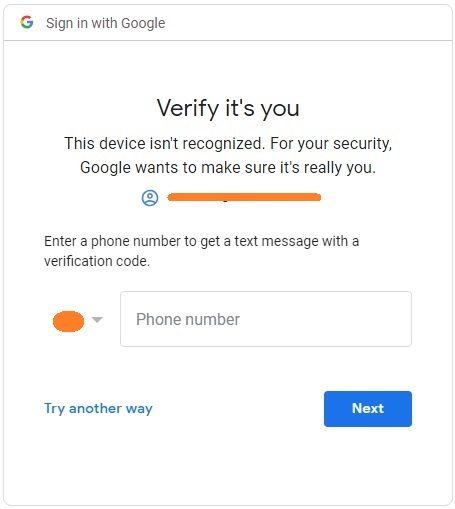
@rmkranack I'm still not able to test it as Google asks for a phone to validate your account. Try to increase the waiting time in the role before navigating to the home page.
"Verify it's you" screenshot
LavrovArtem
on 6 Feb 2019
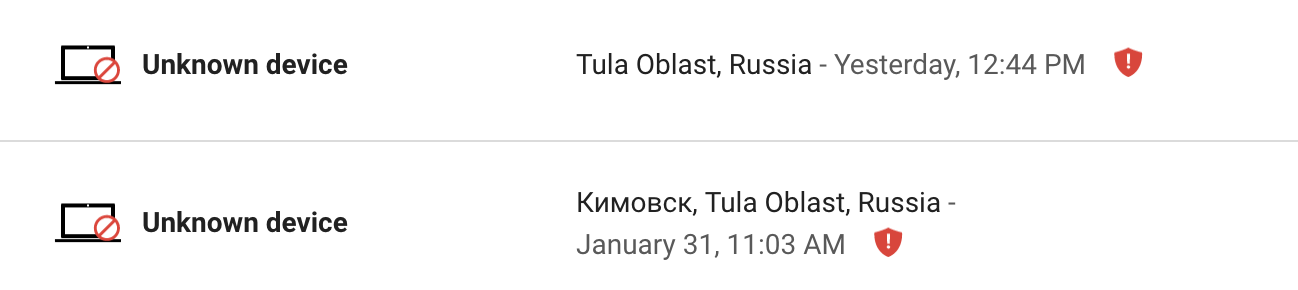
It looks like Google keeps blocking you. I added a recovery email to verify
to hopefully help get you unblocked. The recovery email is
exos.[email protected]. I increased the wait to 10 seconds and still have
the same problem. Any other ideas? Thanks
On Wed, Feb 6, 2019 at 6:36 AM Artem Lavrov notifications@github.com
wrote:
We do not have a recovery phone or email on this test account. It looks
like Google blocked you. Should be okay now.I'm still not able to test it as Google asks for a phone to validate your
account. Try to increase the waiting time in the role before navigating to
the home page.
"Verify it's you" screenshot[image: y2dujq28_oa]
https://user-images.githubusercontent.com/5373460/52347428-fba2e980-2a32-11e9-9f5b-5f6ee69e5848.jpg—
You are receiving this because you were mentioned.
Reply to this email directly, view it on GitHub
https://github.com/DevExpress/testcafe/issues/912#issuecomment-461045035,
or mute the thread
https://github.com/notifications/unsubscribe-auth/AG63Lj3cTZj15SMdCg1ryJ9s7HT3af6Rks5vKuh_gaJpZM4KeyDD
.
--
EXOS
teamexos.com
Robert Kranack | Sr QA Engineer | c 310.696.9349 | 5815 W. Sunset Blvd
Suite 105, Hollywood, CA 90028
--
CONFIDENTIALITY NOTICE:
The information in this communication, including
any attachments, is intended only for the person or entity to which it is
addressed and may contain confidential, proprietary, and/or privileged
material. If you are not the addressee or if you received this
communication in error, you are hereby notified that any review,
retransmission, dissemination or other use of, or taking or any action in
reliance upon, this information is prohibited. If you did receive this
communication in error, please destroy it, all copies and any attachments,
and notify the sender as soon as possible. The individual sender of this
e-mail is responsible for its content, and EXOS does not assume any legal
liability or responsibility for the accuracy, completeness or usefulness of
any information, product, or process disclosed. Further, any comments,
statements or opinions expressed by the author in this communication do not
necessarily reflect those of EXOS.
rmkranack
on 6 Feb 2019
Just realized the recovery email didn't save. It is added now.
rmkranack
on 7 Feb 2019
@rmkranack,
Unfortunately, I could not find a workaround for your site to overcome the google authentication mechanism. At the moment, I'm out of ideas on how I may find a solution for you.
LavrovArtem
on 12 Feb 2019
@AndreyBelym Can you let me know when this feature will be added?
 daenamkim
on 4 Apr 2019
daenamkim
on 4 Apr 2019
We do have this feature on our roadmap, but have not yet established the exact dates. So, at this point I cannot provide any timeframet.
Let me take a moment to thank you everyone who participated in this thread. We have collected the use cases, where this functionality would be useful, and are now looking for a solution. We will lock this thread for now and will update it as soon as we have something ready to test.
LavrovArtem
on 4 Apr 2019
I have a login page which checks pop blocker of browser by launching a small window and automatically closing it. Now the problem is testcafe is loading the pop up and not navigating to login page.when I tried window.history or window.close, again it browses the login url so again pop up opens and i cant fix it...is there any workaround?
 saiparth
on 30 Apr 2019
saiparth
on 30 Apr 2019
At this moment TestCafe does not support operation with multiple browser windows. We have plans to implement this feature in the near future, however, I cannot give any estimates. As for the workaround, it's difficult to say something definite without a working project that demonstrates the issue. I think it's better to create a separate issue and provide us with a working project (or url to your project) and detailed instructions on how to reproduce the issue.
 AlexKamaev
on 30 Apr 2019
AlexKamaev
on 30 Apr 2019
Thanks for replay. I will create new bug with details
saiparth
on 30 Apr 2019
@AlexKamaev Created https://github.com/DevExpress/testcafe/issues/3762
saiparth
on 2 May 2019
@saiparth,
Thank you for your cooperation. We will look into it.
 AlexSkorkin
on 2 May 2019
AlexSkorkin
on 2 May 2019
also from my side i can add that testCafe crashes when href is clicked and should be opened in new tab ( because of functionality of opening every element in same tab )
 appendixshuffle
on 16 Jul 2019
appendixshuffle
on 16 Jul 2019
What is the status for this? Cause this is important and I can see not just for me...
My example:
When you have things opening in the new tab (TestCafe opens in the same) - OK.
BUT You are not able to go back to the previous page. TestCafe just takes you back to blank page.
Seriously thinking about moving back to SeleniumWebdriver :D
 bartzielonka
on 22 Aug 2019
bartzielonka
on 22 Aug 2019
Yes please, please, please :) testcafe is awesome, but this lacking important feature is rendering testcafe not an option for many projects. selenium, cypress, etc... all support that. it is a basic requirement for many apps, especially with social logins.
 devmondo
on 22 Aug 2019
devmondo
on 22 Aug 2019
@bartzielonka we understand that this feature is very important for a lot of users, that's why it is at the top of our roadmap. Unfortunately, we need to make massive changes to our proxy server and it's a very, very big amount of work.
@devmondo Do you have some inside information? Since as far as I know, it is not available in Cypress right now and won't be implemented in the future: https://docs.cypress.io/guides/references/trade-offs.html#Multiple-tabs
AndreyBelym
on 23 Aug 2019
@AndreyBelym, I am very sorry that I stuffed Cypress in there...
but does the workaround they propose here apply to testcafe, until the huge refactoring is done?
https://github.com/cypress-io/cypress-example-recipes/tree/master/examples/testing-dom__tab-handling-links
devmondo
on 23 Aug 2019
As I understand, the referenced workaround suggests removing the target attribute from <a> elements. TestCafe does it automatically so you don't have to worry about workarounds for this simple case. Check the following example:
import { ClientFunction, Selector } from 'testcafe';
const removeTargetAttribute = ClientFunction(selector => selector().removeAttribute('target'));
const getLocation = ClientFunction(() => window.location.toString());
fixture `Hyperlink example`
.page `https://andreybelym.github.io/test-pages/gh-921.html`;
test('Modify a hyperlink to open its target in the current tab', async t => {
const link = Selector('a');
// TestCafe can work without this workaround
//await removeTargetAttribute(link);
await t
.click(link)
.expect(getLocation()).eql('https://example.com/')
.click(link)
.expect(getLocation()).eql('https://www.iana.org/domains/reserved');
});
@AndreyBelym thanks a lot for the tip!
but we are still not able to solve the issue, is there a working workaround for the social sign I new windows?
what about
- injecting the new tab into an IFrame?
- running another instance of the browser internally?
sorry for the stupid suggestions!
devmondo
on 26 Aug 2019
The problem here is determining which browser window is active and dispatching TestCafe events and commands to this active window. The problem is that our proxy can't handle multiple windows and determine which is active right now. It means opening new browser instances or wrapping windows in iframes won't help in this case.
AndreyBelym
on 28 Aug 2019
Any updates on this? I would like to be able to test different payment types that open in a separate window like Paypal and Amex
 mestwanick
on 25 Sep 2019
mestwanick
on 25 Sep 2019
@mestwanick
We have started to implement this feature but I cannot provide you with the precise time frame when the feature will be released.
I would like to be able to test different payment types that open in a separate window like Paypal and Amex
You can test PayPal and Amex payment systems. TestCafe will opens the popup windows in the main window.
miherlosev
on 26 Sep 2019
Hi @miherlosev, Do you have any update on the status of this feature?
 frejfrej
on 2 Jan 2020
frejfrej
on 2 Jan 2020
We are working on this feature.
AlexSkorkin
on 2 Jan 2020
Hi any update on ETA of this feature. Our 30% coverage is blocked due to this.
 rtahiliani
on 8 Jan 2020
rtahiliani
on 8 Jan 2020
We are actively working on this feature. Please stay tuned for our news and releases. 😄
AndreyBelym
on 8 Jan 2020
@AndreyBelym, amazing news!
I may be wrong, but from my observation of the code commits, it seems this will be only supported in none headless mode. this will have a huge impact on CI environments, where the headless mode is mostly used.
I hope i m wrong? and thanks a lot for bringing this maybe most wanted feature soon to us :)
devmondo
on 10 Jan 2020
@devmondo
We will consider the capability to run tests using multiple browser windows in headless browsers.
miherlosev
on 10 Jan 2020
@mestwanick
We have started to implement this feature but I cannot provide you with the precise time frame when the feature will be released.
I would like to be able to test different payment types that open in a separate window like Paypal and Amex
You can test PayPal and Amex payment systems. TestCafe will opens the popup windows in the main window.
If Paypal works, shouldn't social media integration also work? Relating to the issue I'm seeing in 4629
 rob4629
on 10 Jan 2020
rob4629
on 10 Jan 2020
@rob4629
Social media integration will work if it doesn't require interaction between open windows.
 Dmitry-Ostashev
on 13 Jan 2020
Dmitry-Ostashev
on 13 Jan 2020
@rob4629
Social media integration will work if it doesn't require interaction between open windows.
@Dmitry-Ostashev, my assumption is that we don't require interaction between open windows, since the page redirects to Facebook login, then navigates to the Facebook 'Create Post' page. It's only when redirecting back to our own site that the browser freezers. (Same behaviour in both Chrome and FireFox).
I'm also having a similar issues with testing Paypal, where the page redirects but freezes after clicking the Pay with PayPal button.
rob4629
on 23 Jan 2020
@rob4629
Thank you for your input. We will take it into account.
AlexKamaev
on 24 Jan 2020
@AlexKamaev our application currently requires interaction between windows. We are using the Okta js libraries for authentication in our app. The library provides 2 options to create new sessions within the application:
getWithoutPrompt
- Per our Okta consultant, this is not supported when creating a new session (Only used to refresh/mint tokens)
getWithRedirect
- Forces the entire application to re-initialize
getWithPopup(popup window)
- Bad UX, but lesser of the two evils
The popup flow relies on the two windows communicating with one another:
loadPopup Function
Message Handler
Given the above 3 methods are common ways to securely manage sessions in the browser. I think it would make sense for testcafe to try and support all 3 use cases so applications like ours can be tested appropriately.
 raspy8766
on 7 Feb 2020
raspy8766
on 7 Feb 2020
@raspy8766, thank you. We'll check the links and take them into account.
We would also appreciate if you prepare a working project for us to check the desired behavior.
AlexKamaev
on 7 Feb 2020
@AlexKamaev fortunately Okta already has a e2e testing harness available. The only caveat is you will need to create a free demo authorization server to test against, and plug the provided client id and domain values into the CLIENT_ID/DOMAIN env variables for the test app:
Okta Authorization Server Signup
Okta Auth JS Test App
Alternatively, you can follow the E2E guide, and swap out webdriver for testcafe
raspy8766
on 7 Feb 2020
@AlexKamaev @raspy8766
FYI: Okta currently using selenium (webdriver.io) to do the e2e OIDC testing in auth-js. https://github.com/okta/okta-auth-js/tree/master/test/e2e
We tried to convert test to testcafe but failed because of no multi window support.
 haishengwu-okta
on 7 Feb 2020
haishengwu-okta
on 7 Feb 2020
@haishengwu-okta thanks for the info! webdriver.io might have to be our workaround for the time being.
raspy8766
on 7 Feb 2020
@raspy8766 @haishengwu-okta
Thank you for your cooperation. We will take this information into account.
AlexKamaev
on 10 Feb 2020
Any status update on this?
 jasongornall
on 18 Feb 2020
jasongornall
on 18 Feb 2020
This feature implementation is in progress. As it requires massive changes, we cannot give any precise completion estimate at the moment.
 arubtsov
on 19 Feb 2020
arubtsov
on 19 Feb 2020
This feature implementation is in progress. As it requires massive changes, we cannot give any precise completion estimate at the moment.
We understand this is a massive change, and we're all keen for it to be implemented. Is it possible for some functionality to be delivered in stages? For example:
We can now re-direct the page on the same window, rather than opening in a new window. However we're unable to re-direct back to the original page (blocked by this ticket).... it would be great to have everything working in 1 browser as an initial workaround, while we wait on this feature being developed.
rob4629
on 19 Feb 2020
Hello @rob4629 ,
Thank you for sharing your idea with us. We plan to provide a preview build once the core part of the functionality is ready. After that, we will append remaining parts of this feature iteratively.
 aleks-pro
on 20 Feb 2020
aleks-pro
on 20 Feb 2020
I am also facing this issue while testing paypal payment flow. Looking forward for the solution.
 vinaym512
on 19 Mar 2020
vinaym512
on 19 Mar 2020
I don't want to sound like a broken record, asking when this (_basic functionality_) will be implemented...
So instead, would it be possible to get an update from DevExpress every 2-4 weeks in regards to progress being made, or what the current blockers might be? Since it's open source, having more transparency on the work being done might allow someone to jump in and provide some assistance.
I know this is actively being worked on, so it's just a suggestion
rob4629
on 26 Mar 2020
@rob4629 That's a fair suggestion, but we're limited in time and resources. Our prior goal right now is to finish this feature and we will post a notification once it's ready.
AlexKamaev
on 26 Mar 2020
Hi guys,
We are ready to introduce the [email protected] version with the basic support of testing in multiple browser windows.
The 'basic support' means that TestCafe will open a new browser window and close it in the same way as a web browser. This functionality covers the 'Login via something' scenario. To switch to another browser window, you don't need to execute any additional actions - TestCafe does this automatically. See the 'Login via Google' example:
import { Selector, ClientFunction } from 'testcafe';

fixture `JustPark`
    .page('https://www.justpark.com/');

const loginLink          = Selector('a').withText('Login');
const findParkingLink    = Selector('a').withAttribute('track', 'click:web-nav:home');
const continueWithGoogle = Selector('button.bt--google ');

const getLocation = ClientFunction(() => window.location.href);

const GOOGLE = {
    Email:           Selector('input[type=email]'),
    NextEmailBtn:    Selector('#identifierNext').find('span'),
    Password:        Selector('input[type=password]'),
    NextPasswordBtn: Selector('#passwordNext').find('span')
};

test('Login via Google', async t => {
    await t
        .click(loginLink)
        .click(continueWithGoogle)
        .typeText(GOOGLE.Email, '<your email>')
        .click(GOOGLE.NextEmailBtn)
        .typeText(GOOGLE.Password, '<your password>')
        .click(GOOGLE.NextPasswordBtn)
        .click(findParkingLink)
        .expect(getLocation()).eql('https://www.justpark.com/dashboard/bookings/made/', { timeout: 30000 });
});
 ```

'Testing in multiple browser windows' is an experimental option. To use it, you need to add the necessary command line or programmatic option.
```js
// Command line interface

testcafe chrome test.js --allow-multiple-windows

//Programmatic interface

const runner = testcafe.createRunner();

return runner
    .src('test.js')
    .browsers('chrome')
    .run({ allowMultipleWindows: true });
At present, not all the problems related to the 'Testing in multiple browser windows' feature are fixed (for example, Login via Facebook is too slow). We continue working on bug fixes and stability improvements and will release a new TestCafe version with necessary fixes as soon as possible.
Guys, try to write tests that require the multiple browser window support and run them with the [email protected] version. Please share your experience with us. Also, we really want to know what functionality you require besides the basic support of testing in multiple windows.
If you face any issues or have any suggestions, please create separate issues with the window management tag.
miherlosev
on 23 Apr 2020
Thanks for finally getting the basic implementation over line! 1 set of tests works for me (sharing petitions to Facebook), so this has really unblocked my work.
Will the --allow-multiple-windows arg requirement be removed once this feature fully goes live?
Also, Are there any browser limitations? I'm currently getting an error when running on BrowserStack, and it doesn't open a separate window w/ Safari :(.
ERROR You cannot use multi-window mode in "browserstack:edge".
Happy to raise separate issues for these separately, just looking for clarification on whether they're supported in this release
rob4629
on 27 Apr 2020
Hi @rob4629
Will the --allow-multiple-windows arg requirement be removed once this feature fully goes live?
We will think about it later.
Are there any browser limitations?
Yes, there are. At present, the 'Testing in multiple browser windows' feature is available only in locally installed headless and non-headless browsers. I've created a suggestion to support cloud browsers for the 'Testing in multiple browser windows' feature - https://github.com/DevExpress/testcafe/issues/5024.
miherlosev
on 28 Apr 2020
Hi guys,
We've fixed most of the bugs and the performance issue with the 'Login via Facebook' scenario' in `[email protected].
Please use this version for your experiments.
miherlosev
on 28 Apr 2020
Hi Guys,
As discussed here in Forum, 'Login via Facebook' scenario is working fine for me but when I tried it with my AUT, i am facing some issues, as we can see for 'login via Facebook, scenario when we click on 'login via Facebook' link the new window is been opened, but for my AUT when I click on a button, a new tab is expected to open but I am getting an error saying 'INVALID AUTHENTICATION!'
and for another button click where a new Tab opening is expected, the application keeps son loading continuously, Can someone please help me.
Thanks in advance.
 poojathakur2
on 28 Apr 2020
poojathakur2
on 28 Apr 2020
@poojathakur2
It looks like a TestCafe problem. Please create a separate issue with all information necessary to reproduce the problem locally.
miherlosev
on 28 Apr 2020
Hey, is it possible to choose the window when using takeScreenshot or make it take all opened windows screenshots by default?
 andrzej-kodify
on 28 Apr 2020
andrzej-kodify
on 28 Apr 2020
Hi @andrzej-kodify
At present, the takeScreenshot action creates a screenshot of the first opened browser window. We are working on this feature right now. Track the #5017 issue to be informed about our progress.
miherlosev
on 29 Apr 2020
Just raised #5031: Enable debug mode in child windows. I couldn't add any tags to it, so could you please add the window management tag?
rob4629
on 29 Apr 2020
I'm hitting an issue with logging in to Paypal:
import { Selector } from 'testcafe';

fixture('This is a demo to test multi-windows').page('www.change.org');

test.only('Log in to Paypal', async t => {
  await t
    .navigateTo('/p/the-world-send-matt-damon-to-mars-to-recover-opportunity/sponsors/new')
    .expect(Selector(`a[href*="/psf/share?source_location="]`))
    .ok()
    .typeText(Selector('input[name=amount]'), '123', { replace: true, speed: 0.3 });

  const emailAddressInput = Selector('[data-testid="input_email"]').filterVisible();
  const confirmationEmailInput = Selector('[data-testid="input_confirmation_email"]').filterVisible();
  await t
    .click(Selector(`[data-testid="payment-option-button-paypal"]`))
    .expect(Selector('.iframe-form-element').exists)
    .notOk()
    .typeText(emailAddressInput, '[email protected]')
    .typeText(confirmationEmailInput, '[email protected]')
    .typeText(Selector('[data-testid="input_first_name"]'), 'Some')
    .typeText(Selector('[data-testid="input_last_name"]'), 'User');

  const payWithPaypalButton = Selector('[data-funding-source="paypal"]');
  await t
    .switchToIframe(Selector('[data-testid="paypal-button"] iframe'))
    .expect(payWithPaypalButton.with({ visibilityCheck: true }).exists)
    .ok()
    .hover(payWithPaypalButton)
    .click(payWithPaypalButton)
    .switchToMainWindow()
    .expect(Selector('.form-error').find('p').visible)
    .notOk();

  // PayPal Login Window
  await t
    .typeText(Selector('#email'), '[email protected]')
    .click(Selector('#btnNext'))
    .typeText(Selector('#password'), 'password')
    .click(Selector('#btnLogin'));
});
Resulting in:
This is a demo to test multi-windows
 ✖ Log in to Paypal (screenshots: /**/screenshots/test-1/_errors/1.png)

   1) The element that matches the specified selector is not visible.

      Browser: Chrome 81.0.4044.129 / macOS 10.15.4
      Screenshot: /**/screenshots/test-1/_errors/1.png

         31 |    .expect(Selector('.form-error').find('p').visible)
         32 |    .notOk();
         33 |
         34 |  // PayPal Login Window
         35 |  await t
       > 36 |    .typeText(Selector('#email'), '[email protected]')
         37 |    .click(Selector('#btnNext'))
         38 |    .typeText(Selector('#password'), 'password')
         39 |    .click(Selector('#btnLogin'));
         40 |});
         41 |

         at <anonymous> (/**/tests/demo/test.js:36:6)


 1/1 failed (42s)
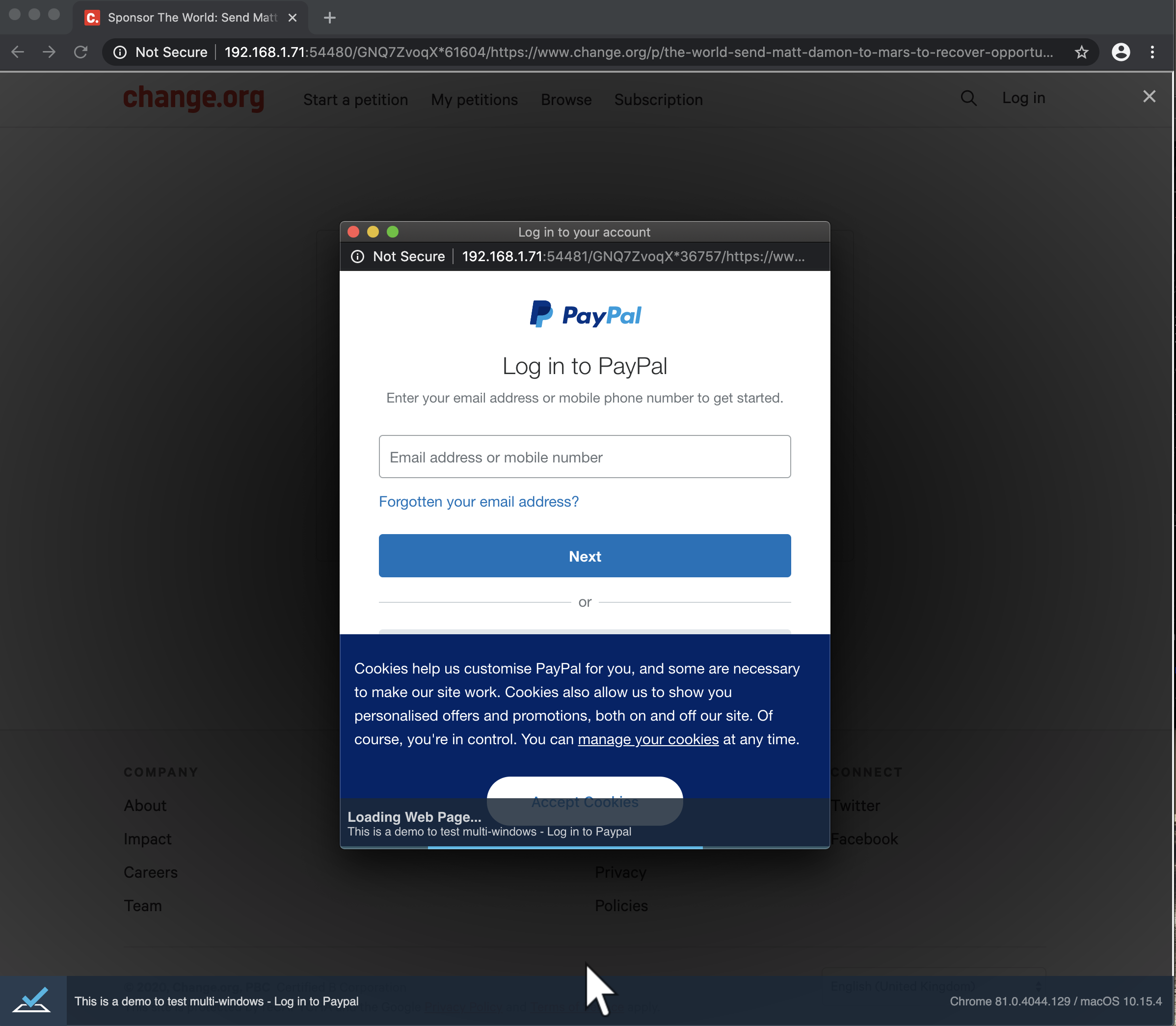
Screenshot:
UPDATE:
If I log out the current URL, it returns the URL for our Sponsor page... however when running our Facebook share tests, the Facebook URL is correctly logged out. My assumption is (and going with the screenshot provided), that the PayPal window is still loading... but never actually completes (despite waiting x mins).
rob4629
on 30 Apr 2020
Hi @rob4629
I've created a separate issue based on your comment. Track it to be informed about our progress.
miherlosev
on 30 Apr 2020
Feature looks good. Thank you guys!
Any plans on implementing ability for opening and closing new tab manually?
bartzielonka
on 30 Apr 2020
@bartzielonka
Do you want to have an API allowing to open/close browser windows from test code?
   await t
    .openWindow(URL)
   .closeWindow(w => w.url === URL);
Yes. That is exactly what I am looking for.
bartzielonka
on 30 Apr 2020
@bartzielonka
I've created a separate issue for this suggestion - https://github.com/DevExpress/testcafe/issues/5034
miherlosev
on 30 Apr 2020
Hi guys,
I am playing with the feature and it looks great for now. Is there a mechanism to switch between windows that are not opened by me? Some list of all opened windows perhaps ...
 presian
on 24 Jun 2020
presian
on 24 Jun 2020
I'm not sure, but I wonder whether something like #5034 might help with what you want.
rob4629
on 24 Jun 2020
@rob4629
Thank you for the suggestion but I need something different.
In the application that I am working on, we have scenarios that on button click a very complicated logic is invoked. This logic makes a lot of things and in the end, opens a new window. I need a way to switch to this window without having the browser's id that openWindow(url) returns.
Something like following:
await t.click('#openNewWindowButton');
const allWindows = await t.getAllOpenedWindows();
OR
await t.click('#openNewWindowButton');
const newWindow = await t.getWindowByTitle/Url/Other; // document.title or url or other
presian
on 24 Jun 2020
hi @presian,
TestCafe automatically switches to a newly opened browser window. Can you describe you scenario in greater detail or create a simple example where it does not do this? Also, the getCurrentWindow method from the mentioned #5034 PR will return the new window if it was opened.
 SergeyShurygin
on 25 Jun 2020
SergeyShurygin
on 25 Jun 2020
Hi @SergeyShurygin
I tested it in a simple Angular project and you are actually right. TestCafe switches to the newly opened browser window.
But the project that I want to test is one giant JS Frankenstein and it doesn't work against it. Perhaps there is some code that returns the focus to the parent browser. So for my case, I am not able to switch to the newly opened browser. Anyway, if there is a list of object representations for all opened windows that allow us to identify the desired window in between all and switch to it will be very helpful.
Unfortunately am not able to reproduce the same behavior in a simple project for illustration.
presian
on 26 Jun 2020
Hi @presian
Perhaps there is some code that returns the focus to the parent browser. So for my case, I am not able to switch to the newly opened browser.
It looks like a TestCafe problem. Can your share your web application to investigate the problem?
Anyway, if there is a list of object representations for all opened windows that allow us to identify the desired window in > between all and switch to it will be very helpful.
I created a suggestion for this case - https://github.com/DevExpress/testcafe/issues/5267.
miherlosev
on 30 Jun 2020
Hi @miherlosev
Unfortunately, I am not able to share it. It is not publicly accessible. But do not worry about this. This project is very complicated and generates a lot of communication between opened windows so it could be anything in our source code. It is just one big mess.
Thank you for the created suggestion. It will be very helpful to me.
presian
on 30 Jun 2020
@presian
Hello,
If you can reproduce this issue in a small project, please share it with us. It will help us to get more details about your your scenario.
Also, you can share your project (or some URL with credentials) via [email protected]. In this case, please note that our policy prevents us from accessing a customer’s internal resources without prior written approval from the entity that owns the server/web resource. If you want us to research the problem further, we’ll need access to the server/web resource. Please ask the website owner to send us ([email protected]) a written confirmation. It must permit DevExpress personnel to remotely access the website and its internal resources for research/testing/and debugging purposes.
 Farfurix
on 1 Jul 2020
Farfurix
on 1 Jul 2020
Hi @Farfurix
Unfortunately, the organization that I am working for won't allow access to their products from outside the organization.
I have some progress though. I found out that the newly opened window becomes a current window but its id is just the same as the parent window. That way the parent window is no more accessible.
I played with some client js (t.eval) and it turned out that after the second window is opened window.location.href returns the child's window URL. Through the window.opener I get the parent window. But paretnWindow.location.href returns the full URL like http://172.16.25.238:62629/PW!IBHA0M*OrvxTsefh/{the real paretnWindowUrl}.
But at the same time t.maximizeWindow() doesn't work on the child window.
I think that for whatever reason the child window hijacks the parent context but not entirely.
I know that this probably is not enough to help you guys but this all that I have.
Parent:

Child:

presian
on 2 Jul 2020
@presian, Thank you for the information. We will take it into account.
 Ogurecher
on 3 Jul 2020
Ogurecher
on 3 Jul 2020
Hi all,
I finally managed to locate what causes this behavior (same id for parent and child window). The problem occurs when the new window is opened through some js and initially the URL is an empty string like following:
const secondPageWindow = window.open('', '_blank', 'location=yes,height=570,width=520,scrollbars=yes,status=yes');
and immediately after that, the URL of the newly opened window is changed like following:
secondPageWindow.location.href = 'http://localhost:4200/second-page';
As a result, the child window has the same id as the parent.
As far as I understood this code guarantees that the new window will be a new tab instead of a separate window. I found the following comment above that piece of code:
//this way, it opens in a new tab???if the url is directly specified it opens a new window
I have made a repository with a simple Angular project that mimics that behavior:
TestcafeThreeWindowsExample
presian
on 14 Jul 2020
Hello @presian,
Thank you for your report. I've reproduced the issue and created a separate thread.
We'll research the issue and update that thread once it's fixed.
Ogurecher
on 15 Jul 2020
Related issues
 calisven
·
3Comments
calisven
·
3Comments
 ParachuteCat
·
3Comments
ParachuteCat
·
3Comments
 multivoltage
·
3Comments
multivoltage
·
3Comments
 KaneMorgan
·
3Comments
KaneMorgan
·
3Comments
 marchugon
·
4Comments
marchugon
·
4Comments
Most helpful comment
Hi guys,
We are ready to introduce the
[email protected]version with the basic support of testing in multiple browser windows.The 'basic support' means that TestCafe will open a new browser window and close it in the same way as a web browser. This functionality covers the 'Login via something' scenario. To switch to another browser window, you don't need to execute any additional actions - TestCafe does this automatically. See the 'Login via Google' example:
At present, not all the problems related to the 'Testing in multiple browser windows' feature are fixed (for example, Login via Facebook is too slow). We continue working on bug fixes and stability improvements and will release a new TestCafe version with necessary fixes as soon as possible.
Guys, try to write tests that require the multiple browser window support and run them with the
[email protected]version. Please share your experience with us. Also, we really want to know what functionality you require besides the basic support of testing in multiple windows.If you face any issues or have any suggestions, please create separate issues with the
window managementtag.