Tesseract: Arabic-Indic numbers incorrectly recognized
Environment
Tesseract Version: tesseract 4.1.1-rc2-21-gf4ef
leptonica-1.78.0
libgif 5.1.4 : libjpeg 8d (libjpeg-turbo 1.4.2) : libpng 1.2.54 : libtiff 4.0.6 : zlib 1.2.8 : libwebp 0.4.4 : libopenjp2 2.3.0
Found AVX
Found SSE
Found libarchive 3.1.2Platform: Ubuntu 16.04 64 bit
Current Behavior:
I need to recognize Arabic-indic numbers like in image below, I know there are many issues for this problem, but all with old dates and many are missing information, so please is this feature is added now, I am using ara.trainddata file, ? or what can I do to fix this?! Do I need to retrain tesseract by myself? @Shreeshrii @ismail @ryanfb Any help, please!!

 ShroukMansour
All 17 comments
Please see if any of the finetuned traineddata at
https://github.com/Shreeshrii/tesstrain-arabic-GS/tree/master/data work for
you.
On Tue, Jan 21, 2020, 20:32 Shrouk Mansour notifications@github.com wrote:
Environment
-
Tesseract Version: tesseract 4.1.1-rc2-21-gf4ef
leptonica-1.78.0
libgif 5.1.4 : libjpeg 8d (libjpeg-turbo 1.4.2) : libpng 1.2.54 :
libtiff 4.0.6 : zlib 1.2.8 : libwebp 0.4.4 : libopenjp2 2.3.0
Found AVX
Found SSE
Found libarchive 3.1.2
-Platform: Ubuntu 16.04 64 bit
Current Behavior:
I need to recognize Arabic-indic numbers like in image below, I know there
are many issues for this problem, but all with old dates and many are
missing information, so please is this feature is added now, I am using
ara.trainddata file, ? or what can I do to fix this?! Do I need to retrain
tesseract by myself? @Shreeshrii https://github.com/Shreeshrii @ismail
https://github.com/ismail @ryanfb https://github.com/ryanfb Any help,
please!!
[image: num]
https://user-images.githubusercontent.com/18499889/72815716-be4d6100-3c6f-11ea-9b73-2872ff57abc1.jpg—
You are receiving this because you were mentioned.
Reply to this email directly, view it on GitHub
https://github.com/tesseract-ocr/tesseract/issues/2864?email_source=notifications&email_token=ABG37I6BPNLMBG3TD7QVNADQ64FBZA5CNFSM4KJU43KKYY3PNVWWK3TUL52HS4DFUVEXG43VMWVGG33NNVSW45C7NFSM4IHVDB5Q,
or unsubscribe
https://github.com/notifications/unsubscribe-auth/ABG37I2HG7HHYB3YUZ3VMTTQ64FBZANCNFSM4KJU43KA
.
 Shreeshrii
on 21 Jan 2020
Shreeshrii
on 21 Jan 2020
@Shreeshrii Oh there is many file at the link, should I test all ? and would you please give me more information like what this data is trained for? which language and what is AmiriGS5? For more info, my main language is Arabic language.
ShroukMansour
on 22 Jan 2020
https://github.com/Shreeshrii/tesstrain-arabic-GS/blob/master/README.md
See the above for details of training. It is finetuned from script/Arabic using the gold standard images and transcription for 5 books and additional synthetic data in Amiri font, hence Amiri GS5. It should support AEN recognition. However if your images are using a fontface different from Amiri, you can retrain in similar fashion.
Shreeshrii
on 22 Jan 2020
@Shreeshrii
There are:
1) tesstrain-arabic-GS/data/AmiriGS5Layer.traineddata
2) tesstrain-arabic-GS/data/AmiriGS5Layer_fast.traineddata
3) tesstrain-arabic-GS/data/AmiriGS5Minus_fast.traineddata
4) tesstrain-arabic-GS/data/testmultilineMinus.traineddata
5) tesstrain-arabic-GS/data/script/Arabic.traineddata
What each file of these is for? what is different between *Layer and *Minus?
And If you can provide me with any info, the tessbest/ara.traindata I added in tessdata directory on my machine and passed lang='ara' as a parameter to pytesseract , if I downloaded any of above files how can I use it?
Thanks in advance.
ShroukMansour
on 22 Jan 2020
tesstrain-arabic-GS/data/AmiriGS5Layer.traineddata - BEST/Float model from replace layer training
tesstrain-arabic-GS/data/AmiriGS5Layer_fast.traineddata - Integer/Fast version of above - you can test with this
tesstrain-arabic-GS/data/AmiriGS5Minus_fast.traineddata - Fast/Integer model plus-minus training. You can test with this to compare with above.
tesstrain-arabic-GS/data/testmultilineMinus.traineddata - TEST model - can be ignored
tesstrain-arabic-GS/data/script/Arabic.traineddata - copy of script/Arabic from official repo for comparison
the tessbest/ara.traindata I added in tessdata directory on my machine and passed lang='ara' as a parameter to pytesseract , if I downloaded any of above files how can I use it?
Download file, move to tessdata directory, use lang=traineddatafilename eg. AmiriGS5Layer_fast
Shreeshrii
on 22 Jan 2020
@ShroukMansour Did that traineddata file recognize Arabic-Indic numbers correctly? Your feedback will be helpful to decide whether to add the file in tessdata_contrib. Thanks!
Shreeshrii
on 7 Feb 2020
@Shreeshrii
- Using AmiriGS5Layer detected Indic numerals only, the rest of the words contained lots of errors, about 80% error.
- Using ara only doesn't detect any Indic numerals, but the rest of the words are just fine, ~5% error.
- Using ara+AmiriGS5Layer, the words were fine, but the Indic numerals were ~50% wrong.
Splitting the image into smaller ones helped reduce all the errors, but it is not practical, the third point still holds tho, ~50% error in Indic numerals.
 wewark
on 11 Feb 2020
wewark
on 11 Feb 2020
@wewark Thanks for the feedback.
80% error is not good. AmiriGS5Layer was trained on Amiri font and scans, while ara was trained on hundreds of fonts. Was your image of a typeface similar to Amiri?
Please also try with traineddata from https://github.com/Shreeshrii/tesstrain-ckb/tree/master/data
That is trained on more fonts.
I am still trying to figure out best option for reversing the text for finetuning of RTL .Appreciate your feedback.
Shreeshrii
on 12 Feb 2020
@Shreeshrii The Arabic.traineddata file didn't recognize Indian numbers as expected, I didn't test it on many images actually but I can say the performance was about to 70%, also it really fails in usual arabic words, the ara.traineddata performed much better.
I'm actually thinking to retrain them, both Arabic for numbers and ara for harder fonts.
The AmiriGS5Layer reduced the usual arabic words accuracy more than the Arabic thatwhy I ended up using Arabic not Amiri.
I'm asking for your help with any notes when retraining?
ShroukMansour
on 12 Feb 2020
@wewark I thought about the same solution, splitting the image into smaller words. but Was this much slower (as calling tesseract many times) or the time still accepted?
ShroukMansour
on 12 Feb 2020
@jbreiden Do you have any insight on how Ray did the training for RTL languages? Our attempts at finetuning to add the AEN and punctuation seem to be unsuccessful on images outside of training data.
Shreeshrii
on 13 Feb 2020
@ShroukMansour No, it wasn't slower, you can give tesseract a list of images in one command and it is fast enough, almost the same time it took for one image.
The impractical part is splitting the image, as it has to be done manually by a human.
wewark
on 13 Feb 2020
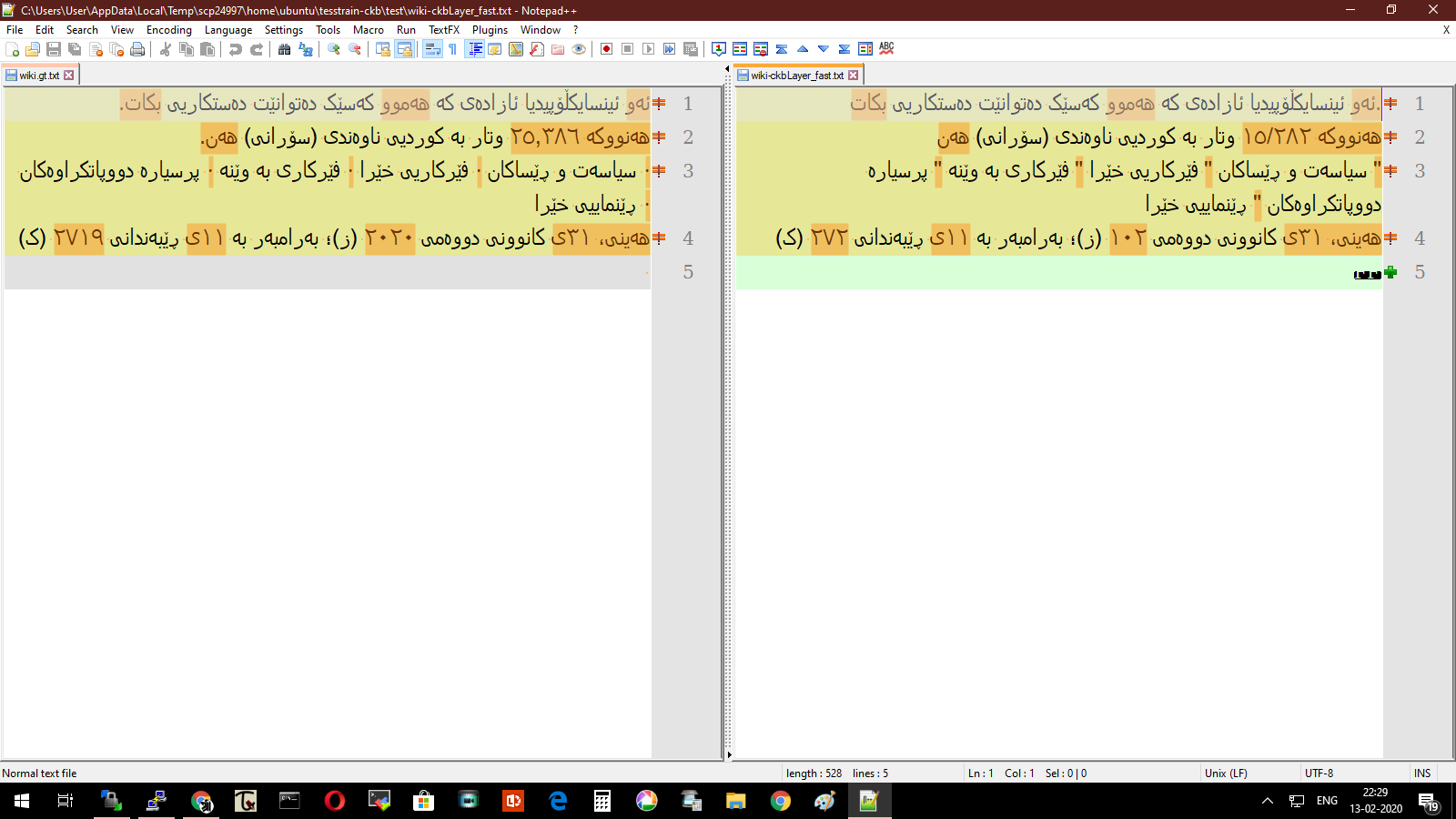
One thing that I noticed while testing and viewing the files in notepad++.
In the default LTR mode the ground truth text and OCRed text have a lot of differences. However, when viewing in RTL mode the results are much better - the digits even though they visually look the same are marked as different by compare plugin.
The following example uses a screenshot from wikipedia,
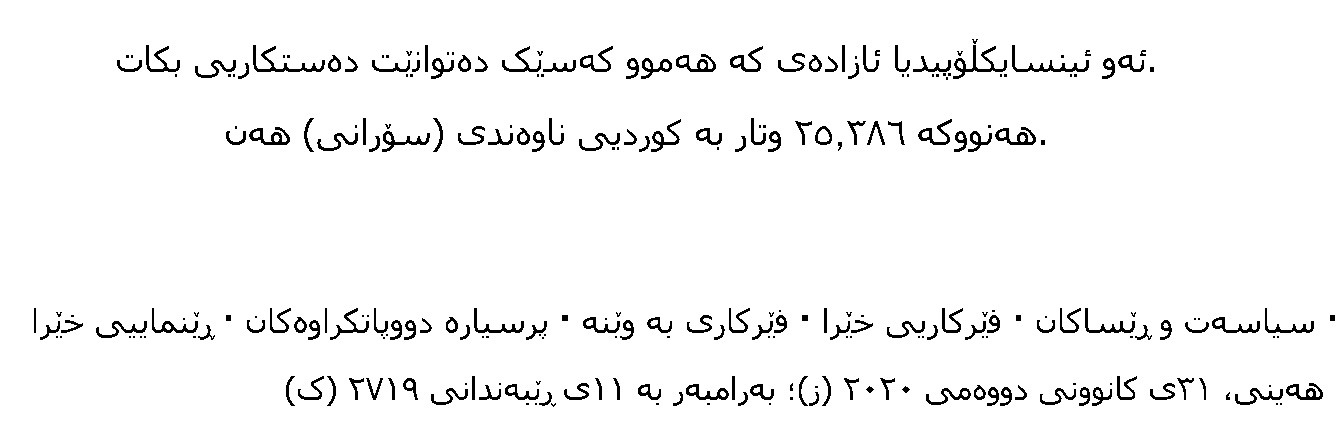
OCRed using finetuned ckb traineddata (trained till 4.1% CER) , same files compared in both modes.
LTR
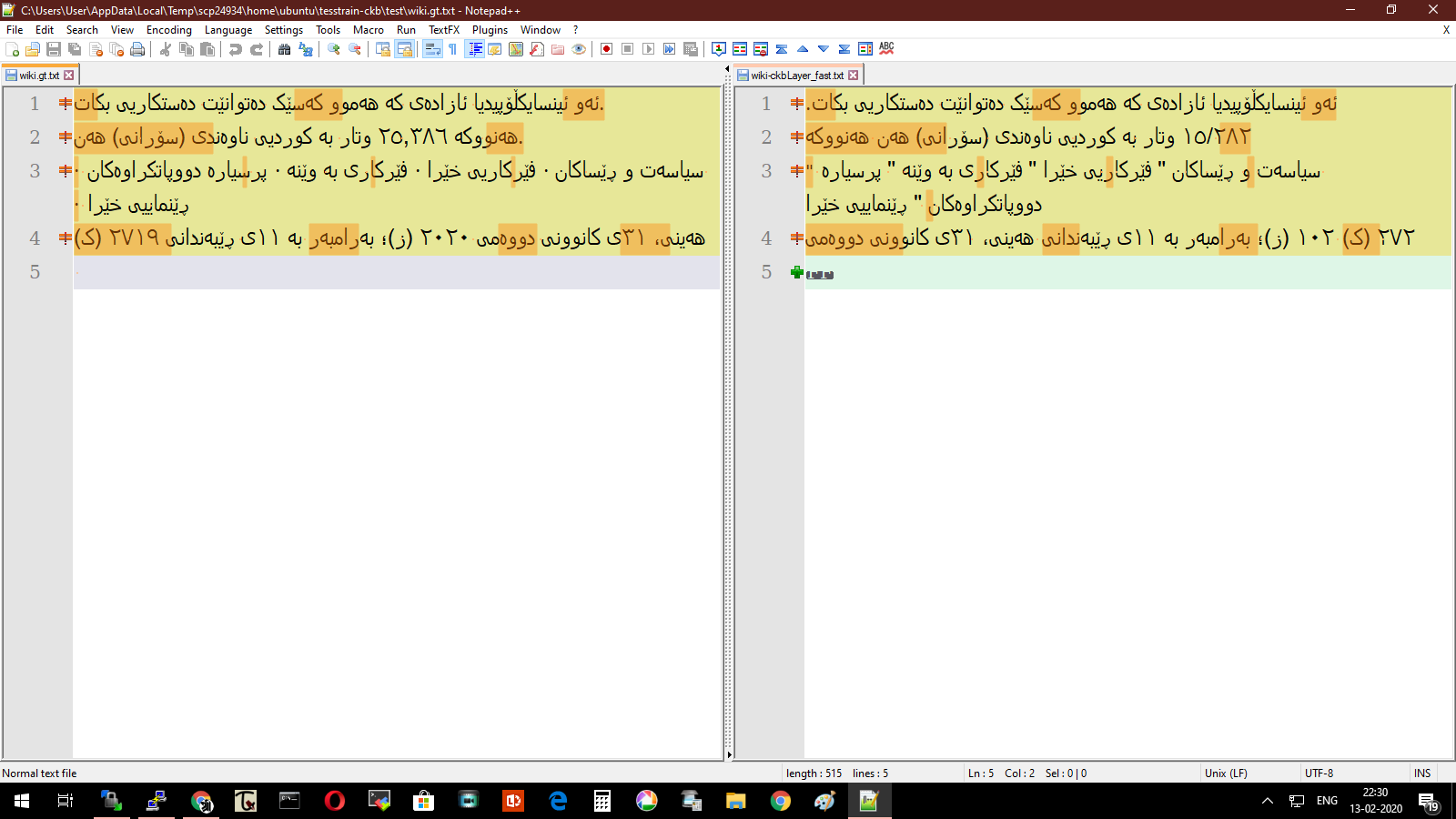
RTL
Shreeshrii
on 13 Feb 2020
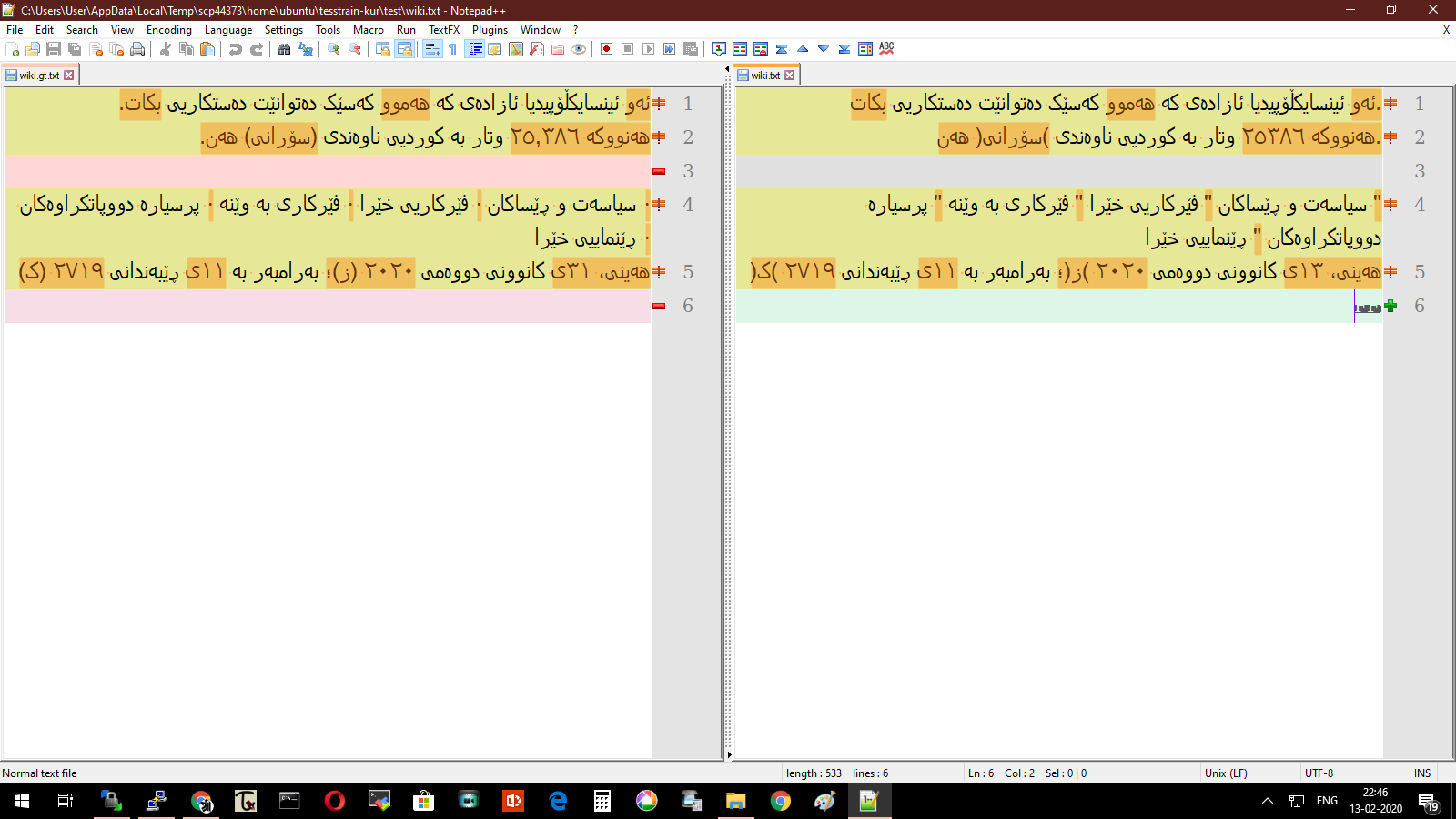
This is the result from an older version of ckb finetuneddata (trained till 1.4% CER) , in which the parenthesis were getting reversed.
Shreeshrii
on 13 Feb 2020
@wewark Is this using the command line or pytesseract? and did you need to write each part of the image on disk then pass the path or you did it with array of images? If with array of images how did you make it?
ShroukMansour
on 25 Feb 2020
This is a known issue. Please see https://github.com/tesseract-ocr/tesseract/issues/1193
Shreeshrii
on 29 Feb 2020
@ShroukMansour Put the images' names in a text file and pass the file path to tesseract instead of an image path.
wewark
on 1 Mar 2020
Related issues
 eliyaz-kl
·
4Comments
eliyaz-kl
·
4Comments
 mm-manu
·
4Comments
mm-manu
·
4Comments
 anavc94
·
6Comments
anavc94
·
6Comments
 reubano
·
6Comments
reubano
·
6Comments
 clarkk
·
3Comments
clarkk
·
3Comments