Teslamate: Unable to login, Error: :authorization_failed (Tesla API v3 tokens in China)
Describe the bug
unable to login, correct email & pw entered, message shows "Error: :authorization_failed"
Expected behavior
Should log in without issue
How to reproduce it (as minimally and precisely as possible):
Steps to reproduce the behavior:
Relevant entries from the logs
teslamate_1  | 2021-02-05 14:32:07.064 [info] Starting logger for 'xxxx'
teslamate_1  | 2021-02-05 14:32:07.069 [error] Error / unauthorized
teslamate_1  | 2021-02-05 14:32:07.071 [info] MQTT connection has been established
teslamate_1  | 2021-02-05 14:33:06.942 [info]     :alarm_handler: {:set, {TeslaMate.Vehicles.Vehicle_1_api_error, :fuse_blown}}
teslamate_1  | 2021-02-05 14:55:02.822 [info] SIGTERM received - shutting down
teslamate_1  |
teslamate_1  | 2021-02-05 14:55:02.828 [info] SIGTERM received - shutting down
teslamate_1  |
teslamate_1  | 2021-02-05 14:55:27.781 [info] Migrations already up
teslamate_1  | 2021-02-05 14:55:28.943 [info] Version: 1.21.2
teslamate_1  | 2021-02-05 14:55:28.963 [info] Running TeslaMateWeb.Endpoint with cowboy 2.8.0 at :::4000 (http)
teslamate_1  | 2021-02-05 14:55:28.964 [info] Access TeslaMateWeb.Endpoint at http://localhost
teslamate_1  | 2021-02-05 14:55:28.967 [warn] Using fallback vehicles:
teslamate_1  |
teslamate_1  | [
teslamate_1  |   %TeslaApi.Vehicle{
teslamate_1  |     api_version: nil,
teslamate_1  |     backseat_token: nil,
teslamate_1  |     backseat_token_updated_at: nil,
teslamate_1  |     calendar_enabled: nil,
teslamate_1  |     charge_state: nil,
teslamate_1  |     climate_state: nil,
teslamate_1  |     color: nil,
teslamate_1  |     display_name: "xxxx",
teslamate_1  |     drive_state: nil,
teslamate_1  |     gui_settings: nil,
teslamate_1  |     id: xxxxxxxxxxxxxxxxxxx,
teslamate_1  |     in_service: false,
teslamate_1  |     option_codes: [],
teslamate_1  |     state: "unknown",
teslamate_1  |     tokens: [],
teslamate_1  |     vehicle_config: nil,
teslamate_1  |     vehicle_id: xxxxxxxxxx,
teslamate_1  |     vehicle_state: nil,
teslamate_1  |     vin: "xxxxxxxxxxxxxxxxxxx"
teslamate_1  |   }
teslamate_1  | ]
teslamate_1  | 2021-02-05 14:55:28.967 [info] Starting logger for 'xxxx'
teslamate_1  | 2021-02-05 14:55:28.971 [error] Error / unauthorized
teslamate_1  | 2021-02-05 14:55:28.972 [info] MQTT connection has been established
teslamate_1  | 2021-02-05 14:56:28.852 [info]     :alarm_handler: {:set, {TeslaMate.Vehicles.Vehicle_1_api_error, :fuse_blown}}
teslamate_1  | 2021-02-05 14:57:40.340 [info] GET /
teslamate_1  | 2021-02-05 14:57:40.346 [info] Sent 302 in 5ms
teslamate_1  | 2021-02-05 14:57:40.355 [info] GET /sign_in
teslamate_1  | 2021-02-05 14:57:40.361 [info] Sent 200 in 5ms
Screenshots
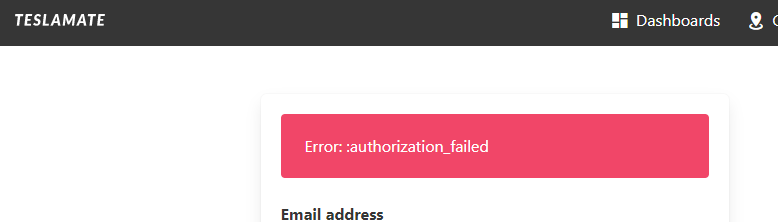
Data
Not sure if it is because of my Tesla Account is created in China, I see the official Tesla website login is at https://auth.tesla.cn/oauth2/
However, based on what Tim Dorr mentioned on the new auth system,
Tesla has deprecated the /oauth/token endpoint in favor of using auth.tesla.com
I tried to use my email and pw to login the tesla.com but nothing happened
Also tried the followings,
- rebuild TeslaMate from scratch
- change password
still the same error
No MFA option in China by the way
Environment
- TeslaMate version: 1.21.2
- Type of installation: Docker
- OS TeslaMate is installed on:
- User OS & Browser: Chrome
- Others:
Lost three days of data, hope this is a bug and can be fixed soon.
Appreciate the great work of TeslaMate by Adrian
 ddjj181
All 18 comments
the same issue happened in my Tesla China account
 codebear82
on 5 Feb 2021
codebear82
on 5 Feb 2021
the same issue happened in my Tesla China account
I saw you several times on Xiaote :) will DM you for disucssion on this
ddjj181
on 5 Feb 2021
rollback to 1.21.1, it works. see you in Xiaote :)
codebear82
on 5 Feb 2021
rollback to 1.21.1, it works. see you in Xiaote :)
I think it won't work because my token already expired and in order to get it refreshed, I will need the new auth system
ddjj181
on 5 Feb 2021
rollback to 1.21.1, it works. see you in Xiaote :)
after rollback to 1.21.1, i saw there is an option to "Use legacy authentication API", but still no luck of successful auth

ddjj181
on 5 Feb 2021
The authentication server and login parameter in China have some difference. Just worked out a temporary fix for this issue and tested working. See the diff below. I think the fix only works in China.
diff --git a/lib/tesla_api/auth.ex b/lib/tesla_api/auth.ex
index 74863ed..c227a7d 100644
--- a/lib/tesla_api/auth.ex
+++ b/lib/tesla_api/auth.ex
@@ -5,7 +5,7 @@ defmodule TeslaApi.Auth do
adapter Tesla.Adapter.Finch, name: TeslaMate.HTTP, receive_timeout: 15_000
- plug Tesla.Middleware.BaseUrl, "https://auth.tesla.com"
+ plug Tesla.Middleware.BaseUrl, "https://auth.tesla.cn"
plug Tesla.Middleware.JSON
alias TeslaApi.Error
@@ -57,7 +57,7 @@ defmodule TeslaApi.Auth do
state = random_string(15)
code_verifier = random_code_verifier()
- with {:ok, form_data} <- load_form(state, code_verifier),
+ with {:ok, form_data} <- load_form(email, state, code_verifier),
{:ok, env = %Tesla.Env{}} <- submit_form(form_data, email, password),
{:ok, {redirect_uri, code}} <- parse_location_header(env, state),
{:ok, tokens} <- get_web_token(code, code_verifier, redirect_uri, state),
@@ -89,7 +89,7 @@ defmodule TeslaApi.Auth do
end
end
- defp load_form(state, code_verifier) do
+ defp load_form(email, state, code_verifier) do
params = [
client_id: @web_client_id,
redirect_uri: "https://auth.tesla.com/void/callback",
@@ -97,6 +97,7 @@ defmodule TeslaApi.Auth do
scope: "openid email offline_access",
code_challenge: challenge(code_verifier),
code_challenge_method: "S265",
+ login_hint: email,
state: state
]
 cliffchen
on 5 Feb 2021
cliffchen
on 5 Feb 2021
@cliffchen can you think of any way to automatically detect that the Chinese version has to be used? Is there perhaps a hint included in the failed response? Otherwise, you'd have to manually specify which API to use every time 🤔
 adriankumpf
on 5 Feb 2021
adriankumpf
on 5 Feb 2021
the same issue +1
Tesla account in China
 dylantoy
on 5 Feb 2021
dylantoy
on 5 Feb 2021
The authentication server and login parameter in China have some difference. Just worked out a temporary fix for this issue and tested working. See the diff below. I think the fix only works in China.
diff --git a/lib/tesla_api/auth.ex b/lib/tesla_api/auth.ex index 74863ed..c227a7d 100644 --- a/lib/tesla_api/auth.ex +++ b/lib/tesla_api/auth.ex @@ -5,7 +5,7 @@ defmodule TeslaApi.Auth do adapter Tesla.Adapter.Finch, name: TeslaMate.HTTP, receive_timeout: 15_000 - plug Tesla.Middleware.BaseUrl, "https://auth.tesla.com" + plug Tesla.Middleware.BaseUrl, "https://auth.tesla.cn" plug Tesla.Middleware.JSON alias TeslaApi.Error @@ -57,7 +57,7 @@ defmodule TeslaApi.Auth do state = random_string(15) code_verifier = random_code_verifier() - with {:ok, form_data} <- load_form(state, code_verifier), + with {:ok, form_data} <- load_form(email, state, code_verifier), {:ok, env = %Tesla.Env{}} <- submit_form(form_data, email, password), {:ok, {redirect_uri, code}} <- parse_location_header(env, state), {:ok, tokens} <- get_web_token(code, code_verifier, redirect_uri, state), @@ -89,7 +89,7 @@ defmodule TeslaApi.Auth do end end - defp load_form(state, code_verifier) do + defp load_form(email, state, code_verifier) do params = [ client_id: @web_client_id, redirect_uri: "https://auth.tesla.com/void/callback", @@ -97,6 +97,7 @@ defmodule TeslaApi.Auth do scope: "openid email offline_access", code_challenge: challenge(code_verifier), code_challenge_method: "S265", + login_hint: email, state: state ]
I'm not a computer guy. Would you plz give some step by step instructions to demonstrate how to fix it ?
Thank you!
dylantoy
on 5 Feb 2021
@cliffchen can you think of any way to automatically detect that the Chinese version has to be used? Is there perhaps a hint included in the failed response? Otherwise, you'd have to manually specify which API to use every time 🤔
Below is the error returned from submit_form function, noticed the body message, location and status field. After 'login_hint=' is my email address which I replaced. The status code is 303 which is to redirect to a new URI specified in the location header. So I figured out the authentication host and the login_hint parameter which are working in China. @adriankumpf, please have a look, I can provide more information if needed. Thanks a lot.
{:error,
%TeslaApi.Error{
env: %Tesla.Env{
__client__: %Tesla.Client{adapter: nil, fun: nil, post: [], pre: []},
__module__: TeslaApi.Auth,
body: "See Other. Redirecting to https://auth.tesla.cn/oauth2/v3/[email protected]",
headers: [
{"server", "nginx"},
{"content-type", "text/plain; charset=utf-8"},
{"content-length", "103"},
{"x-dns-prefetch-control", "off"},
{"x-frame-options", "DENY"},
{"strict-transport-security", "max-age=15552000; includeSubDomains"},
{"x-download-options", "noopen"},
{"x-content-type-options", "nosniff"},
{"x-xss-protection", "1; mode=block"},
{"x-request-id", "6b268b71-e2ca-46df-b8c7-a2d149e4bb2f"},
{"x-correlation-id", "6b268b71-e2ca-46df-b8c7-a2d149e4bb2f"},
{"content-security-policy",
"connect-src 'self'; default-src 'none'; font-src 'self' data: fonts.gstatic.com; frame-src 'self' www.google.com www.recaptcha.net; img-src 'self' data:; script-src www.recaptcha.net 'self' 'nonce-ad3408325cd13c10298a'; style-src 'unsafe-inline' 'self'"},
{"x-content-security-policy",
"connect-src 'self'; default-src 'none'; font-src 'self' data: fonts.gstatic.com; frame-src 'self' www.google.com www.recaptcha.net; img-src 'self' data:; script-src www.recaptcha.net 'self' 'nonce-ad3408325cd13c10298a'; style-src 'unsafe-inline' 'self'"},
{"x-webkit-csp",
"connect-src 'self'; default-src 'none'; font-src 'self' data: fonts.gstatic.com; frame-src 'self' www.google.com www.recaptcha.net; img-src 'self' data:; script-src www.recaptcha.net 'self' 'nonce-ad3408325cd13c10298a'; style-src 'unsafe-inline' 'self'"},
{"location",
"https://auth.tesla.cn/oauth2/v3/[email protected]"},
{"x-response-time", "169.281ms"},
{"date", "Fri, 05 Feb 2021 12:23:53 GMT"},
{"connection", "keep-alive"},
{"set-cookie",
"tesla-auth.sid=s%3A1_DkixryVed_0TR17iDgv01sYjQOjeZz.csJXc%2F2PJftHriehafKF7LMavsWxdU0m9Rz%2FB8v8YjY; Path=/; Expires=Mon, 08 Feb 2021 12:23:53 GMT; HttpOnly; Secure"}
],
method: :post,
opts: [],
query: [],
status: 303,
url: "https://auth.tesla.com/oauth2/v3/authorize"
},
message: nil,
reason: :authorization_failed
}}
i have this issue also for China account
 saxon8506
on 5 Feb 2021
saxon8506
on 5 Feb 2021
Can you try if this works: #1300? Getting the long-lived tokens from the Owner API failed for my test account, but maybe it'll work with yours.
adriankumpf
on 5 Feb 2021
Can you try if this works: #1300? Getting the long-lived tokens from the Owner API failed for my test account, but maybe it'll work with yours.
Login works perfectly now. Below is the log message during login.
teslamate_1  | 2021-02-05 16:10:54.436 [warn] GET https://auth.tesla.com/oauth2/v3/authorize -> 303 (1842.667 ms)
teslamate_1  | 2021-02-05 16:10:56.057 [info] GET https://auth.tesla.cn/oauth2/v3/authorize?client_id=ownerapi&redirect_uri=https%3A%2F%2Fauth.tesla.com%2Fvoid%2Fcallback&response_type=code&scope=openid+email+offline_access&code_challenge=Sohe7R5b3MyuPXO45ldia38Ko2ko4_cH6PRzZTaRFGc&code_challenge_method=S265&state=ccuvX-HVdTC8OCM&login_hint=abcd%40abcd.com -> 200 (1619.798 ms)
teslamate_1  | 2021-02-05 16:10:57.973 [warn] POST https://auth.tesla.cn/oauth2/v3/authorize -> 302 (1891.016 ms)
teslamate_1  | 2021-02-05 16:10:58.603 [info] POST https://auth.tesla.cn/oauth2/v3/token -> 200 (628.943 ms)
teslamate_1  | 2021-02-05 16:11:00.690 [info] POST https://owner-api.teslamotors.com/oauth/token -> 200 (2086.112 ms)
teslamate_1  | 2021-02-05 16:11:00.714 [info] Scheduling token refresh in 5 wk 5 d
But after restart teslamate, following error message occurred, I think it's due to that the token issued by auth.tesla.cn can not be verified by auth.tesla.com. Is it possible to store the host that issued the token? I found that the prefix of my access token is "cn-", maybe you can use that as an indication for which server to connect.
teslamate_1  | 2021-02-05 16:13:15.219 [error] POST https://auth.tesla.com/oauth2/v3/token -> 400 (1107.892 ms)
teslamate_1  | 2021-02-05 16:13:15.220 [warn] Token refresh failed: %TeslaApi.Error{
teslamate_1  |   env: %Tesla.Env{
teslamate_1  |     __client__: %Tesla.Client{adapter: nil, fun: nil, post: [], pre: []},
teslamate_1  |     __module__: TeslaApi.Auth,
teslamate_1  |     body: %{
teslamate_1  |       "error" => "server_error",
teslamate_1  |       "error_description" => "Internal server error",
teslamate_1  |       "error_uri" => "https://auth.tesla.com/error/reference/51d2cd9e-bdda-48f1-b797-636733cf5dad-1612541595142"
teslamate_1  |     },
teslamate_1  |     headers: [
teslamate_1  |       {"server", "nginx"},
teslamate_1  |       {"content-type", "application/json"},
teslamate_1  |       {"x-dns-prefetch-control", "off"},
teslamate_1  |       {"x-frame-options", "DENY"},
teslamate_1  |       {"strict-transport-security", "max-age=15552000; includeSubDomains"},
teslamate_1  |       {"x-download-options", "noopen"},
teslamate_1  |       {"x-content-type-options", "nosniff"},
teslamate_1  |       {"x-xss-protection", "1; mode=block"},
teslamate_1  |       {"x-request-id", "51d2cd9e-bdda-48f1-b797-636733cf5dad"},
teslamate_1  |       {"x-correlation-id", "51d2cd9e-bdda-48f1-b797-636733cf5dad"},
teslamate_1  |       {"access-control-allow-origin", "*"},
teslamate_1  |       {"x-response-time", "4.673ms"},
teslamate_1  |       {"date", "Fri, 05 Feb 2021 16:13:15 GMT"},
teslamate_1  |       {"connection", "close"}
teslamate_1  |     ],
teslamate_1  |     method: :post,
teslamate_1  |     opts: [],
teslamate_1  |     query: [],
teslamate_1  |     status: 400,
teslamate_1  |     url: "https://auth.tesla.com/oauth2/v3/token"
teslamate_1  |   },
teslamate_1  |   message: nil,
teslamate_1  |   reason: :token_refresh
teslamate_1  | }
teslamate_1  | 2021-02-05 16:13:15.221 [info] Scheduling token refresh in 1 h
Nice find! I have just added this to #1300. Can you check again if everything works now?
adriankumpf
on 6 Feb 2021
Nice find! I have just added this to #1300. Can you check again if everything works now?
It all works now, @adriankumpf Thanks a lot for the fix. Really appreciate it.
cliffchen
on 6 Feb 2021
You're welcome! I released v1.21.3 with the fix.
adriankumpf
on 6 Feb 2021
@adriankumpf thanks for the fix, will update in an hour to test, will report back.
Also huge thanks to @cliffchen
ddjj181
on 7 Feb 2021
@adriankumpf all working perfectly again, thanks.
ddjj181
on 7 Feb 2021
Related issues
 detritu5
·
4Comments
detritu5
·
4Comments
 bahree
·
5Comments
bahree
·
5Comments
 russinating
·
4Comments
russinating
·
4Comments
 DrMichael
·
4Comments
DrMichael
·
4Comments
 bastrik
·
3Comments
bastrik
·
3Comments
Most helpful comment
Login works perfectly now. Below is the log message during login.
But after restart teslamate, following error message occurred, I think it's due to that the token issued by auth.tesla.cn can not be verified by auth.tesla.com. Is it possible to store the host that issued the token? I found that the prefix of my access token is "cn-", maybe you can use that as an indication for which server to connect.