Teslamate: Vampire Drain way higher since 2019.36.2.4
I don't think this is a bug with TeslaMate but anyone else notice that the car will not go to sleep since the 2019.36.2.4 update? Since that update my Vampire Drain Standbye %age has been sitting at 0%. NOT GOOD. And no, Sentry mode is not turned on.
 timguy99
All 11 comments
No, I'm on the same version but I haven't notice much difference.
 chilman408
on 12 Dec 2019
chilman408
on 12 Dec 2019
As reported by Teslamate the car seems to be more in state online with less at sleep. But it doesn’t consume that much... Not sure if this is caused by new firmware or if the state is not correctly recognised by Teslamate
 nottheedge
on 13 Dec 2019
nottheedge
on 13 Dec 2019
Its definitely the car that is NOT going to sleep as confirmed by Vampire Drain. It would normally be showing high 80's %age to 90's %age of standby. Now it is showing 0 and draining a LOT more. Easy to see just by looking at the app the next morning as well. I look at it all the time so I know when something is out of whack.
What is odd is there was one time period where it seemed to go to sleep for a day but now back to not sleeping. I also just updated to 2019.40.2.1 just yesterday so will see if that makes a difference but so far I don't think it has.
I may have to report this to Tesla to see if they have anything to say about it.
timguy99
on 14 Dec 2019
I've noticed the same. My online state is way higher than it used to be since 2010.36.2.4. Since Nov 24, my ONLINE time is 81% of the time. I don't have Sentry on during those times.
Just updated Teslamate to newest version from v1.12 today to v1.13.2. Hope that will fix it. Vampire drain is definitely there.
 netkruzer
on 16 Dec 2019
netkruzer
on 16 Dec 2019
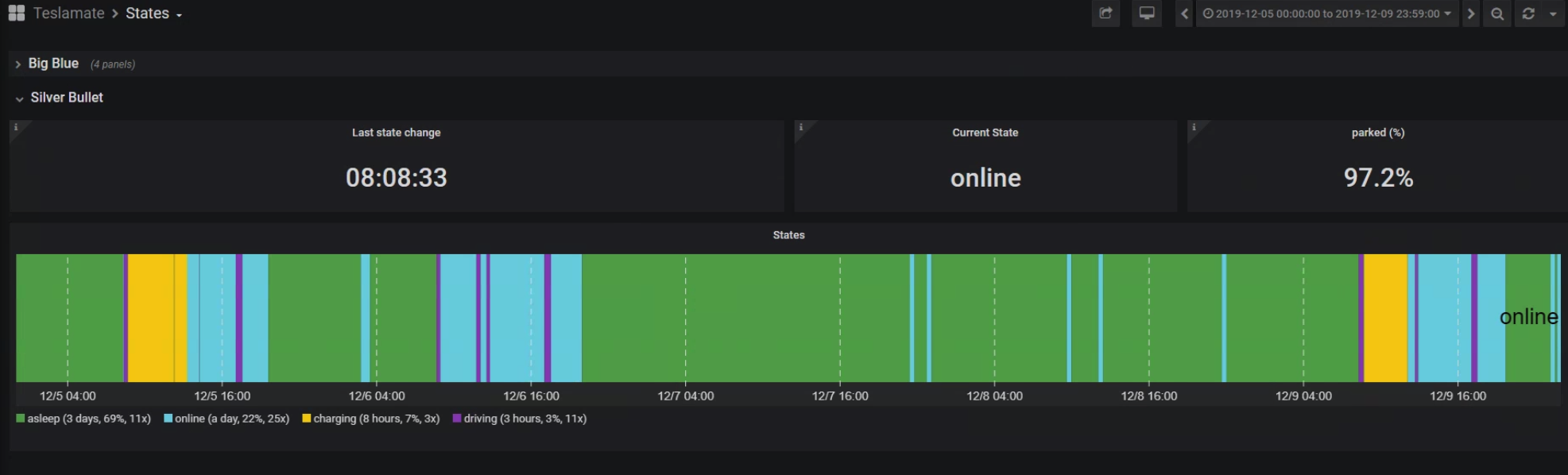
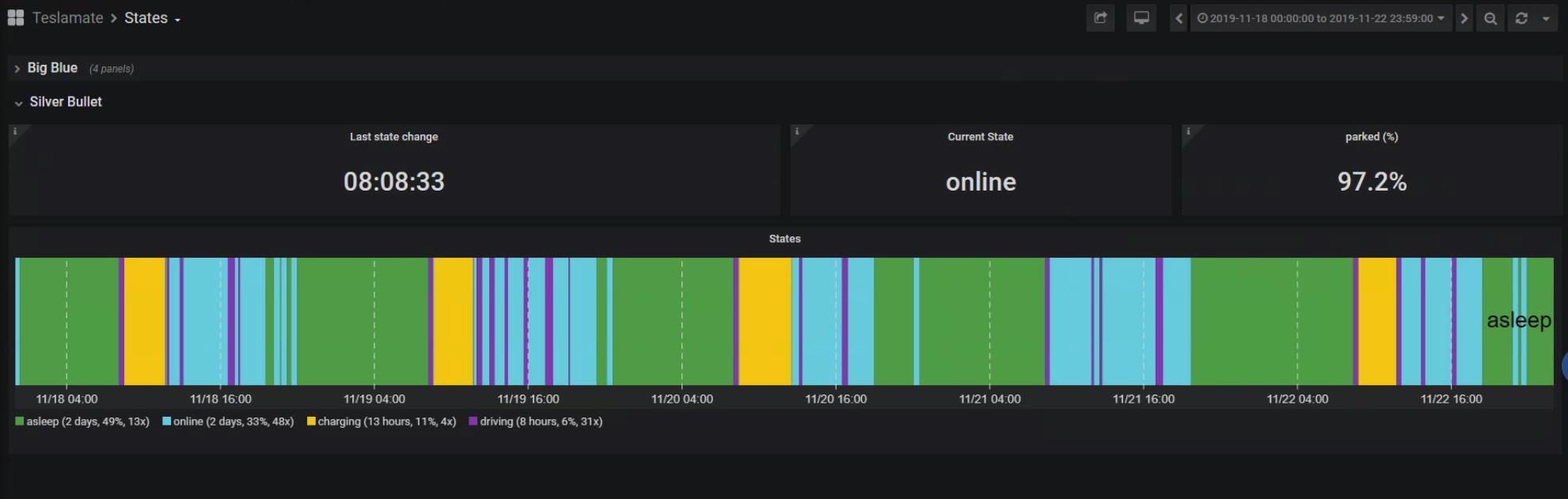
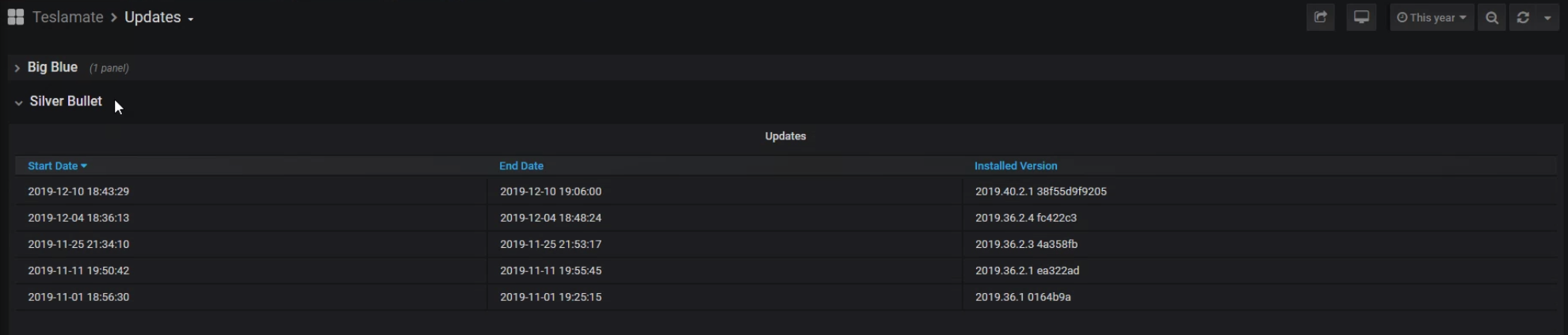
I really don't see any appreciable difference. Attached are data from my M3 from the "States" panel for 18Nov to 22Nov and 05Dec to 09Dec. I received the 36.2.4 update on 04Dec and upgraded to version 40 on 10Dec (attached "Upgrades" panel as well.
chilman408
on 16 Dec 2019
Some are just lucky it seems while others like myself are screwed. My graph has no green in it for a week now. Actually there was one day it went green for maybe half a day and that is it. Certainly some sort of issue but again I don't think it is with TeslaMate.
timguy99
on 17 Dec 2019
Ok, I noticed in geofences that "enable sleep mode" was enabled for my home location. I thought, maybe this checkbox was backwards so I shut that off and now back at the Teslamate screen on port 4000 the "try to sleep" button is greyed out. Although I found you can still click it. When I do so it reports that "sleep mode is disabled at current location".
Why is this? Why would any location be set for disabled sleep mode and I'm still wondering if this functionality is backwards perhaps? Could this be breaking something? Again doesn't seem to be because the car is still not sleeping at just about any location.
timguy99
on 17 Dec 2019
Newest update to Teslamate 1.13.2 seemed to allow sleep again for me. I also unchecked "Vehicle must be locked". I'm now on firmware 2019.40.2.1
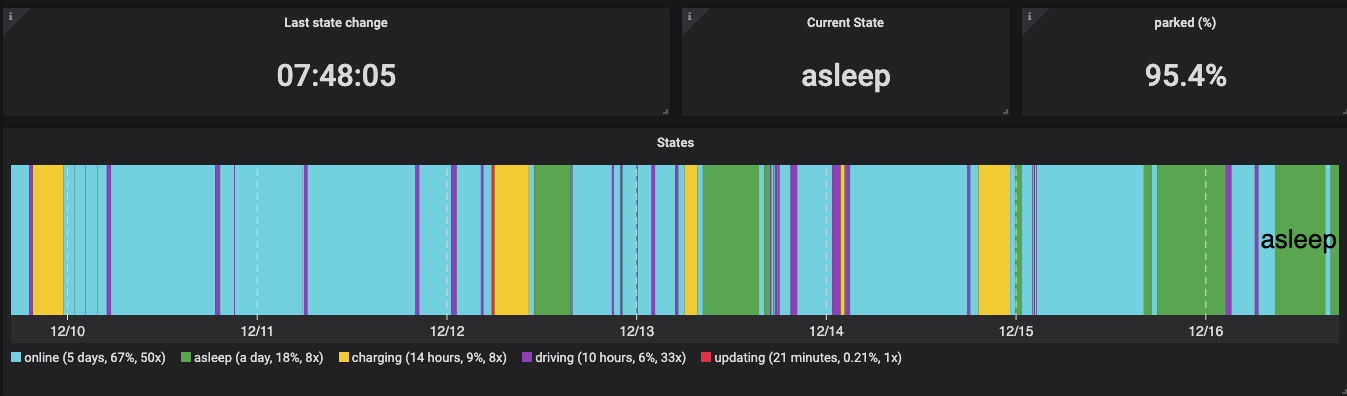
Bug fixed itself?
netkruzer
on 17 Dec 2019
Unfortunately didn't help me. I did the same thing. Updated to 1.13.2 and also unchecked "Vehicle must be locked". No difference. I "had" a service request into Tesla. They unfortunately don't know what they are talking about. They tried to tell me that 30-50km range loss overnight (like a 12 hours period) is NORMAL and that if it happened after an update it is because they are making the car more efficient. Obviously they don't have a clue what they are talking about. They also cancelled my service request and I've been going back and forth with them via text. I told them I can provide data to show they can't possibly be correct.
I'm thinking I should probably "reboot" the car and see if that clears things up.
timguy99
on 18 Dec 2019
Ahhh, finally got around to "rebooting" the car. Seems like that did the trick!!!! I will still have to educate the Tesla technicians because they are COMPLETELY out to lunch with this.
Last 30 days. You can see a sliver of green at the far right.

timguy99
on 19 Dec 2019
I can assure you that those random wake-ups were/are not caused by TeslaMate. It cannot and does not wake up the car. The latest (vehicle) software versions seem to have caused those problems. But the recent updates should've solved the issue.
 adriankumpf
on 22 Dec 2019
adriankumpf
on 22 Dec 2019
Related issues
 bahree
·
5Comments
bahree
·
5Comments
 jun3280net
·
4Comments
jun3280net
·
4Comments
 olivercho
·
4Comments
olivercho
·
4Comments
 phantom1584
·
4Comments
netkruzer
·
6Comments
phantom1584
·
4Comments
netkruzer
·
6Comments