Teslamate: Beginner Needs Help With (SSL, FQDN, pw protected) WIP Setup
Hi there,
I apologize in advance for my ignorance, but I'm trying my best to implement @Helmi 's advanced docker-compose setup. What's frustrating, is that I actually got this working last week, but in trying to debug other issues, I'm no longer able to get this to work. I'm hoping a fresh perspective from other more experienced users might be able to point out where I've erred.
I recently signed up to Dynu.com to get a ddns hostname (eg xyz123.dynu.com which mirrors my local IP of 123.456.789.321)
Teslamate will be run on an Ubuntu VM with LAN Address of 192.168.86.60
My setup is as follows :
Local IP : 123.456.789.321
Domain : xyz123.dynu.com
Alias Subdomain FQDN_TM : teslamate.xyz123.dynu.com
Alias Subdomain FQDN_GRAFANA : grafana.zyz123.dynu.com
*Domain and Subdomains all have :
Record = A
TTL = 120
IP Address = 123.456.789.321
I've port forwarded 80, 443, 3000, 4000 and can confirm the ports are indeed open (for both the external address or xyz123.dynu.com) when I have the run docker-compose up. The ports are closed when docker-compose down is run.
When I navigate to http://xyz123.dynu.com I get "404 page not found" - which based on @adriankumpf 's comment in issue #153 is a sign the server is up and running.
However trying to navigate to the the FQDNs' teslamate.xyz123.dynu.com or grafana.zyz123.dynu.com returns "This site can't be reached".
Any ideas what I'm missing? My log is below - but looks like everything is running properly. Is there a way to simplify the docker YML to remove the security for now and test whether the subdomains work? Thanks in advance.
jun3280@teslamate:~/Desktop/Teslamate$ sudo docker-compose up
Creating network "teslamate_default" with the default driver
Creating teslamate_grafana_1 ...
Creating teslamate_mosquitto_1 ...
Creating teslamate_database_1 ...
Creating teslamate_proxy_1 ...
Creating teslamate_grafana_1
Creating teslamate_database_1
Creating teslamate_proxy_1
Creating teslamate_database_1 ... done
Creating teslamate_teslamate_1 ...
Creating teslamate_teslamate_1 ... done
Attaching to teslamate_mosquitto_1, teslamate_proxy_1, teslamate_grafana_1, teslamate_database_1, teslamate_teslamate_1
mosquitto_1  | 1571182179: mosquitto version 1.6.7 starting
mosquitto_1  | 1571182179: Config loaded from /mosquitto/config/mosquitto.conf.
mosquitto_1  | 1571182179: Opening ipv4 listen socket on port 1883.
mosquitto_1  | 1571182179: Opening ipv6 listen socket on port 1883.
proxy_1      | time="2019-10-15T23:29:39Z" level=info msg="Configuration loaded from flags."
grafana_1    | installing pr0ps-trackmap-panel @ 2.0.4
grafana_1    | from: https://grafana.com/api/plugins/pr0ps-trackmap-panel/versions/2.0.4/download
grafana_1    | into: /var/lib/grafana/plugins
grafana_1    |
database_1   | 2019-10-15 23:29:41.521 UTC [1] LOG:  listening on IPv4 address "0.0.0.0", port 5432
database_1   | 2019-10-15 23:29:41.521 UTC [1] LOG:  listening on IPv6 address "::", port 5432
database_1   | 2019-10-15 23:29:41.536 UTC [1] LOG:  listening on Unix socket "/var/run/postgresql/.s.PGSQL.5432"
database_1   | 2019-10-15 23:29:41.572 UTC [22] LOG:  database system was shut down at 2019-10-15 23:29:26 UTC
database_1   | 2019-10-15 23:29:41.580 UTC [1] LOG:  database system is ready to accept connections
grafana_1    | ✔ Installed pr0ps-trackmap-panel successfully
grafana_1    |
grafana_1    | Restart grafana after installing plugins . <service grafana-server restart>
grafana_1    |
grafana_1    | installing natel-discrete-panel @ 0.0.9
grafana_1    | from: https://grafana.com/api/plugins/natel-discrete-panel/versions/0.0.9/download
grafana_1    | into: /var/lib/grafana/plugins
grafana_1    |
database_1   | 2019-10-15 23:29:43.527 UTC [29] LOG:  incomplete startup packet
grafana_1    | ✔ Installed natel-discrete-panel successfully
grafana_1    |
grafana_1    | Restart grafana after installing plugins . <service grafana-server restart>
grafana_1    |
grafana_1    | t=2019-10-15T23:29:44+0000 lvl=info msg="Starting Grafana" logger=server version=6.3.5 commit=67bad72 branch=HEAD compiled=2019-09-02T09:34:49+0000
grafana_1    | t=2019-10-15T23:29:44+0000 lvl=info msg="Config loaded from" logger=settings file=/usr/share/grafana/conf/defaults.ini
grafana_1    | t=2019-10-15T23:29:44+0000 lvl=info msg="Config loaded from" logger=settings file=/etc/grafana/grafana.ini
grafana_1    | t=2019-10-15T23:29:44+0000 lvl=info msg="Config overridden from command line" logger=settings arg="default.paths.data=/var/lib/grafana"
grafana_1    | t=2019-10-15T23:29:44+0000 lvl=info msg="Config overridden from command line" logger=settings arg="default.paths.logs=/var/log/grafana"
grafana_1    | t=2019-10-15T23:29:44+0000 lvl=info msg="Config overridden from command line" logger=settings arg="default.paths.plugins=/var/lib/grafana/plugins"
grafana_1    | t=2019-10-15T23:29:44+0000 lvl=info msg="Config overridden from command line" logger=settings arg="default.paths.provisioning=/etc/grafana/provisioning"
grafana_1    | t=2019-10-15T23:29:44+0000 lvl=info msg="Config overridden from command line" logger=settings arg="default.log.mode=console"
grafana_1    | t=2019-10-15T23:29:44+0000 lvl=info msg="Config overridden from Environment variable" logger=settings var="GF_PATHS_DATA=/var/lib/grafana"
grafana_1    | t=2019-10-15T23:29:44+0000 lvl=info msg="Config overridden from Environment variable" logger=settings var="GF_PATHS_LOGS=/var/log/grafana"
grafana_1    | t=2019-10-15T23:29:44+0000 lvl=info msg="Config overridden from Environment variable" logger=settings var="GF_PATHS_PLUGINS=/var/lib/grafana/plugins"
grafana_1    | t=2019-10-15T23:29:44+0000 lvl=info msg="Config overridden from Environment variable" logger=settings var="GF_PATHS_PROVISIONING=/etc/grafana/provisioning"


grafana_1    | t=2019-10-15T23:29:44+0000 lvl=info msg="Config overridden from Environment variable" logger=settings var="GF_SERVER_ROOT_URL=https://grafana.xyz123.dynu.net"


grafana_1    | t=2019-10-15T23:29:44+0000 lvl=info msg="Config overridden from Environment variable" logger=settings var="GF_ANALYTICS_REPORTING_ENABLED=FALSE"
grafana_1    | t=2019-10-15T23:29:44+0000 lvl=info msg="Config overridden from Environment variable" logger=settings var="GF_SECURITY_ADMIN_USER=teslamate"
grafana_1    | t=2019-10-15T23:29:44+0000 lvl=info msg="Config overridden from Environment variable" logger=settings var="GF_SECURITY_ADMIN_PASSWORD=*********"
grafana_1    | t=2019-10-15T23:29:44+0000 lvl=info msg="Config overridden from Environment variable" logger=settings var="GF_SECURITY_DISABLE_GRAVATAR=true"
grafana_1    | t=2019-10-15T23:29:44+0000 lvl=info msg="Config overridden from Environment variable" logger=settings var="GF_SECURITY_ALLOW_EMBEDDING=true"
grafana_1    | t=2019-10-15T23:29:44+0000 lvl=info msg="Config overridden from Environment variable" logger=settings var="GF_USERS_ALLOW_SIGN_UP=false"
grafana_1    | t=2019-10-15T23:29:44+0000 lvl=info msg="Config overridden from Environment variable" logger=settings var="GF_AUTH_ANONYMOUS_ENABLED=false"
grafana_1    | t=2019-10-15T23:29:44+0000 lvl=info msg="Config overridden from Environment variable" logger=settings var="GF_AUTH_BASIC_ENABLED=true"
grafana_1    | t=2019-10-15T23:29:44+0000 lvl=info msg="Path Home" logger=settings path=/usr/share/grafana
grafana_1    | t=2019-10-15T23:29:44+0000 lvl=info msg="Path Data" logger=settings path=/var/lib/grafana
grafana_1    | t=2019-10-15T23:29:44+0000 lvl=info msg="Path Logs" logger=settings path=/var/log/grafana
grafana_1    | t=2019-10-15T23:29:44+0000 lvl=info msg="Path Plugins" logger=settings path=/var/lib/grafana/plugins
grafana_1    | t=2019-10-15T23:29:44+0000 lvl=info msg="Path Provisioning" logger=settings path=/etc/grafana/provisioning
grafana_1    | t=2019-10-15T23:29:44+0000 lvl=info msg="App mode production" logger=settings
grafana_1    | t=2019-10-15T23:29:44+0000 lvl=info msg="Initializing SqlStore" logger=server
grafana_1    | t=2019-10-15T23:29:44+0000 lvl=info msg="Connecting to DB" logger=sqlstore dbtype=sqlite3
grafana_1    | t=2019-10-15T23:29:44+0000 lvl=info msg="Starting DB migration" logger=migrator
grafana_1    | t=2019-10-15T23:29:44+0000 lvl=info msg="Initializing HTTPServer" logger=server
grafana_1    | t=2019-10-15T23:29:44+0000 lvl=info msg="Initializing InternalMetricsService" logger=server
grafana_1    | t=2019-10-15T23:29:44+0000 lvl=info msg="Initializing RemoteCache" logger=server
grafana_1    | t=2019-10-15T23:29:44+0000 lvl=info msg="Initializing QuotaService" logger=server
grafana_1    | t=2019-10-15T23:29:44+0000 lvl=info msg="Initializing PluginManager" logger=server
grafana_1    | t=2019-10-15T23:29:44+0000 lvl=info msg="Starting plugin search" logger=plugins
grafana_1    | t=2019-10-15T23:29:44+0000 lvl=info msg="Registering plugin" logger=plugins name=Discrete
grafana_1    | t=2019-10-15T23:29:44+0000 lvl=info msg="Registering plugin" logger=plugins name=TrackMap
grafana_1    | t=2019-10-15T23:29:44+0000 lvl=info msg="Initializing RenderingService" logger=server
grafana_1    | t=2019-10-15T23:29:44+0000 lvl=info msg="Initializing AlertEngine" logger=server
grafana_1    | t=2019-10-15T23:29:44+0000 lvl=info msg="Initializing DatasourceCacheService" logger=server
grafana_1    | t=2019-10-15T23:29:44+0000 lvl=info msg="Initializing HooksService" logger=server
grafana_1    | t=2019-10-15T23:29:44+0000 lvl=info msg="Initializing LoginService" logger=server
grafana_1    | t=2019-10-15T23:29:44+0000 lvl=info msg="Initializing SearchService" logger=server
grafana_1    | t=2019-10-15T23:29:44+0000 lvl=info msg="Initializing ServerLockService" logger=server
grafana_1    | t=2019-10-15T23:29:44+0000 lvl=info msg="Initializing TracingService" logger=server
grafana_1    | t=2019-10-15T23:29:44+0000 lvl=info msg="Initializing UsageStatsService" logger=server
grafana_1    | t=2019-10-15T23:29:44+0000 lvl=info msg="Initializing UserAuthTokenService" logger=server
grafana_1    | t=2019-10-15T23:29:44+0000 lvl=info msg="Initializing CleanUpService" logger=server
grafana_1    | t=2019-10-15T23:29:44+0000 lvl=info msg="Initializing NotificationService" logger=server
grafana_1    | t=2019-10-15T23:29:44+0000 lvl=info msg="Initializing provisioningServiceImpl" logger=server
grafana_1    | t=2019-10-15T23:29:44+0000 lvl=info msg="Initializing Stream Manager"
grafana_1    | t=2019-10-15T23:29:44+0000 lvl=info msg="HTTP Server Listen" logger=http.server address=0.0.0.0:3000 protocol=http subUrl= socket=
teslamate_1  | 23:29:47.256 [info] Already up
teslamate_1  | 23:29:58.629 [info] Running TeslaMateWeb.Endpoint with cowboy 2.6.3 at :::4000 (http)


teslamate_1  | 23:29:58.631 [info] Access TeslaMateWeb.Endpoint at http://teslamate.xyz123.dynu.com


teslamate_1  | 23:29:59.248 [info] Found 'X's Model S'
mosquitto_1  | 1571182199: New connection from 172.24.0.6 on port 1883.
mosquitto_1  | 1571182199: New client connected from 172.24.0.6 as TESLAMATE_302Z3898363 (p2, c1, k60).
teslamate_1  | 23:29:59.260 [info] Initializing handler
teslamate_1  | 23:29:59.261 [info] Connection has been established
teslamate_1  | 23:30:00.612 car_id=1 [info] Start / :online
teslamate_1  | 23:30:00.664 [info] Querying location for elevation takes longer than 50ms ...
 jun3280net
All 10 comments
Update : I was at a public hotspot and decided to try accessing https://teslamate.xyz123.dynu.com and it worked. For whatever reason my phone LTE connection is being refused by the server. Anybody else encounter this issue?
On a separate note I am unable to login to https://grafana.xyz123.dynu.com. I've tried logging in with the .ENV parameters teslamate/secret but no luck. Is there anyways to reset this login/password?
jun3280net
on 16 Oct 2019
Update : Part of the issues I was experiencing were related to the DDNS service from dynu.com. For whatever reason my phone LTE connection kept saying it was being refused by the server. I ended up signing up for the NO-IP.com DDNS service and it works from my phone now.
However, I'm still unable to login to grafana for whatever reason (it keeps telling me wrong invalid username/password). I tried changing both in the .ENV file, and I can see in the TERMINAL log that the username is changing in accordance to the .ENV file.
grafana_1 | t=2019-10-19T08:03:22+0000 lvl=info msg="Config overridden from Environment variable" logger=settings var="GF_ANALYTICS_REPORTING_ENABLED=FALSE"
grafana_1 | t=2019-10-19T08:03:22+0000 lvl=info msg="Config overridden from Environment variable" logger=settings var="GF_SECURITY_ADMIN_USER=xyz123"
grafana_1 | t=2019-10-19T08:03:22+0000 lvl=info msg="Config overridden from Environment variable" logger=settings var="GF_SECURITY_ADMIN_PASSWORD=***"
grafana_1 | t=2019-10-19T08:03:22+0000 lvl=info msg="Config overridden from Environment variable" logger=settings var="GF_SECURITY_DISABLE_GRAVATAR=true"
grafana_1 | t=2019-10-19T08:03:22+0000 lvl=info msg="Config overridden from Environment variable" logger=settings var="GF_SECURITY_ALLOW_EMBEDDING=true"
grafana_1 | t=2019-10-19T08:03:22+0000 lvl=info msg="Config overridden from Environment variable" logger=settings var="GF_USERS_ALLOW_SIGN_UP=false"
grafana_1 | t=2019-10-19T08:03:22+0000 lvl=info msg="Config overridden from Environment variable" logger=settings var="GF_AUTH_ANONYMOUS_ENABLED=false"
grafana_1 | t=2019-10-19T08:03:22+0000 lvl=info msg="Config overridden from Environment variable" logger=settings var="GF_AUTH_BASIC_ENABLED=true"
Maybe this is related to trying to update off Database from the recommended YML installation file. I will try the Advanced method from scratch to see whether I experience this password issue.
jun3280net
on 19 Oct 2019
I don't have any facts for that but I can assume a few points of problems here:
- the stack does SSL cert verification. Make sure you have everything setup for that to work. Not sure if that always works stress free with DynDNS providers.
- Some mobile providers have shown to be problematic with IPv6 setup - does your dyndns service maybe also do IPv6? That might cause issues.
Overall: not sure if that stack plays well with local/dyndns setups. I am only using it on a public server with a real permanent FQDN on my own domain and I would suggest to do the same as it avoids issues with the Internet connection being down or issues with the Dyn DNS service having issues or delays.
Most likely this is unrelated to your grafana issue though so just ignore it for that ;)
 Helmi
on 19 Oct 2019
Helmi
on 19 Oct 2019
@Helmi thanks so much for your reply. NO-IP.COM is very simple and it just works - only an IPv4 address is provided for configuration. On the contrary - DYNU.COM is very feature rich - and indeed also has IPv6 updated. I just deleted the IPv6 address (leaving the IPv4 alone), and my phone is now able to access both webpages now! Thank you for sharing this very specific piece of information - as I imagine others may encounter this problem as well.
On that note - you seem very knowledgeable about networking. Would you happen to know how to bypass my Google Wifi Router's restriction which blocks domains (FQDN) that are mapped to an internal IP to address DNS Rebinding attack. It's explained in this link :
[https://support.google.com/wifi/thread/11904040?msgid=11911338]
Right now, I'm using a separate router for my local server - so I can test locally (as my LTE previously wasn't working). My ISP provides me with two IP addresses.
Yet - when I connect to my Google Wifi - I'm still not able to access the webpage using the specified FQDN. Technically the Teslamate server is not on the Google Wifi Local Network anymore - it should not be considered Local - as it is on a separate network.
Many Thanks!
jun3280net
on 19 Oct 2019
@adriankumpf @Helmi I started from scratch and I was able to login to Grafana using the login/pass as typed into the .ENV file.
Upgrading to the ADVANCED setup from the RECOMMENDED setup to preserve the DB - does not seem to work in terms of accessing Grafana. I can confirm now I can access the Teslamate homepage - and the Terminal log generaates no errors. When you did your test did you try accessing Grafana by chance? teslamate/secret were used in the RECOMMEDED setup.
jun3280net
on 19 Oct 2019
I'm sorry but I don't know a single piece about what Google Wifi is and what it does. I fear I can't help you here. Also I'm not sure why they are blocking rebindings to local IPs. Seems kind of stupid to me but I'd assume that as long you are using any private networking subnet it will identify them as local even though it's not the subnet the Google thing uses. Again I'm just guessing here as I don't know a thing about how it works. I'm on all Unifi here.
Helmi
on 19 Oct 2019
SOLVED!
If you're starting from scratch - @Helmi and @adriankumpf 's wiki guide should work assuming you're familiar with FQDN's (which I was not :( ).
Assuming the following .ENV setup (which mirrors the Recommended setup)
TM_DB_USER=teslamate
TM_DB_PASS=secret
TM_DB_NAME=teslamate
 GRAFANA_USER=admin
 GRAFANA_PW=supersecret

 FQDN_GRAFANA=grafana.yourdomain.com
 FQDN_TM=teslamate.yourdomain.com
TM_TZ=Europe/Berlin
Tips :
- setup 2 domains for your FQDNs (I used both DYNU.COM and NO-IP.COM DDNS services both work)
- port forward your router from 80 to 80 to the local IP of your server (eg 192.168.88.24)
- port forward your router from 443 to 443 to the local IP of your server (eg 192.168.88.24)
- per @Helmi disable IPv6 (this was enabled on DYNU.COM) which can cause LTE mobile connection not to work with the server.
- to login to the Teslamate page - it is simply your login/pass that you defined in your .ENV file (teslamate/secret)
- to login to the Grafana page - is is simply your login/pass that you defined in your .ENV file (admin/supersecret)
* If you are *upgrading from the RECOMMENDED METHOD and want to keep your EXISTING DATA
Tips :
-Make sure to setup your .ENV file so the Teslamate login/pass are exactly what you used in your RECOMMENDED SETUP (eg teslamate/secret).
-As was the case for me and it sounds like @spacecosmos - you may have difficulty logging into your Grafana. In my case I could not login with the credentials from either my original Recommended Setup or even the values stored in the .ENV file (admin/supersecret).
-To solve the password issue - with your server running, open up another TERMINAL and CD navigate to the folder where your docker-compose.YML is stored.
-In Terminal run : docker PS which will list all the docker containers
-In Terminal run : docker exec -ti **[container_id] grafana-cli admin reset-admin-password [admin]
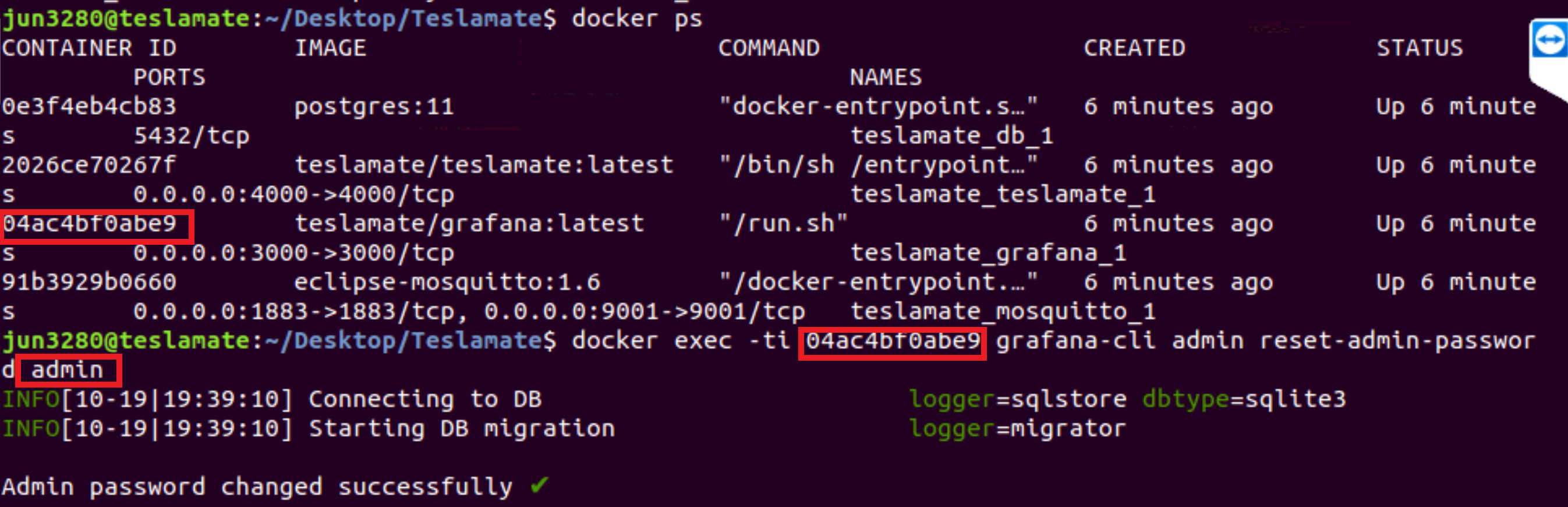
*This allowed me to login to Grafana with admin/admin (and requests you to set a new password). I'm not sure the .ENV password even matters when you do a reset. I was able to confirm all my data was intact with the Advanced setup.
I hope this helps!
jun3280net
on 19 Oct 2019
Yay! 🎉 Thanks for the detailed instructions! That's very valuable feedback. I'll update the wiki.
 adriankumpf
on 19 Oct 2019
adriankumpf
on 19 Oct 2019
Yay! 🎉 Thanks for the detailed instructions! That's very valuable feedback. I'll update the wiki.
All good @adriankumpf . Happy to help any way I can with this fantastic service you've provided.
I do have one question - is there a similar way to reset the password to Teslamate (eg from "secret" to "supersesame")?
jun3280net
on 19 Oct 2019
Yeah, sure – connect to the running database container and then change the password of the postgres user:
$ docker-compose exec database psql teslamate teslamate

teslamate=# ALTER ROLE teslamate WITH PASSWORD 'supersesame';
Related issues
 russinating
·
4Comments
russinating
·
4Comments
 phantom1584
·
4Comments
phantom1584
·
4Comments
 cwanja
·
3Comments
cwanja
·
3Comments
 bahree
·
5Comments
bahree
·
5Comments
 Try2Fly
·
5Comments
Try2Fly
·
5Comments
Most helpful comment
I don't have any facts for that but I can assume a few points of problems here:
Overall: not sure if that stack plays well with local/dyndns setups. I am only using it on a public server with a real permanent FQDN on my own domain and I would suggest to do the same as it avoids issues with the Internet connection being down or issues with the Dyn DNS service having issues or delays.
Most likely this is unrelated to your grafana issue though so just ignore it for that ;)