Describe the bug
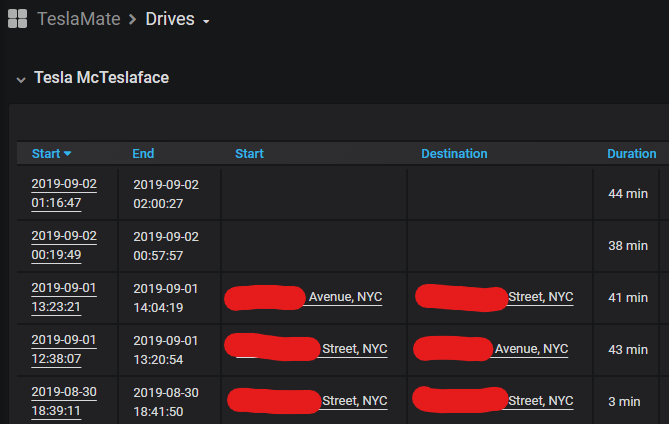
Trying to add a geofence doesn't work. Also my last drive doesn't show a starting or ending position.
To Reproduce
Steps to reproduce the behavior:
- click geo-fences from http://teslamate:4000
- click create
- add a name, set radius to 240
- click save, nothing happens but console spits an error
Expected behavior
geofence succeeds in adding and location shows up
Relevant entries from the logs
not using docker so can provide logs if needed just let me know what location they're in
pankey@teslamate:~/teslamate$ _build/prod/rel/teslamate/bin/teslamate start
02:21:02.364 [info] Running TeslaMateWeb.Endpoint with cowboy 2.6.3 at :::4000 (http)
02:21:02.365 [info] Access TeslaMateWeb.Endpoint at http://teslamate
02:21:02.370 [info] Adding elevation to 96 positions ...
02:21:02.522 [info] Found 'Tesla McTeslaface'
02:21:03.013 car_id=1 [info] Start / :online
02:21:04.128 [error] Mounting lv:phx-umwpbUeX failed while verifying session with: :invalid
02:21:05.594 [error] Mounting lv:phx-umwpbUeX failed while verifying session with: :invalid
02:21:08.594 [error] Mounting lv:phx-umwpbUeX failed while verifying session with: :invalid
02:21:14.594 [error] Mounting lv:phx-umwpbUeX failed while verifying session with: :invalid
02:21:25.594 [error] Mounting lv:phx-umwpbUeX failed while verifying session with: :invalid
02:21:35.596 [error] Mounting lv:phx-umwpbUeX failed while verifying session with: :invalid
02:21:45.598 [error] Mounting lv:phx-umwpbUeX failed while verifying session with: :invalid
02:21:55.600 [error] Mounting lv:phx-umwpbUeX failed while verifying session with: :invalid
02:22:05.602 [error] Mounting lv:phx-umwpbUeX failed while verifying session with: :invalid
02:22:07.767 [info] GET /
02:22:07.772 [info] Sent 200 in 4ms
02:22:52.507 [info] GET /geo-fences
02:22:52.509 [info] Sent 200 in 1ms
02:23:01.198 [info] GET /settings
02:23:01.200 [info] Sent 200 in 1ms
02:23:04.782 [info] GET /
02:23:04.784 [info] Sent 200 in 1ms
02:33:20.352 [info] GET /geo-fences
02:33:20.353 [info] Sent 200 in 1ms
02:33:26.594 [info] GET /geo-fences/new
02:33:26.596 [info] Sent 200 in 1ms
02:34:14.514 [error] GenServer #PID<0.3763.0> terminating
** (FunctionClauseError) no function clause matching in Mint.HTTP2.HPACK.encode_headers/3
    (mint) lib/mint/http2/hpack.ex:186: Mint.HTTP2.HPACK.encode_headers([{:store_name, "accept-language", nil}, {:store_name, "accept", "Application/json; Charset=utf-8"}], %Mint.HTTP2.HPACK.Table{entries: [], length: 0, max_table_size: 4096, size: 0}, [[[[[[[], <<130>>], [<<4>>, ["f", "/reverse?format=jsonv2&addressdetails=1&extratags=1&namedetails=1&zoom=19&lat=40.641472&lon=-73.926987"]]], <<135>>], [<<1>>, [<<31>>, "nominatim.openstreetmap.org:443"]]], [<<15, 43>>, ["\t", "TeslaMate"]]], [<<15, 16>>, [<<16>>, "application/json"]]])
    (elixir) lib/map.ex:860: Map.get_and_update!/3
    (mint) lib/mint/http2.ex:1109: Mint.HTTP2.encode_headers/4
    (mint) lib/mint/http2.ex:496: Mint.HTTP2.request/5
    (mojito) lib/mojito/conn.ex:61: Mojito.Conn.request/2
    (mojito) lib/mojito/conn_server.ex:159: Mojito.ConnServer.start_request/4
    (mojito) lib/mojito/conn_server.ex:69: Mojito.ConnServer.handle_call/3
    (stdlib) gen_server.erl:661: :gen_server.try_handle_call/4
Last message (from #PID<0.3728.0>): {:request, %Mojito.Request{body: "", headers: [{"User-Agent", "TeslaMate"}, {"Content-Type", "application/json"}, {"Accept-Language", nil}, {"Accept", "Application/json; Charset=utf-8"}], method: :get, opts: [], url: "https://nominatim.openstreetmap.org/reverse?format=jsonv2&addressdetails=1&extratags=1&namedetails=1&zoom=19&lat=40.641472&lon=-73.926987"}, #PID<0.3728.0>, #Reference<0.2021890185.870055937.35514>}
02:34:14.784 [error] GenServer #PID<0.3767.0> terminating
** (FunctionClauseError) no function clause matching in Mint.HTTP2.HPACK.encode_headers/3
    (mint) lib/mint/http2/hpack.ex:186: Mint.HTTP2.HPACK.encode_headers([{:store_name, "accept-language", nil}, {:store_name, "accept", "Application/json; Charset=utf-8"}], %Mint.HTTP2.HPACK.Table{entries: [], length: 0, max_table_size: 4096, size: 0}, [[[[[[[], <<130>>], [<<4>>, ["f", "/reverse?format=jsonv2&addressdetails=1&extratags=1&namedetails=1&zoom=19&lat=40.641472&lon=-73.926987"]]], <<135>>], [<<1>>, [<<31>>, "nominatim.openstreetmap.org:443"]]], [<<15, 43>>, ["\t", "TeslaMate"]]], [<<15, 16>>, [<<16>>, "application/json"]]])
    (elixir) lib/map.ex:860: Map.get_and_update!/3
    (mint) lib/mint/http2.ex:1109: Mint.HTTP2.encode_headers/4
    (mint) lib/mint/http2.ex:496: Mint.HTTP2.request/5
    (mojito) lib/mojito/conn.ex:61: Mojito.Conn.request/2
    (mojito) lib/mojito/conn_server.ex:159: Mojito.ConnServer.start_request/4
    (mojito) lib/mojito/conn_server.ex:69: Mojito.ConnServer.handle_call/3
    (stdlib) gen_server.erl:661: :gen_server.try_handle_call/4
Last message (from #PID<0.3728.0>): {:request, %Mojito.Request{body: "", headers: [{"User-Agent", "TeslaMate"}, {"Content-Type", "application/json"}, {"Accept-Language", nil}, {"Accept", "Application/json; Charset=utf-8"}], method: :get, opts: [], url: "https://nominatim.openstreetmap.org/reverse?format=jsonv2&addressdetails=1&extratags=1&namedetails=1&zoom=19&lat=40.641472&lon=-73.926987"}, #PID<0.3728.0>, #Reference<0.2021890185.870055937.35566>}
02:34:14.785 [error] GenServer #PID<0.3728.0> terminating
** (CaseClauseError) no case clause matching: {:error, :checkout_timeout}
    (teslamate) lib/teslamate_web/live/geofence_live/new.ex:58: TeslaMateWeb.GeoFenceLive.New.handle_event/3
    (phoenix_live_view) lib/phoenix_live_view/channel.ex:81: Phoenix.LiveView.Channel.handle_info/2
    (stdlib) gen_server.erl:637: :gen_server.try_dispatch/4
    (stdlib) gen_server.erl:711: :gen_server.handle_msg/6
    (stdlib) proc_lib.erl:249: :proc_lib.init_p_do_apply/3
Last message: %Phoenix.Socket.Message{event: "event", join_ref: "1", payload: %{"event" => "save", "type" => "form", "value" => "_csrf_token=JxcoJ3oJBT4QBz5EHWEXa2QQDFsdOgMZiFKIN12yJ0P-X6q4Wvn0Xnsa&_utf8=%E2%9C%93&geo_fence%5Bname%5D=Home&geo_fence%5Blatitude%5D=40.641472&geo_fence%5Blongitude%5D=-73.926987&geo_fence%5Bradius%5D=240"}, ref: "82", topic: "lv:phx-zwVE3eMe"}
02:34:23.484 [info] GET /geo-fences
02:34:23.485 [info] Sent 200 in 1ms
02:35:43.771 [info] GET /geo-fences
02:35:43.772 [info] Sent 200 in 1ms
02:35:48.403 [info] GET /
02:35:48.404 [info] Sent 200 in 1ms
Screenshots
Operating environment:
- OS: Ubuntu
- Version v1.7.0
 bpankz
All 8 comments
Thanks for the very detailed bug report! This problem should by resolved by d0cec8435d37db00018bdd4088302c6c87e257e5.
 adriankumpf
on 2 Sep 2019
adriankumpf
on 2 Sep 2019
It works perfectly now.
Thanks!
 virtualm2000
on 2 Sep 2019
virtualm2000
on 2 Sep 2019
just updated and it's working, thanks! still getting the mounting error but doesn't seem to affect anything
02:21:04.128 [error] Mounting lv:phx-umwpbUeX failed while verifying session with: :invalid
I'm manually updating the database now to add back the missing locations to my drives table. which looks like I should be updating addresses table and add the ID to drives table?
bpankz
on 2 Sep 2019
just updated and it's working, thanks! still getting the mounting error but doesn't seem to affect anything
02:21:04.128 [error] Mounting lv:phx-umwpbUeX failed while verifying session with: :invalidI'm manually updating the database now to add back the missing locations to my drives table. which looks like I should be updating addresses table and add the ID to drives table?
Hmmm, how would you do that, when it is running in a Docker container? (I am completely new to Docker, sorry...)
 DrMichael
on 2 Sep 2019
DrMichael
on 2 Sep 2019
Great!
The session error can be resolved by reloading the browser tab with the TeslaMate web interface that was opened before restarting. (To never see that error again set both env vars SECRET_KEY_BASE and SIGNING_SALT)
You can connect to the running instance with
_build/prod/rel/teslamate/bin/teslamate remote
Then run
iex> TeslaMate.Locations.find_address %{latitude: ..., longitude: ...}
to get the address id.
adriankumpf
on 2 Sep 2019
just updated and it's working, thanks! still getting the mounting error but doesn't seem to affect anything
02:21:04.128 [error] Mounting lv:phx-umwpbUeX failed while verifying session with: :invalid
I'm manually updating the database now to add back the missing locations to my drives table. which looks like I should be updating addresses table and add the ID to drives table?Hmmm, how would you do that, when it is running in a Docker container? (I am completely new to Docker, sorry...)
You don't need to do that if you are using the latest docker container from Dockerhub. That bug only affects users running the unreleased beta.
adriankumpf
on 2 Sep 2019
Ok, but I meant, how to manually add missing locations...
DrMichael
on 2 Sep 2019
Do you see any missing locations? That should not usually happen. If so please open a separate issue.
adriankumpf
on 2 Sep 2019
Related issues
 olivercho
·
4Comments
olivercho
·
4Comments
 Highlander1694
·
3Comments
Highlander1694
·
3Comments
 russinating
·
4Comments
russinating
·
4Comments
 bahree
·
5Comments
bahree
·
5Comments
bahree
·
5Comments
bahree
·
5Comments