Teslamate: Missing Data In Grafana?
This might be related to getting Teslamate to start polling overnight. When I look at the States graph, it looks like the car did not sleep overnight (am I correct with this assumption?). I naturally assumed that the car was still being polled by Teslamate. Looking at DriveDetails it appears some data was captured - only when I reached my workplace (which is why the graph shows a straight line. The Drives graph captures nothing. I figured it would have captured my final destination as an end data point, and the original data point would be the start data point.
I just purchased Tasker for my Android phone - now I need to figure out how to PUSH/PUT resume to Teslamate (which is running on virtualized Ubuntu in VMWare).
On a separate note - should the Position graph display a "dot" where the vehicle is on the map? Currently I just get a map of the general area where the car is.


 jun3280net
All 38 comments
This might be related to getting Teslamate to start polling overnight. When I look at the States graph, it looks like the car did not sleep overnight (am I correct with this assumption?). I naturally assumed that the car was still being polled by Teslamate. Looking at DriveDetails it appears some data was captured - only when I reached my workplace (which is why the graph shows a straight line. The Drives graph captures nothing. I figured it would have captured my final destination as an end data point, and the original data point would be the start data point.
I just purchased Tasker for my Android phone - now I need to figure out how to PUSH/PUT resume to Teslamate (which is running on virtualized Ubuntu in VMWare).
On a separate note - should the Position graph display a "dot" where the vehicle is on the map? Currently I just get a map of the general area where the car is.
In tasker open a new task, add a javascriptlet and put the following:
xmlhttp = new XMLHttpRequest(); xmlhttp.open('PUT', 'https://192.168.1.1:4000/api/car/1/logging/resume');
where 192,168.1.1 is the IP address (I have mine over a VPN), 4000 is the port and 1 is the car number
It took me a while to get that worked out
 IMgoRt
on 15 Aug 2019
IMgoRt
on 15 Aug 2019
naturally assumed that the car was still being polled by Teslamate
It is constantly being polled, even overnight.
Unless something is not working as intended, which seems to be the case here.
Please provide the log output of that given time period. With docker-compose that can be done with
docker-compose logs teslamate
On a separate note - should the Position graph display a "dot" where the vehicle is on the map? Currently I just get a map of the general area where the car is.
It never bothered me tbh. But it can be changed of course.
In general, the Grafana interface might not always be as polished as a custom written UI. That’s why there are some quirks I cannot necessarily fix or that need community feedback and help. So please keep that in mind.
 adriankumpf
on 15 Aug 2019
adriankumpf
on 15 Aug 2019
Hi Adrian,
Thank you so much for your responses. To be honest, I'm a complete
beginner when it comes to all of the work you've produced. The past couple
days I've spent learning basic Linux commands and about Docker to get this
up and running. I've tried a few different self serve Tesla data scrapers
(Lephisto, Tesalive, etc) - and yours by far is the best one I've tried.
My "issue" submissions to your Github are not intended to be critical of
your development, but just things I've noticed/experienced. It seems you
have an active following - as other members have responded providing
assistance to troubleshooting my issues. Please feel free to
comment/ignore. You've graciously shared your awesome work with the
public, so I have no expectations with regards to fulfilling my specific
requests. That said - thank you and keep up the excellent work.
I do hope to peel back the layers and learn more about how the data is
being loaded into Postgres DB and retrieved in Grafana. Which file houses
the Elixir code you've developed? I've recommended your Github to some
coworkers who own Teslas as well. I'm sure they'll be as pleased as I am
with your work.
Cheers,
J
On Thu, Aug 15, 2019 at 1:48 PM Adrian Kumpf notifications@github.com
wrote:
naturally assumed that the car was still being polled by Teslamate
It is constantly being polled, even overnight.
Unless something is not working as intended, which seems to be the case
here.Please provide the log output of that given time period. With
docker-compose that can be done withdocker-compose logs teslamate
On a separate note - should the Position graph display a "dot" where the
vehicle is on the map? Currently I just get a map of the general area where
the car is.It never bothered me tbh. But it can be changed of course.
In general, the Grafana interface might not always be as polished as a
custom written UI. That’s why there are some quirks I cannot necessarily
fix or that need community feedback and help. So please keep that in mind.—
You are receiving this because you authored the thread.
Reply to this email directly, view it on GitHub
https://github.com/adriankumpf/teslamate/issues/95?email_source=notifications&email_token=AHJD4L2KZKSTLJ3DSMPCEJLQEWXKTA5CNFSM4IMAWGFKYY3PNVWWK3TUL52HS4DFVREXG43VMVBW63LNMVXHJKTDN5WW2ZLOORPWSZGOD4MZ6YA#issuecomment-521772896,
or mute the thread
https://github.com/notifications/unsubscribe-auth/AHJD4L362NE7T3JEPIO6O3TQEWXKTANCNFSM4IMAWGFA
.
jun3280net
on 15 Aug 2019
Thank you, I appreciate your kind words. Sorry, if my previous response sounded too harsh. It's just getting a little exhaustive with all those inquiries coming in lately.
Your drives should be logged in any case. And if there is a bug I really want to fix it. To find out more we need to check out the logs TeslaMate produces. If you're getting stuck with Docker or the above mentioned command feel free to ask for help.
adriankumpf
on 15 Aug 2019
In tasker open a new task, add a javascriptlet and put the following:
xmlhttp = new XMLHttpRequest(); xmlhttp.open('PUT', 'https://192.168.1.1:4000/api/car/1/logging/resume');
where 192,168.1.1 is the IP address (I have mine over a VPN), 4000 is the port and 1 is the car numberIt took me a while to get that worked out
Thanks for your sharing your findings @IMgoRt
Is this what you mean?
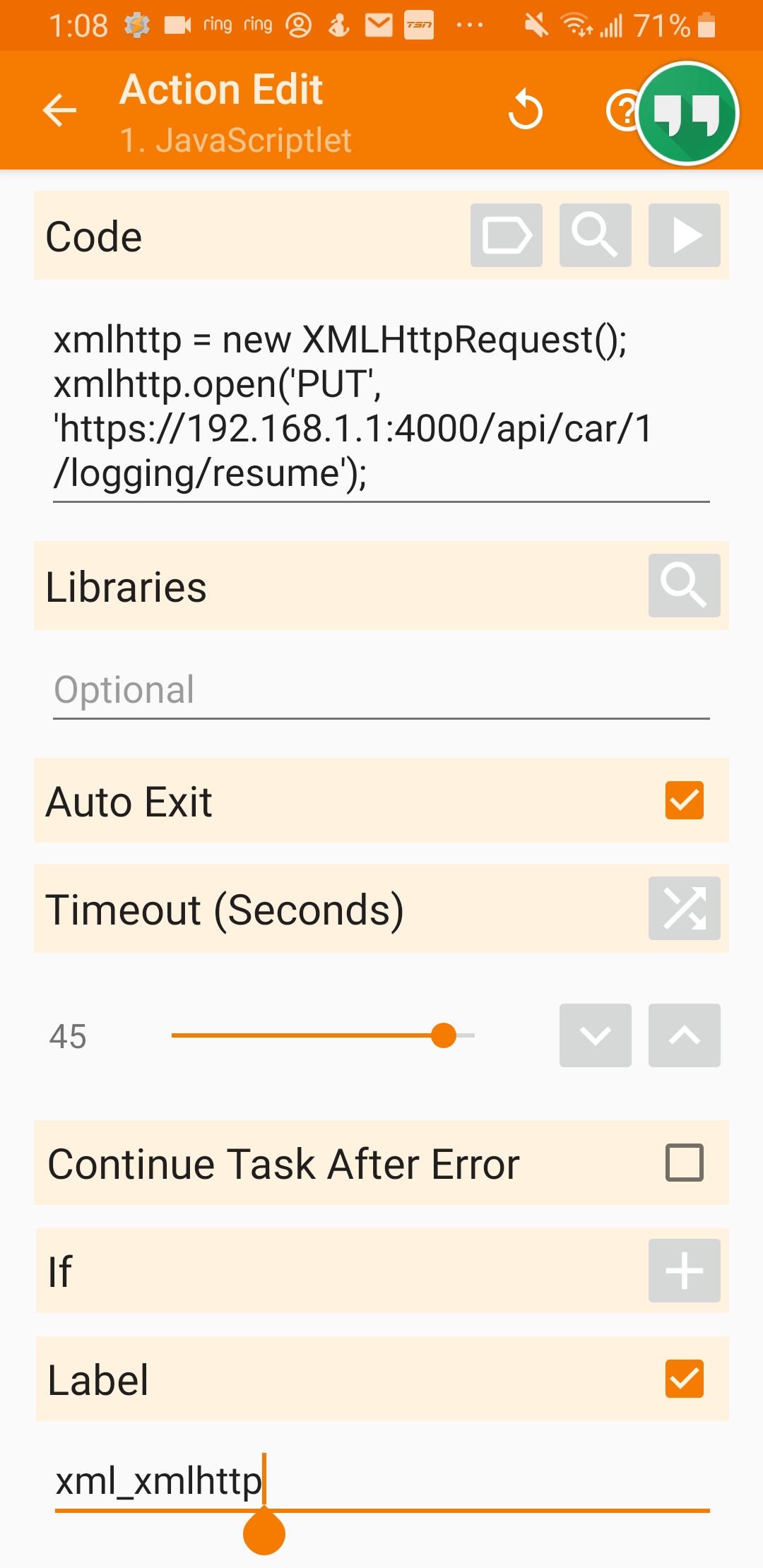
So based on what @adriankumpf suggested - did you create a profile that triggers the above, when the bluetooth is connected to the Tesla?
Thanks,
J
jun3280net
on 15 Aug 2019
Yes, exactly like that and a profile triggered I connect to the car
 Im-goRt
on 15 Aug 2019
Im-goRt
on 15 Aug 2019
Thank you, I appreciate your kind words. Sorry, if my previous response sounded too harsh. It's just getting a little exhaustive with all those inquiries coming in lately.
Your drives should be logged in any case. And if there is a bug I really want to fix it. To find out more we need to check out the logs TeslaMate produces. If you're getting stuck with Docker or the above mentioned command feel free to ask for help.
@adriankumpf no worries about your comment. You're getting lots of inquiries, because your development is getting alot of interest. Your product is very good :)
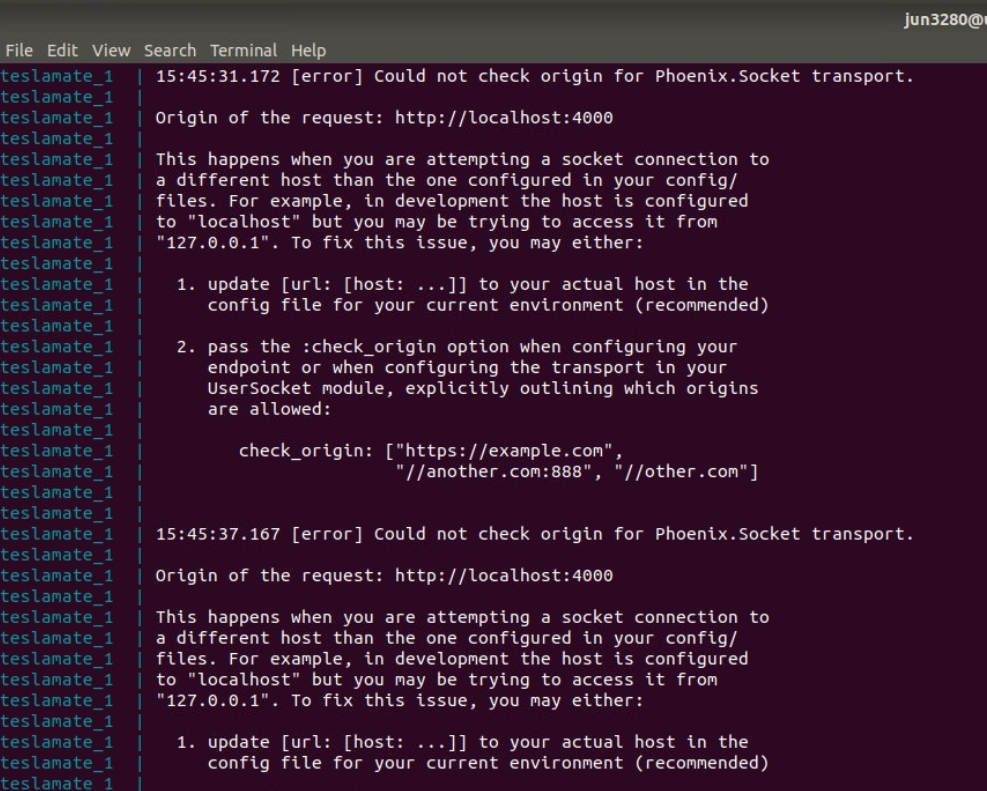
I ran "sudo docker-compose log teslamate" and it outputted the same message over and over again. I'm guessing it might be related to the YML file.
teslamate:
image: teslamate/teslamate:latest
restart: unless-stopped
environment:
- DATABASE_USER=teslamate
- DATABASE_PASS=secret
- DATABASE_NAME=teslamate
- DATABASE_HOST=db
- MQTT_HOST=mosquitto
- VIRTUAL_HOST=192.168.14.129 # if you're going to access the UI from another machine replace
# "localhost" with the hostname / IP address of the docker host.
- TZ=America/Edmonton # (optional) replace to use local time in debug logs. See "Configuration".
ports:
- 4000:4000
cap_drop:
- all
jun3280net
on 16 Aug 2019
When I look at the States graph, it looks like the car did not sleep overnight (am I correct with this assumption?)
Sorry if this is a dumb question - what do the state numbers mean? Could we either please add it to the readme, or perhaps a part of the legend. For example below is my interpretation, but I am not sure if I got it right:
0 (Yellow) - Car Asleep
1 (Green) - Car Awake ?
2 (Bluish) - Car driving?
Thanks.
 bahree
on 16 Aug 2019
bahree
on 16 Aug 2019
I’m not sure I’ve seen blue but green means it’s in a sleep/offline state and yellow means online
 natrlhy
on 16 Aug 2019
natrlhy
on 16 Aug 2019
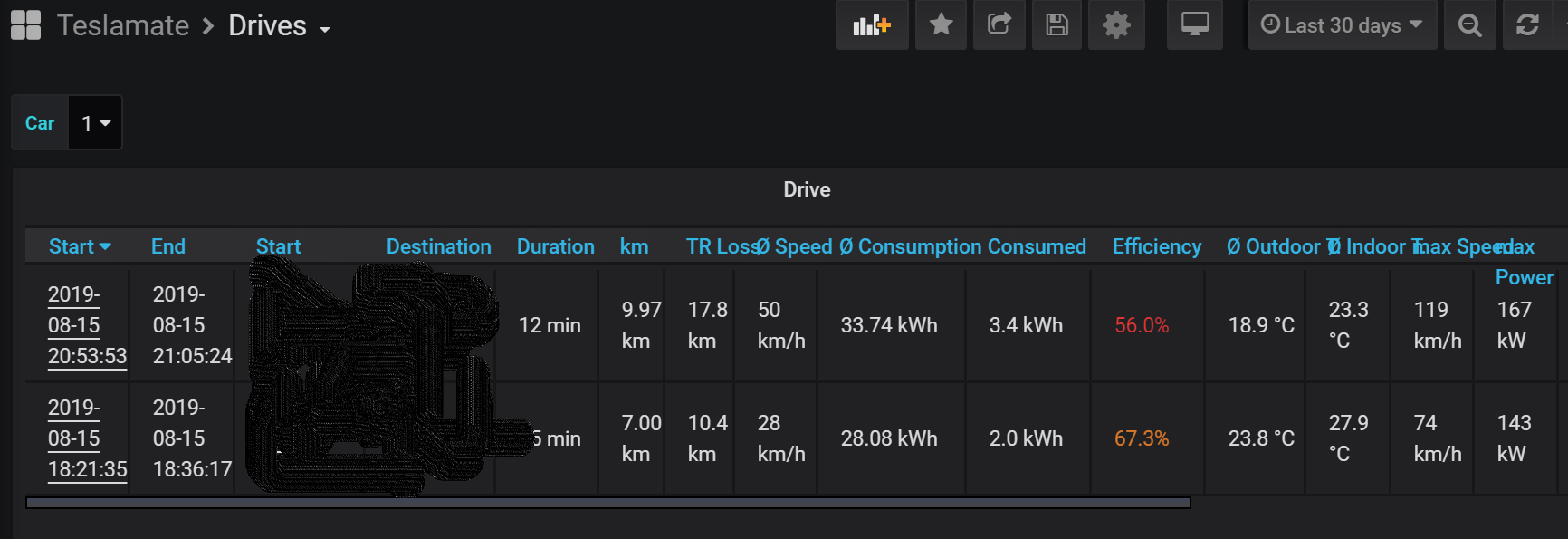
I can confirm from my Drive Details the issue is related to the Tesla sleeping. It's the only way to explain the straight lines in the maps (which i've noted as 1 and 2). Both instances, the vehicle was parked for an extended period of time.
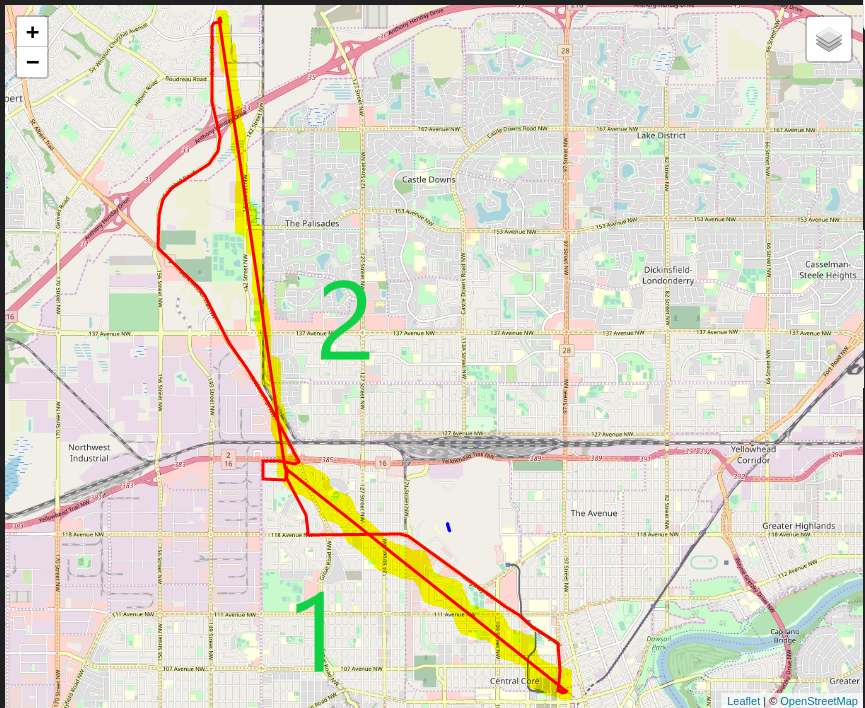
My States dashboard should reflect when the car is On, Sleeping, or Driving I believe. However, the only state I see is "2" which is "On". The car was definitely sleeping as my instrumentation cluster was off upon entering the parked vehicle.

That said, my Drives are working! It has captured 2 out of my 4 drives today. If I can get the Tasker trigger to work, that would solve the issue. I just need to figure out how to expose the ipaddress of Ubuntu (ens33 : 192.168.14.129), which is a VM (VMware - VMNet1 (192.168.220.1) and VMNet8 (192.168.14.1)) within a Windows box (192.168.86.219) on my LAN. On my this Windows box, I can type the address 192.168.13.129 and access port 3000 and 4000. However, using another computer on the same LAN (eg 192.168.86.200) cannot access the server.
Thanks for everyone's help
jun3280net
on 16 Aug 2019
When I look at the States graph, it looks like the car did not sleep overnight (am I correct with this assumption?)
Sorry if this is a dumb question - what do the state numbers mean? Could we either please add it to the readme, or perhaps a part of the legend. For example below is my interpretation, but I am not sure if I got it right:
0 (Yellow) - Car Asleep
1 (Green) - Car Awake ?
2 (Bluish) - Car driving?Thanks.
For me
Yellow (2), I think, is falling asleep
Green (1) is car asleep
I'm guessing blue (0) is awake - only seen when driving or this app was misconfigured keeping the car awake.
IMgoRt
on 16 Aug 2019
When I look at the States graph, it looks like the car did not sleep overnight (am I correct with this assumption?)
Sorry if this is a dumb question - what do the state numbers mean? Could we either please add it to the readme, or perhaps a part of the legend. For example below is my interpretation, but I am not sure if I got it right:
0 (Yellow) - Car Asleep
1 (Green) - Car Awake ?
2 (Bluish) - Car driving?
Thanks.For me
Yellow (2), I think, is falling asleep
Green (1) is car asleep
I'm guessing blue (0) is awake - only seen when driving or this app was misconfigured keeping the car awake.
I've already built an improved version of the States graph that replaces the numbers with the actual state names. It also includes driving and charge sessions. Coming soon.
adriankumpf
on 16 Aug 2019
That said, my Drives are working!
okay, awesome! Let's figure out how to expose teslamate to your local LAN then. I'm not familiar with VMWare though. I only know that you need to replace the VIRTUAL_HOST env variable with the IP address of your windows box (192.168.86.219 ?) once you got it to work.
How are you gonna access teslamate remotely? Do you plan to use a VPN to your home LAN?
Edit: you can also experiment with the sleep settings e.g. increase the Idle Time Before Trying to Sleep and/or decrease Time to Try Sleeping. Some cars can handle a Time to Try Sleeping of 12 minutes just fine, especially Model 3.
adriankumpf
on 16 Aug 2019
That said, my Drives are working!
okay, awesome! Let's figure out how to expose teslamate to your local LAN then. I'm not familiar with VMWare though. I only know that you need to replace the
VIRTUAL_HOSTenv variable with the IP address of your windows box (192.168.86.219 ?) once you got it to work.How are you gonna access teslamate remotely? Do you plan to use a VPN to your home LAN?
So I figured out half of the problem. I changed the network settings on the VM from the default to use NAT to Bridge mode. Now I can see the VM on the Local LAN. The new settings yield the following :
Ubuntu (ens33 : 192.168.86.22)
VMware - VMNet1 (192.168.220.1)
VMware - VMNet8 (192.168.14.1)
Host Windows box (192.168.86.219)
Other Windows box (192.168.86.200)
As Ubuntu, Host, Other exist on the same LAN now (192.168.86.XXX), I can now access Ubuntu from any of my computers on the LAN with 192.168.86.22:3000 and 192.168.86.22:4000.
I thought to access from the outside would be easy from this point by simply port forwarding (192.168.86.22:3000 and 192.168.86.22:4000). I thought I could then use My_Provider_IP:3000 and My_Provider_IP:4000 from outside the LAN to access the content - no such luck.
I don't understand VPNs and Reverse Proxies - so I was just trying to get this to work first before getting my hands dirty with those unfamiliar configurations.
Thanks in advance for everyone's help.
jun3280net
on 16 Aug 2019
a little comment on that: exposing both ports by simply port forwarding comes with the risk of your data getting exposed. The default configuration provides no protection whatsoever. A potential attacker could grab your Tesla API token via Grafana.
adriankumpf
on 16 Aug 2019
a little comment on that: exposing both ports by simply port forwarding comes with the risk of your data getting exposed. The default configuration provides no protection whatsoever. A potential attacker could grab your Tesla API token via Grafana.
Yikes. Thanks for the heads up. I think I am getting close to getting a working solution. I've tried using NGROK, which I believe acts like a VPN and provides a specific IP. I can confirm it works to access http://192.168.86.22:4000, but I'm unable to click the resume/sleep button. It is related to the below error message. I think I need to config the check origin to allow http://XXXYYYZZZ.ngrok.io.
teslamate_1 | Origin of the request: http://XXXYYYZZZ.ngrok.io
teslamate_1 |
teslamate_1 | This happens when you are attempting a socket connection to
teslamate_1 | a different host than the one configured in your config/
teslamate_1 | files. For example, in development the host is configured
teslamate_1 | to "localhost" but you may be trying to access it from
teslamate_1 | "127.0.0.1". To fix this issue, you may either:
teslamate_1 |
teslamate_1 | 1. update [url: [host: ...]] to your actual host in the
teslamate_1 | config file for your current environment (recommended)
teslamate_1 |
teslamate_1 | 2. pass the :check_origin option when configuring your
teslamate_1 | endpoint or when configuring the transport in your
teslamate_1 | UserSocket module, explicitly outlining which origins
teslamate_1 | are allowed:
teslamate_1 |
teslamate_1 | check_origin: ["https://example.com",
teslamate_1 | "//another.com:888", "//other.com"]
teslamate_1 |
teslamate_1 |
jun3280net
on 16 Aug 2019
Yes, that error is related to the VIRTUAL_HOST variable in the docker-compose file. It needs to march the IP address or hostname of your machine. Apparently ngrok supports virtual-host sites. If you want to access telamate inside your lan via its IP address and remotely via ngrok you can probably do this (not tested):
ngrok http -auth "user:password" -host-header=your.ip.here 4000
Ah, never mind, you can already see the teslamate page, right? It now fails because it cannot establish a websocket connection. I don't know if ngrok supports that.
adriankumpf
on 16 Aug 2019
Ah, never mind, you can already see the teslamate page, right? It now fails because it cannot establish a websocket connection. I don't know if ngrok supports that.
In the docker-compose file I have :
teslamate:
image: teslamate/teslamate:latest
restart: unless-stopped
environment:
- DATABASE_USER=teslamate
- DATABASE_PASS=secret
- DATABASE_NAME=teslamate
- DATABASE_HOST=db
- MQTT_HOST=mosquitto
- VIRTUAL_HOST=192.168.14.129 # if you're going to access the UI from another machine replace
That is related to this log message :
teslamate_1 | 1. update [url: [host: ...]] to your actual host in the
teslamate_1 | config file for your current environment (recommended)
But is my issue not related to this :
teslamate_1 | 2. pass the :check_origin option when configuring your
teslamate_1 | endpoint or when configuring the transport in your
teslamate_1 | UserSocket module, explicitly outlining which origins
teslamate_1 | are allowed:
teslamate_1 |
teslamate_1 | check_origin: ["https://example.com",
teslamate_1 | "//another.com:888", "//other.com"]
That almost reads like a list of allowable addresses. Is there somewhere that where I can add http://XXXYYYZZZ.ngrok.io as a permissible address?
Thanks
jun3280net
on 16 Aug 2019
Currently you can only supply one address. Try this VIRTUAL_HOST=XXXYYYZZZ.ngrok.io
adriankumpf
on 16 Aug 2019
Currently you can only supply one address. Try this `VIRTUAL_HOST=XXXYYYZZZ.ngrok.io
I suspect that won't work because NGROK is already set to port 4000. By doing that...wouldn't Teslamate be resolving to XXXYYYZZZ.ngrok.io:4000?
I will try to remote in and give it a try.
On a separate not - I looked up reverse proxy, and NGINX comes up. Maybe that is the route to go for me.
Anybody familiar with NGINX and how to configure it?
jun3280net
on 16 Aug 2019
This could be a good starting point: https://github.com/jwilder/nginx-proxy
adriankumpf
on 16 Aug 2019
@jun3280net I setup an nginx reverse proxy for teslamate. I can share my settings with you if you'd like and give you the approximate high level steps to set things up. You'll probably need to Google some of the details yourself however.
 EvanMcEwen
on 16 Aug 2019
EvanMcEwen
on 16 Aug 2019
Thanks @adriankumpf @EvanMcEwen ! I've been youtubing on how to use NGINX. Until I get home - I won't be able to try anything. That said - if @EvanMcEwen have some high level pointers on what needs to be done, I'd be most grateful. Below is my starting point :
Ubuntu (ens33 : 192.168.86.22)
Port : 4000 (to access Teslamate)
Port : 3000 (to access Grafana)
Port : 80 (do we need to do anything with this)
My_IP : WWW.XXX.YYY.ZZZ
The goal is to add the following commands to Tasker :
PUT https://teslamate.your-domain.com/api/car/$car_id/logging/resume
PUT https://teslamate.your-domain.com/api/car/$car_id/logging/suspend
Does NGINX provide a new IP address or am I required to sign up for a domain name (teslamate.your-domain.com) to make this all work?
Thanks
jun3280net
on 16 Aug 2019
Does NGINX provide a new IP address or am I required to sign up for a domain name (teslamate.your-domain.com) to make this all work?
No NGINX is simple a piece of software to take incoming requests and route them (or serve them) to the appropriate resource. Most often it's used to simply serve static/dynamic HTML but it can also be used as a reverse proxy. Your external IP address is given to you by your ISP.
Truthfully if you want to do this proper you should have a domain so that you can throw SSL encryption on it but it is not technically required. The high level steps look like this:
1) Add an "A" record into the domain you own. So for example your-domain.com you'd add an "A" record that points "teslamate" (subdomain) to your IP: WWW.XXX.YYY.ZZZ This will point to the teslamate front-end.
2) Add another "A" record for "tesla" that points to your IP (same as step #1). This will point to Grafana.
(I found it easier to add two subdomains, one for teslamate and one for Grafana).
3) Setup NGINX to have backed service links to teslamate and Grafana.
4) Setup NGINX to allow access to the root of your webdirectory so that LetsEncrypt can verify that you actually own your domain so it can issue an SSL cert to you.
5) Setup NGINX so that when you hit http:// it redirects to https://
6) Finally setup the final endpoints (tesla.yourdomain.com and teslamate.yourdomain.com) and have them point respectively to the backend services you setup in step #3
I'll provide more details around my setup soon as I can but as I built it specifically for myself, it doesn't translate so easily into steps for someone else to follow (or copy/paste). Let me try and make all this work with the official NGINX docker image so there is less setup and then I'll share my config.
EvanMcEwen
on 18 Aug 2019
@EvanMcEwen thanks for all the tips. I look forward to getting there, as I think your suggestions are a bit further along than where I'm at though.
That said, I've got NGINX running. I'm following some very basic guides right now.
https://www.techandme.se/set-up-nginx-reverse-proxy/
https://docs.nginx.com/nginx/admin-guide/web-server/reverse-proxy/#pass
Basic Setup
https://medium.com/moving-cubes/how-to-set-up-a-reverse-proxy-using-nginx-on-debian-9-d5f42d19ce07
SSH Setup
https://medium.com/moving-cubes/guide-set-up-open-source-ssl-for-nginx-on-linux-726867d11b6
I've got the basic NGINX setup running.
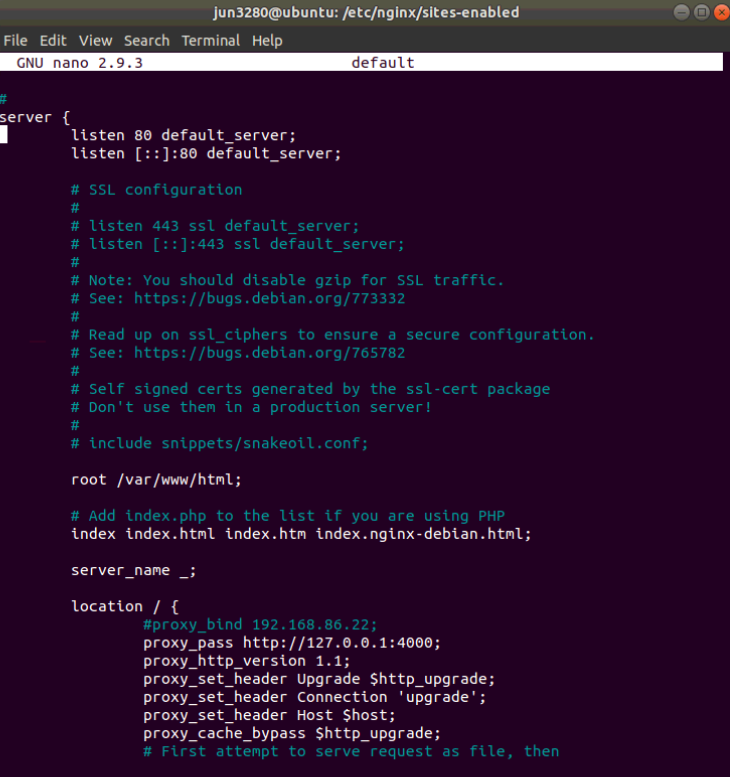
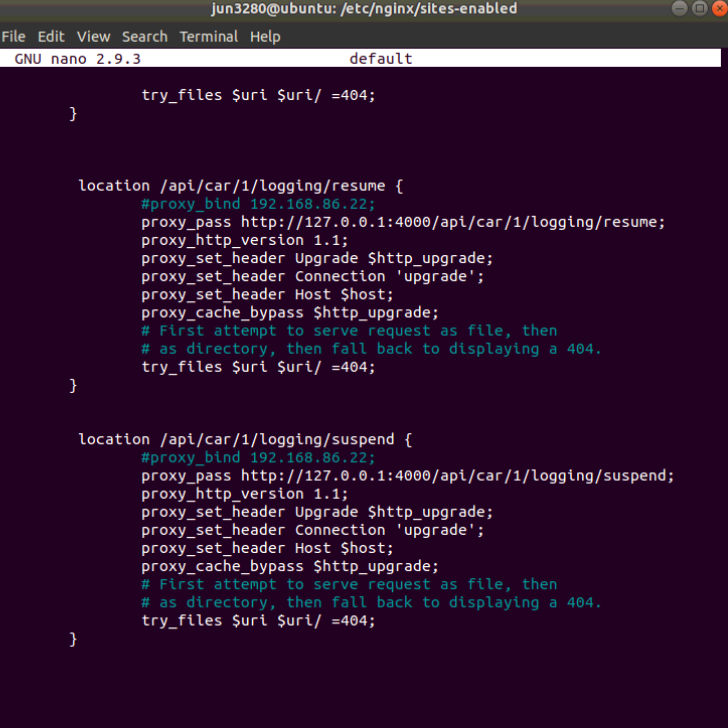
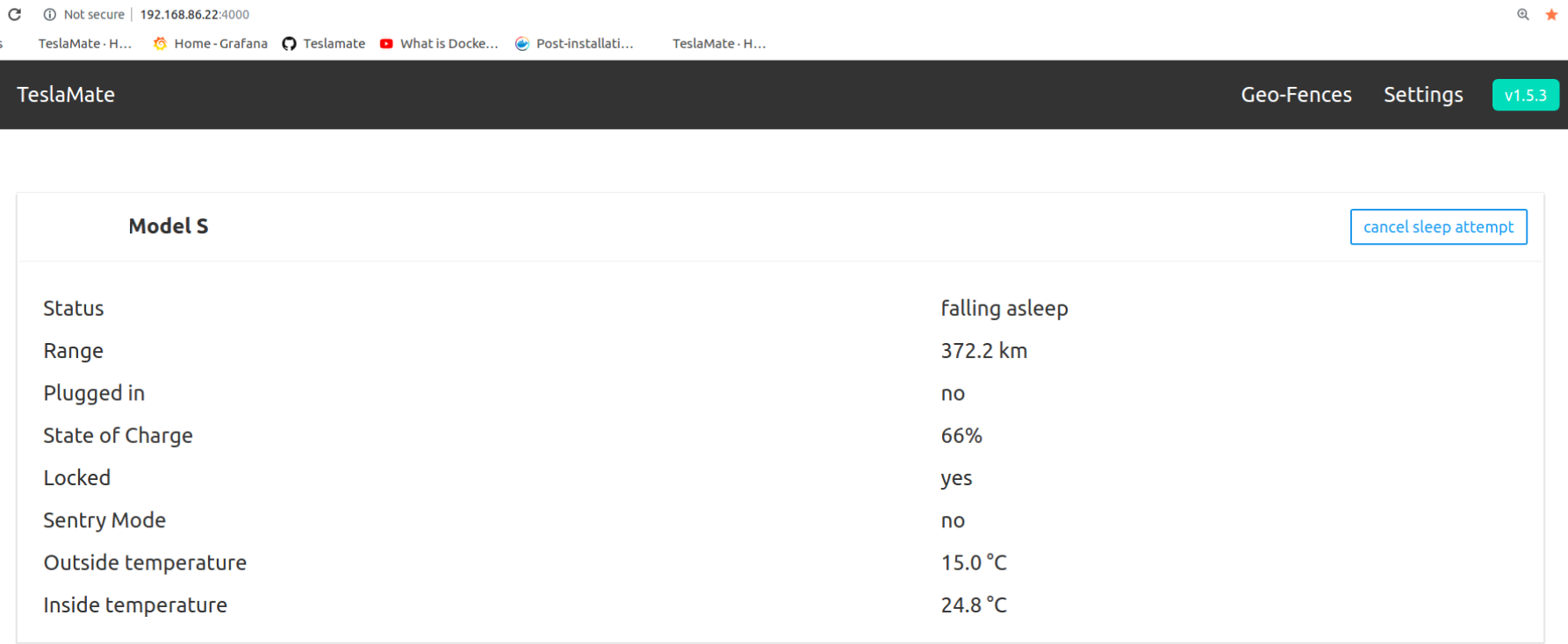
It is doing what I've set it up to do....kinda. http://192.168.86.22:4000 is behaving the way as it should.
However, typing in http://192.168.86.22 NGINX takes me to the deprecated version of the Teslamate webpage.
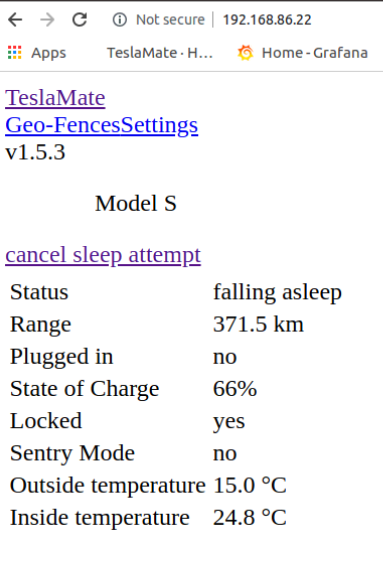
I think I need to solve this issue first before I get into anything too complicated. I might try the SSH guide next.
jun3280net
on 19 Aug 2019
Since you're already using docker, might want to check out https://github.com/JrCs/docker-letsencrypt-nginx-proxy-companion. This is what I use for teslamate (along with all other sites I have). It handles nginx + cert renewal for you and you just have to specify your subdomain in each of your docker container configs.
 Rfvgyhn
on 19 Aug 2019
Rfvgyhn
on 19 Aug 2019
In addition, if you plan to expose your endpoint to the internet you should secure it somehow to ensure that no one else can access it. I chose to do this via oauth2 (google auth). I'll post a sample docker-compose file along with my nginx config and others later.
 Simple-Complexity
on 19 Aug 2019
Simple-Complexity
on 19 Aug 2019
I would love to see this so I can extend this too. Currently mine is running on a synology NAS (via docker) and I don't want to expose everything of course.
bahree
on 22 Aug 2019
Sorry! I'll post it tonight!
Simple-Complexity
on 22 Aug 2019
Firstly @Simple-Complexity , no need to apologize - life is busy, but I do appreciate it.
I also see that on my Synology NAS (which is running docker for TeslaMate), I can setup virtual hosts. So if I want to do something similar, with that and point it to port 3000 - any ideas on what one would need to do? See the screnshot below.
Or is it better to get it on a different port and then either with apache or Nginx, redirect it to the port 3000 - can the redirect be done locally even when access this externally?
And for those curious, the http backend are those two - nginx, or Apache 2.4 and PHP options I have are 7.0 or 5.6 or not configured.
Thanks in advance.
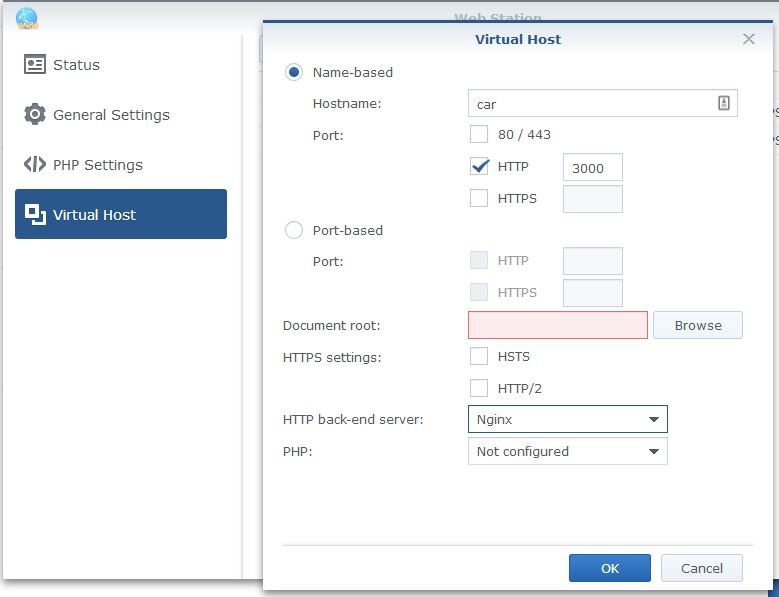
bahree
on 23 Aug 2019
On the original topic of this issue.... I have two vehicles, and both are reporting only the green "online" state for over a week. Neither has shown any other state. I started on version 1.4.x and have been on 1.6.0 for a week or so.
 traviscollins
on 27 Aug 2019
traviscollins
on 27 Aug 2019
I upgraded to 1.6.2 and now I see charging states, even historically, across both vehicles. great!
traviscollins
on 27 Aug 2019
@bahree and anyone else that is interested, here's the docker-compose file that I use along with an nginx config that terminates TLS and makes use of oauth to ensure I am the only one who can access it:
https://gist.github.com/Simple-Complexity/fe1fe13f031dd7645a338318fce9fa66
Simple-Complexity
on 27 Aug 2019
I upgraded to 1.6.2 and now I see charging states, even historically, across both vehicles. great!
@traviscollins that sounds a bit suspicious though. How is the Vampire Drain of your vehicles? If they have the MCU1 make sure 'Always Connected' is turned off and 'Energy Savings' is turned on in the vehicle.
adriankumpf
on 27 Aug 2019
@bahree and anyone else that is interested, here's the docker-compose file that I use along with an nginx config that terminates TLS and makes use of oauth to ensure I am the only one who can access it:
https://gist.github.com/Simple-Complexity/fe1fe13f031dd7645a338318fce9fa66
Thank you for sharing this! I will look into testing this out. Question though - do you need to have a domain name in order to use this? Or can you just use your IP address with this (whatismyip). Which OAUTH provider would you recommend using with this?
Cheers,
J
jun3280net
on 27 Aug 2019
In order to get SSL/TLS certificates you would need a domain. I chose to use Google since I use it for most things, but it should work for any OAUTH provider with some additional configuration.
Simple-Complexity
on 30 Aug 2019
This is awesome, thank you @Simple-Complexity.
A few questions - One, on the OAUTH2 details (below) - where do I get the client ID and the secrets? And I am curious if I can use a Live ID?
- OAUTH2_PROXY_PROVIDER=google
      - OAUTH2_PROXY_CLIENT_ID=<<your-google-oauth-client-id-here>>
      - OAUTH2_PROXY_CLIENT_SECRET=<<your-google-oauth-client-secret-here>>
      - OAUTH2_PROXY_COOKIE_SECRET=<<arbitrary-cookie-secret>>
And two, I should use this as my 'base' instead of @adriankumpf 's docker compose file, right? And seeing the dependencies it would pull TeslaMate too?
And finally, what are the ports 4180:4180 used for? I have a UTM running, so need to figure out what all to open to get to this.
Thanks.
bahree
on 30 Aug 2019
Related issues
 olivercho
·
4Comments
olivercho
·
4Comments
 Highlander1694
·
3Comments
bahree
·
5Comments
Highlander1694
·
3Comments
bahree
·
5Comments
 virtualm2000
·
4Comments
virtualm2000
·
4Comments
 petariga
·
5Comments
petariga
·
5Comments
Most helpful comment
@bahree and anyone else that is interested, here's the docker-compose file that I use along with an nginx config that terminates TLS and makes use of oauth to ensure I am the only one who can access it:
https://gist.github.com/Simple-Complexity/fe1fe13f031dd7645a338318fce9fa66