Terraform-provider-azuredevops: Support import private repository
Community Note
- Please vote on this issue by adding a 👍 reaction to the original issue to help the community and maintainers prioritize this request
- Please do not leave "+1" or "me too" comments, they generate extra noise for issue followers and do not help prioritize the request
- If you are interested in working on this issue or have submitted a pull request, please leave a comment
Terraform (and Azure DevOps Provider) Version
Terraform v0.13.5
azurerm v2.36.0
random v3.0.0
azuredevops v0.1.0
Affected Resource(s)
azuredevops_git_repository
Terraform Configuration Files
provider "azurerm" {
  version = "~> 2.36.0"
  features {}
}

provider "azuredevops" {
  version = "= 0.1.0"
  org_service_url       = var.org_service_url
  personal_access_token = var.personal_access_token
}

resource "azuredevops_project" "appproj" {
  name               = local.project_name
  description        = local.project_description
  visibility         = "private"
  version_control    = "Git"
  work_item_template = local.project_process
  features = {
      "testplans"    = "disabled"
      "artifacts"    = "disabled"
      "boards"       = "enabled"
      "pipelines"    = "enabled"
      "repositories" = "enabled"
  }
}

## Add Project Owners to Project Administrator role
resource "azuredevops_user_entitlement" "owners" {
  principal_name = each.key
  for_each       = var.project_owners
}

resource "azuredevops_group" "project_owners_group" {
  scope        = azuredevops_project.appproj.id
  display_name = "Project Administrators"
}

resource "azuredevops_group_membership" "project_owners_membership" {
  for_each = var.project_owners
  group    = azuredevops_group.project_owners_group.descriptor
  members = [
    azuredevops_user_entitlement.owners[each.key].descriptor
  ]
}

resource "azuredevops_user_entitlement" "admins" {
  principal_name = each.key
  for_each       = var.project_admins
}

resource "azuredevops_group" "project_team_group" {
  scope        = azuredevops_project.appproj.id
  display_name = "${local.project_name} Team"
}

resource "azuredevops_group_membership" "project_admins_membership" {
  for_each = var.project_admins
  group    = azuredevops_group.project_team_group.descriptor
  members = [
    azuredevops_user_entitlement.admins[each.key].descriptor
  ]
}

data "azurerm_key_vault" "key_vault" {
  name                = module.subscription.kv_name
  resource_group_name = module.subscription.rgname
}

data "azurerm_key_vault_secret" "secret_key_vault" {
  name         = "secretname"
  key_vault_id = data.azurerm_key_vault.key_vault.id
}

resource "azuredevops_serviceendpoint_azurerm" "endpointazure" {
  project_id            = azuredevops_project.appproj.id
  service_endpoint_name = local.project_spn_name

  credentials {
    serviceprincipalid  = var.spn_objectid
    serviceprincipalkey = data.azurerm_key_vault_secret.secret_key_vault.value
  }

  azurerm_spn_tenantid      = local.tenant_id
  azurerm_subscription_id   = module.subscription.subscription_guid
  azurerm_subscription_name = module.subscription.current_subscription_display_name
}

resource "azuredevops_git_repository" "repo" {
  project_id = azuredevops_project.appproj.id
  name       = "abcde"
  initialization {
    init_type = "Import"
    source_type = "Git"
    source_url = "<here comes a url of  a github repo in the same azure devops organisation, but in another project>"
  }
}
Debug Output
```
2020/11/25 15:00:36 [DEBUG] azuredevops_git_repository.repo: applying the planned Create change
2020-11-25T15:00:36.195Z [DEBUG] plugin.terraform-provider-azuredevops_v0.1.0: 2020/11/25 15:00:36 [DEBUG] expandGitRepository: ID is empty (not set)
2020/11/25 15:00:36 [DEBUG] azuredevops_git_repository.repo: apply errored, but we're indicating that via the Error pointer rather than returning it: Error import repository in Azure DevOps:
### Panic Output
Error: Error import repository in Azure DevOps:
on main.tf line 138, in resource "azuredevops_git_repository" "repo":
138: resource "azuredevops_git_repository" "repo" {
```
Expected Behavior
The apply proceeds successfully, the repository is created and there is no error.
Actual Behavior
What actually happens:
1) terraform apply exits with the above mentioned error
2) the needed resource actually gets created and the repo is imported - can be seen in the Azure DevOps porta;
3) what is not expected - another empty repo is created with the same name as the project name.
Steps to Reproduce
terraform apply
 ak58588
All 15 comments
@ak58588 Azure DevOps will create a repo with the same as the project name by default. You can reuse the default repository with data source azuredevops_git_repository or azuredevops_git_repositories
 xuzhang3
on 30 Nov 2020
xuzhang3
on 30 Nov 2020
@xuzhang3 thanks for your reply. What still I need is to create a new repo by importing some other existing one...and I wonder what makes terraform apply to fail every time
ak58588
on 30 Nov 2020
@ak58588 I tested your script and it worked for me, I cannot reproduce your error(both of github repo and azure git repo works). Can you share more error logs or reproduce steps? Is the repo you want to import is an existed one or created along with this repo.
xuzhang3
on 30 Nov 2020
@xuzhang3 thanks for your response. I have tried to deploy a project with a repo only (the one with import). I have examined the debug logs and found there
2020/12/06 17:27:16 [DEBUG] azuredevops_git_repository.repo: applying the planned Create change
2020-12-06T17:27:16.871Z [DEBUG] plugin.terraform-provider-azuredevops_v0.1.0: 2020/12/06 17:27:16 [DEBUG] expandGitRepository: ID is empty (not set)
2020/12/06 17:27:17 [DEBUG] azuredevops_git_repository.repo: apply errored, but we're indicating that via the Error pointer rather than returning it: Error import repository in Azure DevOps: <nil>
2020/12/06 17:27:17 [ERROR] eval: *terraform.EvalApplyPost, err: Error import repository in Azure DevOps: <nil>
2020/12/06 17:27:17 [ERROR] eval: *terraform.EvalSequence, err: Error import repository in Azure DevOps: <nil>
So it complains about the id expandGitRepository: ID is empty (not set)
ak58588
on 6 Dec 2020
@xuzhang3 https://gist.github.com/ak58588/85c1a3bc6ade720a7af0039821b63944 this is the gist with the logs
ak58588
on 6 Dec 2020
@xuzhang3 I think I got what my problem in my case is - I am referring another Azure DevOps git repo from the same organisation. I have just tried importing some github.com/
ak58588
on 6 Dec 2020
@ak58588 I'm experiencing this issue also, with the same Error: Error import repository in Azure DevOps: <nil> error message.
I'm trying to import an existing repo from the same project and organisation. When I do this via the UI, I have to provide authentication. @xuzhang3 is this supported by the updated provider?
Our use case is that when we create these new repos (there will be many), we want to use the another repo as the template which we will then add code to.
 ChrisF987
on 7 Dec 2020
ChrisF987
on 7 Dec 2020
Hi @ChrisF987 @ak58588 The root issue here is current import function only support public repo link, if you want import a private repo, you need the pass the credentials.
If the source repository is empty. This error will also happen, the source repo should have at least one file.
Potential Terraform Configuration
resource "azuredevops_git_repository" "repo" {
  project_id = id
  name = "Project name"
  initialization {
    init_type = "Import"
    source_type = "Git"
    source_url = "repo_link"
    username =""
    password=""
   personal_access_token=""
  }
}
Thanks, @xuzhang3 ! I have just tried adding the credentials and I am getting the error "unsupported argument" on these three parameters like this:
An argument named "personal_access_token" is not expected here.
Hi @ak58588 This is not supported yet, this is new feature we need to implement.
xuzhang3
on 7 Dec 2020
@xuzhang3 thanks for the information
ak58588
on 7 Dec 2020
Any information about a roadmap for this feature?
Digged a bit deeper in the source code and traced the function calls. Seems like the repository is created and afterwards the import is requested (which we can verify as the repo gets created in azure devops but in state uninitialized).
The function which should trigger the import seems to be this one:
https://github.com/microsoft/terraform-provider-azuredevops/blob/abee538ead915f3e8b802c910ae8ca396c88ffda/vendor/github.com/microsoft/azure-devops-go-api/azuredevops/git/client.go#L580
(Note the [Preview]in the comment line above)
When running terraform we get the same error as @ak58588 :
Error: Error import repository in Azure DevOps: <nil>
On line 599 onwards it says:
resp, err := client.Client.Send(ctx, http.MethodPost, locationId, "5.1-preview.1", routeValues, nil, bytes.NewReader(body), "application/json", "application/json", nil)
if err != nil {
    return nil, err
}
So as we are not getting any additional error message besides to nil there might be a problem with the actual API call? Might this be related to https://github.com/microsoft/azure-devops-go-api/issues/93 ?
EDIT 1:
Can someone explain what location does and why it is hardcoded?: https://github.com/microsoft/terraform-provider-azuredevops/blob/abee538ead915f3e8b802c910ae8ca396c88ffda/vendor/github.com/microsoft/azure-devops-go-api/azuredevops/git/client.go#L598
Here we have "5.1-preview.1" as part of the request
https://github.com/microsoft/terraform-provider-azuredevops/blob/abee538ead915f3e8b802c910ae8ca396c88ffda/vendor/github.com/microsoft/azure-devops-go-api/azuredevops/git/client.go#L599
which is no longer available at the official API documentation
EDIT 2:
Another finding: The CreateRpository function which runs sucessfully before the CreateImportRequest function uses API version 5.1: https://github.com/microsoft/terraform-provider-azuredevops/blob/4a33afed77e7c1f400617989df060e4eec84f402/vendor/github.com/microsoft/azure-devops-go-api/azuredevops/git/client.go#L1057
whereas the latter one uses 5.1-preview.1
So for me there are 2 different things that could be the root cause:
- This terraform provider does not support the authentication to clone private repos
- The API which is triggered by this provider does not support cloning private repos at all (which would be worst case)
 wernerfred
on 21 Dec 2020
wernerfred
on 21 Dec 2020
@xuzhang3 any roadmap update on this? Is there any point where we can assist?
wernerfred
on 12 Apr 2021
Hi @wernerfred In portal, when you try to import a repository with authorization, you will find 4 HTTP requests before the repository created.
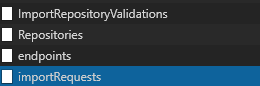
Analysis the requests, you will found that the authorization is based on service connection(the third request endpoints), since import API support send the service connection ID along with the request, you can do the authorization with service connection.
xuzhang3
on 14 Apr 2021
@wernerfred This issue is in our backlog, but not the highest priority. If you interest in this issue, you can create a PR for it.
xuzhang3
on 14 Apr 2021
Related issues
 DamonStamper
·
4Comments
DamonStamper
·
4Comments
 booyaa
·
3Comments
booyaa
·
3Comments
 jameswestall
·
5Comments
DamonStamper
·
4Comments
jameswestall
·
5Comments
DamonStamper
·
4Comments
 FernandoMiguel
·
7Comments
FernandoMiguel
·
7Comments
Most helpful comment
Hi @ak58588 This is not supported yet, this is new feature we need to implement.