Terraform-provider-azuredevops: [Feature request] Add support for importing azuredevops_git_repository
Community Note
- Please vote on this issue by adding a 👍 reaction to the original issue to help the community and maintainers prioritize this request
- Please do not leave "+1" or "me too" comments, they generate extra noise for issue followers and do not help prioritize the request
- If you are interested in working on this issue or have submitted a pull request, please leave a comment
Description
Add support for importing a azuredevops_git_repository resource.
What I'm focused on is the ability to define the resource in the state file so that Terraform won't attempt to create the repo when it already exists and then fail to run to completion.
New or Affected Resource(s)
- azuredevops_git_repository
 DamonStamper
All 4 comments
Hi @DamonStamper This feature is in reviewing :D. #118
 xuzhang3
on 10 Aug 2020
xuzhang3
on 10 Aug 2020
@xuzhang3 Since the importing of repos is still a work in progress, I am trying to initialize multiple repo's under the same project to match a template repo.
backend.tf
provider "azuredevops"{
  version = ">= 0.0.1"
  org_service_url       = var.AZDO_ORG_SERVICE_URL
  personal_access_token = var.AZDO_PERSONAL_ACCESS_TOKEN
}

data "azuredevops_project" "project" {
  project_name = "workflow"
}
data "azuredevops_project" "project-base" {
  project_name = "workflow-base"
}

data "azuredevops_git_repositories" "base_repo" {
  project_id = data.azuredevops_project.project-base.id
  name       = "workflow-base"
}

resource "azuredevops_git_repository" "customer1" {
  project_id = data.azuredevops_project.project.id
  name       = "Customer1"
  parent_repository_id  = data.azuredevops_git_repositories.base_repo.project_id
  initialization {
    init_type = "Clean"
  }
}
But when I run terraform apply I get the following error related to authorization
azuredevops_git_repository.customer1: Creating...

Error: Failed to locate parent repository [######]: TF401019: The Git repository with name or identifier ###### does not exist or you do not have permissions for the operation you are attempting.

  on test-project-stg.tf line 80, in resource "azuredevops_git_repository" "customer1":
  80: resource "azuredevops_git_repository" "customer1" {
I confirmed the access token I'm using to authenticate has full permissions and googling this issues just suggests it's a permission issue.
My question is - have you encountered this before, or have another suggestion on how to fork repo's or initalize multiple repo's following a base repo in a specific project?
For example - the end result is
/project
-> /repo1
-> /repo2
-> /repo3
Where the three repo's are initialized from repo base
/project-base
-> /repo-base
Thanks!
 skinamdar
on 1 Sep 2020
skinamdar
on 1 Sep 2020
This may be related to failure to fork a repo - trying to troubleshoot how to resolve the issue.
skinamdar
on 1 Sep 2020
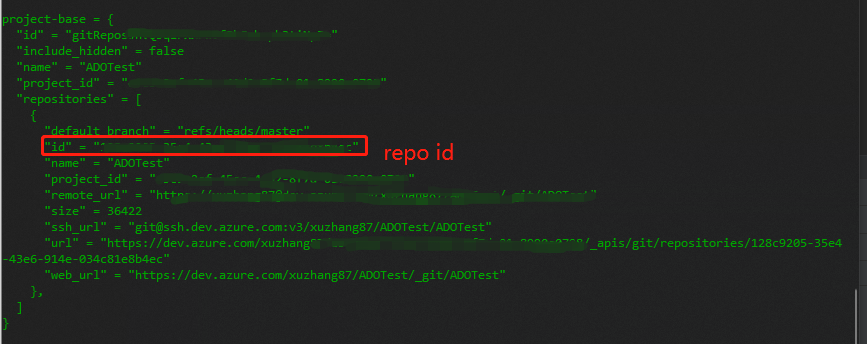
@skinamdar The data source azuredevops_git_repositories you use will fetch all the repository belong to this project. The configuration parent_repository_id = data.azuredevops_git_repositories.base_repo.project_id is referenced to the project ID. You can get the repository ids from data.azuredevops_git_repositories.base_repo.repositories, you need to iterate it as it is an array
xuzhang3
on 2 Sep 2020
Related issues
 booyaa
·
3Comments
booyaa
·
3Comments
 oscarmorasu
·
8Comments
oscarmorasu
·
8Comments
 A30004028
·
8Comments
A30004028
·
8Comments
 josh-barker
·
4Comments
josh-barker
·
4Comments
 EliiseS
·
8Comments
EliiseS
·
8Comments
Most helpful comment
Hi @DamonStamper This feature is in reviewing :D. #118