Terra-core: [terra-form-select] Opening one dropdown in a table will not close another opened dropdown
Bug Report
Description
When a terra-table contains a terra-form-select dropdown on each row, opening one select will not automatically close the previously opened select.
This works as expected on Chrome and Edge; only having the issue in IE.
Steps to Reproduce
- Render a terra-table with a terra-form-select on each row.
- Open a select on one row.
- Open a select on a different row - the previous select remains open.
- Open a select on another row - the previous two selects remain open.
Additional Context / Screenshots
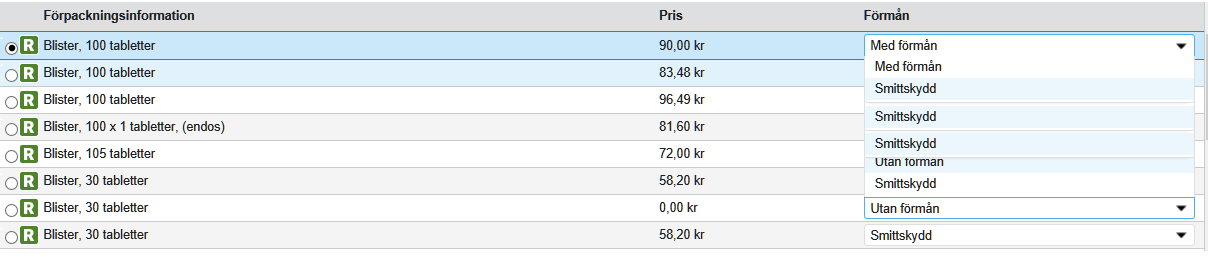
Expected Behavior
When one select is opened, close other selects in the same table.
Environment
- Component Name and Version: "terra-form-select": "^5.36.0", "terra-table": "^3.26.0",
- Browser Name and Version: IE 10
- Node/npm Version: [e.g. Node 8/npm 5] node 10.16 / npm 6.9
- Webpack Version: "webpack": "^4.30.0",
- Operating System and version (desktop or mobile): Windows 10
 dajaffe
All 6 comments
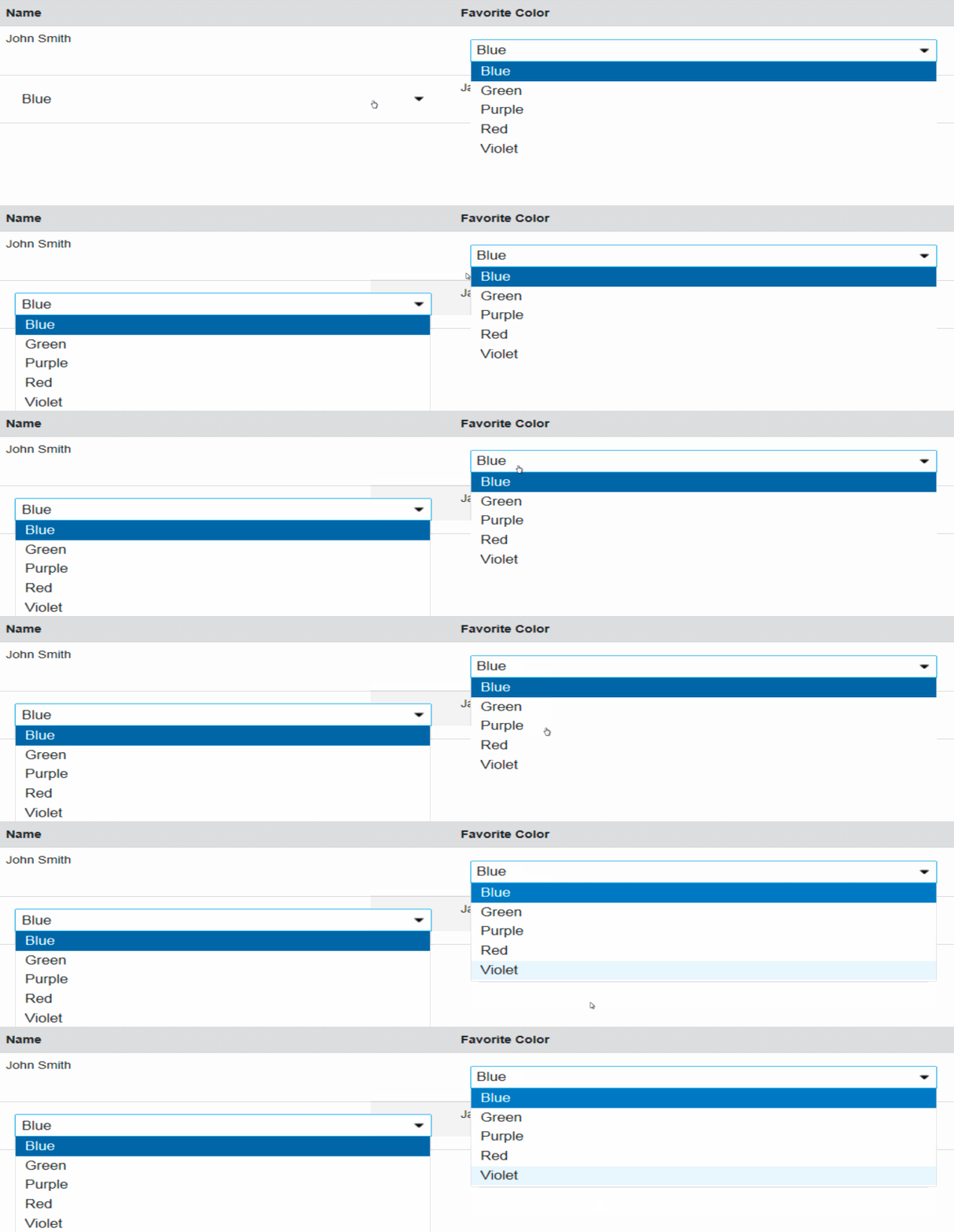
This seems to be an issue with single-select variant on IE 10 and IE 11 -
 nramamurth
on 18 Nov 2019
nramamurth
on 18 Nov 2019
This problem is exposed after https://github.com/cerner/terra-core/issues/2648 was fixed and maybe it was masked by the defect earlier.
At this point, I ain't 💯 sure what is really happening but in the code, I see that we query the DOM for terra-select-menu and compare the result against the currently focussed element in multiple places. I am assuming that when there are multiple select elements on the page, the intended element is not obtained and instead the first element seen in the DOM is obtained and compared against and blur handler (that closes the dropdown) is never actually getting invoked.
Instead of querying the DOM for the menu like that, I made sure that each individual Frame is aware of the Menu that it shows by adding a ref and it seems to have worked.
Is this the correct solution? I am not sure because I do not know why Frame does not maintain a ref its Menu in the current code.

cc / @StephenEsser
nramamurth
on 18 Nov 2019
Thanks for looking into this @nramamurth. Any chance we could get a fix released within the next week or two? We're looking to release a project consuming this soon, and I anticipate this won't be an uncommon workflow.
dajaffe
on 18 Nov 2019
@nramamurth
I think you are correct. The setTimeout is allowing two menus with the same ID to be rendered onto the page. When the comparison is made the wrong dom elements are being compared.
Two options come to mind that should resolve this issue.
Option 1: Using your solution, implement a refCallback on the menu and use that as the comparison.
Option 2: Implement a unique ID for each select menu. This file is already using lodash.uniqueid. That solution would look something like this.
I lean towards the first option, if possible, so that we are not concerned about querying the dom if we can define an explicit reference. However, the reason the current code doesn't implement a ref may be related to the aria-controls and aria-owns attributes are expecting an identifier:
 StephenEsser
on 19 Nov 2019
StephenEsser
on 19 Nov 2019
@StephenEsser
the reason the current code doesn't implement a ref may be related to the aria-controls and aria-owns attributes are expecting an identifier:
I'd have missed that. Thanks for the heads-up!
How about we do both — have an unique ID for each select menu to support accessibility and also, maintain a ref so that we do not have to parse the DOM often (although I have read that performance difference between these approaches is quite negligible)? Maybe, it looks 'cleaner'.
When I do this, should I update the other variants as well or it is better that we get to them when we get to flattening issues later at some point?
nramamurth
on 19 Nov 2019
That approach sounds good to me. I'm not too strongly opinionated about using the ref vs querying the dom. I would implement whichever approach you feel works best.
I'd recommend not updating the other variants to keep the changes small unless they are also experiencing this same issue. It's easy to lose track of the original issue when there's a lot of changes in one PR.
StephenEsser
on 19 Nov 2019
Related issues
 noahbenham
·
5Comments
noahbenham
·
5Comments
 bjankord
·
3Comments
noahbenham
·
4Comments
bjankord
·
5Comments
bjankord
·
5Comments
bjankord
·
3Comments
noahbenham
·
4Comments
bjankord
·
5Comments
bjankord
·
5Comments