Terra-core: [terra-dropdown-button] Split button menu does not close on primary action click
Bug Report
Description
When using a SplitButton from terra-dropdown-button, if the face-up (primary) action is clicked while the dropdown menu is open, the menu is not closed.
Steps to Reproduce
- Click the SplitButton arrow to open the menu options.
- Click the primary action instead of a menu option.
- The menu remains open.
Additional Context / Screenshots
We're using the button to open a modal and this behavior is resulting in the menu being open while the modal is open.
Expected Behavior
The menu should close if the primary action is clicked.
Possible Solution
Do not wrap the primary action with the class in this line.
Environment
- Component Name and Version: terra-dropdown-button 1.0.0
- Browser Name and Version: Chrome
- Node/npm Version: Node 8/npm 5
- Webpack Version: 4
- Operating System and version (desktop or mobile): Mac, Desktop
@ Mentions
@dkasper-was-taken
 dkschoonover
All 8 comments
It'll need some validation and tests, but I believe the proper fix would be something like this:
https://github.com/cerner/terra-core/compare/fix-dropdown-click
 dkasper-was-taken
on 8 Aug 2019
dkasper-was-taken
on 8 Aug 2019
It'll need some validation and tests, but I believe the proper fix would be something like this:
https://github.com/cerner/terra-core/compare/fix-dropdown-click
@dkasper-was-taken I was looking into this issue and found a different fix(I could be wrong).
handleDropdownRequestClose(callback) {
    this.setState({ isOpen: false }, typeof callback === 'function' ? callback : undefined);
  }

<button
    type="button"
    className={primaryClassnames}
-   onClick={onSelect}
+   onClick={(event) => { this.handleDropdownRequestClose(onSelect); event.stopPropagation(); }}
    onKeyDown={this.handlePrimaryKeyDown}
    onKeyUp={this.handlePrimaryKeyUp}
    disabled={isDisabled}
    tabIndex={isDisabled ? '-1' : undefined}
    aria-disabled={isDisabled}
>
I was wondering if there is a specific reason behind your approach. Thank you.
 lokesh-0813
on 12 Aug 2019
lokesh-0813
on 12 Aug 2019
The terra-overlay pattern and metaData cleanup is more consistent with our other implementations. Popups, modals, navigation, etc. The finer points being keeping the selection logic contained within the Item rather than spreading the logic across the rest of the component. Also the type checking for a function within the handler is an odd pattern.
dkasper-was-taken
on 13 Aug 2019
The terra-overlay pattern and metaData cleanup is more consistent with our other implementations. Popups, modals, navigation, etc. The finer points being keeping the selection logic contained within the Item rather than spreading the logic across the rest of the component. Also the type checking for a function within the handler is an odd pattern.
hey @dkasper-was-taken, I was wondering what is the use of metaData here ? Can you tell me how it is useful in this context or provide any resource so I can look into ?
lokesh-0813
on 16 Aug 2019
MetaData in this context doesn't alter the clickoutside issue, it's an additional change given that we are adjusting the logic around selection anyway. MetaData itself is just a pass-through, we use it when managing lists of options/items to give consumers with a method of providing additional keys/indexes/attributes to associated to the item, rather than users attempting to store said data on the DOM in some fashion. We don't necessarily need to return the event to the user, it could also be onSelect(metaData). A few examples would be terra-application-navigation, terra-list, upcoming terra-table-cell-grid changes, terra-navigation-prompt, and terra-navigation-side-menu.
dkasper-was-taken
on 16 Aug 2019
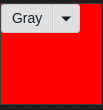
After the Overlay pattern, few WDIO tests are failing. Since we have a overlay now, either clicking outside the menu or on the primary button is not setting the focus on the dropDown button or the primary button and the box-shadow highlight is missing. Have attached few before and after WDIO snaps
Before :
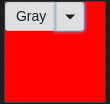
After :
cc @neilpfeiffer @dkasper-was-taken @bjankord
lokesh-0813
on 26 Aug 2019
@dkasper-was-taken terra-overlay has a wicg-inert attribute set to it. So once the menu is closed it is pointed to the 'root' id. So is there a way to set the focus back to dropDown button once the menu(overlay) is closed?
Using ref(React.createRef) did not work.
Should we consider using a custom overlay like the one popup uses?
lokesh-0813
on 5 Sep 2019
Hi @dkasper-was-taken , implementing terra-overlay here might impact the scenario where before user was able to access any other element present in the DOM even though when the dropdown of terra-button-dropdown was open let say with single click. might now have to click the other element twice after the overlay implementation. as the overlay will be rendered above all the other elements present in the DOM. i see the same behavior in our Menu examples which in turn use terra-popup.
 ShettyAkarsh
on 17 Sep 2019
ShettyAkarsh
on 17 Sep 2019
Related issues
 bjankord
·
3Comments
bjankord
·
3Comments
 FloraChenCerner
·
4Comments
FloraChenCerner
·
4Comments
 saisanthosh225
·
5Comments
saisanthosh225
·
5Comments
 dv297
·
4Comments
dv297
·
4Comments
 neilpfeiffer
·
5Comments
neilpfeiffer
·
5Comments