Terra-core: Expose the pattern attribute on terra-form-textarea
Feature Request
Description
Make pattern a first class attribute on text area to be able to flag certain characters as invalid.
 ryanthemanuel
All 10 comments
This should behave the same as the regular form-input with respect to the pattern attribute.
ryanthemanuel
on 7 Mar 2019
It doesn't look like the pattern attribute is supported on the textarea element.
Supported attributes on the textarea. I think this might be more challenging than we originally thought as we'd need to emulate the native pattern attribute behavior on a textarea.
 bjankord
on 12 Mar 2019
bjankord
on 12 Mar 2019
If we decide to try to emulate the behavior, something similar to this might work:
  onChange(event) {
    if (this.props.isAutoResizable && !this.isMobileDevice) {
      this.resizeTextarea();
    }
    if (this.props.onChange) {
      if (!RegExp(this.props.pattern).test(event.target.value)) {
        event.target.style.color = 'red';
      } else {
        event.target.style = cx(['textarea']);
      }
      this.props.onChange(event);
    }
  }
Grab the string from the pattern prop, turn it into regex and test the value of the textarea on change, applying whatever style to bad input, and resetting to the default style otherwise. Would probably have to put some other checks in there, but that's the general idea anyway.
 amichaelparker
on 12 Mar 2019
amichaelparker
on 12 Mar 2019
As @bjankord stated, the HTML <textarea> element does not support the pattern attribute. My idea is to check out the concept of using the Constraint Validation API.
Basically, the idea is to trigger JavaScript on some form field event (like onchange) to calculate whether the constraint is violated, and then to use the method field.setCustomValidity() to set the result of the validation: an empty string means the constraint is satisfied, and any other string means there is an error and this string is the error message to display to the user.
I noticed that the default validation message is 'Please match the requested format' in all the modern browsers and I am yet to confirm the behavior of regular form-input with pattern attribute on IE and Edge. With that in mind, I'd believe that the snippet will look something similar to -
Assuming that DEFAULT_VALIDATION_MESSAGE is '_Please match the requested format_' (which I believe should be translated),
onChange(event) {
    ...
    const textarea = event.target;
    if (textarea.checkValidity() || textarea.validationMessage === DEFAULT_VALIDATION_MESSAGE) {
        const regex = new RegExp(`${this.props.pattern}`);
        textarea.setCustomValidity(regex.test(textarea.value) ? '' : DEFAULT_VALIDATION_MESSAGE);
    }
    ...
  }
The article states that -
Form validation has become a new standard as per the HTML5 specification, yet how the error popup appears is entirely up to the browser vendor. Expect different aesthetics in different browsers, which won’t help the consistency of your UI.
So I wouldn't expect us to handle styles for all the browsers explicitly unless I am interpreting it wrong.
@ryanthemanuel @bjankord Please let me know your thoughts. I'd appreciate it.
 nramamurth
on 25 Mar 2019
nramamurth
on 25 Mar 2019
I noticed a significant difference in the behavior on IE 11 and Edge in comparison to the other modern browsers. The message that is displayed by default for a form-input element is 'You must use this format:' prepended to whatever that is set to the 'title' attribute on IE 11 and Edge.
Chrome:
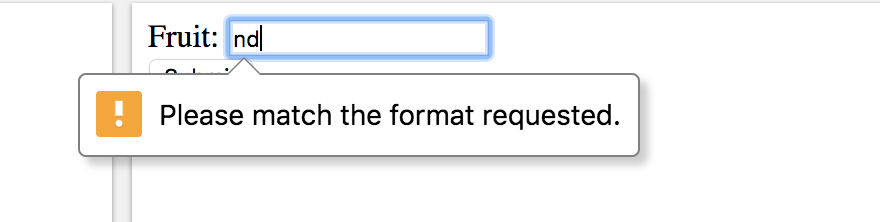
Edge:
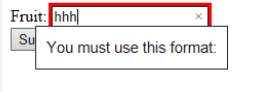
Default behavior can be noticed on - https://www.w3schools.com/code/tryit.asp?filename=G2G487WP6J8L.
To be clear, @ryanthemanuel @bjankord @neilpfeiffer may I know if the ask of this enhancement is to emulate the similar behavior for <textarea>?
nramamurth
on 26 Mar 2019
More context: https://developer.mozilla.org/en-US/docs/Web/HTML/Element/input#Custom_error_messages
In brief:
We check the valid state of the input element every time its value is changed by running the checkValidity() method via the input event handler.
If the value is invalid, an invalid event is raised, and the invalid event handler function is run. Inside this function we work out whether the value is invalid because it is empty, or because it doesn't match the pattern, using an if() block, and set a custom validity error message.
As a result, if the input value is invalid when the submit button is pressed, one of the custom error messages will be shown.
If it is valid, it will submit as you'd expect. For this to happen, the custom validity has to be cancelled, by invoking setCustomValidity() with an empty string value. We therefore do this every time the input event is raised. If you don't do this, and a custom validity was previously set, the input will register as invalid, even if it current contains a valid value on submission.
If this approach needs to be implemented for <textarea> then I believe that we'd have to maintain the default validation messages separately for IE 11/Edge and Safari/Chrome/Firefox.
nramamurth
on 26 Mar 2019
It feels like a better solution would be to use form validation (react-final-form) to be able to flag certain characters as invalid. The pattern attribute seems like an attribute you'd use with an uncontrolled version, where we are trying to guide people towards using controlled version of form inputs/textareas.
Teams could write rules to check that specific characters are not entered and display error messages. Another option with react-final-form would be to parse the input and strip unwanted characters. Here is an example of using react-final-form to only allow numeric characters into the phone number input. My preference would be we recommend teams use this approach to prevent entering characters they don't want rather than trying to get the pattern attribute working with textarea. Ideally I want form validation to be handled at the app level and avoid creating form validation solutions backed into the terra form components. cc/ @JakeLaCombe
I'll add a topic to our team meeting on Friday and see if we can find some consensus on this and provide a path forward.
bjankord
on 26 Mar 2019
@bjankord @ryanthemanuel I was wondering if we have an update on this one?
nramamurth
on 1 Apr 2019
We were hoping this would allow us to filter down to only use specific character sets. We have the need to only allow ASCII characters for the text-area input instead of UTF-8, etc. We expected that others may have this need as well. Could we expose a prop that would allow us to pass in the expected character set, then the text-area component could validate on it so it would then be consistent amongst all consumers on the behavior in either stripping the characters or need to show error text.
 kschuste
on 1 Apr 2019
kschuste
on 1 Apr 2019
The best method to do this as @bjankord mentioned is to use react-final-form. That is something we can provide examples and guidance for but not completely encapsulate. It would be difficult to maintain all of the possible scenarios that would be necessary for us to fully encapsulate it so it would be better for consumers to implement the react-final-form plumbing. The code to implement this is straightforward.
ryanthemanuel
on 1 Apr 2019
Related issues
 noahbenham
·
5Comments
noahbenham
·
5Comments
 neilpfeiffer
·
3Comments
bjankord
·
5Comments
neilpfeiffer
·
3Comments
bjankord
·
5Comments
 SpartaSixZero
·
5Comments
SpartaSixZero
·
5Comments
 cwalten
·
6Comments
cwalten
·
6Comments
Most helpful comment
The best method to do this as @bjankord mentioned is to use react-final-form. That is something we can provide examples and guidance for but not completely encapsulate. It would be difficult to maintain all of the possible scenarios that would be necessary for us to fully encapsulate it so it would be better for consumers to implement the react-final-form plumbing. The code to implement this is straightforward.