Terra-core: [terra-form-radio] Unable to click terra-form-radio in webdriver test
Bug Report
Description
When running our tests in our lowlight theme our test is unable to click on a radio button, terra-form-radio, that is inside a terra-toggle-section-header. This problem does not occur when we do not use our lowlight theme.
Steps to Reproduce
- Create a terra-toggle-section-header with a radio button inside its content
- Style elements with theme
- Use webdriver test to open toggle-section-header
- Use webdriver test to click on radio button
Test should fail at this point
Additional Context / Screenshots
Here is the output of our failing test being run in normal vs lowlight-theme, we have screenshots for the errors if needed:
SUCCESS / NORMAL LIGHT

------------------------------------------------------------------
[firefox #1-0] Session ID: 58beaee5-73ae-4706-a0c6-23235eb7c5d5
[firefox #1-0] Spec: /Users/js062512/Work/Repo/radiology-search-js/test/wdio/Search/search-spec.js
[firefox #1-0] Running: firefox
[firefox #1-0]
[firefox #1-0] Search
[firefox #1-0]
[firefox #1-0]     patient criteria
[firefox #1-0]       ✓ should display the search page with criteria panel open, verify the age number fields are enabled
[firefox #1-0]       ✓ should remove focus
[firefox #1-0]       ✓ [Patient Criteria: age number fields enabled] to be within the mismatch tolerance
[firefox #1-0]       ✓ only the leftmost (from) error should be shown on invalid input
[firefox #1-0]       ✓ should remove focus
[firefox #1-0]       ✓ [Patient Criteria: age number field error] to be within the mismatch tolerance
[firefox #1-0]       ✓ the rightmost error should be shown if there is no error in the other field
[firefox #1-0]       ✓ should remove focus
[firefox #1-0]       ✓ [Patient Criteria: age invalid input] to be within the mismatch tolerance
[firefox #1-0]       ✓ should fail on negative input
[firefox #1-0]
[firefox #1-0]
[firefox #1-0] 10 passing (16s)
[firefox #1-0]

------------------------------------------------------------------
[chrome #0-0] Session ID: 04a9d757-cb59-4732-b013-3778998ba89e
[chrome #0-0] Spec: /Users/js062512/Work/Repo/radiology-search-js/test/wdio/Search/search-spec.js
[chrome #0-0] Running: chrome
[chrome #0-0]
[chrome #0-0] Search
[chrome #0-0]
[chrome #0-0]     patient criteria
[chrome #0-0]       ✓ should display the search page with criteria panel open, verify the age number fields are enabled
[chrome #0-0]       ✓ should remove focus
[chrome #0-0]       ✓ [Patient Criteria: age number fields enabled] to be within the mismatch tolerance
[chrome #0-0]       ✓ only the leftmost (from) error should be shown on invalid input
[chrome #0-0]       ✓ should remove focus
[chrome #0-0]       ✓ [Patient Criteria: age number field error] to be within the mismatch tolerance
[chrome #0-0]       ✓ the rightmost error should be shown if there is no error in the other field
[chrome #0-0]       ✓ should remove focus
[chrome #0-0]       ✓ [Patient Criteria: age invalid input] to be within the mismatch tolerance
[chrome #0-0]       ✓ should fail on negative input
[chrome #0-0]
[chrome #0-0]
[chrome #0-0] 10 passing (23s)
[chrome #0-0]

------------------------------------------------------------------
[internet explorer #2-0] Session ID: 28380170-1c4b-4390-afd0-f66eda98bf39
[internet explorer #2-0] Spec: /Users/js062512/Work/Repo/radiology-search-js/test/wdio/Search/search-spec.js
[internet explorer #2-0] Running: internet explorer
[internet explorer #2-0]
[internet explorer #2-0] Search
[internet explorer #2-0]
[internet explorer #2-0]     patient criteria
[internet explorer #2-0]       ✓ should display the search page with criteria panel open, verify the age number fields are enabled
[internet explorer #2-0]       ✓ should remove focus
[internet explorer #2-0]       ✓ [Patient Criteria: age number fields enabled] to be within the mismatch tolerance
[internet explorer #2-0]       ✓ only the leftmost (from) error should be shown on invalid input
[internet explorer #2-0]       ✓ should remove focus
[internet explorer #2-0]       ✓ [Patient Criteria: age number field error] to be within the mismatch tolerance
[internet explorer #2-0]       ✓ the rightmost error should be shown if there is no error in the other field
[internet explorer #2-0]       ✓ should remove focus
[internet explorer #2-0]       ✓ [Patient Criteria: age invalid input] to be within the mismatch tolerance
[internet explorer #2-0]       ✓ should fail on negative input
[internet explorer #2-0]
[internet explorer #2-0]
[internet explorer #2-0] 10 passing (1m, 29s)
[internet explorer #2-0]


==================================================================

FAILURE / LOWLIGHT THEME

------------------------------------------------------------------
[chrome #0-0] Session ID: 0f13702f-b24f-45a7-a00b-349fb4e1384c
[chrome #0-0] Spec: /Users/js062512/Work/Repo/radiology-search-js/test/wdio/Search/search-spec.js
[chrome #0-0] Running: chrome
[chrome #0-0]
[chrome #0-0] Search
[chrome #0-0]
[chrome #0-0]     patient criteria
[chrome #0-0]       1) should display the search page with criteria panel open, verify the age number fields are enabled
[chrome #0-0]       ✓ should remove focus
[chrome #0-0]       ✓ [Patient Criteria: age number fields enabled] to be within the mismatch tolerance
[chrome #0-0]       2) only the leftmost (from) error should be shown on invalid input
[chrome #0-0]       ✓ should remove focus
[chrome #0-0]       ✓ [Patient Criteria: age number field error] to be within the mismatch tolerance
[chrome #0-0]       3) the rightmost error should be shown if there is no error in the other field
[chrome #0-0]       ✓ should remove focus
[chrome #0-0]       ✓ [Patient Criteria: age invalid input] to be within the mismatch tolerance
[chrome #0-0]       4) should fail on negative input
[chrome #0-0]
[chrome #0-0]
[chrome #0-0] 6 passing (11s)
[chrome #0-0] 4 failing
[chrome #0-0]
[chrome #0-0] 1) patient criteria should display the search page with criteria panel open, verify the age number fields are enabled:
[chrome #0-0] unknown error: Element is not clickable at point (1, 313). Other element would receive the click: <div class="Toggle-module__toggle___34f0E" aria-hidden="false">...</div>
[chrome #0-0] Error: An unknown server-side error occurred while processing the command.
[chrome #0-0]     at elementIdClick("8") - click.js:20:22
[chrome #0-0]
[chrome #0-0] 2) patient criteria only the leftmost (from) error should be shown on invalid input:
[chrome #0-0] invalid element state: Element is not currently interactable and may not be manipulated
[chrome #0-0] Error: An element command could not be completed because the element is in an invalid state (e.g. attempting to click a disabled element).
[chrome #0-0]     at elementIdValue("11", "151") - setValue.js:46:80
[chrome #0-0]
[chrome #0-0] 3) patient criteria the rightmost error should be shown if there is no error in the other field:
[chrome #0-0] invalid element state: Element is not currently interactable and may not be manipulated
[chrome #0-0] Error: An element command could not be completed because the element is in an invalid state (e.g. attempting to click a disabled element).
[chrome #0-0]     at elementIdValue("11", "10") - setValue.js:46:80
[chrome #0-0]
[chrome #0-0] 4) patient criteria should fail on negative input:
[chrome #0-0] invalid element state: Element is not currently interactable and may not be manipulated
[chrome #0-0] Error: An element command could not be completed because the element is in an invalid state (e.g. attempting to click a disabled element).
[chrome #0-0]     at elementIdValue("11", "-10") - setValue.js:46:80
[chrome #0-0]

------------------------------------------------------------------
[firefox #1-0] Session ID: 6bffe89a-d450-47b2-b8c0-9f03b7bc8bef
[firefox #1-0] Spec: /Users/js062512/Work/Repo/radiology-search-js/test/wdio/Search/search-spec.js
[firefox #1-0] Running: firefox
[firefox #1-0]
[firefox #1-0] Search
[firefox #1-0]
[firefox #1-0]     patient criteria
[firefox #1-0]       1) should display the search page with criteria panel open, verify the age number fields are enabled
[firefox #1-0]       ✓ should remove focus
[firefox #1-0]       ✓ [Patient Criteria: age number fields enabled] to be within the mismatch tolerance
[firefox #1-0]       2) only the leftmost (from) error should be shown on invalid input
[firefox #1-0]       ✓ should remove focus
[firefox #1-0]       ✓ [Patient Criteria: age number field error] to be within the mismatch tolerance
[firefox #1-0]       3) the rightmost error should be shown if there is no error in the other field
[firefox #1-0]       ✓ should remove focus
[firefox #1-0]       ✓ [Patient Criteria: age invalid input] to be within the mismatch tolerance
[firefox #1-0]       4) should fail on negative input
[firefox #1-0]
[firefox #1-0]
[firefox #1-0] 6 passing (15s)
[firefox #1-0] 4 failing
[firefox #1-0]
[firefox #1-0] 1) patient criteria should display the search page with criteria panel open, verify the age number fields are enabled:
[firefox #1-0] expected false to equal true
[firefox #1-0] AssertionError: expected false to equal true
[firefox #1-0]     at Context.it (/Users/js062512/Work/Repo/radiology-search-js/test/wdio/Search/search-spec.js:527:63)
[firefox #1-0]     at new Promise (<anonymous>)
[firefox #1-0]     at new F (/Users/js062512/Work/Repo/radiology-search-js/node_modules/core-js/library/modules/_export.js:36:28)
[firefox #1-0]
[firefox #1-0] 2) patient criteria only the leftmost (from) error should be shown on invalid input:
[firefox #1-0] Element is disabled and so may not be used for actions
Build info: version: '2.53.1', revision: 'a36b8b1', time: '2016-06-30 17:37:03'
System info: host: '5a3f5415b434', ip: '172.17.0.6', os.name: 'Linux', os.arch: 'amd64', os.version: '3.10.0-862.9.1.el7.x86_64', java.version: '1.8.0_91'
Driver info: driver.version: unknown
[firefox #1-0] Error: An element command could not be completed because the element is in an invalid state (e.g. attempting to click a disabled element).
[firefox #1-0]     at elementIdValue("11", "151") - setValue.js:46:80
[firefox #1-0]
[firefox #1-0] 3) patient criteria the rightmost error should be shown if there is no error in the other field:
[firefox #1-0] Element is disabled and so may not be used for actions
Build info: version: '2.53.1', revision: 'a36b8b1', time: '2016-06-30 17:37:03'
System info: host: '5a3f5415b434', ip: '172.17.0.6', os.name: 'Linux', os.arch: 'amd64', os.version: '3.10.0-862.9.1.el7.x86_64', java.version: '1.8.0_91'
Driver info: driver.version: unknown
[firefox #1-0] Error: An element command could not be completed because the element is in an invalid state (e.g. attempting to click a disabled element).
[firefox #1-0]     at elementIdValue("11", "10") - setValue.js:46:80
[firefox #1-0]
[firefox #1-0] 4) patient criteria should fail on negative input:
[firefox #1-0] Element is disabled and so may not be used for actions
Build info: version: '2.53.1', revision: 'a36b8b1', time: '2016-06-30 17:37:03'
System info: host: '5a3f5415b434', ip: '172.17.0.6', os.name: 'Linux', os.arch: 'amd64', os.version: '3.10.0-862.9.1.el7.x86_64', java.version: '1.8.0_91'
Driver info: driver.version: unknown
[firefox #1-0] Error: An element command could not be completed because the element is in an invalid state (e.g. attempting to click a disabled element).
[firefox #1-0]     at elementIdValue("11", "-10") - setValue.js:46:80
[firefox #1-0]

------------------------------------------------------------------
[internet explorer #2-0] Session ID: 47b8a9ac-03a5-41a7-b23c-ac61a8e45697
[internet explorer #2-0] Spec: /Users/js062512/Work/Repo/radiology-search-js/test/wdio/Search/search-spec.js
[internet explorer #2-0] Running: internet explorer
[internet explorer #2-0]
[internet explorer #2-0] Search
[internet explorer #2-0]
[internet explorer #2-0]     patient criteria
[internet explorer #2-0]       ✓ should display the search page with criteria panel open, verify the age number fields are enabled
[internet explorer #2-0]       ✓ should remove focus
[internet explorer #2-0]       ✓ [Patient Criteria: age number fields enabled] to be within the mismatch tolerance
[internet explorer #2-0]       ✓ only the leftmost (from) error should be shown on invalid input
[internet explorer #2-0]       ✓ should remove focus
[internet explorer #2-0]       ✓ [Patient Criteria: age number field error] to be within the mismatch tolerance
[internet explorer #2-0]       ✓ the rightmost error should be shown if there is no error in the other field
[internet explorer #2-0]       ✓ should remove focus
[internet explorer #2-0]       ✓ [Patient Criteria: age invalid input] to be within the mismatch tolerance
[internet explorer #2-0]       ✓ should fail on negative input
[internet explorer #2-0]
[internet explorer #2-0]
[internet explorer #2-0] 10 passing (1m, 40s)
[internet explorer #2-0]


==================================================================
Number of specs: 3


22 passing (111.90s)
8 failing

1) Search patient criteria should display the search page with criteria panel open, verify the age number fields are enabled:
unknown error: Element is not clickable at point (1, 313). Other element would receive the click: <div class="Toggle-module__toggle___34f0E" aria-hidden="false">...</div>
running chrome
Error: An unknown server-side error occurred while processing the command.
    at elementIdClick("8") - click.js:20:22

2) Search patient criteria should display the search page with criteria panel open, verify the age number fields are enabled:
expected false to equal true
running firefox
AssertionError: expected false to equal true
    at Context.it (/Users/js062512/Work/Repo/radiology-search-js/test/wdio/Search/search-spec.js:527:63)
    at new Promise (<anonymous>)
    at new F (/Users/js062512/Work/Repo/radiology-search-js/node_modules/core-js/library/modules/_export.js:36:28)

3) Search patient criteria only the leftmost (from) error should be shown on invalid input:
invalid element state: Element is not currently interactable and may not be manipulated
running chrome
Error: An element command could not be completed because the element is in an invalid state (e.g. attempting to click a disabled element).
    at elementIdValue("11", "151") - setValue.js:46:80

4) Search patient criteria the rightmost error should be shown if there is no error in the other field:
invalid element state: Element is not currently interactable and may not be manipulated
running chrome
Error: An element command could not be completed because the element is in an invalid state (e.g. attempting to click a disabled element).
    at elementIdValue("11", "10") - setValue.js:46:80

5) Search patient criteria only the leftmost (from) error should be shown on invalid input:
Element is disabled and so may not be used for actions
Build info: version: '2.53.1', revision: 'a36b8b1', time: '2016-06-30 17:37:03'
System info: host: '5a3f5415b434', ip: '172.17.0.6', os.name: 'Linux', os.arch: 'amd64', os.version: '3.10.0-862.9.1.el7.x86_64', java.version: '1.8.0_91'
Driver info: driver.version: unknown
running firefox
Error: An element command could not be completed because the element is in an invalid state (e.g. attempting to click a disabled element).
    at elementIdValue("11", "151") - setValue.js:46:80

6) Search patient criteria should fail on negative input:
invalid element state: Element is not currently interactable and may not be manipulated
running chrome
Error: An element command could not be completed because the element is in an invalid state (e.g. attempting to click a disabled element).
    at elementIdValue("11", "-10") - setValue.js:46:80

7) Search patient criteria the rightmost error should be shown if there is no error in the other field:
Element is disabled and so may not be used for actions
Build info: version: '2.53.1', revision: 'a36b8b1', time: '2016-06-30 17:37:03'
System info: host: '5a3f5415b434', ip: '172.17.0.6', os.name: 'Linux', os.arch: 'amd64', os.version: '3.10.0-862.9.1.el7.x86_64', java.version: '1.8.0_91'
Driver info: driver.version: unknown
running firefox
Error: An element command could not be completed because the element is in an invalid state (e.g. attempting to click a disabled element).
    at elementIdValue("11", "10") - setValue.js:46:80

8) Search patient criteria should fail on negative input:
Element is disabled and so may not be used for actions
Build info: version: '2.53.1', revision: 'a36b8b1', time: '2016-06-30 17:37:03'
System info: host: '5a3f5415b434', ip: '172.17.0.6', os.name: 'Linux', os.arch: 'amd64', os.version: '3.10.0-862.9.1.el7.x86_64', java.version: '1.8.0_91'
Driver info: driver.version: unknown
running firefox
Expected Behavior
The expected behavior is for the test to function the same no matter the theme being applied and that when a webdriver test attempts to click an element that is contained inside a toggle-section-header for this click to succeed.
Environment
- Component Name and Version:
terra-toggle-section-header @ 1.33.0
terra-form-radio @ 2.36.0 - Browser Name and Version: Chrome and Firefox
- Node/npm Version: [e.g. Node 8/npm 5] 5.6.0
- Webpack Version: webpack @ 4.29.0
- Operating System and version (desktop or mobile): macOS High Sierra @ 10.13.6
 Me999999999
All 12 comments
You might try reducing your theme around section header and radio button to get back to the default theme to see if you can find which properties are causing the issue.
 bjankord
on 1 Feb 2019
bjankord
on 1 Feb 2019
After some investigation it seems that a combination of multiple variables is the problem. When removing these variables the tests pass
--terra-form-radio-native-input-clip
--terra-form-radio-native-input-width
--terra-form-radio-outer-ring-height
When testing the same test in the terra Clinical theme I experienced the same test failures
Me999999999
on 1 Feb 2019
Spoke with someone offline about this and it is also a problem with any clinical theme. Given that it is a problem when these components get themed. Calling this a bug.
 ryanthemanuel
on 8 Feb 2019
ryanthemanuel
on 8 Feb 2019
@Me999999999 I'm curious, do tests pass if you either
- click the label that encases the radio button
- remove
terra-form--terra-form-radio-native-input-clipor set it to the default value ofauto
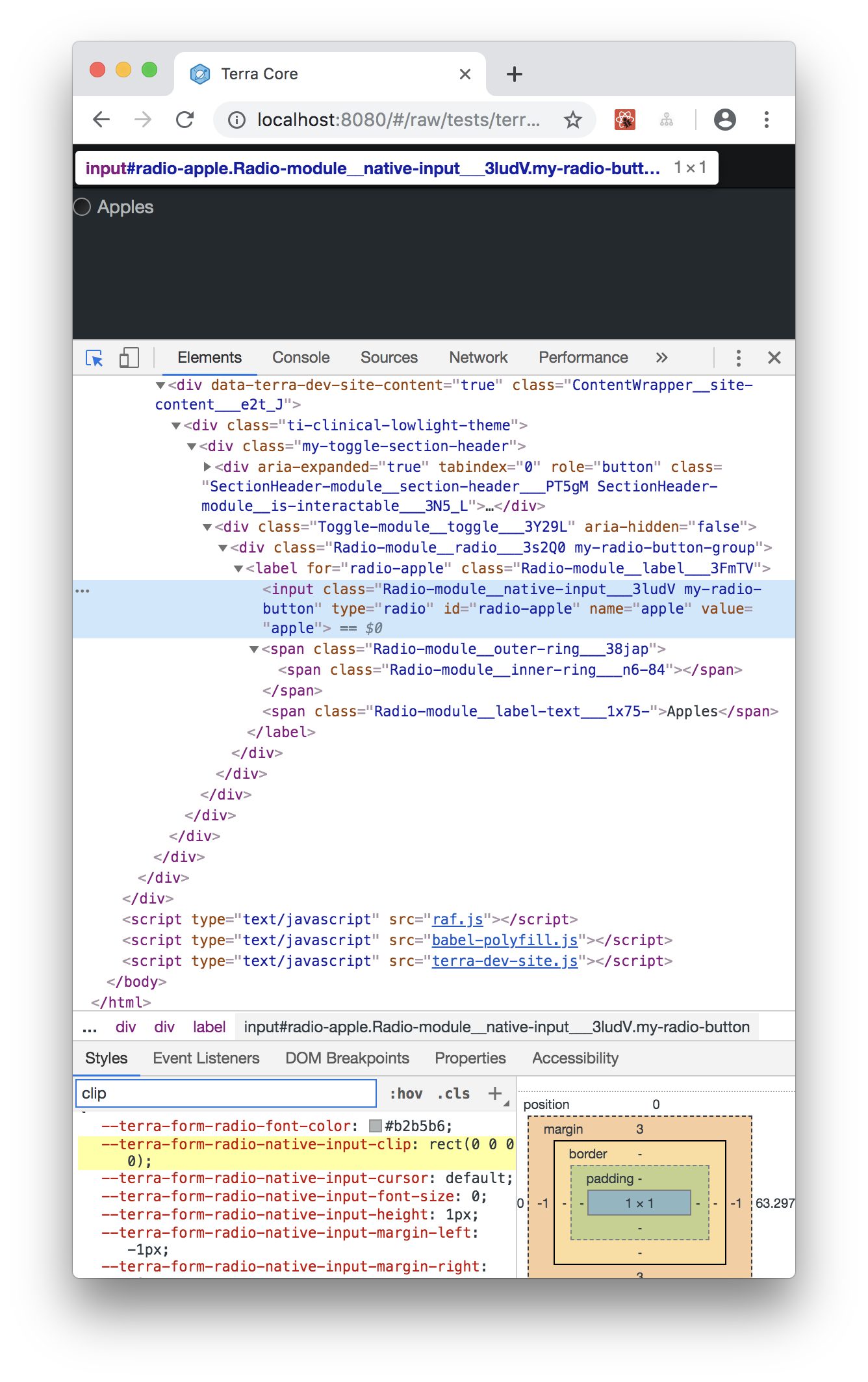
The hidden input styles taken from html5-boilerplate are probably the issue. Specifically, clip: rect(0,0,0,0), which visually hides the element. I assume the browser has issues clicking on a non visible element
 yuderekyu
on 1 Mar 2019
yuderekyu
on 1 Mar 2019
@yuderekyu / @Me999999999 FYI I was able to reproduce this issue in-house and in clinical lowlight theme, the WDIO test does pass by clicking on the label to select the radio button.
I shall look further as to why the test fails while trying to explicitly click on the radio button.
 nramamurth
on 14 Mar 2019
nramamurth
on 14 Mar 2019
Which selector is being used to click on the radio button? The center of the element will be receiving the click in the selenium test. It could be that you are actually clicking on the radio div instead of the radio label, which is why the radio button is not clickable.
 emilyrohrbough
on 14 Mar 2019
emilyrohrbough
on 14 Mar 2019
@emilyrohrbough You're right! During my investigation, I verified that the test does pass when I use the radio label to select the radio button.
As @yuderekyu stated earlier, the radio input has clip: rect(0, 0, 0, 0) set in the clinical lowlight theme and it could be the reason that the ChromeDriver throws up because the location is not clickable at this point.
At this point, is the resolution to recommend testing by clicking on the radio label like the post suggests or is it still worth proceeding to investigate further?
cc: @ryanthemanuel @neilpfeiffer
nramamurth
on 15 Mar 2019
Thanks @nramamurth - since a theme physically "switches" interactive elements for the radio-button item itself between the actual native input and a custom span with styling for the low-light theme, if the tests written needs to work across theme implementations, I would agree that the test should target an element that will be present in any and all themes - which in this case would be the label.
@Me999999999 -- Seems like it is a fine fix to update the wdio test to click on the label, since that will be consistent with a theme on or off.
 neilpfeiffer
on 19 Mar 2019
neilpfeiffer
on 19 Mar 2019
@Me999999999 The recommendation is to test the selection / de-selection of the radio button in any theme by possibly clicking on the radio button label text. As per the discussion above and an offline discussion with @neilpfeiffer, this bug shall be closed as a non-issue for Terra.
nramamurth
on 20 Mar 2019
@nramamurth Do we need to update our tests to click on the label then?
emilyrohrbough
on 20 Mar 2019
@emilyrohrbough Yeah, we should update our wdio tests for radio and checkbox to click on labels so we don't run into the issues in the theme repos.
bjankord
on 20 Mar 2019
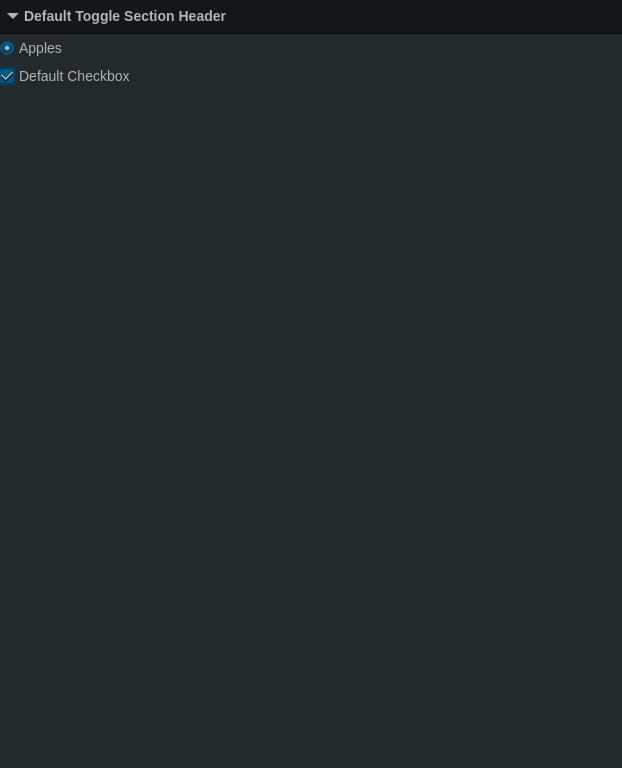
@emilyrohrbough @bjankord That is a good point. I believe that the current WDIO tests [1][2] written for themed and the default radio and checkbox do click on the label element and I confirmed that it works as expected in Clinical Lowlight theme too. Do the tests need to explicitly click on the label text 'span' instead?
- https://github.com/cerner/terra-core/blob/master/packages/terra-form-radio/tests/wdio/form-radio-spec.js#L120
- https://github.com/cerner/terra-core/blob/master/packages/terra-form-checkbox/tests/wdio/form-checkbox-spec.js#L107
nramamurth
on 21 Mar 2019
Related issues
 saisanthosh225
·
5Comments
saisanthosh225
·
5Comments
 StephenEsser
·
4Comments
StephenEsser
·
4Comments
 juliacalandro
·
3Comments
juliacalandro
·
3Comments
 SpartaSixZero
·
5Comments
bjankord
·
5Comments
SpartaSixZero
·
5Comments
bjankord
·
5Comments
Most helpful comment
Thanks @nramamurth - since a theme physically "switches" interactive elements for the radio-button item itself between the actual native input and a custom span with styling for the low-light theme, if the tests written needs to work across theme implementations, I would agree that the test should target an element that will be present in any and all themes - which in this case would be the label.
@Me999999999 -- Seems like it is a fine fix to update the wdio test to click on the label, since that will be consistent with a theme on or off.