Termux-packages: dpkg error installing nodejs
I'm getting the same problem as https://github.com/termux/termux-packages/issues/1784 but with the latest (stable) nodejs package.
pkg install nodejs
Unpacking nodejs (8.9.3) ...
dpkg: error processing archive /data/data/com.termux/files/usr/var/cache/apt/archives/nodejs_8.9.3_arm.deb (--unpack):
corrupted filesystem tarfile - corrupted package archive
dpkg-deb (subprocess): decompressing archive member: lzma write error: Broken pipe
dpkg-deb: error: subprocess returned error exit status 2
Errors were encountered while processing:
/data/data/com.termux/files/usr/var/cache/apt/archives/nodejs_8.9.3_arm.deb
E: Sub-process /data/data/com.termux/files/usr/bin/dpkg returned an error code (1)
I tried the usual apt fixes: update upgrade autoclean autoremove, rebooted the device, deleted an app to ensure sufficient space
Any suggestions on diagnosing the issue?
Termux v0.59, Android 6.0.1, Samsung SM-T700.
 gdevacc12
All 22 comments
I'm unable to reproduce, but have heard of others having an issue like this.
Could you paste the output of running the following commands:
mkdir -p ~/tmp-issue-2032
cd ~/tmp-issue-2032
wget -q http://termux.net/dists/stable/main/binary-arm/nodejs_8.9.3_arm.deb
ar x nodejs_8.9.3_arm.deb
echo Untaring control.tar.xz
tar xf control.tar.xz
echo Untaring data.tar.xz
tar xf data.tar.xz
 fornwall
on 14 Jan 2018
fornwall
on 14 Jan 2018
Also, just to make sure, check that if updating to latest package versions with pkg up makes any difference!
fornwall
on 14 Jan 2018
Thanks for the response Fredrik.
Output is:
$ mkdir -p ~/tmp-issue-2032
$ cd ~/tmp-issue-2032
$ wget -q
http://termux.net/dists/stable/main/binary-arm/nodejs_8.9.3_arm.deb
$ ar x nodejs_8.9.3_arm.deb
ar: unrecognized file type
$ echo Untaring control.tar.xz
Untaring control.tar.xz
$ tar xf control.tar.xz
tar: can't open 'control.tar.xz': No such file or directory
$ echo Untaring data.tar.xz
Untaring data.tar.xz
$ tar xf data.tar.xz
tar: can't open 'data.tar.xz': No such file or directory
"pkg up" did not make a difference.
All was up to date.
On Mon, 15 Jan 2018, 04:25 Fredrik Fornwall, notifications@github.com
wrote:
Also, just to make sure, check that if updating to latest package versions
with pkg up makes any difference!—
You are receiving this because you authored the thread.
Reply to this email directly, view it on GitHub
https://github.com/termux/termux-packages/issues/2032#issuecomment-357543717,
or mute the thread
https://github.com/notifications/unsubscribe-auth/AB1uIG3cH2MWfHVxoubOHzS7rByD-ZW9ks5tKnCygaJpZM4Rdiq7
.
gdevacc12
on 15 Jan 2018
Also,
I note the "ar" failed.
"dpkg -x nodejs_8.9.3_arm.deb x" does extract the package to x
"dpkg -I nodejs_8.9.3_arm.deb" fails with the same error as pkg install
nodejs
As dpkg extract worked, I tried:
$dpkg -x nodejs_8.9.3_arm.deb /
it successfully extracted.
I ran:
$ npm -v
5.5.1
$ node -v
v8.9.3
Naturally though the package is not registered:
$dpkg-query -W node
dpkg-query: no packages found matching node
I re-ran pkg install nodejs but the same error resulted.
On Mon, 15 Jan 2018, 08:41 Steve Brumby, me@stevebrumby.info wrote:
Thanks for the response Fredrik.
Output is:
$ mkdir -p ~/tmp-issue-2032
$ cd ~/tmp-issue-2032
$ wget -q
http://termux.net/dists/stable/main/binary-arm/nodejs_8.9.3_arm.deb
$ ar x nodejs_8.9.3_arm.deb
ar: unrecognized file type
$ echo Untaring control.tar.xz
Untaring control.tar.xz
$ tar xf control.tar.xz
tar: can't open 'control.tar.xz': No such file or directory
$ echo Untaring data.tar.xz
Untaring data.tar.xz
$ tar xf data.tar.xz
tar: can't open 'data.tar.xz': No such file or directory"pkg up" did not make a difference.
All was up to date.On Mon, 15 Jan 2018, 04:25 Fredrik Fornwall, notifications@github.com
wrote:Also, just to make sure, check that if updating to latest package
versions with pkg up makes any difference!—
You are receiving this because you authored the thread.
Reply to this email directly, view it on GitHub
https://github.com/termux/termux-packages/issues/2032#issuecomment-357543717,
or mute the thread
https://github.com/notifications/unsubscribe-auth/AB1uIG3cH2MWfHVxoubOHzS7rByD-ZW9ks5tKnCygaJpZM4Rdiq7
.
gdevacc12
on 15 Jan 2018
Sorry to hear your having problems with nodejs Versions 6.11.3 is available online from https://sdrausty.github.io/repoArm/ if this helps. Use dpkg --purge pkgName , and then dpkg --install pkgName to downgrade packages if possible to a previous version of a package.
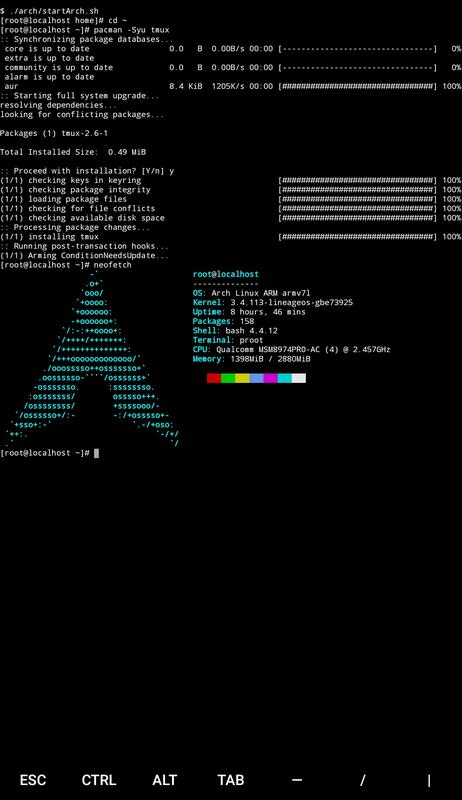
@gdevacc12 nodejs is currently available via https://sdrausty.github.io/TermuxArch/ Arch Linux in Termux PRoot. Use pacman -S nodejs to install nodejs on device once Arch Linux is installed in Termux when desired.
 SDRausty
on 15 Jan 2018
SDRausty
on 15 Jan 2018
@sdrausty thank you for the response. No apologies necessary, complexity is bound to give a few problems. This is great stuff! :-)
I tried the approach you shared , albeit with a different mix:
PRoot with Ubuntu,
installed build tools and the nvminstaller
used nvm to install the latest nodejs
This approach uses more storage than the native Termux node install but I understand running the other Linux variants may have other benefits also.
For anyone following, steps taken:
pkg up
pkg install proot
pkg install wget #Needed as busybox wget does not implement https
hash -r #bash forget where the busybox wget is
wget https://raw.githubusercontent.com/Neo-Oli/termux-ubuntu/master/ubuntu.sh
bash ubuntu.sh #currently Ubuntu 17.10 (Artful Ardvark)
./start.sh
apt-get update
apt-get install build-essential libssl-dev curl
curl -o- https://raw.githubusercontent.com/creationix/nvm/v0.33.8/install.sh| bash
exit #leave Ubuntu so the path can be refreshed
./start.sh
nvm --version #currently 0.33.8
nvm install node #installs latest which is current v9.4.0
I am thinking I need to upgrade my tablet to one with more storage and more processing capacity. As termux looks very useful. Thanks guys.
I'd still like to get to the bottom of the pkg install nodejs problem though.
gdevacc12
on 15 Jan 2018
@gdevacc12 Thanks! Could you first install binutils (to use ar from binutils instead of ar from busybox):
pkg in binutils
hash -r
Then try the following again:
mkdir -p ~/tmp-issue-2032
cd ~/tmp-issue-2032
wget -q http://termux.net/dists/stable/main/binary-arm/nodejs_8.9.3_arm.deb
ar x nodejs_8.9.3_arm.deb
echo Untaring control.tar.xz
tar xf control.tar.xz
echo Untaring data.tar.xz
tar xf data.tar.xz
Installed the binutils.
Your code ran without error:
$ mkdir -p ~/tmp-issue-2032
$ cd ~/tmp-issue-2032
$ wget -q http://termux.net/dists/stable/main/binary-arm/nodejs_8.9.3_arm.deb
$ ar x nodejs_8.9.3_arm.deb
$ echo Untaring control.tar.xz
Untaring control.tar.xz
$ tar xf control.tar.xz
$ echo Untaring data.tar.xz
Untaring data.tar.xz
$ tar xf data.tar.xz
I tried $pkg install nodejs but the error persists.
gdevacc12
on 16 Jan 2018
Following this: https://medium.freecodecamp.org/building-a-node-js-application-on-android-part-1-termux-vim-and-node-js-dfa90c28958f
installing the coreutils worked for me
apt install coreutils
 JosefJ
on 21 Jan 2018
JosefJ
on 21 Jan 2018
@JosefJ
Alas, coreutils already installed.
gdevacc12
on 21 Jan 2018
I got the exact same problem. I would love to run node on my android :)
Termux v6.00, File: nodejs_8.9.4_arm.deb, Android v6.0.1, Device GT-N8013.
Any ideas on how we could get nodejs installed? Do you need to install anything else, before you can install nodejs?
 DjangoCharango
on 12 Feb 2018
DjangoCharango
on 12 Feb 2018
I believe it requires openssl and c-ares packages, but you can probably check for requirements by pkg show nodejs
Also, there is a nodejs-current package you could try, just to see if it installs. I don't remember how stable it is for practical use.
 Quasic
on 13 Feb 2018
Quasic
on 13 Feb 2018
I tried getting the checksum of the above link, but it's gone. Maybe it's not downloading properly...
Quasic
on 13 Feb 2018
@DjangoCharango to install nodejs
pkg install coreutils
pkg install nodejs
If that fails the nodejs package should still be cached.
Try
cd /data/data/com.termux/files/usr/var/cache/apt/archives
dpkg -x nodejs_8.9.4_arm.deb / (or whatever version is used)
This extracts the package into the correct location but the package is not registered as installed.
You can run it though.
gdevacc12
on 13 Feb 2018
I was having this problem on SM-T810, fixed after upgrading the android OS to 7.0
 tomatopeel
on 29 Apr 2018
tomatopeel
on 29 Apr 2018
A couple of weeks ago I updated packages pkg upgrade and nodejs installed without problems.
Working config: Samsung SM-T700, Android 6.0.1, Termux 0.60, node v8.11.1
Try install coreutils before node.
gdevacc12
on 29 Apr 2018
Let's close this then. Maybe it was a temporary error which that particular deb.
 Grimler91
on 29 Apr 2018
Grimler91
on 29 Apr 2018
I fix it with this:
- Install termux api in play store.
- In termux shell: apt install termux-api
Thats all.
https://www.npmjs.com/package/termux
 TalbiDev
on 30 Jun 2018
TalbiDev
on 30 Jun 2018
For anyone finding this thread like I did, I got the same error as described above for pkg install nodejs which tried to install version 11.6.0 after installing the requirements, it seems to be a problem with some versions, I was able to use pkg install nodejs-lts which installed version 10.15.0 with no trouble.
 inmysocks
on 12 Jan 2019
inmysocks
on 12 Jan 2019
@inmysocks what device was this on? Samsung?
What's your output of termux-info?
Grimler91
on 12 Jan 2019
@Grimler91 yes, it is a samsung s4 phone. This is a screenshot of the termux-info output:

inmysocks
on 12 Jan 2019
@inmysocks Thanks, so seems that this only happens on some samsung devices, and only on some ROMs. This probably means that there isn't anything we can do on the termux side (except perhaps finding a workaround)
Grimler91
on 12 Jan 2019
Related issues
 Cyb3rD3m0n
·
3Comments
Cyb3rD3m0n
·
3Comments
 newmania
·
3Comments
newmania
·
3Comments
 tigran123
·
3Comments
tigran123
·
3Comments
 StephanBeer
·
3Comments
StephanBeer
·
3Comments
 neitsab
·
3Comments
neitsab
·
3Comments