Temporary-containers: Tab data disappears after left-clicking DuckDuckGo search result.
- Temporary Containers Version: 1.3
- Firefox Version: Nightly 72.0a1
- Operating System + Version: Fedora x64 + Kernel 5.3.6-100
- Non-default Options/Preferences in Temporary Containers: N/A
- Other installed Add-ons + Version: uBlock Origin, Decentraleyes, MAC, CAD
Actual behavior
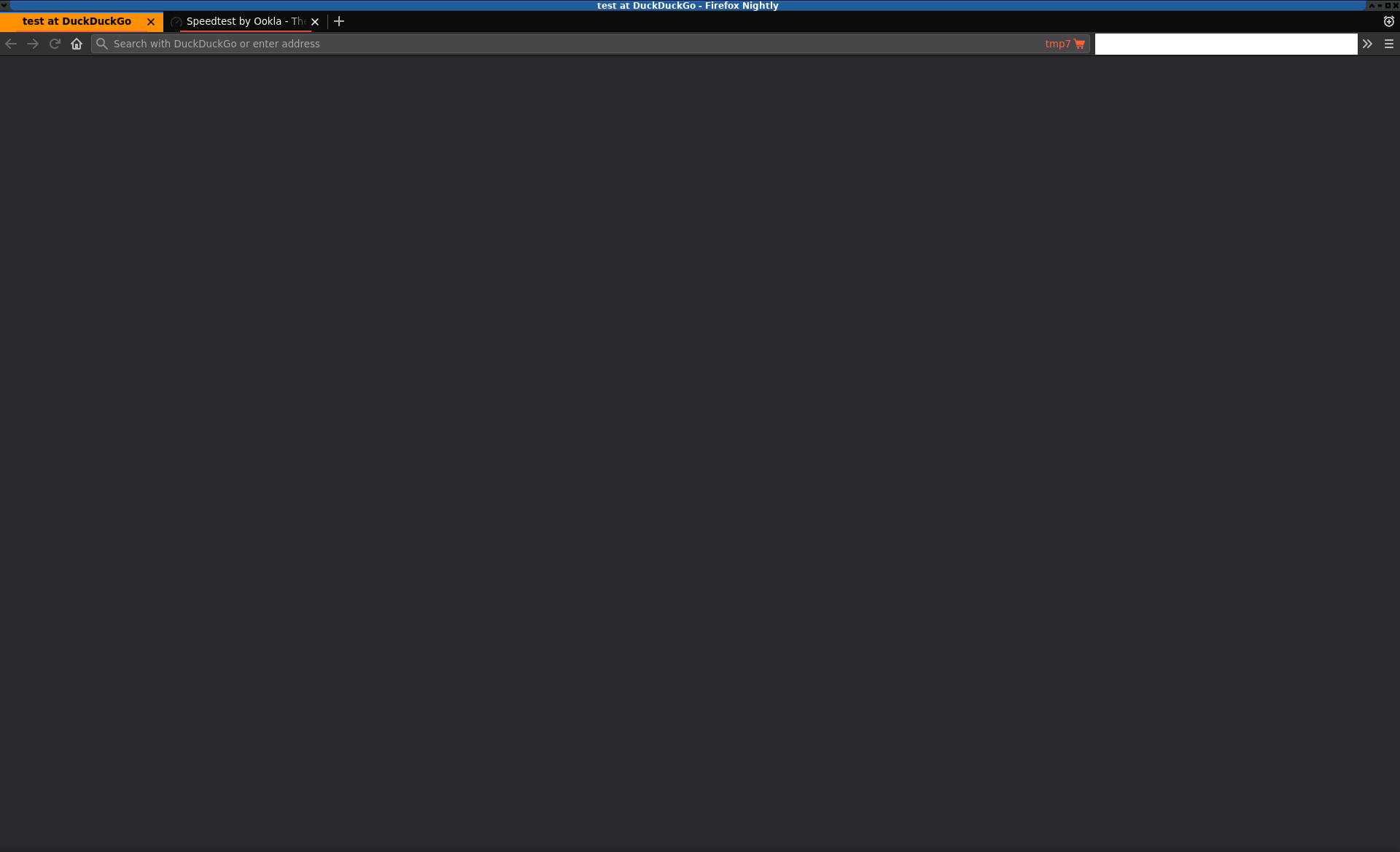
Search tab becomes blank, URL disappears, unable to reload page
Expected behavior
search tab remains the same, nothing happens to it, i can go back and forth with ease
Steps to reproduce
1) Visit www.duckduckgo.com
2) Search for anything your heart desires
3) Left-click on any result to go to new tab with your search result (middle click doesn't produce this behavior)
4) Go back to the Duck Duck Go tab and find that it's blank, the URLbar is empty and the only remnant that you were ever there is the title of the tab never changed.
Notes
If I disable Isolation globally, this doesn't happen. I left click on a search result and it opens the result in the same tab, I can go back to the search page and click on another result.
Browser Console shows the following right after left-clicking a search result:
Unchecked lastError value: Error: Frame not found, or missing host permission context-menu.js:280
    activateDomain moz-extension://599ee7bc-01ab-4997-a29f-52b17fccb2ab/data/context-menu.js:280

TypeError: document.body is null contentscript.js:1:1

SecurityError: Permission denied to access property "document" on cross-origin object ExtensionContent.jsm:401

SecurityError: Permission denied to access property "removeEventListener" on cross-origin object ExtensionCommon.jsm:415
The first one is from CAD, the second one is from Temporary Containers, and the last 2 are from Firefox, probably because of blocking something from loading via uBlock.
 geeknik
All 23 comments
That's interesting. TC never navigates an existing tab to another location, it only cancels navigations and opens new tabs (and potentially closing old tabs), so I'm not exactly sure how this can even happen - looks like a Firefox bug to me, especially since you get a blank tab but the title is still there. And since you're on Nightly, it's not that unlikely. However I'm unfortunately not able to reproduce on Stable 70.0 or Nightly 72.0a1 (2019-11-01), neither with global navigation nor mouseclick isolation.
Would you mind testing with:
- new profile (easily done with
about:profiles) - stable, beta or different nightly FF version
If that doesn't help you might want to consider providing your preferences export and a debug log so I can try to get on the bottom of this.
 stoically
on 2 Nov 2019
stoically
on 2 Nov 2019
temporary_containers_preferences_2019-11-2_18.43.27.json.gz
Haven't been able to get a Debug Log yet.
geeknik
on 3 Nov 2019
I wonder if this could be related to the fact that auto-closing leftover t.co tabs doesn't work in Nightly any more (exact same behavior as my reported bug, just an orphaned tab with a title and nothing else)? Either way, it's Nightly and the only reason I use this version of Firefox is for the Mozilla bug bounty, so I'm going to close this since regular FF works. The caveat is that every 4 to 6 or 8 weeks, Nightly forks off to Beta and eventually becomes regular FF.
geeknik
on 7 Nov 2019
Just tried with your preferences and unfortunately can't reproduce with Nightly 72.0a1 (2019-11-07), so a debug log would still be helpful.
stoically
on 7 Nov 2019
Auto-closing of leftover tabs also works for me. So something seems odd.
stoically
on 7 Nov 2019
Hopefully this is sufficient:
geeknik
on 7 Nov 2019
Interesting, so what happens is that t.co finishes loading, then the "meta refresh" kicks in and starts redirecting to the actual target url, and while doing so it resets the t.co tab url to about:blank. In that case it's not possible to detect that it's a t.co tab and close it based on that. For me, with the latest nightly, that doesn't happen tho. Can you confirm that it also happens for you with a new Nightly profile?
stoically
on 7 Nov 2019
With a new profile and only your extension installed, this doesn't manifest itself. I won't be using a new profile at this time, however we can consider this issue closed. Thank you.
geeknik
on 7 Nov 2019
Good to know, thanks for checking. That probably means that something is odd with your profile, since another Add-on can't influence how Firefox updates the tab url while loading.
stoically
on 7 Nov 2019
I created a new profile and it's happening again. ): Same TC configuration as before, exported and imported into new profile.
The only other settings in Nightly that I have changed are:
browser.cache.cache_isolation=true
browser.cache.disk.parent_directory=/tmp/fx_cache
browser.tabs.insertAfterCurrent=true
media.peerconnection.enabled=false
network.dns.disablePrefetch=true
network.prefetch-next=false
privacy.firstparty.isolate=true
webgl.disable-wgl=true
webgl.disabled=true
webgl.enable-webgl2=false
The DigitalOcean tab is pinned. PayPal is not.
geeknik
on 13 Nov 2019
The flow on this is silly. If I don't assign PayPal to a container via MAC and I click on the payment option on DigitalOcean to go to PayPal, it opens a new tab for PayPal and empties the old one out leaving just the title. If I assign PayPal to the same container as DigitalOcean, it opens PayPal in the same Tab as DigitalOcean but when I return to Digital Ocean from PayPal it opens a new tab and cleans out the original.
geeknik
on 13 Nov 2019
Try this approach: https://github.com/stoically/temporary-containers/issues/240#issuecomment-484046344
Forget about TC configuration there, since its old, and take this, newer, one: https://raw.githubusercontent.com/crssi/Firefox/master/temporary_containers_preferences.json
You don't need MAC.
 crssi
on 13 Nov 2019
crssi
on 13 Nov 2019
@crssi So should I remove MAC and install Containerise or just use TC by itself?
geeknik
on 13 Nov 2019
Disable MAC for now, just in case you would like to return to it.
Containerise is not necessary, but it helps in some cases... for example: I have github configured there, so I need to sign-in to github just first time after each FF start, and it also help when I click on ggithub links on email client to always opens in a github container.
crssi
on 13 Nov 2019
Well I need MAC or something to tell the browser which tabs to open sites in. I have everything segregated properly and everything works fine otherwise, but if I disable MAC everything opens in a temporary container and that isn't optimal, so I'll just deal with the bugs happening on a couple of sites. Thank you.
geeknik
on 13 Nov 2019
Then use Containerise instead of MAC... its easier to config and you can copy/paste your config.
I also had bad, unstable, experiences with MAC.
crssi
on 13 Nov 2019
@geeknik So it happens only in combination with MAC? Would you mind sharing the full steps to reproduce (including assigning container with MAC, which container you open first, and such)?
stoically
on 14 Nov 2019
It happens with Containerise as well as MAC.
DigitalOcean is a pinned tab assigned to Container A.
PayPal is not assigned to a Container.
I click the PayPal link in the DigitalOcean dashboard in Container A.
It opens a new tab for PayPal. The DigitalOcean tab becomes blank.
Or
DigitalOcean is a pinned tab assigned to Container A.
I assign PayPal to always open in Container A.
I click the PayPal link in the DigitalOcean dashboard in Container A.
PayPal opens in the same tab as DigitalOcean.
When I complete the transaction at PayPal the redirection back to DigitalOcean happens in a new tab with the old parent tab becoming blank except for the title.
If I close the tab that became blank, and then tap ctrl-shift-t to re-open it, it reloads like nothing happened.
geeknik
on 14 Nov 2019
If I disable TC and only leave CAD and Containerise and I left-click a link in DuckDuckGo, it obviously opens that link in the same tab, however, when I press the back button, it briefly loads about:blank before DuckDuckGo returns.
geeknik
on 14 Nov 2019
Unfortunately I'm still not able to reproduce. I tried:
- Install TC and MAC
- Open "Personal" container, navigate to
duckduckgo.com, assign it with MAC and pin the tab - Import your preferences
- Search "test" on duckduckgo, click the first result
- New tmp tab opens, old
duckduckgo.comtab keeps its content
stoically
on 14 Nov 2019
I finally tracked down the root cause. And I'm a total doofus for forgetting about this and not listing it above.
fission.autostart = true
If I disable fission, the problem goes away completely. I made the connection after I searched for about blank on Bugzilla and the top result was this bug.
geeknik
on 14 Nov 2019
Ah, interesting. Didn't know about fission, thanks for letting me know. With that enabled I can reproduce indeed, though can't do anything about it. So hopefully they sort it out before they deploy it.
stoically
on 14 Nov 2019
The Firefox bug linked above is about a Firefox automated test failure (that is no longer reproducible). Since this Temporary Containers extension problem is reportedly still reproducible, I filed a new Firefox bug specifically for this problem:
 cpeterso
on 24 Jun 2020
cpeterso
on 24 Jun 2020
Related issues
 mkruer
·
5Comments
mkruer
·
5Comments
 BryanQuigley
·
7Comments
BryanQuigley
·
7Comments
 grenzor
·
4Comments
grenzor
·
4Comments
 YoAm
·
3Comments
YoAm
·
3Comments
 quentm74
·
8Comments
quentm74
·
8Comments
Most helpful comment
The Firefox bug linked above is about a Firefox automated test failure (that is no longer reproducible). Since this Temporary Containers extension problem is reportedly still reproducible, I filed a new Firefox bug specifically for this problem:
https://bugzilla.mozilla.org/show_bug.cgi?id=1648211