Templating: dotnet new is slow with 3.0 sdk
dotnet new takes much longer with 3.0 sdk. From less than half a second with 2.2, to more than 3 seconds with 3.0:
$ dotnet --version
2.2.108
$ time dotnet new console --no-restore
The template "Console Application" was created successfully.

real    0m0.416s
user    0m0.395s
sys 0m0.039s
$ dotnet --version
3.0.100-preview8-013656
$ time dotnet new console --no-restore
The template "Console Application" was created successfully.

real    0m3.369s
user    0m0.847s
sys 0m0.070s
The message The template "Console Application" was created successfully. appears as fast, but then the program still idle for some time.
 tmds
tmds
All 12 comments
but then the program still idle for some time.
After the message is printed, the sdk is still doing some things that involve installUnitDescriptors.json, nugetTemplateSearchInfo.json and downloading stuff from the internet.
tmds
on 2 Sep 2019
CC @livarcocc @KathleenDollard
tmds
on 3 Sep 2019
-- edit: Fixed link --
@tmds We made a change in dotnet new that allows it to check the validity of templates when running dotnet new so this slow down is in the range we expected. If your template is out of date (important for some templates like the gRPC one) you'll be notified.
These changes were in the template engine
 KathleenDollard
on 3 Sep 2019
KathleenDollard
on 3 Sep 2019
this slow down is in the range we expected
This is the UX:
$ dotnet new console --no-restore
The template "Console Application" was created successfully.
<several seconds pass>
$
It's not obvious why several seconds are passing.
It also seems weird that you check new templates after instantiating, and not before.
If I'm not instantiating a template that may need an update why am I delayed.
tmds
on 3 Sep 2019
@vijayrkn
KathleenDollard
on 3 Sep 2019
-- edit: Fixed link --
@tmds We made a change in
dotnet newthat allows it to check the validity of templates when runningdotnet newso this slow down is in the range we expected. If your template is out of date (important for some templates like the gRPC one) you'll be notified.These changes were in the template engine
Hello , How do you do,
Is this slow down still in the we expected

dotnet.exe  5584    52.239.161.42   223 30,936  31,159
dotnet.exe  5584    104.47.54.28    180 1,184   1,364
dotnet.exe  2632    a23-209-12-194.deploy.static.akamaitechnologies.com 15  198 213
dotnet.exe  5584    a23-213-113-104.deploy.static.akamaitechnologies.com    81  1,070   1,151
so , may I ask,
How can I set a option so dotnet won't update template check?
I was uninstalled many things for solve this .
thank god we have google and github.
no obvious hints, even in the preview version, this update is too hasty.
I certainly hope I'm in Santa Clara rather than complaining .
 git-Charlie
on 25 Sep 2019
git-Charlie
on 25 Sep 2019
this slow down is in the range we expected
This is the UX:
$ dotnet new console --no-restore
The template "Console Application" was created successfully.
<several seconds pass>
$
It's not obvious why several seconds are passing.
It also seems weird that you check new templates after instantiating, and not before.
If I'm not instantiating a template that may need an update why am I delayed.
if your are not from US, you can try this solution,
add proxy for this domain:
go.microsoft.com:443
webpifeed.blob.core.windows.net:443
nam06.safelinks.protection.outlook.com:443
or nam06 change to
*.safelinks.protection.outlook.com:443
or just firewall block it .
git-Charlie
on 25 Sep 2019
@git-Charlie here is the place in the code:
https://github.com/dotnet/templating/blob/v3.1.4/src/Microsoft.TemplateSearch.Common/BlobStoreSourceFileProvider.cs#L33
So setting DOTNET_NEW_LOCAL_SEARCH_FILE_ONLY env variable to 1 disables the update check.
But still... The json returned looks like the whole template package list. So it will work slower with every new community project template added (at least because of more data transferred). Is it expected?
BTW. I'm ready to contribute the fix if smbd from the project team confirms the way to improve the tool (@KathleenDollard). Maybe something like checking updates no more than once per day?
 nbalakin
on 28 Oct 2019
nbalakin
on 28 Oct 2019
same issue here. DOTNET_NEW_LOCAL_SEARCH_FILE_ONLY works for me. :)
 jack2gs
on 3 Jan 2020
jack2gs
on 3 Jan 2020
This is a terrible experience. I've had time to notice the command being slow, search for this issue and respond here, all while the tool was still completing.
 wekempf
on 29 Apr 2020
wekempf
on 29 Apr 2020
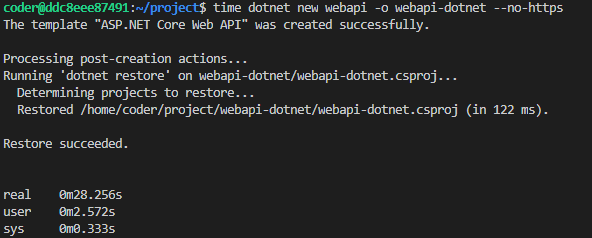
It's a terrible experience to promote dotnew core 3.1 to others. It took long time as show.
 cosmoslx
on 15 Sep 2020
cosmoslx
on 15 Sep 2020
This has been addressed in .NET 6 Preview 4, this are major changes here:
1) We don't download that 3MB .json anymore but check using NuGet.org API which is much smaller/faster
2) We execute check in parallel with template creation
3) We stopped checking for updates for SDK installed templates(console, web...)
We also plan to add option to disable checking for update.
 DavidKarlas
on 19 May 2021
DavidKarlas
on 19 May 2021
Related issues
 natemcmaster
·
5Comments
natemcmaster
·
5Comments
 crhairr
·
5Comments
crhairr
·
5Comments
 wli3
·
3Comments
wli3
·
3Comments
 DamianEdwards
·
9Comments
DamianEdwards
·
9Comments
 livarcocc
·
3Comments
livarcocc
·
3Comments
Most helpful comment
@git-Charlie here is the place in the code:
https://github.com/dotnet/templating/blob/v3.1.4/src/Microsoft.TemplateSearch.Common/BlobStoreSourceFileProvider.cs#L33
So setting
DOTNET_NEW_LOCAL_SEARCH_FILE_ONLYenv variable to1disables the update check.But still... The json returned looks like the whole template package list. So it will work slower with every new community project template added (at least because of more data transferred). Is it expected?
BTW. I'm ready to contribute the fix if smbd from the project team confirms the way to improve the tool (@KathleenDollard). Maybe something like checking updates no more than once per day?