Teams-for-linux: Microsoft building a client for Linux
Looks like, at last, Microsoft are on it. I will keep supporting this until the Linux client is released and working.
It is going to probably be a few months until they release anything but I will probably move more into a support mode for this project.
I will accept PRs and release them as fast as I can, but I will spend my free time with other wee projects.
I will keep this updated. Thank you all a lot and don't worry, we aren't done in here just yet.
 IsmaelMartinez
All 56 comments
Nevertheless - Big thanks for your hard work on that project, you saved me from getting a MacBook :D
 christiancloudical
on 11 Sep 2019
christiancloudical
on 11 Sep 2019
I don't have a paypal account, how can I post-sponsor your effort?
 dariopsmw
on 17 Sep 2019
dariopsmw
on 17 Sep 2019
Hi @dariopsmw,
You can send me money with transferwise. use my email address ([email protected])
Drop me an email if you want/need any help. If it ends up been too much bother, just give it to a local charity. It will make me as happy.
IsmaelMartinez
on 18 Sep 2019
Thanks for all Ismael!
 sugarnet
on 16 Oct 2019
sugarnet
on 16 Oct 2019
Well, seeing the current state of their from scratch electron implementation, it looks like we will still use the app for a while... How sad to see they waste time do reinvent the wheel rather that building on an existing initiative (all this to avoid releasing the source code...)
 zeitounator
on 21 Oct 2019
zeitounator
on 21 Oct 2019
@IsmaelMartinez, out of curiosity, did Microsoft had any contact with you about this?
No acknowledgement for providing a linux solution, no intention of even building on your project, no reward, nothing? That
My company forces me to use Microsoft products due to office365 enterprise contracts and I must say they are the ones that give me the most issues. I entirely subscribe to @zeitounator 's comment and say that I will keep using your app for a long time...
 ruifm
on 2 Nov 2019
ruifm
on 2 Nov 2019
Thanks @ruifm and @zeitounator. Microsoft never contacted me nor I think they will ever do. I did try to approach them a couple of times but didn't get a reply. I will keep supporting this until there is no much point (aka the number of users drop considerably and ms client does do as much as this app). In any case, I learned lots and I am enjoying the community support. Thanks again to all for your support
IsmaelMartinez
on 3 Nov 2019
Thanks to you @IsmaelMartinez, you have made an amazing work with this wrapper/client.
In my work every linux user is using your app, i think you deserve some reward :1st_place_medal:
 sebaplaza
on 4 Nov 2019
sebaplaza
on 4 Nov 2019
Thank you for the effort!
MS announced that Teams will be released on Linux by the end of the year here: https://microsoftteams.uservoice.com/forums/555103-public-preview/suggestions/16911565-linux-client
 nickelghost
on 8 Nov 2019
nickelghost
on 8 Nov 2019
I think we can add some interesting"New feature" which is better than microsoft, for example change the css file to get a better look, I don't like the color or styles of MSTeams UI
 jonnyguo1988
on 15 Nov 2019
jonnyguo1988
on 15 Nov 2019
This client already allows you the change of CSS styles. It even includes a
few of them (not sure if they are still working).
Check the config folder. There is more info in it. Cheers!
On Fri, 15 Nov 2019, 07:34 Jonny G, notifications@github.com wrote:
I think we can add some interesting"New feature" which is better than
microsoft, for example change the css file to get a better look, I don't
like the color or styles of MSTeams UI—
You are receiving this because you were mentioned.
Reply to this email directly, view it on GitHub
https://github.com/IsmaelMartinez/teams-for-linux/issues/281?email_source=notifications&email_token=AADJHEFO4ALSO6STQPSNSUDQTZGGZA5CNFSM4IVHWNG2YY3PNVWWK3TUL52HS4DFVREXG43VMVBW63LNMVXHJKTDN5WW2ZLOORPWSZGOEEESQNQ#issuecomment-554248246,
or unsubscribe
https://github.com/notifications/unsubscribe-auth/AADJHEDS22TSWTTUK7ZGJA3QTZGGZANCNFSM4IVHWNGQ
.
IsmaelMartinez
on 15 Nov 2019
Looks like it's finally out.
Stable version | Preview version
Installation steps:
 echo "deb [arch=amd64] https://packages.microsoft.com/repos/ms-teams stable main" | sudo tee /etc/apt/sources.list.d/teams.list
 sudo apt update
 sudo apt install teams
 #or if you want insiders build
 sudo apt install teams-insiders
 Surendrajat
on 10 Dec 2019
Surendrajat
on 10 Dec 2019
guys its official now:
 rnd-ash
on 10 Dec 2019
rnd-ash
on 10 Dec 2019
Well, it was nice to help you all while it lasted. I will give it a try this week and, if it does do what it's supposed to do, close/lock this project.
Thanks everyone for all your contributions. It's been a great experience.
IsmaelMartinez
on 10 Dec 2019
From my very first quick test (and I'm not really surprised....) it failed connecting via SAML into my organisation from home (investigation pending). I'm afraid I will have even more problems from work when I have to encounter SSL certs signed by internal CA. I'll keep you updated.
zeitounator
on 11 Dec 2019
I've been using it for about 24 hours. The official release is slower, has some graphical glitches, and also doesn't show the icon in my xfce task tray, which is annoying. I haven't tried to do a video call yet. So far, I'm not very impressed, compared to this project.
EDIT:
The official version doesn't show the number of missed notifications in the tray.
MS took a very long time to roll this out. I would very much appreciate it if this project doesn't die until MS has at least reached feature parity and has demonstrated that they are going to actively update and patch it. I'm concerned about another Skype for Linux situation.
 shellster
on 11 Dec 2019
shellster
on 11 Dec 2019
HI all. Thanks @IsmaelMartinez for all the hard work. Been using teams-for-linux for some months. Also other coworkers use it. Today we updated to official version but looks like some coworkers are having bad time with RAM consume. Official version seems to eat more RAM that your version, so they will keep using your version more time. If MS improve their performance on official version we'll review and test again. By now we are all attached to your version, awesome work btw.
 cronopio
on 11 Dec 2019
cronopio
on 11 Dec 2019
Is anyone aware of a way to override the userAgent within the official Microsoft app? If that's not a option, I will still only be able to use teams-for-linux as my company only allows Microsoft apps on Windows only.
 tardis89
on 11 Dec 2019
tardis89
on 11 Dec 2019
Hi
@tardis89, I will ask your company to look into that. I am sure MS will NOT allow the change of user agent in their app.
@cronopio the high RAM consumption is probably related to all the metrics that they will be collecting. I suspect they will collect more than usual as this is a Beta, but don't worry that you should still be able to use teams-for-linux for as long as you want. (but will not be adding new features etc as now people get paid officialy by Microsoft to provide a client)
@shellster, don't worry that the project will still be here. But same as I said in my previous point to @cronopio .
@zeitounator, I am surprised they didn't prioritize the different authentications that companies use (specially SAML that is quite a common case). But give them time and they will provide a solution (or at least now you can probably legally ask if you got official support).
To resume, teams-for-linux will be here to stay until there is no point for it to be, it's pretty stable (that is why is number 1.0.0) so should not need any/many "maintenance".
Anything just shout, but do not send me emails as if I am MS. (I got a couple of emails about version 1.2.0 not doing stuff, etc)
IsmaelMartinez
on 11 Dec 2019
@tardis89 Not straightforward but you can reverse the binary and replace the UA string, embedded in that hopefully.
Surendrajat
on 12 Dec 2019
I'm staying with your version a while longer, the official client can't handle a simple bt-headset :)
 ellepdesk
on 13 Dec 2019
ellepdesk
on 13 Dec 2019
Anybody knows a way to know when MS updates the .deb?
 doniks
on 13 Dec 2019
doniks
on 13 Dec 2019
@doniks Add the repo to sources.list and apt update will tell you.
Surendrajat
on 13 Dec 2019
@doniks Add the repo to
source.listandapt updatewill tell you.
which repo? I only see a direct link to a .deb but no ppa
doniks
on 14 Dec 2019
@doniks Check Installation steps of my first comment. The first step contains the ppa url.
Surendrajat
on 14 Dec 2019
@Surendrajat ups, yeah of course! I only looked at @UKSFM99 's comment. Thx!
doniks
on 14 Dec 2019
For now I will also stay with your client, as the official client uses custom notification windows (instead of using the system ones) and also enables a spell check, which underlines many correct words by mistake. And the MS client is slower.
 basicmaster
on 17 Dec 2019
basicmaster
on 17 Dec 2019
Not to mention you can only share your whole desktop, not an individual app.
 Fmstrat
on 18 Dec 2019
Fmstrat
on 18 Dec 2019
Just tried the official package - it has indeed got a way to go yet: meeting joins default to camera on, can only share desktop from current X screen (I have a zaphod system with two X screens), notifications do not use the desktop standard mechanism. Sticking with your excellent option for now, also incoming PP donation :)
 ghost
on 20 Dec 2019
ghost
on 20 Dec 2019
Thanks a lot @PhlashGBG for the donation and I am glad to hear that many people are still using this client!
IsmaelMartinez
on 20 Dec 2019
Like already implied by @zeitounator: The MS client is neither free software source nor open source. Hence this project is quite important!
 doak
on 13 Jan 2020
doak
on 13 Jan 2020
Looks like it's finally out.
Stable version | Preview version
Installation steps:
 echo "deb [arch=amd64] https://packages.microsoft.com/repos/ms-teams stable main" | sudo tee /etc/apt/sources.list.d/teams.list
 sudo apt update
 sudo apt install teams
 #or if you want insiders build
 sudo apt install teams-insiders
Hi,
Before, we can install MS gpg key:
curl https://packages.microsoft.com/keys/microsoft.asc | gpg --dearmor > microsoft.gpg
sudo install -o root -g root -m 644 microsoft.gpg /etc/apt/trusted.gpg.d/
 lboucherpostal
on 21 Jan 2020
lboucherpostal
on 21 Jan 2020
Still beats the MS version. I have no screen share share on the MS version (Linux Mint Mate). And this one has a normal window border so I can see where it is. So please do not abandon it yet ;-) .
 bvhoesel
on 20 Mar 2020
bvhoesel
on 20 Mar 2020
I'd rather not mess with the sources.list - can MS not snap it?
 nilsboy
on 8 May 2020
nilsboy
on 8 May 2020
@nilsboy , I will suggest you ask them. You will not get an answer from them in here.
IsmaelMartinez
on 8 May 2020
You need to update
https://github.com/IsmaelMartinez/teams-for-linux/blob/develop/HISTORY.md
Ideally this project will die when Microsoft implements a desktop client for linux. Please do vote for it in the Microsoft Suggestions Forum
though!
 aubertc
on 11 May 2020
aubertc
on 11 May 2020
For me working share function (single windows are not supported by the MS client) and the window frame is the best reason not to use the MS version. Currently my org refuse to let Linux client in so I am more than happy with the command line option to set the user agent, too!
There is only one issue that is quite annoying on my machine: There is a problem with the file open dialog and this will crash the tool. Only thing that works is adding files from Onedrive (good enough as workaround).
So, thanks for keeping this alive!
 elhennig
on 13 May 2020
elhennig
on 13 May 2020
You need to update
https://github.com/IsmaelMartinez/teams-for-linux/blob/develop/HISTORY.md
Ideally this project will die when Microsoft implements a desktop client for linux. Please do vote for it in the Microsoft Suggestions Forum
though!
If wishes were horses, beggars would ride. Feel free to open a wee PR to update that text.
IsmaelMartinez
on 14 May 2020
If wishes were horses, beggars would ride. Feel free to open a wee PR to update that text.
Done.
https://github.com/IsmaelMartinez/teams-for-linux/pull/355
Thanks again for your work on this project.
aubertc
on 18 May 2020
Screen sharing got me here too. Great work.
 caroldomokos
on 20 May 2020
caroldomokos
on 20 May 2020
When the company disables the client for Linux, it affects the MS version only -- teams-for-linux still works!
I am grateful for this version :+1:
Now if we could get the option to detach a chat window (new, from what I saw at work yesterday), that would be even better! :smiley:
 AngelQC
on 20 May 2020
AngelQC
on 20 May 2020
Thanks for this Project, so please keep this alive.
The MS Version sucks. No Updates.
 michaelmassee
on 22 May 2020
michaelmassee
on 22 May 2020
The MS version keeps pushing my cpu to 100%, @IsmaelMartinez your version works way better (at least for me), thanks! please keep it up!
 manuel-arguelles
on 1 Jun 2020
manuel-arguelles
on 1 Jun 2020
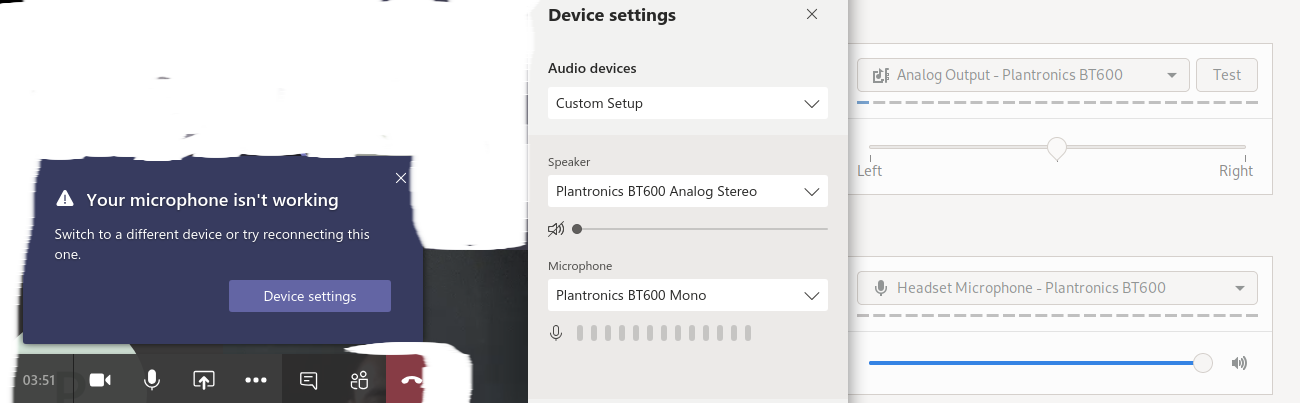
MS build is pointless and useless for many things currently,, can't select audio reliably isn't great, but this version can like running in browser
 grealish
on 3 Jun 2020
grealish
on 3 Jun 2020
@IsmaelMartinez I really love your teams version.
MS doesn't work correct in:
- screensharing on wayland
- notification to gnome-notification
- windows decoration from system-theme
Please, go on in this project
 mxsteini
on 29 Jun 2020
mxsteini
on 29 Jun 2020
The official MS client better supports the video for me, but the fact that they do not use standard notifications makes it an absolute nightmare to use for me. I am using a tiling WM, so I get a popup that takes half of my screen anytime somebody sends me a message. I can't work like this, so I keep using your version so far 🙂
 chmduquesne
on 2 Jul 2020
chmduquesne
on 2 Jul 2020
Still far superior to the official app for me. Thanks for bothering to make native notifications work and for all of the hard work!
Great to be able to share my screen as well
Thank you 😁
 FredHappyface
on 2 Jul 2020
FredHappyface
on 2 Jul 2020
Please keep continuing your unofficial client! It's far better than the official one.
 hbarsaiyan
on 23 Jul 2020
hbarsaiyan
on 23 Jul 2020
Microsoft should just give up and let this be the official version. It works much better
 DeanKertai
on 30 Jul 2020
DeanKertai
on 30 Jul 2020
Microsoft's official client's screen sharing is extremely slow on Elementary OS 5.1. This webapp version client works so much better.
 jianpan
on 28 Aug 2020
jianpan
on 28 Aug 2020
I love this version, please keep it up!
Question: Will we be able to pop-out chat windows anytime soon? I'd like that! :)
AngelQC
on 28 Aug 2020
Wow, what a thread!
This might be an updated link if you are looking for the MS version of Teams
https://www.microsoft.com/en-us/microsoft-365/microsoft-teams/download-app
I haven't tried either of these Linux versions out yet, but Friday I'll have a report on your desk.
 beebus
on 9 Sep 2020
beebus
on 9 Sep 2020
I love this version, please keep it up!
Question: Will we be able to pop-out chat windows anytime soon? I'd like that! :)
Also, my organization disabled the use of the linux version (go figure...) so I'd really like for this version to stay!
AngelQC
on 9 Sep 2020
There were several important features that do not work on the official MS Teams linux client. Notably screen-sharing of individual windows. Did this change? Also the Microsoft client was a good 100MB+ or so bigger than this one (after installation). Perhaps there are additional MS Teams features that are in the official app. But I really like this one, and appreciate the source code that can make it eventually be packaged for the different distributions.
 maitra
on 10 Sep 2020
maitra
on 10 Sep 2020
Microsoft's client does not support live events (I get "Joining a live event is not enabled."), and Microsoft doesn't have a repo to report issues like they do for other proprietary projects (example: microsoft/WSL). @IsmaelMartinez's client continues to be very relevant.
 zrhoffman
on 10 Nov 2020
zrhoffman
on 10 Nov 2020
I will close this ticket. Doesn't change the situation. still supported in maintenance mode only. Thanks everyone again for the kind words.
IsmaelMartinez
on 18 Mar 2021
Related issues
 homebrew79
·
8Comments
homebrew79
·
8Comments
 smonat
·
8Comments
ellepdesk
·
7Comments
elhennig
·
7Comments
smonat
·
8Comments
ellepdesk
·
7Comments
elhennig
·
7Comments
 jpiautinity
·
8Comments
jpiautinity
·
8Comments
Most helpful comment
Nevertheless - Big thanks for your hard work on that project, you saved me from getting a MacBook :D