Tdesktop: Selected output device is ignored for calls
Steps to reproduce
- Go to Settings > Advanced > Call Settings (under System integration) > Output device
- Select a different output device than the default one
- Start a call
Expected behaviour
The audio output should come out of the selected output device
Actual behaviour
The audio output comes out of the default output device
Configuration
Operating system:
Tested on both Windows and macOS
Version of Telegram Desktop:
2.3
Installation source (Linux Only) - the official website / GitHub releases / flatpak / snap / distribution package:
the official website
Used theme:
Builtin dark theme
Notes
BTW, an option to select a camera device to use for video calls could be handy,
And making Settings > Advanced > Show tray icon (under System integration) a switch button instead of a checkbox could make finding Call Settings much easier, as there are no other checkboxes in that screen, and this checkbox makes Call Settings look like a title rather than a button to another settings screen, maybe even move this button to the main settings screen.
 giladgd
All 7 comments
I had been experiencing the same symptoms for a while until I made an interesting discovery, almost by accident:
It appears that there are two _types_ of "default" output devices in Windows 10, the ordinary Default Device and the Default Communications Device. The only place in the interface where I've seen them mentioned (and managed) separately is the Sound component of the good old Control Panel.
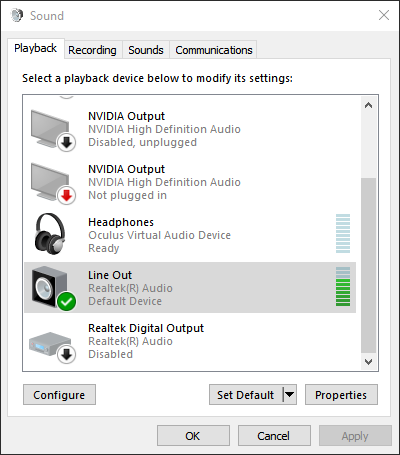
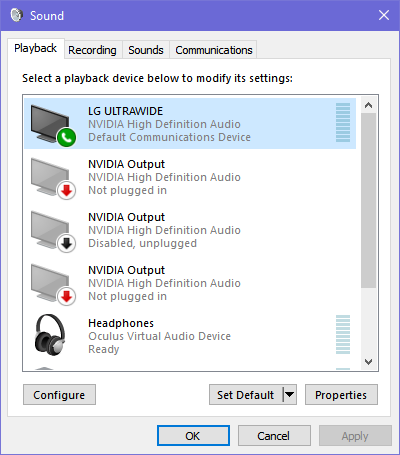
The next two screenshots show how my system was set up when audio from Telegram calls was not routed to the correct output device. The Telegram output settings as well as _Windows 10 Settings_ audio section had the correct devices selected. Only the Sound component of the Control Panel, displayed in the screenshots had a different setting which seems to have been overriding everything else.
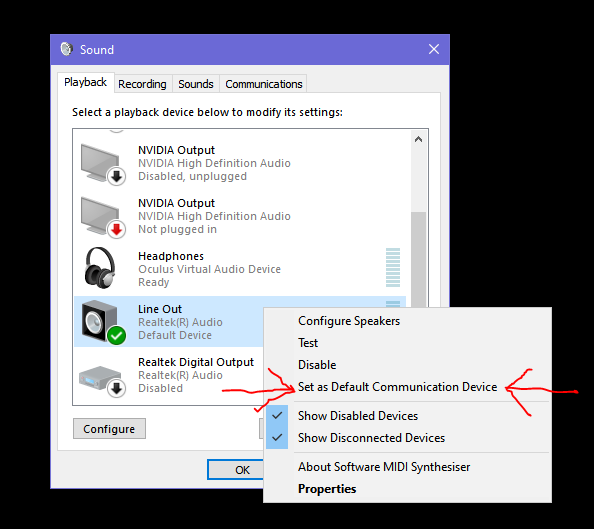
I assigned the Default Communications Device to the correct output device and now Telegram behaves as I would expect.
 olliefr
on 25 Aug 2020
olliefr
on 25 Aug 2020
Hey there!
This issue will be automatically closed in 7 days if there would be no activity. We therefore assume that the user has lost interest or resolved the problem on their own.
Don't worry though; if this is an error, let us know with a comment and we'll be happy to reopen the issue.
Thanks!
![stale[bot] picture](https://avatars3.githubusercontent.com/in/1724?v=4&s=40) stale[bot]
on 24 Oct 2020
stale[bot]
on 24 Oct 2020
Would this be something like facebook has where on the call you can choose to change your audio output device and microphone. Discord also allows the same thing ?
Then remembering that choice ? rather than just using the default system communication device
 Bookrage001
on 6 Nov 2020
Bookrage001
on 6 Nov 2020
@Bookrage001 there are call settings in advanced settings
 ilya-fedin
on 6 Nov 2020
ilya-fedin
on 6 Nov 2020
Would this be something like facebook has where on the call you can choose to change your audio output device and microphone. Discord also allows the same thing ?
Then remembering that choice ? rather than just using the default system communication device
I don't think so because I use the same bluetooth headphones with my PC. It's just sometimes they are connected and sometimes they are not. I have found that I (often) need to restart TGM after (dis)/connecting them because it does not pick up changes in input/output devices. I had a different pair of bluetooth headphones before and it was the same.
For me, this feels like an intermittent problem, because I never know whether I'll need to restart it after having connected or disconnected the headphones.
olliefr
on 6 Nov 2020
@Bookrage001 there are call settings in advanced settings
And they don't work for me. As in the right devices are selected when I open the settings, but there is no sound. Restarting TG helps.
I've noticed that TG writes detailed logs, I conjecture it would be very simple to diagnose (and possibly) solve the issue for someone who actually knows how TG handles sound. I conjecture (pure guess) that it relies on some cross-platform library which is just not that good for bluetooth devices which come on and off all the time.
olliefr
on 6 Nov 2020
Same problem, I use Manjaro Linux (official package, version 2.4.11-0.1).
 chernyaknikita
on 13 Dec 2020
chernyaknikita
on 13 Dec 2020
Related issues
 ghost
·
3Comments
ghost
·
3Comments
 Yanrishatum
·
3Comments
Yanrishatum
·
3Comments
 ArmeF97
·
3Comments
ArmeF97
·
3Comments
 abhyrz
·
3Comments
abhyrz
·
3Comments
 hosseinab
·
3Comments
hosseinab
·
3Comments
Most helpful comment
I had been experiencing the same symptoms for a while until I made an interesting discovery, almost by accident:
It appears that there are two _types_ of "default" output devices in Windows 10, the ordinary Default Device and the Default Communications Device. The only place in the interface where I've seen them mentioned (and managed) separately is the Sound component of the good old Control Panel.
The next two screenshots show how my system was set up when audio from Telegram calls was not routed to the correct output device. The Telegram output settings as well as _Windows 10 Settings_ audio section had the correct devices selected. Only the Sound component of the Control Panel, displayed in the screenshots had a different setting which seems to have been overriding everything else.
I assigned the Default Communications Device to the correct output device and now Telegram behaves as I would expect.