Tdesktop: Use system window border/frame/header
After last update on Linux Telegram started to use own window border instead of system one. This is an UX degradation because prevents users from using the management mechanisms provided by desktop/window managers, such as custom buttons, effects and etc.
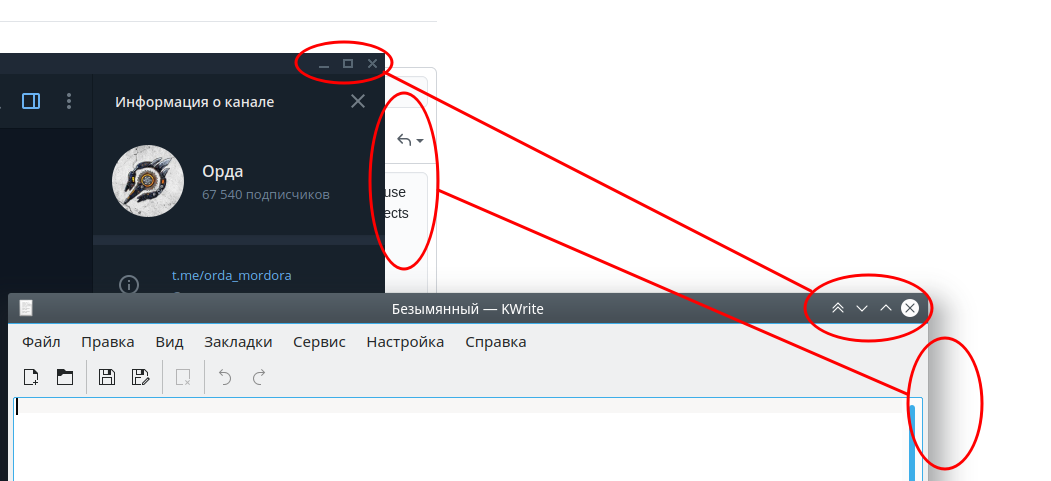
There should be an option to use a system border on Linux.
 mekras
All 7 comments
2958
 ilya-fedin
on 30 Jun 2020
ilya-fedin
on 30 Jun 2020
This is not a duplicate of #2958 at all. Up until this last update, Telegram Desktop on Linux has always used the native decoration, but now its using the native one, with no option to change it.
 electricduck
on 30 Jun 2020
electricduck
on 30 Jun 2020
Use system window border/frame/header
Set native windows frame
100% duplicate
Up until this last update
This doesn't make this issue a non-duplicate, since it is the same decorations, just cross-platform due to the new Qt APIs now
ilya-fedin
on 30 Jun 2020
Please rollback that change. I want and I like my native KDE window decoration. Right now It's awful.
Or make this OPTIONAL, let the users to choose which one to use.
 jfsanchez-gh
on 8 Jul 2020
jfsanchez-gh
on 8 Jul 2020
@jfsanchez-gh you're a little late ;)
https://github.com/telegramdesktop/tdesktop/commit/f10b2194e605cd0730c23da6472bbb1c12cd8aaf
ilya-fedin
on 8 Jul 2020
"committed 22 hours ago" really? haha.
Updated to v2.1.18, now I can switch back to my beautiful native KDE window decorations. Thx.
jfsanchez-gh
on 8 Jul 2020
Found the setting. Thanks.
 hongquan
on 27 Jul 2020
hongquan
on 27 Jul 2020
Related issues
 slowaways
·
3Comments
slowaways
·
3Comments
 matteotumiati
·
3Comments
matteotumiati
·
3Comments
 beppe9000
·
3Comments
beppe9000
·
3Comments
 TheAppService
·
3Comments
TheAppService
·
3Comments
 abhyrz
·
3Comments
abhyrz
·
3Comments
Most helpful comment
@jfsanchez-gh you're a little late ;)
https://github.com/telegramdesktop/tdesktop/commit/f10b2194e605cd0730c23da6472bbb1c12cd8aaf