Tdesktop: Group links aren't opening properly in Telegram
Title.
Whenever I open a group link on a web browser, the application comes up and does nothing.
Here is an example of the log file that gets produced:
[2020.04.22 10:00:38] Launched version: 2000001, install beta: [FALSE], alpha: 0, debug mode: [FALSE], test dc: [FALSE]
[2020.04.22 10:00:38] Executable dir: D:/Telegram Desktop/, name: Telegram.exe
[2020.04.22 10:00:38] Initial working dir: C:/Program Files/Mozilla Firefox/
[2020.04.22 10:00:38] Working dir: D:/Telegram Desktop/
[2020.04.22 10:00:38] Command line: D:\Telegram Desktop\Telegram.exe tg://join?invite=###################
[2020.04.22 10:00:38] Executable path before check: D:/Telegram Desktop/Telegram.exe
[2020.04.22 10:00:38] Logs started
[2020.04.22 10:00:38] Connecting local socket to Global\bacdea0964705717ba4509b541a84234-{87A94AB0-E370-4cde-98D3-ACC110C5967D}...
[2020.04.22 10:00:38] Socket connected, this is not the first application instance, sending show command...
[2020.04.22 10:00:38] Show command written, waiting response...
[2020.04.22 10:00:38] Show command response received, pid = 26360, activating and quitting...
 NirvanaDraavon
All 16 comments
Update...noticed a disparity when using Telegram on a different system...
When opening the link would work, the log line would read as follows:
[2020.04.22 10:00:38] Command line: D:\Telegram Desktop\Telegram.exe -- tg://join?invite=###################
The '--' is missing for some reason in the log of my original version...any clue why this occurs?
NirvanaDraavon
on 22 Apr 2020
Update...there is a workaround for this, but it is very inconvenient.
Copying the web invite link and then pasting into a telegram chat, then clicking on it will auto default on Telegram and somehow forces it to open with the join chat prompt.
I don't understand this, but it works I guess. Very annoying though.
NirvanaDraavon
on 22 Apr 2020
thanks @NirvanaDraavon! that worked for me.
 bkamapantula
on 15 Sep 2020
bkamapantula
on 15 Sep 2020
Happening to me on linux too #8626
 txtsd
on 21 Sep 2020
txtsd
on 21 Sep 2020
The same problem. Last version of Telegram Desktop. Windows 8.1x64
 squromiv
on 6 Nov 2020
squromiv
on 6 Nov 2020
@squromiv @bkamapantula @NirvanaDraavon can you try changing the entry for tg:// links in firefox like here: https://github.com/telegramdesktop/tdesktop/issues/8626#issuecomment-720659161
txtsd
on 6 Nov 2020
@txtsd I updated from "Always ask" to as below ("Use System handler (default)") and that worked

using "Use Telegram Desktop" didn't open any native app prompt.
bkamapantula
on 6 Nov 2020
@bkamapantula Thanks for your feedback. Hopefully it'll help the devs pinpoint the issue.
txtsd
on 6 Nov 2020
can you try changing the entry for tg:// links in firefox
Yes, this half-decision works with FF.
But what about support of opening tg-links directly in Telegram-desktop, bypassing browser?
I set Tgdesktop as default application for files *.tg (contain tg-links). And I see the same behavior, opening them from OS Windows 8.1: application doesn`t switch to necessary channel. Is there any idea, how to force this feature?
Scr1
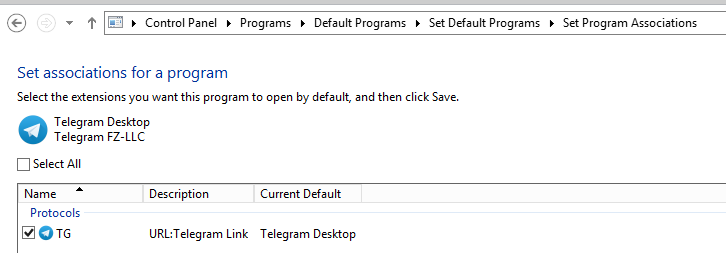
Scr2

Scr3

Scr4

squromiv
on 11 Nov 2020
But what about support of opening tg-links directly in Telegram-desktop, bypassing browser?
Just use the standard Windows way for this

 ilya-fedin
on 15 Nov 2020
ilya-fedin
on 15 Nov 2020
Just use the standard Windows way for this
I know, how to create shortcuts in Windows. What is about opening them in Telegram Desktop??? I see the same behavior, as described in the first message of this topic:
the application comes up and does nothing
squromiv
on 17 Nov 2020
¯_(ツ)_/¯ it works for me
ilya-fedin
on 17 Nov 2020
¯_(ツ)_/¯ it works for me
What version of Windows and TG? Did you modify registry or smth else?
squromiv
on 17 Nov 2020
TG versionis 2.4.7, Windows 10 LTSC in a virtual machine
ilya-fedin
on 17 Nov 2020
TG versionis 2.4.7, Windows 10 LTSC in a virtual machine
Can you please upload video or GIF of opening tg-link directly in TG?
squromiv
on 17 Nov 2020
No, I just wanted to show you about this standard way since creating a .tg file with link seems like something weird for me
ilya-fedin
on 17 Nov 2020
Related issues
 TotalKrill
·
3Comments
TotalKrill
·
3Comments
 TheAppService
·
3Comments
TheAppService
·
3Comments
 DRSDavidSoft
·
3Comments
DRSDavidSoft
·
3Comments
 beppe9000
·
3Comments
beppe9000
·
3Comments
 luisalvarado
·
3Comments
luisalvarado
·
3Comments
Most helpful comment
Update...there is a workaround for this, but it is very inconvenient.
Copying the web invite link and then pasting into a telegram chat, then clicking on it will auto default on Telegram and somehow forces it to open with the join chat prompt.
I don't understand this, but it works I guess. Very annoying though.