Tdesktop: Image viewer regression in tiling window managers
Steps to reproduce
- Use a tiling window manager (ie i3)
- Open a picture to view
- picture viewer pops in its own window. If I float the window, it does not properly align to the top of my screen.
Expected behaviour
The behaviour before was much better. It popped over the full telegram window as expected (even if it was a bit wonky when I'd change workspaces). It should just be attached to the telegram window and not its own window.
Actual behaviour
I end up with two windows (telegram + telegram image view)
Example when viewing a profile pic:

Configuration
Operating system: Arch Linux
Version of Telegram Desktop: 1.3.11 Alpha
Used theme: built-in night mode
 PandorasFox
All 20 comments
@PandorasFox I don’t know what to do with that one :( the old behavior was glitchy in a number of ways, because of inability to have its own focus or whatever. When app lost focus on some DEs (by alt tab) it would just stop the process unresponsive until manually killed. Perhaps a handcoded list of exceptions is the only way :/
 john-preston
on 3 Aug 2018
john-preston
on 3 Aug 2018
Can confirm on Gentoo Linux with XMonad WM.
@john-preston Perhaps an option in the settings menu that allows reverting back to the old behavior would suffice?
 Ristovski
on 3 Aug 2018
Ristovski
on 3 Aug 2018
@Ristovski I'm not sure an option would be easy to understand. Is there an easy way of DEs that should use the old behaviour? The ones, that don't support separate fullscreen windows.
john-preston
on 3 Aug 2018
@john-preston Maybe an environment variable?
This bug mainly affects tech-savvy Linux users who use tiling window managers.
(_something that imo requires you to at least have basic enough knowledge to be able to prepend a environment variable before a command_).
Having a runtime env var (TG_USE_OLD_WINDOWING or something similar) would be quite nice as it would both allow users who experience this to launch Telegram with the old behavior while not adding any new GUI options that could confuse other users.
Edit: I don't think hard-coding a list of WM/DEs to override the behavior for would be practical, as there are far too many edge-cases (what would happen if someone running KDE was using a tiling window manager? Would you detect KDE or the WM?)
Ristovski
on 3 Aug 2018
@john-preston When I inspect the image-viewer window, I see basically the same window attributes:
┌arcana@lapfox-(~)   24h:58m:24s
└> ~/dotfiles/bin/i3-get-window-criteria.sh
[class="TelegramDesktop" id=6291463 instance="Telegram" title="TelegramDesktop"]
┌arcana@lapfox-(~)
└> ~/dotfiles/bin/i3-get-window-criteria.sh
[class="TelegramDesktop" id=6291460 instance="Telegram" title="Telegram"]
The former was the image viewer, and the latter was the telegram window.
There are two things that I think would fix this:
The window should set some window manager hints to tell the window manager to set it as a "floating" window automatically, or the window styling should be different enough so users can easily set it themselves
the window should play nicely with sizing/positioning
This is what it looks like before floating the window:
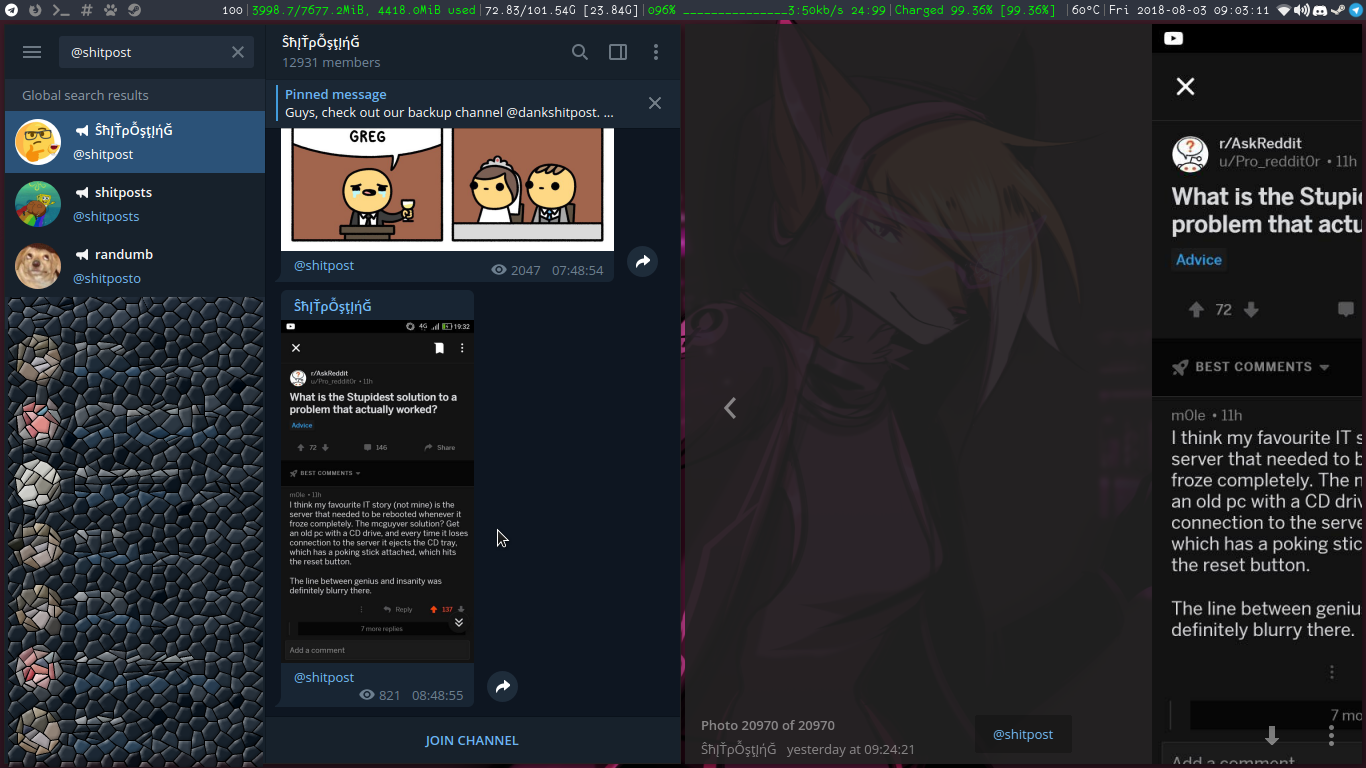
This is what it looks like when I manually float the window:

This is pretty close to perfect. It just needs to be moved upwards a bit (which might be a small issue with my window manager, I'm unsure why it isn't covering the full screen)
Setting the window type to _NET_WM_WINDOW_TYPE_UTILITY and setting the window as WM_TRANSIENT_FOR for the main telegram window should also help.
Worst case, having a window class that we can select and set it floating ourselves isn't the worst. At least in i3 I can set up some stuff to execute when a window matching it gets created (ie I can script it being floated + correctly re-rooted in the top-left).
I'm not sure an option would be easy to understand. Is there an easy way of DEs that should use the old behaviour? The ones, that don't support separate fullscreen windows.
i3 definitely does support it, but there just may need to be a couple extra WM hints that need to be set for it to handle it correctly. If it's set as a normal window, tiling wm's will just tile it like above, but it really needs to be a floating window of some sort to exist over the main window.
PandorasFox
on 3 Aug 2018
@PandorasFox
It just needs to be moved upwards a bit (which might be a small issue with my window manager, I'm unsure why it isn't covering the full screen)
This happens for me on XMonad as well, so it is not a bug with your window manager.
Ristovski
on 3 Aug 2018
The following line in my i3 config fixes this issue (however, wm-config workarounds is not the proper fix)
for_window [title="^TelegramDesktop"] floating enable, move absolute position 0 0
i3 will automatically do the former depending on _NET_WM_TYPE. The latter should also be specifiable through _NET_WM_MOVERESIZE I think: this is all defined here, but I think that _NET_WM_MOVERESIZE_SIZE_TOPLEFT should probably work?
Most window managers should obey these just fine :)
Thanks for all the work! Telegram is one of the best multi-platform pieces of software I've used.
PandorasFox
on 4 Aug 2018
I'll add support for TD_SUBWINDOWS_BYPASS_MANAGER environment variable which if set to "1" will use the old window flags when creating.
But fixing this so it won't require to set it would be better. Is it possible to do having access only to Qt classes? (QWidget / QWindow), not the underlying window objects?
Also, perhaps hardcoding at least some values of "XDG_CURRENT_DESKTOP" could be a good idea, if you mention here which exactly values belong to WMs that surely can't work nice with the new window flags.
john-preston
on 4 Aug 2018
I'll also try setting WA_X11NetWmWindowTypeUtility attribute (this should set _NET_WM_WINDOW_TYPE_UTILITY), perhaps this will help.
john-preston
on 4 Aug 2018
@PandorasFox Sadly, if I add _NET_WM_WINDOW_TYPE_UTILITY to this window on Ubuntu it is no longer FullScreen.
Why don't tiled WMs respect _NET_WM_STATE(ATOM) = _NET_WM_STATE_FULLSCREEN? It should be set for the image viewer.
john-preston
on 4 Aug 2018
When I use Qt fullscreen windows I get:
_NET_WM_WINDOW_TYPE(ATOM) = _KDE_NET_WM_WINDOW_TYPE_OVERRIDE, _NET_WM_WINDOW_TYPE_NORMAL
_NET_WM_STATE(ATOM) = _NET_WM_STATE_FULLSCREEN, _NET_WM_STATE_FOCUSED
But if I add Qt::WA_X11NetWmWindowTypeUtility attribute it becomes:
_NET_WM_WINDOW_TYPE(ATOM) = _NET_WM_WINDOW_TYPE_UTILITY, _KDE_NET_WM_WINDOW_TYPE_OVERRIDE, _NET_WM_WINDOW_TYPE_NORMAL
_NET_WM_STATE(ATOM) = _NET_WM_STATE_FOCUSED
and is no longer fullscreen :( As if UTILITY windows are not allowed to be fullscreen.
john-preston
on 4 Aug 2018
I've tested with i3:
If I set WA_X11NetWmWindowTypeUtility it does work as it should, with _NET_WM_WINDOW_TYPE_UTILITY + _NET_WM_STATE_FULLSCREEN
But in Unity:
If I set WA_X11NetWmWindowTypeUtility it removes _NET_WM_STATE_FULLSCREEN and shows _NET_WM_WINDOW_TYPE_UTILITY not on fullscreen :(
I don't know how to make a Qt fullscreen window that does work in both Unity and i3 without bypassing the window manager.
Currently I've tried to use 1.3.11.alpha in Ubuntu:i3 and it works fine, placing image viewer fullscreen :( So I can't even reproduce the issue.
john-preston
on 4 Aug 2018
@PandorasFox @Ristovski You can skip all my monologues above :)
It looks like Unity works fine with:
setWindowFlags(Qt::FramelessWindowHint | Qt::Popup);
setAttribute(Qt::WA_X11NetWmWindowTypeUtility, true);
So I hope that tiling WMs work fine with those as well (floating and fullscreen). Please check in the 1.3.12.alpha (will be available in several hours).
If it still won't work fine I'll get back to the env-var crazy stuff.
john-preston
on 4 Aug 2018
That sounds like it should work fine. Thanks for looking into this!
I'll check back and (hopefully) close this in a few hours :)
PandorasFox
on 4 Aug 2018
@PandorasFox Bad news, if you use Qt::Popup, you can't use dialogs (for example file choose dialog) in that window, it gets closed. And I use them for "Save as" on a photo.
Looking through the i3 source code I think there are two ways it might work.
Set a transient parent for image viewer to be the main window. Possibly the window will be floating in i3 then. Possibly in other tiling managers too.
Set image viewer modality to ApplicationModal or WindowModal. Possible it will do the trick. Possibly in others too.
The second looks good (it is emulated in some way right now, instantly activating the image viewer if you activate the main window) and scary (no idea what will go wrong) at the same time.
The problem with ApplicationModal is that other windows, like Call Popup will appear below it and not accessible while you're in the viewer. Also custom notifications won't be above it and won't be able to receive input (for inline replies).
WindowModal requires a parent, so I guess it combines both ways. I'll try that one for 1.3.12.alpha version.
john-preston
on 4 Aug 2018
Yeah, it mostly works. I wouldn't have noticed the bug with save popups appearing under the window if it wasn't mentioned.

It seems that it isn't aligned height-wise correctly - there'll probably need to be some messing with a setPosition call (although just setting its position to (0, 0) might end up placing it on another screen; there'll probably need to be a call that's something like:
windowHandle()->setPosition(QPoint(
    windowHandle()->screen()->geometry().x,
    windowHandle()->screen()->geometry().y
);
I think that'll fix the positioning issue, at least. I haven't ever dealt too much with QT windowing so I'm not sure if I quite follow why the saveas dialogues are stuck behind it.
PandorasFox
on 5 Aug 2018
@PandorasFox This is exactly like this window geometry is set already - by assigning it the geometry of the screen :(
john-preston
on 5 Aug 2018
D:
That's pretty weird. I'm not familiar enough with QT shenanigans to figure out the proper way to do it through there, unfortunately
PandorasFox
on 5 Aug 2018
still bugged on Centos 7, Telegram Desktop 1.4.4 beta
https://youtu.be/Z9qHFGZu8gI
 Dramacydal
on 30 Oct 2018
Dramacydal
on 30 Oct 2018
I think this is still an issue with GNOME + pop shell (pop OS's windows management layer), even though they manually added a fix for Telegram
 RememberTheAir
on 9 Jun 2020
RememberTheAir
on 9 Jun 2020
Related issues
 ArmeF97
·
3Comments
ArmeF97
·
3Comments
 TotalKrill
·
3Comments
TotalKrill
·
3Comments
 hosseinab
·
3Comments
hosseinab
·
3Comments
 abhyrz
·
3Comments
abhyrz
·
3Comments
 matteotumiati
·
3Comments
matteotumiati
·
3Comments
Most helpful comment
I'll add support for TD_SUBWINDOWS_BYPASS_MANAGER environment variable which if set to "1" will use the old window flags when creating.
But fixing this so it won't require to set it would be better. Is it possible to do having access only to Qt classes? (QWidget / QWindow), not the underlying window objects?
Also, perhaps hardcoding at least some values of "XDG_CURRENT_DESKTOP" could be a good idea, if you mention here which exactly values belong to WMs that surely can't work nice with the new window flags.